13 essential email marketing tips for successful newsletter campaigns in 2026
Is email marketing outdated? Far from it! Email marketing remains one of the most effective marketing channels in 2026. With an average return on investment of 42, it clearly outperforms many other measures. Its major advantage is that a well-planned email campaign lets you reach your target audience directly and personally, without any detours. At the same time, the time and financial investment remains manageable. Whether you run a company, online shop or association, newsletters are quick to implement, flexible to adapt and easy to analyze. This combination of low costs, high impact and long-term relationship building will continue to make email marketing indispensable. Our 13 email marketing tips for successful newsletter campaigns in 2026 show you how to get the best from your campaigns.
🥜 In a nutshell: the most important email marketing tips for 2026
Email marketing remains a key success factor in 2026, provided your strategy and its execution work perfectly together. The following points determine whether your email marketing campaign performs or disappears in the inbox:
- ✔️ Relevance through personalization: Unsegmented newsletters are noticeably less effective, so personalizing content according to interests, behavior and purchase history is essential for successful newsletters. This increases the relevance, clicks and revenue of your newsletter and email marketing activities.
- ✔️ AI as a productivity booster: AI in email marketing can help with subject lines, draft copy, send times and topic planning for your email campaign. However, strategic control and the final decision remain with you.
- ✔️ Automation as standard: Welcome sequences, campaigns to reactivate inactive contacts and drip campaigns are essential elements of every successful email marketing campaign in 2026.
- ✔️ “Mobile first” and clear content: Newsletters are predominantly read on mobile devices. Short copy, clear calls to action, streamlined designs and fast loading times are therefore essential.
- ✔️ Accessibility is becoming more important: Good readability, simple language, alt text and sufficient contrast increase reach and engagement while future-proofing your email marketing.
- ✔️ Data-driven optimization instead of gut feeling: Open rates alone are no longer enough. Click rates, conversions, send-time tests and target-audience responses reveal how successful your email campaign really is.
👀 Did you know?
With rapidmail, you can send GDPR-compliant newsletters, automate recurring email sequences and use integrated analytics to keep track of your campaigns at all times.
💡 Our rapidtip to start: email marketing tips for beginners, in a free ebook
Is email marketing still new territory for you? Or would you like to refresh your knowledge of the most important email marketing tips? Then our free ebook on email marketing for beginners is just what you need.
It provides an accessible overview of newsletter email marketing fundamentals, from key terminology and benefits to practical insights into email marketing campaigns for companies of different types and sizes. The ebook also helps you choose suitable email marketing software.
Best of all, you do not have to read everything at once. Simply download the ebook free of charge and read it at your own pace. 🚀
Download the free ebook now (PDF in German)
Tip 1: Know and understand your target audience
Successful email marketing does not begin with sending, but with listening. Genuine interest only develops when your newsletter content closely matches your contacts’ needs.
Competition in your contacts’ inboxes is also intense. Countless emails arrive in our inboxes every day, and many are deleted for lack of time or interest, often without even being opened. This is where it becomes clear whether your email campaign will be noticed or overlooked.
Why is defining your target audience so important in email marketing?
A lack of interest in promotional emails usually has clear causes. The most common are:
- 😴 Too little relevance: Subject lines seem interchangeable or uninspired, or suggest that the newsletter offers no new value.
- ⌛ Poor timing: The campaign reaches your contacts at the wrong time.
- 🚮 Disappointing content: The email is opened but does not deliver what it promised.
In short, readers may eventually stop paying attention to a newsletter for many reasons. The good news is that our email marketing tips can help you counteract precisely these problems. The underlying issue often lies elsewhere: many email marketers do not take enough time to truly get to know their subscribers. As a result, content remains too general, misses people’s needs and fails to inspire them.
Successful direct marketing and newsletter or email marketing depend on recognizing and using these differences. Instead of treating every contact alike and sending impersonal mass emails, you should tailor your email marketing campaign to specific segments of your target audience.
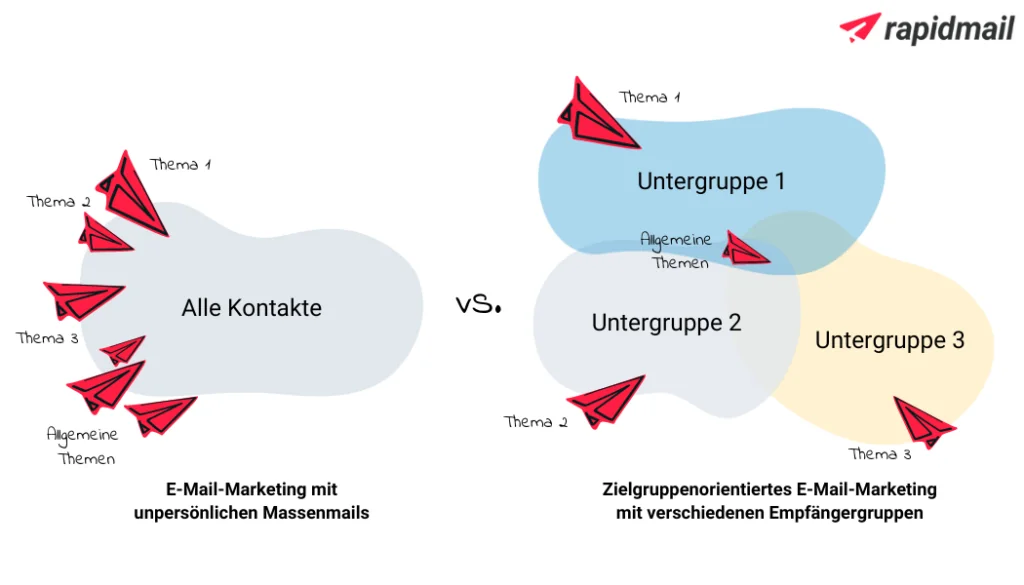
Create target-audience-focused emails using buyer personas
Working with buyer personas is a proven way to develop relevant newsletter content. Personas make your target audience tangible and help you focus your content.
The advantage is that creating compelling content becomes much easier when you have a “real” person in mind, with specific interests, expectations and circumstances, rather than thinking only of the anonymous group called “all contacts”.
This lets you assess your email content from your readers’ perspective while you create it:
- 🔎 What interests them?
- 👀 What do they expect?
- ❤️ And what would genuinely delight them?
By segmenting your recipient list and assigning contacts to particular personas, you can send precisely tailored content that meets each group’s specific needs.
Important questions for defining your personas:
- ✨ What does my company stand for?
- 👥 Which customers is my offer relevant to?
- 🎯 What do I want to achieve with my email marketing?
- ❤️ Which interests, circumstances and needs shape this persona?
- ✅ Which criteria must be met for the persona to choose my offer?
👀 Did you know? What buyer personas are

Buyer personas are fictional but realistic models of “typical” customers. They are assigned specific characteristics, wishes, expectations, goals and behaviors. These profiles are based on real insights, for example from surveys, purchase data or user behavior. Personas are usually given a name, age, job title and defining characteristics.
Practical example: an email campaign for a persona called “Ludwig”
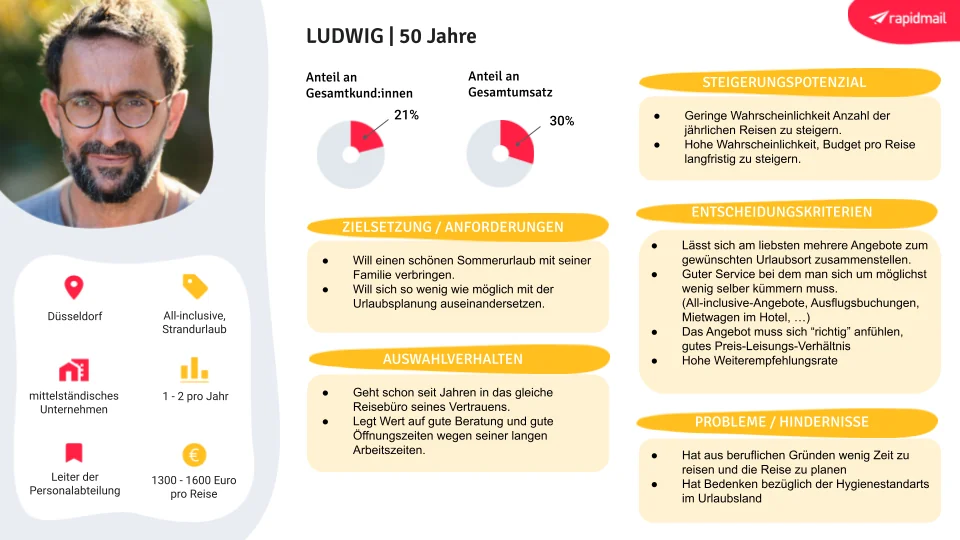
Imagine that you work for a tour operator or travel agency. One of your personas could be “Ludwig”. To plan a suitable email campaign for him, proceed as follows:
- 👣 Step 1: Analyze needs: People like Ludwig have little time to plan vacations. At the same time, they place great importance on value for money.
- 👣 Step 2: Derive suitable content: Instead of spontaneous short breaks or expensive luxury vacations, offer personalized travel suggestions based on previous bookings, such as inspiration for next summer’s holiday.
- 👣 Step 3: Create specific offers: Fairly priced, family-friendly all-inclusive vacations are particularly appealing to this persona. At other times, you can also send inspiring content to strengthen the customer relationship further.
👀 Did you know?
To make getting started a little easier, we have created a free persona template to download. Fill it with your own text and images, then adapt it to your company design. Why not give it a try?
The benefits of persona-based email marketing campaigns
Persona-based email marketing campaigns not only make content creation easier, but also measurably improve your results:
- 📈 More conversions: Relevant content generates clicks and conversions more often than impersonal mass emails.
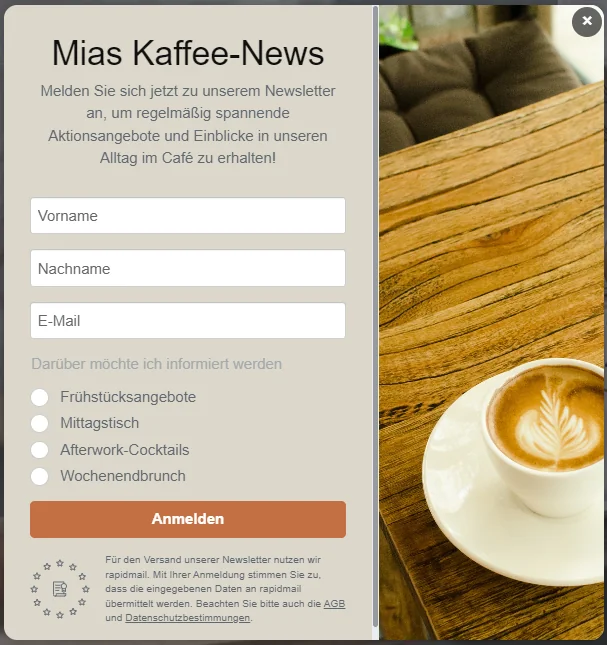
- 🎯 More targeted customer acquisition: You can tailor content and offers to different personas in the sign-up form itself.
- 💰 Lower costs: Less wasted reach means lower newsletter costs and more efficient email marketing.
💡 rapidtip
Let prospects choose from different topics when they subscribe to your newsletter. This makes it much easier to send segmented campaigns based on individual interests later.
Tip 2: Send emails according to a plan
Successful email marketing needs structure, and a clear campaign or sending plan provides the ideal foundation. It shows you at a glance which holidays, events or special occasions are approaching and which email campaigns you should prepare in good time.
Creating a campaign plan for the first time takes some effort. However, that effort quickly pays off because you can simply reuse your plan the following year and immediately see when to send each email marketing campaign. Usually, you only need to update individual dates such as Easter or Mother’s Day and perhaps add particular promotions taking place that year.
To save you from starting at zero, we have prepared a suitable campaign-plan template. Simply fill it in and get started!
Free newsletter plan template for 2026 to download
To make your planning as efficient as possible, we provide our newsletter sending plan as a practical template.
The template already includes all important dates and topics for 2026. It also contains useful columns for planning, implementation and analyzing your newsletter and email marketing activities. Step by step, you can create a sending plan that is ideally suited to your company and target audience. ✨
We hope you enjoy filling it in and wish you every success with your 2026 newsletter editorial plan. 🚀
Download the free 2026 newsletter sending plan (Excel file in German)
What should you include in your sending plan?
In addition to specific sending occasions, it is worth recording other important information directly in your sending plan. This ensures you always have an overview, even shortly before sending.
Useful contents for your sending plan include:
- 👤 The target audience or buyer persona for the email campaign
- 🙋🏻 Team responsibilities, for example for the recipient list, newsletter design, content and newsletter tracking
- 🗨️ Planned language versions of the newsletter
- 🎯 The goal of the campaign
The final point is particularly important. When the purpose of an email is clearly defined, you can create more targeted content and improve the success of your email marketing campaign.
Example of a simple sending plan:
| Goal | Content / activities |
|---|---|
| Win new customers | – Contests – Advance offers – Discounts such as “Sign up today and save 10%” |
| Retain existing customers | – Loyalty gifts – Maintain contact through regular emails |
| Reactivate former customers | – Free delivery – Voucher codes |
| Boost product sales | – Present new products – Send discount codes – Offer products in a sale, for example on Black Friday – Present gift ideas for special occasions such as Christmas or Mother’s Day |
| Entertain recipients | – Employee interviews – Behind-the-scenes insights |
| Inform subscribers | – Provide helpful resources – Overview of upcoming events and promotions |
| Inform employees through internal campaigns | – Farewells / introducing new employees – Messages from management – Announce birthdays, weddings and anniversaries |
💡 rapidtip
To make planning even easier, we have developed an AI-powered newsletter sending plan. It creates content tailored to your business and provides inspiration for email marketing campaigns throughout the year in just a few clicks.
Tip 3: Use your email subject line to outshine the competition
Even the best newsletter achieves little if nobody opens it. That is why the subject line plays a central role in email marketing. Few email marketers manage to spark genuine curiosity in the subject line and make readers eager to see the content.
A powerful subject line determines whether your email campaign attracts attention or remains unread alongside the competition. The aim is to give subscribers a good reason to devote their valuable time to your campaign.
How to create subject lines and preheaders that leave readers wanting more:
- 🕵🏼 Spark curiosity: Do not reveal everything immediately. Instead, briefly address the interests and needs of the relevant persona, for example: “Still looking for THE dress for the garden party? 👗”
- ⚠️ Avoid cryptic wording and jargon: Incomprehensible or overly complex subject lines are off-putting. Only use specialist terms when you are sure your target audience understands them. If in doubt, keep your wording clear and simple so that your newsletter message does not end up in the trash before it is even opened.
- 👀 Keep the subject line short: Different devices display different numbers of characters. Allow no more than 50 characters for mobile devices and 60 to 70 characters for emails opened on a desktop. This helps ensure your entire subject line remains visible and can have its full effect.
- 🗣️ Address recipients personally: Personalized subject lines establish a connection before the email is even opened. Besides a first name or surname, you can include a location, for example in newsletters about regional events. This can significantly increase your email marketing campaign’s open rate.
- 🏆 Use emojis to create deliberate accents: Emojis in newsletter subject lines provide a visual incentive in the inbox and attract attention. The emoji must suit the message, such as a star ⭐ or Christmas tree 🎄 for a Christmas campaign. Less is more: one emoji per subject line is quite enough.
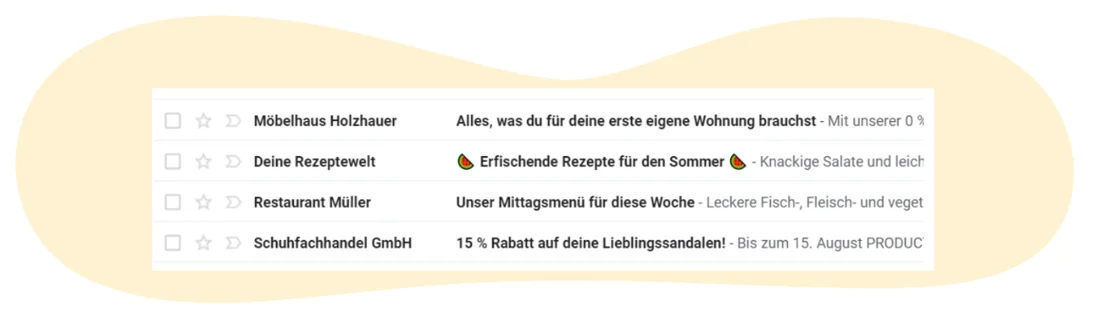
- 🤔 Test the subject line before sending: A/B tests quickly reveal which subject line works best for each persona and help you generate more newsletter opens.
- ‼️ Avoid words that look like spam: To help your emails reach the inbox reliably, avoid problematic terms and formatting. These include strongly promotional words such as “free”, “win” or “gift”, too many CAPITAL LETTERS, several special characters in a row, and spelling or grammar errors. All of these can harm your campaigns’ deliverability.
💡 rapidtip: Creative subject lines in seconds with AI
With rapidmail, you do not need to spend ages pondering the perfect subject line. Our AI subject-line generator creates several imaginative suggestions within seconds, tailored to your business and email marketing campaign.
It could not be easier:
- ⌨️ Enter your website URL: AI analyzes your website, products and style.
- 💡 Provide a keyword: Enter your newsletter topic, such as “summer sale”.
- ✅ Choose: AI supplies original, suitable subject lines designed to boost your open rate.
Tip 4: Limit the number of topics in each email
Your newsletter was opened, excellent, congratulations! You have successfully overcome the first major email marketing hurdle. Now comes the crucial part: providing valuable content that delights readers, strengthens their connection to your brand and ideally leads to newsletter conversions.
To achieve this goal, focus on one central topic per newsletter. Too many different subjects quickly overwhelm readers and distract from the actual objective of your email campaign.
Put yourself in your subscribers’ shoes and ask yourself before creating the newsletter:
- 👀 What do my readers expect from this email?
- 🤔 What challenges are they currently facing?
- 😀 And what would genuinely delight them?
There is a huge variety of possible topics for newsletter email marketing. For inspiration, we have compiled a selection of proven newsletter content ideas:
- ✨ Present new products by email
- 💸 Launch discount campaigns
- 🍂 Use seasonal occasions for inspirational newsletters
- 🎁 Run prize draws and contests
- 📰 Share industry news and relevant information
- 🛠️ Pass on tips, tricks, instructions, tutorials or DIY ideas
- 🎒 Present must-haves, leisure tips and gift ideas
- 🍝 Share creative recipes
- ❤️ Launch fundraising appeals
- 🗨️ Conduct interviews
- 👋 Introduce new employees
- 🎬 Provide behind-the-scenes insights
💡 rapidtip: Add variety to your email content
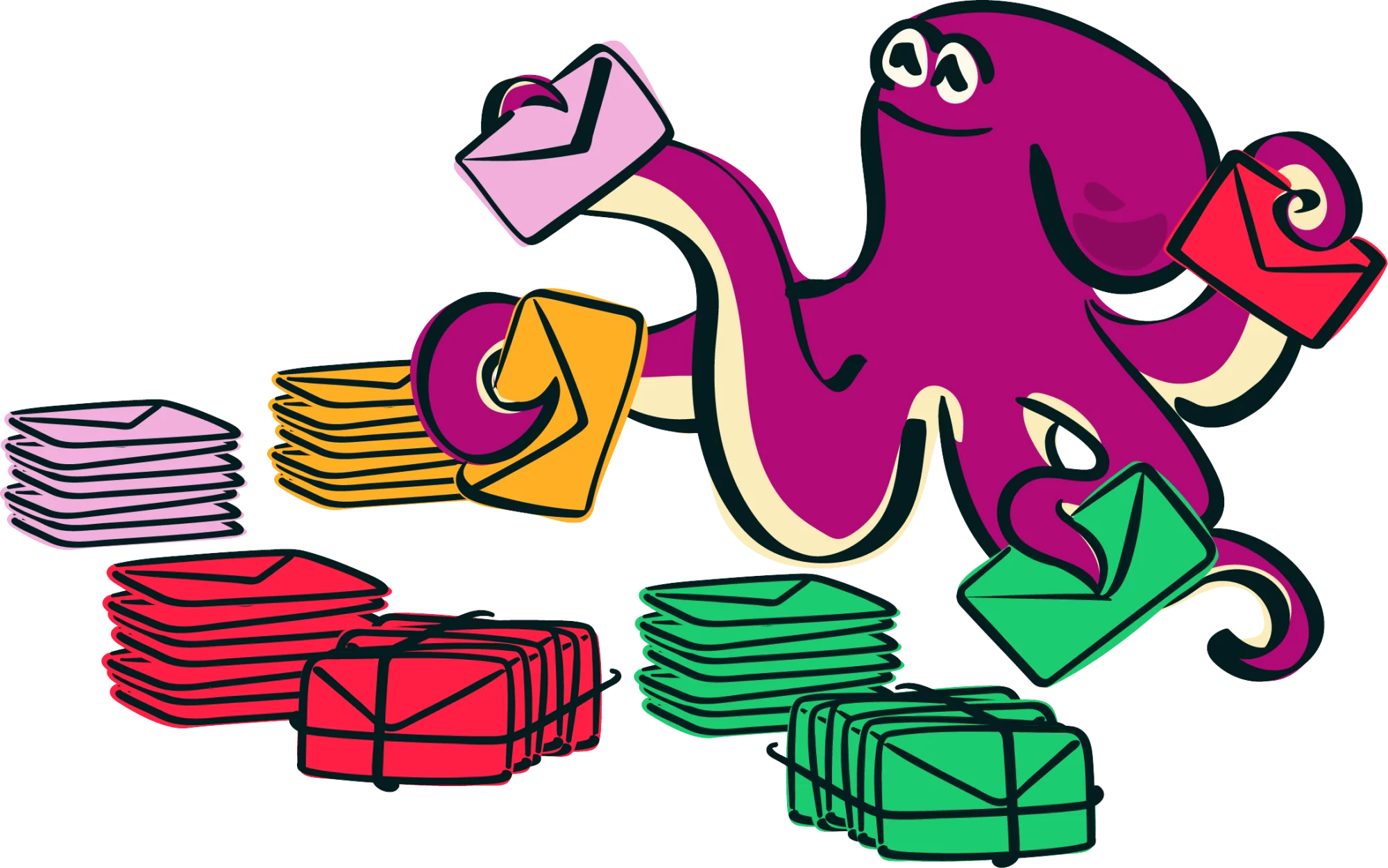
To keep your email marketing engaging in the long term, do not send only product advertising or discounts. Instead, use a balanced mix of topics comprising promotions, expert knowledge, company news and creative content.
Surveys and analyzing your email marketing metrics are the best ways to discover which content performs especially well and which does not.
Then package your chosen topic in well-structured, easy-to-understand newsletter copy. The art lies in keeping it as short as possible while still including all relevant information.
Like the subject line, your email marketing campaign content should arouse curiosity and motivate readers to act, for example through a clear call to action leading to your website, online shop or landing page. This brings you a big step closer to the conversion you want from your contacts.
Tip 5: Optimize campaigns for mobile devices
Emails used to be read predominantly on desktop computers, but the reality is now very different. Most newsletters are opened on smartphones. Mobile optimization is therefore no longer nice to have, but essential.
Because smartphone screens are much smaller than desktop monitors, your marketing emails should use responsive design. A responsive newsletter design automatically adapts to the relevant screen size, whether it is displayed on a smartphone, tablet or desktop computer.
How to ensure your email campaign also impresses on mobile:
- ❗ Use short subject lines: ideally no more than 50 to 70 characters
- 🤓 Choose easily readable font sizes:
- approx. 22 px for headings
- approx. 14 px for body copy
- approx. 17 px line spacing
- 👆🏻 Enable simple touch navigation: links and buttons should be easy to tap with a thumb
- 🎨 Use high-contrast colors: this improves readability on small screens
- 🖼️ Limit the number of images: this avoids long email loading times
- 📄 Use no more than three columns: this prevents unnecessary horizontal scrolling
👀 Did you know?
Every campaign created with rapidmail is automatically responsive. The preview function, display tests and test emails also let you ensure that all your email campaigns display correctly on mobile devices.
Better safe than sorry: simply use rapidmail’s preview function to test your email’s responsive design before sending.
Tip 6: Build a personal connection with email contacts
Successful email marketing thrives on personal connections. Every contact should feel personally addressed, rather than like “one of many”. People want to feel seen and appreciated, and the same applies to your newsletter contacts. This is how you build trust and a lasting connection with your brand.
How to create a personal connection with subscribers
How to build a genuine relationship with your contacts:
- 🙋🏻 Use a personalized form of address: Address subscribers personally by first name or surname in the subject line or salutation. This immediately feels more approachable and shows that the newsletter reflects genuine interest rather than being just another anonymous email marketing campaign.
- 📨 Use a personal sender address: A personal sender address such as lisa@icecreamfactory.com invites interaction. Contacts can reply, ask questions or provide feedback. Avoid impersonal noreply addresses, which create distance rather than closeness.
- ❤️ Write emotional newsletter copy: Take time to produce honest, authentic copy. Newsletters that evoke emotion are memorable and strengthen the connection to your company much more than purely factual content.
💡 rapidtip: Perfect the personal impression with an email signature
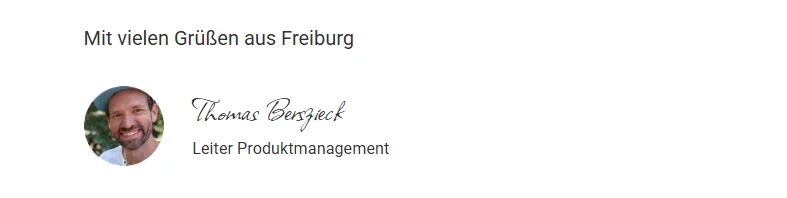
A professional email signature gives your newsletter a particularly personal touch. Alongside the required details, you could add a photo of the responsible employee, for example. This creates the feeling of a genuine dialogue. Incidentally, more than 40 web fonts in the rapidmail email editor even let you sign your email using a handwriting-style font.
Build customer loyalty through authentic storytelling
Product advertising works best when it tells stories, not when it merely lists facts. If you want to introduce a new product in an email marketing campaign, explain the story behind it and why you wholeheartedly believe in it.
For example, describe how exciting the past few weeks have been for your project team. Share moments of success, such as when the first working prototype was completed. Mention challenges too, such as several design revisions before everything became truly user-friendly. Images from the development process, team anecdotes or personal comments make your story tangible. Show why the product matters to you and what you hope to achieve with it.
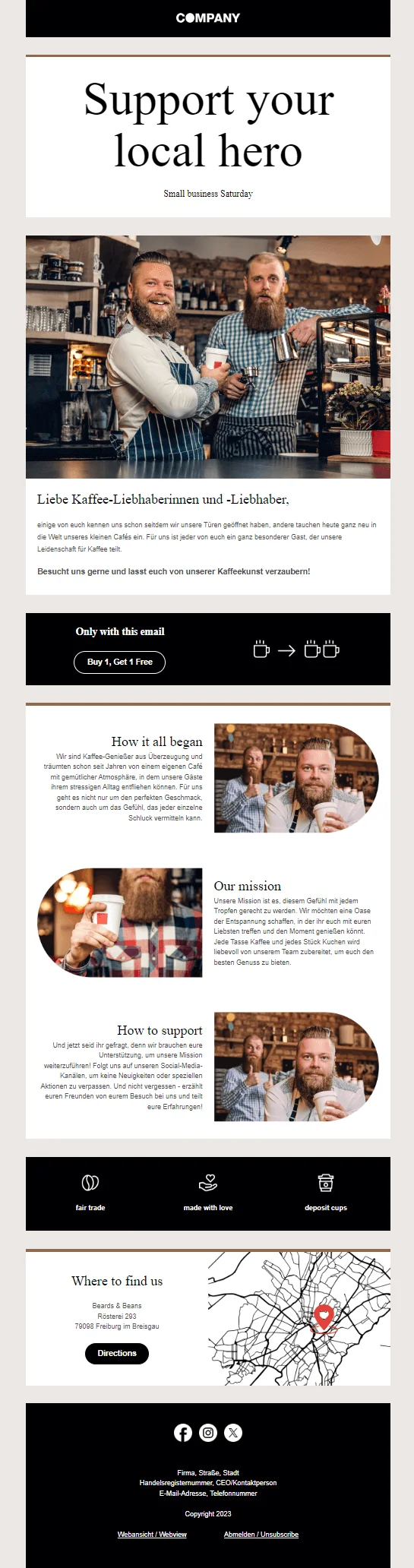
In short, do not simply reel off product advertising. Show passion, values and personality. Your enthusiasm will spread to subscribers, because these are precisely the qualities that make your company likeable. Storytelling in email marketing builds recognition and motivates readers to pay close attention to your future newsletters too.
The rapidmail newsletter
Tips, ideas and news about email marketing, straight to your inbox.
Tip 7: Provide simple design and structured content
A successful newsletter impresses not only with good content, but also with its appearance. Alongside carefully written copy, email design and newsletter structure play a crucial role in email marketing.
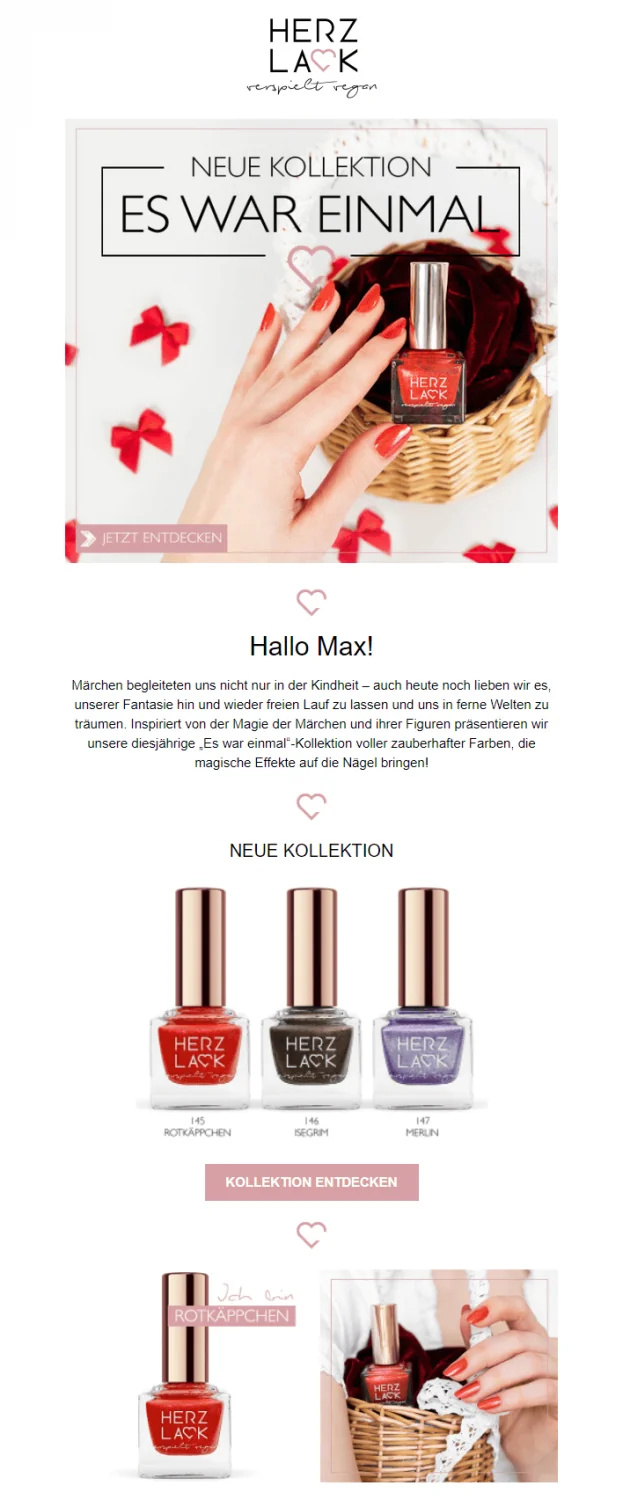
Only when a newsletter is visually appealing will contacts be happy to spend time on its content. Put yourself in their position for a moment: would you read a campaign filled with clashing colors, enormous blocks of text or an outdated, chaotic design? Probably not.
A clear, uncluttered design is also important for another reason. According to a Litmus study (2022), readers spend an average of only around nine seconds on an email’s content. It is therefore in your own interest to make the most important information easy for contacts to grasp quickly.
If you still need a suitable design idea, take inspiration from 10 successful newsletter examples from our customers.
👀 Did you know?
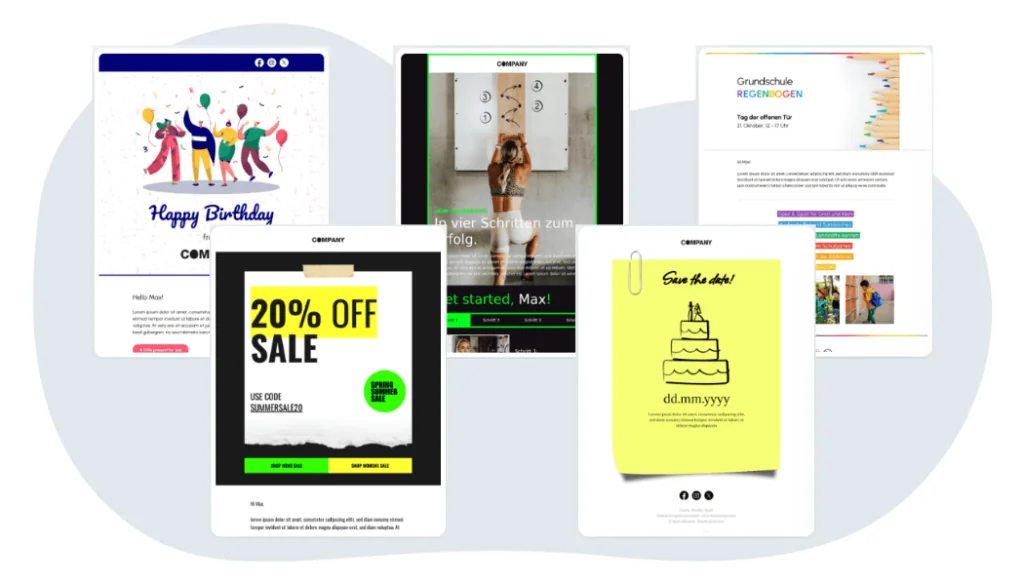
rapidmail offers more than 250 free, pre-structured newsletter templates for a huge range of occasions, including birthdays, Christmas, Valentine’s Day and Easter, as well as numerous industries. You do not need to worry about the layout and structure: simply add your content and get started.
Use images purposefully: less is more
Images make newsletters more vivid, provided you use them deliberately. Choose visuals that support your copy without distracting readers through too many colors or details. Also make sure you have the necessary usage rights for the images.
With images in particular, less is often more. Allow sufficient white space between individual elements and maintain a balanced ratio of text to images. File size also matters, as large images increase email loading times and the risk that frustrated readers will close your newsletter early.
👀 Did you know?
With rapidmail as your newsletter tool, you can crop and edit your own photos and graphics, or apply filters, directly in the integrated image editor. You also have access to an image library with more than 1.5 million free images, so your newsletters remain visually compelling even when you do not have your own graphics available.

Structure text: optimize it for scanning
The reality of email marketing is that most readers scan content rather than reading it word for word. A clear text structure is therefore all the more important.
The following approaches have proved effective:
- 📏 Short blocks of text, around four to no more than five lines
- 🧭 Bullet points for easier navigation
- 🗂️ Subheadings to create clear content sections
- 🔎 Bold formatting for key messages
- 🎯 Short paragraphs, each with only one main point
This ensures that the most important information still registers when readers scan the content quickly.
💡 rapidtip: Create professional newsletter templates in your corporate design
rapidmail 1-click design lets you create professional newsletter templates in your corporate design in no time. Simply enter your website URL and the system automatically integrates your logo, colors, fonts and even social links into your templates. ✨🖌️This saves time and effort and makes external design support unnecessary.
Tip 8: Contact subscribers at the right moment
Even the best newsletter content is ineffective when sent at the wrong time. The success of your email marketing is initially measured by whether your campaigns are opened and read. In fact, the click rate is overtaking the open rate as the most important metric, because privacy features and spam tests are making opens increasingly difficult to measure reliably.
The likelihood of achieving as many email opens as possible rises exponentially when the email reaches subscribers’ inboxes at the right moment. Plan your email campaign’s send time carefully. Ideally, send newsletters when contacts have the time and peace to engage with your content. You can identify that time by getting to know your target audience better and learning more about their daily routines.
Recommended send times for B2B and B2C
Whether you are addressing B2B or B2C customers plays a central role in scheduling:
- 📧 B2B email marketing: In a B2B setting, avoid sending campaigns outside conventional working hours or on weekends whenever possible. Otherwise, they may disappear in the inbox before anyone notices them. Proven time windows are: Tuesday to Thursday, between 9 am and 11 am or 2 pm and 4 pm.
- 📧 B2C email marketing: If you are addressing private individuals, sending during leisure time makes sense because subscribers are more likely to have time to consider your offers. Proven time windows are: evenings between 6 pm and 9 pm, or weekend mornings, such as around 10 am on Saturday over breakfast.
Find the ideal send time through testing
Every target audience is different, so consistent testing is the only way to find the perfect send time. This groundwork pays off, as higher open rates will reward your efforts over time.
Do not expect immediate results, however. To discover when subscribers are most active, you must first test, analyze and optimize. Newsletter statistics help you identify over time which days and times are most successful for your email marketing and schedule future campaigns accordingly.
💡 rapidtip: Optimize your newsletter campaign with A/B tests

The send time is an important success factor that is often underestimated in email marketing. A difference of just a few hours can determine whether your email is opened or ignored. Deliberately test different days and times, then compare open and click rates to identify the optimum timing for your target audience.
Once you have established the timing, move on to the next optimization step: A/B tests. These let you compare specific elements of your email campaign, such as different subject lines or sender profiles, and discover which version performs better.
The key is to change only one criterion in each test, either the time, subject line or sender. This is the only way to identify clearly which adjustment actually produced better results.
Tip 9: Design accessible newsletters
Have you ever wondered whether your newsletters really reach everyone? Accessible newsletters do not only serve people with disabilities; they also improve the user experience for every subscriber. They offer clear benefits for your target audience and therefore for your email marketing too.
Why accessible email marketing matters
The figures speak for themselves: around 1.3 billion people worldwide live with some form of disability (CBM, 2024). That is approximately 16% of the world’s population, or one in six people. In Germany alone, this affects around 8 million people (German Federal Statistical Office, 2024). Many of them depend on accessible digital services or benefit greatly from them.
Accessible email marketing newsletters also provide tangible benefits:
- 📈 Higher engagement rates: Companies that use accessible emails achieve higher engagement rates (Litmus, 2025). Features that are essential for people with disabilities make newsletters more pleasant and, above all, easier for everyone to read.
- 🤝 Social responsibility and a strong brand image: You demonstrate your values and make it clear that inclusion is more than a buzzword to you. This strengthens trust, affinity and your overall brand, providing a genuine competitive advantage in an age of more conscious purchasing decisions.
- 👴 Addressing an aging society: Germany is aging rapidly. By 2030, one in three people will be over 60 (Federal Statistical Office, 2024). Visual impairments become more common with age, so accessible newsletters with strong contrast and legible font sizes serve a steadily growing target audience.
The most important measures for accessible newsletters
Accessibility may sound complex, but it is straightforward to implement in practice. These measures make your email marketing campaign accessible to everyone:
📝 Clear and simple language
Avoid complicated sentence structures and unexplained jargon. Short, comprehensible sentences are easier for everyone to understand and communicate your message more quickly.
Example:
❌ “Registration for our loyalty program”
✅ “Register now and enjoy the benefits”
🎨 Sufficient color contrast
Text and background should contrast clearly. The WCAG (2025) recommend a minimum contrast ratio of 4.5:1 for normal text. Light-gray text on a white background may look stylish and modern, but it is a definite no-go for accessibility. Dark text on a light background, or vice versa, is better.
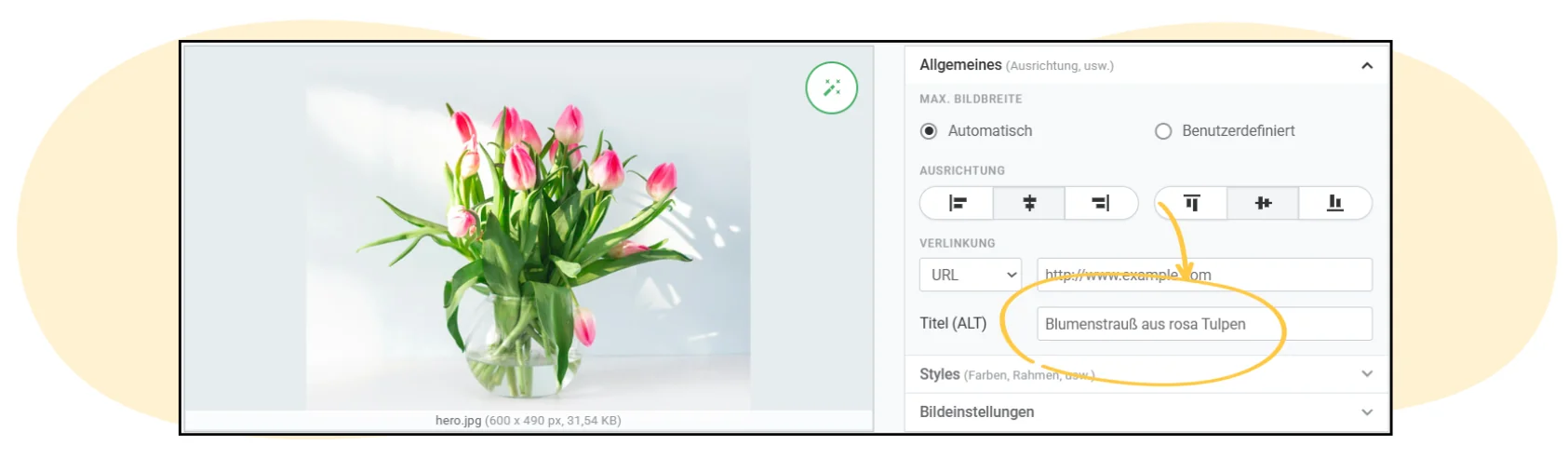
🖼️ Alternative text for images
Every image should contain meaningful alt text. In Germany, more than 300,000 people have a severe visual impairment or are blind (Destatis, 2021), and many use screen readers that read alt text aloud.
Example:
❌ “Product image”
✅ “Our new coffee machine model with integrated milk frother”
👀 Did you know?
rapidmail makes it easy to add alt text to every image. This ensures that the visual content of your newsletters is accessible too.
📱 Readable font sizes
Use at least 14 pixels for body copy in your campaigns. People with visual impairments benefit, and other readers will also appreciate being able to read your newsletter without straining.
🔗 Self-explanatory links
Instead of “Click here”, use clear link text such as “Learn more about our prices” or “PDF download: product overview”. This helps both screen-reader users and other readers.
📊 Structured content
Use proper HTML headings (H1, H2, H3), paragraphs and lists. Screen readers can then recognize the structure correctly and your content becomes easier to understand.
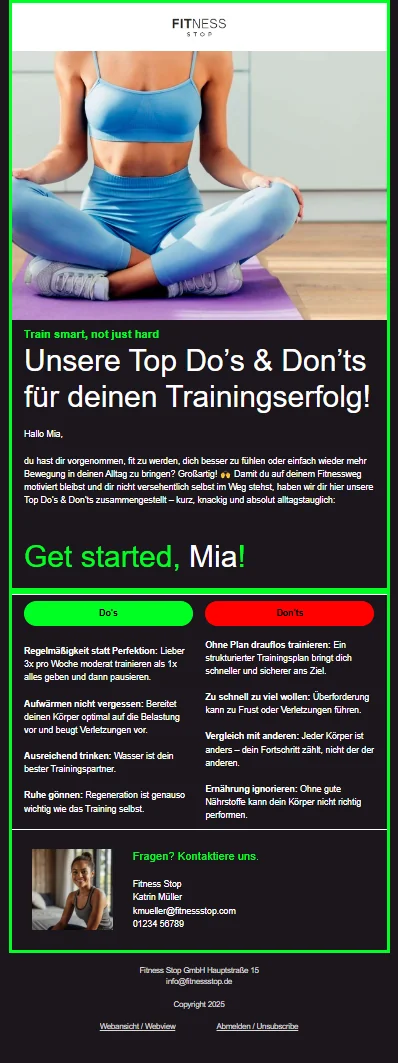
🚦 Do not communicate information through color alone
Green for “yes” and red for “no”? People with color blindness may find it virtually impossible to tell the difference, so always label buttons and notices clearly with text.
🎬 Use animations sparingly
Rapidly flashing animations can cause problems, for example for people with epilepsy. If you use animation, it should run slowly and the information should also be presented in a static form.
Would you like to explore the subject in more detail? Our comprehensive guide to accessible newsletters, including a free downloadable checklist, shows you step by step how to design newsletters that truly reach everyone. Accessibility is also one of THE email marketing trends for 2026.
Tip 10: Use AI intelligently in your email marketing
One thing has already become clear: artificial intelligence takes time-consuming routine tasks off your hands, creating space for what really matters, namely high-quality content and a considered strategy. This promise is particularly appealing when sending newsletters.
Our study on the relevance of email marketing also clearly shows that the greatest email marketing challenges arise long before sending. Content creation, implementation and fine-tuning take the most time. This is exactly where AI tools such as ChatGPT, Claude and Gemini can support you as creative sparring partners.
More specifically, AI can support your email marketing campaign by:
- 🤖 providing initial drafts of newsletter copy, subject lines or calls to action in seconds
- 🤖 adapting content to particular target audiences, occasions or campaign goals
- 🤖 generating image ideas or visual motifs from a text prompt, for example: “Create a cheerful penguin sending a newsletter, in a modern design”
- 🤖 creating a sending plan for the whole year
Blank screens, a lack of inspiration and frustration can become things of the past. AI offers genuine productivity gains for your newsletters and email marketing, as the many available tools get you from the initial idea to a finished newsletter draft much faster.
AI as a sparring partner, not a replacement
However powerful AI may be, it should never run on autopilot in email marketing. You remain responsible for the strategy, tone and brand voice.
Use AI-generated content as inspiration, not as a finished product that you insert into newsletters without reviewing it yourself. The best newsletters combine AI suggestions with your brand knowledge, style and experience, and above all personalize them. Subscribers quickly notice whether copy was written personally or produced carelessly by a machine.
Always examine AI results critically too, because even intelligent systems sometimes make mistakes. When generating images, ensure that the style, visual language and brand values fit together, and that no copyright is infringed. 👀
💡 rapidtip
Would you like to explore the subject in more depth? Our guide “Email marketing with AI: opportunities, risks and best practices” contains specific examples, tool recommendations and helpful information about possible pitfalls when using AI.
Tip 11: Save time with automation
Imagine your email marketing running largely automatically while you focus on other projects. That is exactly what modern automation makes possible. Once set up, it sends the right message at the right time without any further manual action from you. Sounds good, doesn’t it?
What is email automation?
Email automation, often also called marketing automation, consists of predefined email sequences launched by particular events known as “triggers”.
Triggers for email automation include:
- 🕓 Time-based, such as “three days after sign-up”
- 🙋🏻 Behavior-based, for example “viewed product but did not buy”
- ⚡ Event-based, meaning a specific event such as subscribing to the newsletter or downloading a document
The major advantage is that automated emails feel particularly personal because they match each contact’s current situation precisely. This is the strength of automation in your email campaign.
Some proven automation classics are:
- 📧 Welcome emails: Greet new contacts immediately with a multi-part email sequence. Use the high level of initial attention to introduce your company and deliver value straight away.
- 🎂 Birthday greetings: Send automatic congratulations with a small gift such as a discount code. This strengthens the emotional connection.
- 💤 Reactivation emails: Win back inactive contacts with a charming “We miss you!” email.
- 🎓 Drip campaigns: Share your knowledge as an automated mini-course, such as “5 days, 5 tips”. This positions you as an expert and builds trust.
- 📅 Event reminder emails: Remind contacts about upcoming events, webinars or promotions in good time. This increases registrations and attendance and ensures your event is not forgotten.
Email automation is this easy with rapidmail
Automation does not have to be complicated. With rapidmail, you can create marketing automation workflows easily and without any technical knowledge. This saves time while improving your email marketing performance.
rapidmail email automation provides the following features:
- 🎯 Workflow editor: Conveniently create automation sequences using drag and drop.
- 📋 Ready-made templates: Use workflow templates for welcome emails, birthday greetings or appointment reminders. Simply adapt the copy, activate the workflow and you are done.
- 🔀 Intelligent branches: Respond flexibly to contacts’ behavior. Did they click? Follow up with information A. No click? Send information B.
- 📊 Real-time statistics: Track how many contacts pass through your automation and how opens and clicks develop.
👀 Did you know?
rapidmail lets you choose from six different automation workflows for a variety of occasions. Alternatively, you can of course give free rein to your creativity and create a completely individual workflow.
Tip 12: Measure campaign success and optimize campaigns
Anyone who wants to run successful email marketing cannot avoid analysis. Only by checking exactly how your email campaign performed after each send can you improve your strategy purposefully.
After each campaign, pay particular attention to the following metrics:
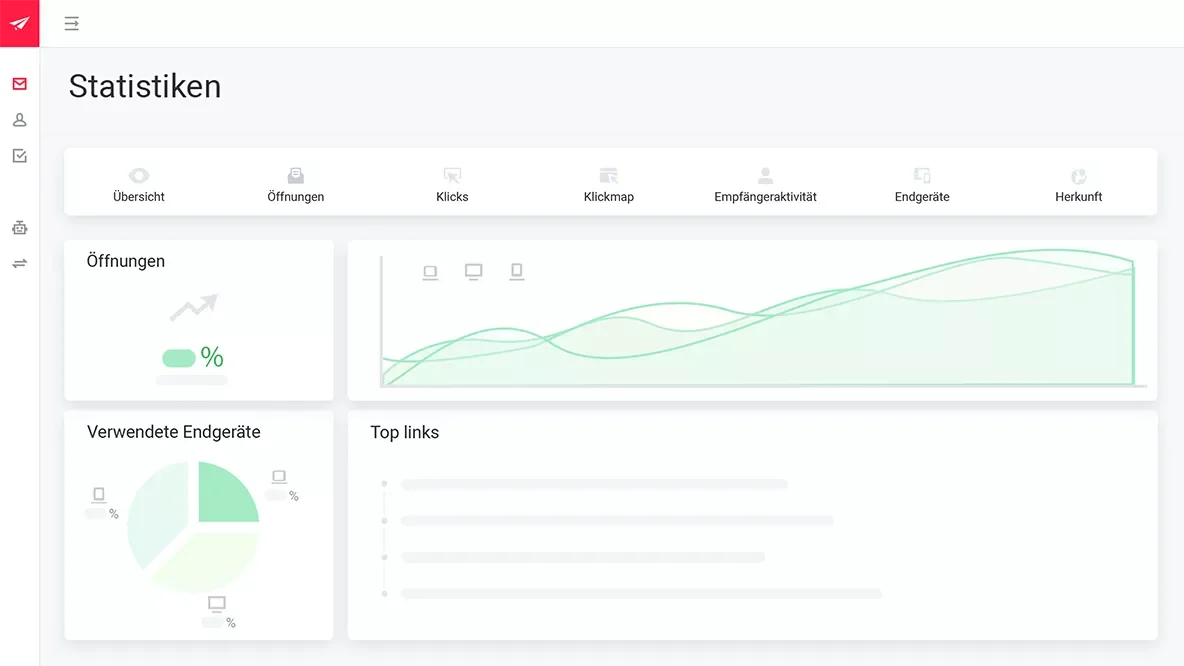
- 👀 Open rate: Shows how many recipients opened your newsletter
- 👆🏻 Click rate: Indicates how many contacts clicked a link in your email
- 🛒 Conversion rate: Measures how many readers performed the desired action, such as making a purchase or signing up
- 👋🏼 Unsubscribe rate: Shows how many recipients unsubscribed from your newsletter after the send
- 🚨 Bounce rate: Indicates how many emails could not be delivered
Analyzing these metrics after each send quickly shows how well your newsletter was received and where there is still room for improvement. Monitor the bounce rate to assess your campaigns’ deliverability and determine whether you need to optimize it further.
💡 rapidtip
Do not fancy building complicated statistics yourself? No problem! rapidmail provides all the important metrics in your campaign overview. This gives you a clear, stress-free view of your email marketing campaign performance at all times.
Questions you should ask regularly
Analyzing your campaigns provides valuable insights into subscribers’ behavior and interests. In the long term, you can answer questions including:
- 👀 Which subject lines achieve the highest open rates?
- 😀 Which topics perform particularly well?
- 👋🏼 Which content leads to more unsubscribes?
- 🛍️ Can you segment contacts by interests or purchasing behavior?
- 🕔 On which day and at what time does your email campaign perform best?
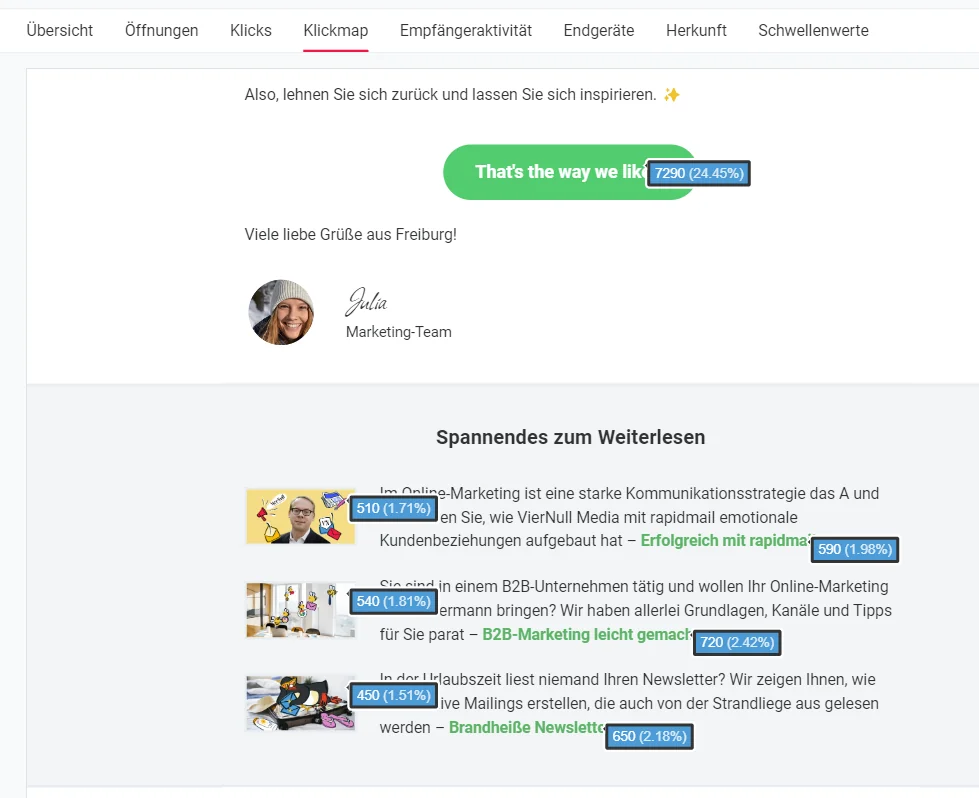
- 🔗 Do text links or image links receive more clicks?
- 📢 Which call-to-action placement generates the most clicks?
- 📅 What is the optimum sending frequency?
- 📱 Which devices and email clients do readers use to view your newsletters?
- 🌍 In which countries do your campaigns achieve the greatest reach?
All these insights help you develop your email marketing based on data, rather than making decisions purely on gut feeling.
Tip 13: Use a professional email marketing tool
Whether you are just starting out in email marketing or already run complex email campaigns regularly, a professional newsletter tool makes your work much easier.
Modern email marketing software helps you:
- 👤 Manage your contacts in a structured way
- 📨 Plan, create and send campaigns efficiently
- ⚙️ Implement useful automation
- 📈 Clearly analyze all important metrics after sending
- 💌 Use sign-up forms to attract plenty of new contacts to your newsletter list easily
This saves valuable time while giving you full control over your newsletter marketing. Professional tools also offer features that basic email software such as Outlook cannot provide, including display tests, previews and test sends to internal addresses. These help you ensure no errors creep in and your newsletter displays correctly in all common email clients.
Focus on deliverability and security
Professional email marketing software also helps ensure your newsletters reliably reach the inbox. rapidmail, for example, is whitelisted by the Certified Senders Alliance (CSA) and holds numerous certifications. This means emails sent through our servers enjoy a high level of trust among many email providers.
We also support important authentication methods such as DKIM and SPF, as well as DMARC, which you can configure yourself in your account. This improves the deliverability of your email marketing campaigns even further.
👀 Have you seen this?
With rapidmail, you can send your first newsletter to as many as 2,000 contacts free of charge and test whether our tool has all the features your company needs for email marketing. What are you waiting for? Take a relaxed look around! In this video, our social media manager Wiebke takes you on a short tour of rapidmail:
Open video transcript
Chapter 1: Introduction
No time for lengthy onboarding and complex features? rapidmail makes it easy to create and send great newsletters!
Email marketing with rapidmail gets you to your destination in no time, whether you want to win new customers, attract more people to an event or boost sales in your online shop.
Hi, my name is Wiebke. Today, I will show you that you need neither prior knowledge nor lots of time to design great newsletters with rapidmail and move closer to your business goals. So let’s not beat about the bush. Let’s get started!
Chapter 2: Navigation and first steps
The dashboard takes you anywhere you need to go. For example, you can create a new campaign directly. To make your newsletter a hit with contacts, use our personalization formulas to address them individually, add emojis to the subject line and consult the automatic subject-line check. It shows you how effective your subject line is and where you could improve it.
Our 1-click design makes newsletter design child’s play. Simply enter your website URL and, just like that, rapidmail creates a design template featuring your logo, company colors and fonts. You can make further adjustments here if you wish, then save it.
Now choose one of more than 250 free templates, and your newsletter framework is ready! You can replace and populate all the content however you like.
Chapter 3: Design and customization
The integrated image editor and our free image library are particularly useful. The library offers more than 1.5 million high-quality, royalty-free images, saving you extra steps and additional tools!
If you have an online shop, our free plugins make it easy to connect it to rapidmail and automatically synchronize your customer and product data. Then use our one-click product import to drag products directly from your online shop into the newsletter.
Now it is time to scrutinize the draft with the preview function. Does personalization work? Does the newsletter look good on different devices? You can now send test emails to as many as 10 email addresses, completely free of charge!
Before the newsletter goes out, put its deliverability through its paces and make any final corrections. This helps ensure your campaign does not end up in spam. Thanks to our excellent deliverability, rapidmail gets your newsletter to its destination particularly reliably.
Everything looking good? Your newsletter can now set off on its journey, either immediately or automatically at a scheduled time. Your first send to as many as 2,000 contacts is on us, so you can test rapidmail at your leisure.
Chapter 4: AI sending planner
If you ever lack the right idea for newsletter content, our AI sending planner uses artificial intelligence to create a personalized newsletter sending plan for your business. Simply enter the company name, a few keywords and a short description, and there it is: your personalized sending plan with newsletter ideas for the whole year!
Chapter 5: Gaining contacts
rapidmail also helps you gain new contacts. Just like 1-click design, it lets you create newsletter sign-up forms that fit your website design perfectly in only a few clicks.
You can easily upload existing contacts to rapidmail from CSV, Excel or text files using copy and paste. You can also assign contacts as many tags as you like, ensuring they receive only the campaigns that genuinely interest them.
Chapter 6: Data protection and segmentation
Data protection is our highest priority! All rapidmail processes are 100% GDPR-compliant. Your contact data is stored exclusively on servers in Germany, so there is no need to worry.
To address contacts in a particularly targeted way, divide them into segments, for example by age group, gender or place of residence, then select these segments when sending to distribute your newsletter only to particular subgroups.
Incidentally, we are always happy to talk! If you have questions or difficulties, our support team will be delighted to help, free of charge by telephone or through the ticket system within the tool.
Chapter 7: Reporting and analysis
After sending your newsletter, you can track its success in real time. The automatically generated newsletter statistics give you a clear view of all important email marketing KPIs in rapidmail.
Our campaign statistics help you understand your target audience’s interests and wishes better and better, enabling you to send more successful newsletters.
Want to know every detail? The activity history for individual contacts shows you exactly which campaigns a recipient has received, opened and clicked. These reporting options help you get to know contacts better and tailor newsletter sends even more precisely.
Chapter 8: Email automation
If you want to tailor your email marketing even more precisely to contacts, you should certainly try our email automation. You need no prior knowledge and can set up individual email sequences with only a few clicks, for example for welcome messages, birthday greetings or multi-part courses. Our practical workflow templates make getting started even easier!
Chapter 9: Prices
Finally, a few words about our prices. If you want complete flexibility and to pay only when needed, our pay-per-send plan is ideal for you. If you want to send newsletters regularly, our monthly “Starter” and “Premium” subscription packages are perfect. You can get started from just €15 per month and send an unlimited number of emails. The price calculator on our website helps you find the right package. Of course, you can change, pause or cancel your package at any time.
Sound good? Try rapidmail free of charge and see for yourself that rapidmail lets you send professional newsletters without being a newsletter professional!
Of course, you should ultimately decide for yourself which newsletter tool best suits your company. To help you make the right choice, we have created a detailed newsletter tool comparison, where you can conveniently compare different providers’ strengths and weaknesses.
Important features of a professional newsletter tool
When choosing your email marketing tool, pay attention to the following criteria:
- 😀 Ease of use: An intuitive interface saves time and reduces sources of error.
- 🖌️ Design flexibility: Professional templates and the option to create your own templates in your corporate design are definite advantages in the “daily newsletter business”.
- 🛡️ Data protection compliance: GDPR-compliant data processing, ideally with data stored in Germany. It should be possible to integrate features such as double opt-in, a legal notice and an unsubscribe link as standard.
- 🙋🏻 Personalization options: Individual sign-up forms, such as pop-ups, for purposefully attracting new subscribers.
- 🖼️ Design options: An integrated image editor, web fonts and automatic responsive design for visually appealing campaigns.
- 🎯 Target-audience communication: Tagging or segmentation features for sending content tailored to different buyer personas.
- Optimization features: A/B tests for subject lines or content, enabling you to improve your email campaign based on data.
- ⚙️ Automation: Workflows for welcome emails, birthday greetings or more complex email automation.
- 📊 Performance analysis: Clear statistics for comprehensive email marketing campaign reporting.
- 🤖 AI support (optional but helpful): AI-powered features for activities such as optimizing copy or generating subject lines.
A professional tool is therefore not a luxury, but the foundation for efficient, scalable email marketing.
Conclusion: Your starting signal for successful email marketing in 2026
Email marketing remains one of the strongest and most efficient marketing channels in 2026. Success depends on relevant content that precisely suits your target audience, compelling subject lines and consistently optimizing your email marketing campaigns using easy-to-understand metrics.
AI tools can provide substantial support. They save time when writing copy, help develop creative subject lines and can even optimize send times. This frees up time and energy to refine your strategy and quality, and to implement creative ideas.
Combine these possibilities with:
- 📱 Mobile-optimized, accessible design
- ⚙️ Thoughtful automation for recurring campaigns
- 📊 Data-driven analysis
- 🙋🏻 Targeted personalization
And you have all the important ingredients for successful campaigns!
Would you like to get started immediately? Our email marketing tips provide everything you need to make your first or next email campaign a success.
And do not worry: everything does not need to be perfect straight away. Begin with the email marketing fundamentals, then develop your newsletters step by step. You learn something new with every campaign and gain an increasingly clear understanding of what genuinely appeals to your contacts.
Best of all, rapidmail lets you try newsletter marketing without any complications. Your first rapidmail campaign to as many as 2,000 contacts is completely free.
So, what are you waiting for? 🚀
Bonus: Our email marketing tips specifically for your industry
Still not had enough? Neither have we!
The email marketing tips in this guide give you a strong foundation for future campaigns. However, industry-specific details often make the crucial difference. Every target audience is different and every email marketing campaign presents its own challenges.
We have therefore compiled the most important information and newsletter sending tips for different industries in dedicated articles. Simply choose the guide that suits your company and get the most from your email marketing! 🚀
- 🏨 Email marketing for hotels: Learn how hotels can use personalized offers, automated booking reminders and clever guest-loyalty programs to keep their rooms full and turn one-time visitors into loyal regular guests.
- 🤝 Email marketing for NGOs and non-profit organizations: Discover how non-profit organizations use authentic storytelling, effective fundraising appeals and targeted engagement campaigns to advance their mission and build a loyal community.
- 🍽️ Email marketing for restaurants and hospitality businesses: From daily menus and event announcements to voucher promotions, strategic email campaigns help restaurants fill tables, remain in guests’ memories and gradually build a loyal customer base.
- 🏋️ Email marketing for gyms: Regular motivation pays off! Gyms use email marketing to inform members about new classes, promotions or training ideas, strengthening loyalty and encouraging recommendations.
- 🚗 Email marketing for car dealerships and repair shops: From service appointments to vehicle offers, the right email marketing campaign ensures dealerships and repair shops are present exactly when customers need them, generating additional revenue through targeted prompts.
Whatever industry you work in, a thoughtful strategy and the right tools can make your email marketing a genuine success! 🚀
FAQ: Frequently asked questions about email marketing
Is email marketing still worthwhile in 2026, or is it long outdated?
Email marketing remains one of the most powerful marketing channels in 2026. You can reach your target audience directly, personally and measurably, with a manageable amount of effort. The crucial question is not whether to use it, but how you plan, personalize and optimize your email campaign. A newsletter tool such as rapidmail gives you the best possible foundation for email marketing success.
What are the most important success factors for newsletter campaigns in 2026?
Important success factors include relevance through personalization, compelling subject lines, mobile-responsive design, accessibility, automation and data-driven optimization. AI can also help you save time and achieve better results faster.
How can I find out what really interests my target audience?
Segment your contacts, for example by interests, purchasing behavior or persona, and tailor your content accordingly. Buyer personas make typical needs and expectations more tangible and help you build your content consistently around them.
How should I write the subject line so that people actually open my newsletters?
Spark curiosity without being cryptic, avoid jargon unless it suits your target audience and keep the subject line short. Personalization can provide an additional incentive to open the email. Emojis work when they suit the message and are used sparingly.
How can I use AI effectively in email marketing?
Use AI as an effective partner: it is particularly useful for drafting copy, subject lines, hooks and CTA ideas, planning topics or optimizing send times. The important thing is that you set the strategy and tone, then revise the output so that it fits your brand.