Newsletter creation: The costs you can expect


Do you want to communicate with your customers regularly, increase your sales and stay visible? Then email marketing is exactly the right tool for you! But are the costs involved still a big question mark? In this guide, we show you transparently which email marketing costs you can expect, how to calculate a sensible budget and how you can save even more money when creating newsletters.
🥜 In a nutshell: The essentials about newsletter costs
- ✔️ Email marketing is a cost-effective channel with high open rates, a strong ROI and virtually no wastage.
- ✔️ Email marketing software costs from 7 to €20 per month.
- ✔️ In addition to these fixed costs, you may incur further expenses, such as one-off costs for the initial organizational and technical setup, as well as other variable expenses (for agencies or freelancers, for example).
- ✔️ The specific costs of your email marketing depend on the scope and objective of your campaign and how frequently you send it.
- ✔️ A budget plan helps you calculate your expenses realistically, spread them across the year and respond flexibly to new requirements.
- ✔️ Measures such as choosing a streamlined tool that focuses on the most important features, keeping your mailing lists tidy, using reusable templates and getting support from AI can reduce the cost of your campaigns.
👀 Did you know? Alongside various monthly packages, rapidmail also offers a no-commitment plan where you only pay when you actually send something.
1. How much email marketing costs
People say you shouldn’t talk about money. We disagree! To assess how much you can expect to spend on email marketing and whether you can afford this form of advertising, it is essential to look at the costs involved. 💸
However, email marketing costs depend on many different factors, so there is no single figure that applies to every business and use case.
These factors affect your email marketing costs:
1. 👩🏽💻 Email marketing software
To make the most of all the benefits of email marketing, you need a dedicated email marketing tool with applications and professional features designed specifically for the job. Depending on the provider, you will usually pay a fixed price per month. Prices vary depending on the provider’s range of features, ease of use and support. The various email marketing tools also use different pricing models, charging either according to the number of contacts or for a fixed number of emails per month.
💡 rapidtip

Our comprehensive newsletter tool comparison helps you choose email marketing software that meets your exact needs. We assess the email marketing tools not just by cost, but also by range of features, GDPR compliance and support.
2. 👥 Size of your contact list
With most providers, the number of newsletter subscribers affects your monthly costs. Under a contact-based model, you pay for a fixed maximum number of contacts and can send them as many emails as you like. The price only rises when you reach a new contact threshold (from 1,000, 5,000 or 10,000 contacts, for example). So the more people you want to reach by email, the more expensive it becomes.
3. 📅 Sending frequency
How often you send newsletters (weekly rather than monthly, for example) and your overall sending volume affect your costs in different ways depending on the provider. With some providers, the sending frequency does not affect the price as long as the number of contacts remains the same. Other email marketing tools, however, do not just charge by the number of contacts, but also set a fixed volume of emails that you can send to those contacts each month. Under this pricing model, the more campaigns you send, the more expensive it becomes. Regardless of the pricing model, however, the more frequently you send, the more internal resources you need for content, coordination and planning, among other things.
💡 rapidtip
Some providers allow you to buy credits and use them as prepaid funds for sending campaigns if you do not want to commit to a monthly subscription. Particularly useful: with rapidmail’s no-commitment plan, you only pay when you actually send something. This is ideal if you only send newsletters to your contacts occasionally, or if you want to keep your spending down.
🔎 Comparing the costs of different email marketing tools
| rapidmail | Brevo | Mailchimp | GetResponse | MailerLite | Mailjet | |
|---|---|---|---|---|---|---|
| Monthly packages* | From €15; unlimited emails to up to 500 contacts | From €7; 5,000 emails to 500 contacts | $13; 5,000 emails to 500 contacts | From €16; unlimited emails to up to 1,000 contacts | From €9; unlimited emails to up to 500 contacts | From €16; 15,000 emails to an unlimited number of contacts |
| Send campaigns with no monthly commitment | From €20; 500 emails | From €30; 5,000 email credits | From $200; 5,000 credits | – | – | – |
* Prices refer to the monthly cost of the cheapest paid plan with monthly billing
Depending on the provider, a self-employed person or small to medium-sized enterprise (SME) will therefore pay at least €7 to €20 per month to implement a professional newsletter strategy, excluding additional services or external support.
Other costs you may incur in email marketing
As you can see, many factors influence the cost of your email marketing campaigns. Some can be calculated in advance, while others arise from your individual use case.
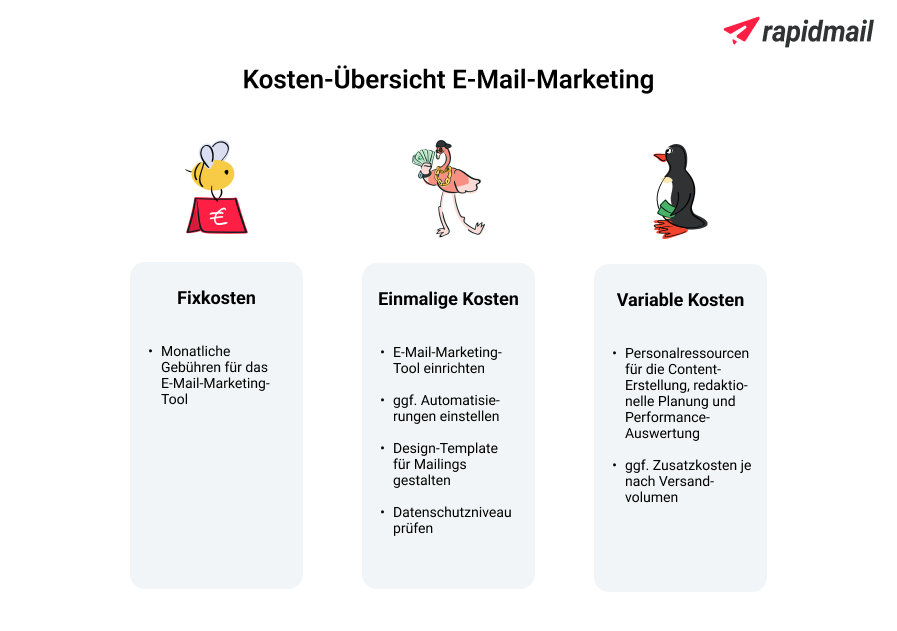
One-off costs
One-off costs usually arise at the start of your email marketing activities or when you switch from one email provider to another. These steps give your newsletter a solid technical, visual and legal foundation from the outset. 🧱 Depending on your internal capacity, these costs take the form of your team’s time or fees for external agencies or freelancers.
- ⚙️ Configure the tool: Before your first newsletter is ready to send, the newsletter tool needs to be set up and, if necessary, connected to your online shop, customer database (CRM) and content management system (CMS). Once the technical setup is complete, much of it runs automatically. However, if you switch CRM later or want to connect new systems, this may involve more work.
- 🤖 Set up automated email sequences and the sign-up process: Automated emails, such as welcome emails or appointment reminders, need to be created once so they can save you time and bring structure to your email marketing. The sign-up process also needs to be set up once in a GDPR-compliant way, including double opt-in and clear consent wording.
- 🎨 Create a design template in your corporate design: A professionally designed template ensures that your newsletters match your corporate design and look polished and display correctly on every device. You can then use this template for all future campaigns. If you hire freelancers, experienced graphic designers or an agency, the cost ranges from 50 to several hundred euros (source: Clever Elements). If your company makes design changes (following a rebrand, for example) or you have new campaign objectives, updating your newsletter design is of course essential too.
💡 rapidtip
Fortunately, rapidmail lets you avoid these email marketing costs, as our 1-click design automatically creates email designs to match your business, including your logo, colors, fonts and social icons!
- 🦺 Check data protection: Your newsletters should not only appeal to your target audience, but also be legally compliant. This means that a privacy policy, complete legal notice on your website, unsubscribe link in your newsletter and consent to tracking are mandatory. If you choose email marketing software that is not automatically 100% GDPR-compliant, this could result in costs for advice from specialist lawyers, legal reviews or technical measures on your website. If you want to commission a legal newsletter check, you can expect to pay from around €39 for a basic review to several hundred euros for a customized, detailed analysis (source: KONTENTIERT LEGAL).Alternatively, choose a newsletter tool that is already 100% GDPR-compliant to avoid these additional email marketing costs.
Variable costs
Logically enough, variable email marketing costs are the most individual factor of all. A self-employed person sending a simple informational newsletter will clearly face considerably less work than a large company planning huge marketing campaigns.
- 💼 Staff costs: Creating newsletters involves more than just writing compelling copy. Images, graphics, offers and seasonal content also need to be designed and coordinated. Then there is the planning, coordination and approval of newsletter content, particularly when several departments are involved. Finally, the figures collected by your tool also need to be analyzed. How many contacts opened your email? Which calls to action, images and links in the newsletter did they click? How far did readers scroll through your newsletter? The answers to these questions help you optimize your next newsletter, but they take time. Whether you cover this internally or with freelancers or an agency, the more frequent and complex your campaigns, the higher the staff costs generally are.
- 📧 Sending volume and additional features: The more contacts you write to and the more frequently you send emails, the higher the costs, particularly with plans that limit contacts or sending volume. Some tools also charge extra for smart features such as personalized send times, product widgets or individual content.
2. Are email marketing costs really worth it?
The short answer is yes! Email marketing costs are already considerably lower than those of other advertising measures (such as catalog ads, television advertising or billboards). The comparatively low costs were also named as the greatest advantage of email marketing by 93.5% of respondents in a 2023 survey of 794 rapidmail customers.
At the same time, email marketing regularly delivers strong performance and a whole host of benefits. Of course, there are no guarantees: for a newsletter to resonate with your target audience, its objectives, content and delivery must mesh like perfectly coordinated gears. ⚙️
💡 rapidfacts: Some benefits of email marketing
- 📬 High open rates: The average newsletter open rate across all industries in German-speaking Europe (Germany, Austria and Switzerland) is 36.07% (source: Brevo, 2025). In other words, if you send a newsletter to 1,000 contacts, around 361 people will open your email, and at least one link is subsequently clicked in 5.42% of delivered newsletters. So the effort you invest pays off!
- 📈 Excellent ROI: Email marketing has an excellent return on investment (ROI). This means that every euro you invest in newsletter marketing generates an average return of €42 (source: summ-it, 2025). Other channels such as social media or display ads cannot compete. Incidentally, a newsletter does more than generate revenue, it also gives you greater awareness and more satisfied customers. 💪🏼
- 🤖 Automation: From welcome messages to reactivation emails, email automation lets you reach your contacts at precisely the right moment. Once set up, your email workflow runs automatically and maintains contact with prospects and customers. Smart sending triggers ensure that your emails are only ever sent to people for whom your message is currently relevant, saving you unnecessary costs.
- 🧾 Full control of your data: In email marketing, you retain full control of your most valuable asset: your contacts. Unlike on external platforms such as Facebook, TikTok or Instagram, you can export, analyze and segment them whenever you like and use your mailing list for as long as you wish. This gives you a direct line to your target audience, so changes to algorithms or terms of use no longer need to give you a headache. Note: Of course, when you use email marketing tools, you are still bound by their terms and conditions.
3. Smart budgeting: How to plan your newsletter costs
A clear budget plan is essential for successful email marketing, as it helps you keep your costs under control and avoid expensive surprises. 🤓 Here is how to build your budget plan step by step:
1. Objectives: First, think about what you want to achieve with email marketing. Which features should your email marketing tool offer to help you do so?
👀 Have you seen this? How to find your perfect newsletter tool
Are you still spoiled for choice among all the different email marketing tools? It can be extremely helpful to start by forming a clear picture of your individual requirements for the ideal software. This video explains what those requirements might be. Roll the film! 🎬
Open video transcript
Chapter 1: Introduction
Especially when you’re just getting started, choosing exactly the right option from all the different tools on the market can be extremely difficult.In this video, I’ll help you work out what requirements you should have for your email marketing software, and how to tell whether a tool is really right for you.That way, you can make an informed decision straight away instead of wasting time on a tool that isn’t designed for your goals. Let’s get started!
Chapter 2: Ease of use
The first, and in my opinion almost the most important, requirement for your perfect email marketing tool is ease of use. Obviously, you need to be able to work well with the tool. A great deal depends on whether you already have experience in the field and generally pick up new technical tools quickly, or whether you’ve never sent newsletters before and want to start with the basics.
You should also ask yourself what you want to achieve with email marketing.
- Or do you want to set up complex campaigns?
That brings us straight to the second requirement for email marketing software: the features you need.
Chapter 3: Complexity and range of features
In my opinion, the essential basic features you need for sending newsletters include at least:
- the ability to manage your contacts, divide them into segments and address them individually using personalization fields.
Virtually every professional email marketing tool meets these basic requirements.
But the tools also offer features that can make email marketing easier for you. Artificial intelligence is particularly popular at the moment.
- For example, rapidmail offers an AI sending planner that creates a tailored newsletter editorial calendar for your entire year. Our AI also helps you write compelling subject lines.
Design templates that only need to be filled with content before you send them directly to your contacts make email marketing at least as easy. This is particularly practical if you’re not a design professional, have little time or simply want to avoid extra steps.The range of features also varies between tools: rapidmail, for example, offers 12 ready-to-send newsletter templates in English, while Brevo has around 50.
Alongside these features that make email marketing easier, there are other features that enable you to run more complex campaigns. Again, it all comes down to your requirements:
- Do you also want to set up complex automations and remind your contacts about an abandoned basket, for example? Not every email marketing tool meets this advanced requirement, so you should pay particular attention to it when choosing one.
In our newsletter tool comparison, we took a close look at seven different providers and compared their various features. If you’d like a more detailed overview, you’ll find the link in the information box as usual.
Chapter 4: Data protection
Another important requirement for your email marketing tool is data protection. In my opinion, it should even be right at the top of your list. Personally, I would always prefer to play it safe from the outset and choose software that meets every requirement of the GDPR (General Data Protection Regulation), rather than having to deal with legal breaches or warning notices later.
This is how you find a tool that is 100% GDPR-compliant:
- It is also important that you can easily enter into a data processing agreement, or DPA.
If your potential newsletter tool is not transparent about this, steer clear of it.
Chapter 5: Deliverability
What good is the best email if it never reaches the inbox? Deliverability is one of the most important, but unfortunately often underestimated, requirements in email marketing.
To find a provider with the highest possible deliverability, make sure it uses certified sending servers and supports you in setting up authentication methods such as SPF or DKIM. Does that sound like another language? Don’t worry: good tools guide you through the process step by step and handle most of it for you in the background.
If you don’t want to leave anything to chance, choose a tool that runs an automatic spam check before sending and shows you the risk of your campaign ending up in spam. If necessary, you can then resolve the last remaining problems before sending your newsletter. Ultimately, your message has to arrive, otherwise all that work would have been for nothing.
Chapter 6: Support
Especially when you’re just starting out with email marketing, it’s perfectly possible that you’ll get stuck. But one question or another can always arise later too. You should therefore consider what support you want from your email marketing tool.
- Or are written replies by email or live chat enough for you?
Personally, I think being able to reach customer support by phone for free, without being stuck in a queue forever, is worth its weight in gold these days!
Chapter 7: Prices
Of course, price also plays a role when you’re looking for the perfect newsletter tool. Naturally, it varies from one provider to another depending on the range of features, service offering and your sending habits. The cheapest paid plans range from around 7 to €20 per month.
There are three different pricing models:
- Or you pay for a fixed number of emails per month. Under this model, however, the number of contacts is often limited at the same time.
Chapter 8: Conclusion and checklist
Ultimately, choosing the right email marketing software depends entirely on your goals and requirements. When you have a potential candidate in mind, this checklist can help you make a final assessment of whether it really is the right tool for you:
- Range of features: Is a tool with the essential basic features enough for me, or do I want to use professional features such as complex automations and dynamic personalization?
Once you know what your requirements are, platforms such as OMR Reviews can also help you compare the different providers and find the right software for you.
If this video helped you, I’d be delighted if you gave it a thumbs up. Let me know in the comments what experiences you’ve already had with the different tools, or if you still have questions, I’ll be happy to help. See you next time!
2. Scheduling: Before finally choosing a provider’s package, it is best to take another look at your calendar. What campaigns are still coming up this year? Are you launching a new product this year? Will you send your newsletter regularly or only for seasonal events such as Black Friday or Christmas? For occasional newsletter sends, a no-commitment package, such as rapidmail’s “Pay as you go” plan, may be the more cost-effective choice for your email marketing. Your sending volume may also fluctuate throughout the year and you may, for example, want to send more frequently during the Christmas season than during the summer lull. In this case, choosing a provider with a contact-based pricing model is particularly advisable, allowing you to send as many campaigns as you like each month.
💸 Monthly vs quarterly newsletters: A cost comparison
How much can you save by sending less frequently? The following table uses an example to show the annual cost of sending newsletters to 500 contacts, depending on the sending frequency (monthly or quarterly):
| Regular sending (at least once a month) | Occasional sending (once a quarter) |
|---|---|
| 12 x €15 = €180 per year | 4 x €20 = €80 per year |
Good to know: This comparison uses two rapidmail pricing packages : the monthly “Starter” package for regular sends and the “Pay as you go” no-commitment package for occasional sends.
3. Staff planning: Do you have enough staff capacity to handle tasks such as editorial planning, writing and designing the campaigns and analyzing campaign success internally with your own team? Or do you need external support from an agency or freelancer? If you want to commission professionals to create a newsletter template in your corporate design or carry out a data protection check, you will need to budget for additional costs here too.
| Cost | |
| Data protection review by external service providers (one-off) | From €39 |
| Template design by external service providers (one-off) | 50–€200 |
| Variable costs (such as copy and graphics from freelancers/agencies) | 100–€500 per send |
By choosing suitable email marketing software, planning your schedule ahead and making an honest assessment of your staff capacity, you can create a realistic email marketing budget. Email marketing experts such as Manuela Meier recommend always including a budget buffer of 10 to 20% when calculating newsletter costs (source: E-Mail-Marketing – Auf den Punkt, dpunkt Verlag, 2025). That will definitely put you on the safe side. 🤑
4. Five tips for reducing your email marketing costs
You now know what to expect financially when sending newsletters and how to create a realistic budget. But a few smart measures can make your email marketing even more affordable. 💸
1. Consider downgrading your email marketing tool
Did you sign up for the first email marketing provider’s large enterprise package with heatmaps, AI personalization and countless target-group options, even though you only want to send a newsletter now and then? Take some time to consider how you will actually use your newsletter tool day to day. If you do not really need every feature, downgrading to a cheaper plan or even switching to a simpler, more affordable provider can be worthwhile, saving you real money every month. Many providers also offer discounts for annual payments.
👀 Did you know? You can make money with newsletters

Here’s the exciting part: with rapidmail, you can even earn money very easily by creating newsletters! 💰 Simply create your campaigns as usual, then add our rapidmail ad banner by drag and drop. For every individual contact who registers with rapidmail through the ad banner in your newsletter, you receive €10 from us. And if that contact then actively uses rapidmail and generates their first invoice, you’ll receive another €100! That means you can earn up to €110 for each contact you refer with the new ad banner, without much effort.
2. Spring-clean your contact list
The more contacts in your newsletter mailing list, the better? This rule of thumb only applies if your contacts are actually active and open your newsletters. As you now know, most email tools charge by the number of contacts you write to, regardless of whether they open your emails or have been ignoring them for months. You are effectively throwing money out of the window and diluting your newsletter statistics with all those inactive contacts. A tidy, well-maintained list, by contrast, saves email marketing costs and improves your metrics. Win-win! 💪🏼
💡 rapidtip

An automated reactivation workflow elegantly filters out inactive subscribers with very little effort. For example, anyone who has not opened your newsletters or clicked a link for six months receives one final chance by email. If there is still no click after this last appeal, remove the contact from your mailing list for good. Your email marketing budget will thank you.
3. Create a basic layout in your corporate design
First impressions count in email marketing too! Even so, a professional newsletter does not need to start from scratch in design terms every time. Instead of developing a separate design for every campaign, it is worth working consistently with a well-considered, attractive template in your corporate design. A basic layout like this, with a fixed newsletter structure, logo, colors and fonts, not only saves time, coordination and unnecessary design costs, but automatically makes your newsletter more recognizable too. rapidmail’s 1-click design does it in no time: simply enter your website URL and admire the automatic design template in your company’s look. 🪄
4. Reuse good content
Content recycling means reusing high-performing content from your website after revising it, updating it or presenting it in a new format. This increases the visibility of your best content, saves valuable time and reduces the work involved at the same time. 💪🏼
Here’s how:
- ✨ Repurpose existing content: You can reuse content that you have already published on your website or social media in your newsletter, perhaps in a different format or with updated context. Example (hotel): An Instagram post about regional breakfast products is retold in the newsletter, including images and a short interview with the head chef.
- 🆕 Update and reuse content: Instead of leaving old content unused, you can revise it, add current information and use it again. Example (gym): An existing magazine article entitled “Back training for beginners” is revised to include new exercises with small equipment, updated and republished as “Effective back training 2.0”. You then feature the article prominently in your fitness newsletter as part of a series on back health.
- ✂️ Split up long-form content: Extensive formats such as ebooks, guides or video courses can be divided into several smaller, easy-to-consume newsletter snippets. Example (car dealership): A detailed buying guide entitled “New or used car: which is right for me?” is divided into a three-part email series. Part 1 examines costs and depreciation, Part 2 compares equipment and warranty considerations, and Part 3 offers a decision-making checklist together with an invitation to a personal consultation at the dealership.
- 🎯 Adapt content for target audiences: The same content can be adapted individually for different target audiences, making it more relevant and personal and achieving significantly better results. Example (hotel): A seasonal spring travel guide is presented differently for various target audiences. Business travelers receive a focus on short running routes near the hotel and flexible breakfast times, families get tips on attractions for children and local leisure activities, and couples receive inspiration for romantic activities and exclusive dining options.
5. Use artificial intelligence as a co-creator
Subject lines that spark curiosity? Preheaders with that special something? A complete newsletter at the touch of a button? Thanks to AI text generators such as ChatGPT, Neuroflash and Rytr, it has never been easier to produce professional newsletter content in your chosen style on screen in seconds. 🪄
💡 rapidtip
rapidmail’s AI sending planner provides original sending occasions for the entire year, tailored precisely to you and your business. You can find usage tips in the help article. And if you ever lack inspiration for your next subject line, the AI subject line generator lets you create original, high-impact subject lines in no time. ✨
Using the website URL you entered earlier, the AI gets to know your business and provides suitable, individual subject line suggestions. Its suggestions are tailored to your business, sector and writing style.
The monthly cost of AI tools is generally far lower than that of agencies or freelancers, and there are often even free starter packages or plans for under €10 per month. This enables even small businesses and self-employed people to create target-group-specific newsletter copy without external support. Artificial intelligence in email marketing becomes your powerful partner: it handles both creative and repetitive tasks, giving you valuable time to focus more on strategic issues.
Important: As helpful as AI is, it does not replace trained copywriters and designers. You should always review AI output. Facts may be incorrect or wording may feel inappropriate. Give every newsletter text your personal touch to make your campaigns unmistakably yours.
5. Conclusion: Get started with manageable email marketing costs
As you can see, effective email marketing can be achieved with manageable effort. If you keep an eye on your expenses, choose sensible tools and plan content intelligently, you can achieve a great deal even with a small team and budget. 💸
Get started with rapidmail right away: your first send to up to 2,000 contacts is free, making it ideal for trying us out.
👀 Have you seen this?
Would you like to revisit the most important points about email marketing costs in video form? No problem! Here, our social media manager Wiebke explains which factors you can use to plan your newsletter budget realistically. Roll the film! 🎬
Open video transcript
Chapter 1: Introduction
How much does it actually cost to send a newsletter? The monthly cost of email marketing software starts at around 7 to €20. But that isn’t the whole answer, because there can be other costs in addition to these fixed costs, and they depend entirely on how you want to design your campaign. So let’s go through the different cost items in detail.
Chapter 2: Are email marketing costs worth it?
Although email marketing costs depend on many different factors and cannot be reduced to a single flat-rate amount, I can tell you one thing in advance: email marketing is cheaper than you might initially think and is actually one of the most cost-effective marketing channels available. For every euro spent, you receive an average return of €42. So it is definitely worth accepting a few costs.
Okay, but exactly which costs might arise?
Chapter 3: An overview of fixed costs
The newsletter tool
To create and send your newsletter, you first need a dedicated email marketing tool. You usually pay a fixed monthly price for it. Prices vary from provider to provider depending on the range of features, ease of use and support. I’ve already made a video about German email marketing tools and compared their prices and features, among other things. So do take a look if you’re interested in the subject.
The size of your contact list
With most providers, the size of your email mailing list affects the cost. In other words, the more contacts you have, the more expensive your monthly subscription becomes. Under this contact-based model, you pay for a fixed maximum number of contacts and can send them as many emails as you like every month. The price only rises when you reach a new threshold, such as 1,000, 5,000 or 10,000 contacts.
The sending frequency
But there are also providers with a volume-based pricing model. In other words, the more campaigns you send, the higher your monthly price. But regardless of the pricing model, you naturally need additional resources if you want to send your newsletter very frequently, for example for planning, preparing content or coordinating within the team.
Now, so that I can finally give you a few specific figures, let’s quickly look at the cost of a few different newsletter tools on their cheapest plans:
rapidmail starts at €15 per month, which lets you send unlimited emails to up to 500 contacts. Alternatively, you can choose the no-commitment plan with no monthly obligation, starting at €20 for 500 emails.
Brevo starts at just €7 per month. That gives you 5,000 emails to 500 contacts. If you do not want a subscription, you can also buy credits, starting at €30 for 5,000 emails.
Mailchimp prices start at $13 per month for 5,000 emails to 500 contacts. Without a subscription, however, it becomes significantly more expensive, starting at $200 for 5,000 credits.
GetResponse costs €16 per month and lets you send unlimited emails to up to 1,000 contacts.
MailerLite costs from €9 per month and also lets you send unlimited emails to up to 500 contacts.
And finally, Mailjet starts at €16 per month and gives you 15,000 emails to an unlimited number of contacts.
When choosing a tool, however, you should of course consider more than just the price. Above all, check whether it suits your needs and offers the features you require.
These cost items, meaning your newsletter tool, the size of your mailing list and your sending frequency, can be calculated fairly well in advance. But there are other factors that are much more individual.
Chapter 4: Costs for staff, external agencies or freelancers
When you start email marketing, your chosen tool first needs to be set up. That means someone has to take care of the technical setup, configure the sign-up process for new subscribers and, if necessary, create automated email sequences too. But don’t worry, this needn’t be complicated. With rapidmail, you can do all this in just a few clicks and receive excellent guidance along the way. So you don’t need previous experience or a huge amount of time, but someone does at least need to take care of the initial setup briefly and keep an eye on things to make sure they run exactly as you intended.
The newsletter design needs to be created too. Again, you should consider whether you want to handle this internally or need external help. In my opinion, however, that isn’t really necessary, as you can use newsletter templates for many different purposes and occasions, and can even have most of them adapted to your own corporate design. You could also search the image library for additional photos and graphics. So you don’t necessarily need to spend a fortune here either. You’ll find more tips on how to create an appealing newsletter in this video. Do take a look.
Chapter 5: How to plan your newsletter costs
You now know which factors could affect your email marketing costs. To finish, let’s take a brief look at how to plan your budget intelligently and avoid expensive surprises.
Think carefully again about exactly what you want to achieve with email marketing and which features you really need. That may determine whether you genuinely need a comprehensive, more expensive tool or can already save some money there.
Before committing to a provider, however, you should quickly check your calendar again. What campaigns are still coming up this year? Is a new product being launched? Do you want to send your newsletter regularly or only on special occasions? If you only want to send occasionally, for example, a no-commitment package such as rapidmail’s “Pay as you go” plan would be a good choice because you only pay when you actually send something. And if your sending volume fluctuates over the year, perhaps you send less in summer and a great deal during the peak season at the end of the year, a contact-based pricing model may be a suitable option. In other words, you pay each month for the number of contacts but decide for yourself how often you want to write to them.
But think about your staff too, because your newsletter needs to be planned, written and designed. Can you take care of it yourself, do you have staff for it or do you need external support?
If you choose suitable software, plan your newsletter sends ahead and assess your capacity honestly, you can create a realistic budget. It is best to add a further buffer of 10–20% so that nothing can go wrong.
Chapter 6: Conclusion
As you’ve seen, email marketing costs are entirely manageable and easy to plan if you build your budget intelligently from the outset. And if you also choose a tool that does not require marketing or design professionals, but lets you complete every step yourself quickly and easily, you can even save the cost of external service providers altogether. You’ll find more money-saving tips for your email marketing in this video, which you should definitely watch next!
And if you simply want to try rapidmail, you’ll receive a 50% discount on your first invoice via the link in the video description. Your first send to 2,000 contacts is always on the house anyway.
Have fun trying it out, and see you next time!