Reactivation emails: How to win back inactive customers

Perhaps this sounds familiar: after a while, some of your newsletter subscribers stop responding to your emails. Fortunately, there is a way to rekindle their interest in your newsletter. Automated reactivation emails are the perfect way to bring inactive contacts back on board while breathing new life into your email campaigns. We show you how targeted reactivation campaigns can strengthen customer loyalty over the long term and help you continuously optimize your newsletter strategy. Discover which elements really matter for a successful reactivation email and how rapidmail helps you implement them effortlessly and reactivate your customers effectively.
1. Reactivation emails in email marketing: Why they matter
You have been sending newsletters regularly for some time. Your contacts were enthusiastic at first and eagerly opened your emails. But over time, you notice that some subscribers no longer respond to your newsletters at all. Although these contacts have not unsubscribed, they show no activity because they neither open newsletters nor click linked content. They are simply lying dormant in your newsletter mailing list. 😴
It is time to use reactivation emails to try to wake them up before you remove these inactive customers from your contact list! Reactivation emails are designed to reactivate inactive subscribers. They are an effective way to reconnect with former customers while improving the performance of your entire email marketing strategy at the same time.
Automated reactivation emails can help your email marketing to…
- 💰 Save time and money: Reactivation emails are sent automatically when a contact has not responded within a specified period, allowing you to win back inactive contacts without investing a great deal of time or money.
- 🚀 Increase engagement: Targeted reactivation measures increase the open rates, clicks and conversions of subsequent newsletters, which in turn has a positive effect on your newsletters’ overall deliverability.
- 💡Reactivate customers: You reconnect with inactive subscribers and bring them back into the active customer lifecycle.
- 📈 Improve the quality of your newsletter mailing list: If inactive contacts do not respond to your reactivation emails either, you can filter them out of your contact list, improving the quality of your mailing list, your sender reputation and therefore overall email deliverability.
👀 When are newsletter contacts considered inactive?
If subscribers ignore your newsletter for three to four months, meaning that they do not respond by opening or clicking it, you can safely classify them as inactive.
2. The key ingredients of an effective reactivation email
To ensure that your reactivation campaigns and newsletters are not simply overlooked but instead rekindle your customers’ interest, you need the perfect balance of creativity and strategy.
A subject line that makes an impact
First impressions count! A cleverly worded subject line for your reactivation email can instantly make your contacts curious. It is the key to getting your email opened. 🗝️
Striking reactivation email subject line examples that spark curiosity:
- Let’s make a fresh start: a gift is waiting for you! 🎁
- 🥹 Did we do something wrong? Tell us and get 10% off!
- Whatever we said, whatever we did, we didn’t mean it. We just want you back for good 💌
- 🧑🏻🎤 Is it time for a comeback? Your exclusive offer is waiting!
- We miss you: claim your surprise now! 🤫
- Hello, is it us you’re looking for? 👀
- ⏰ We wake you up before you go-go with our exclusive offer!
Compelling content
When it comes to successfully reactivating former customers, one thing matters above all: relevance! Whether you offer interesting discount promotions, for example on favorite products, heartfelt personal messages or exclusive content, your reactivation email should provide genuine added value that immediately appeals to your contacts. Give your customers a welcome, exciting and perhaps even unexpected change from your usual campaigns.
Here are a few ideas for suitable reactivation email content to get your creativity flowing:
- 🎁 Discounts and voucher codes: “10% off your next purchase, for a limited time only!”
- 💌 Personalized greeting: “Dear Ms Miller, we look forward to seeing you again!”
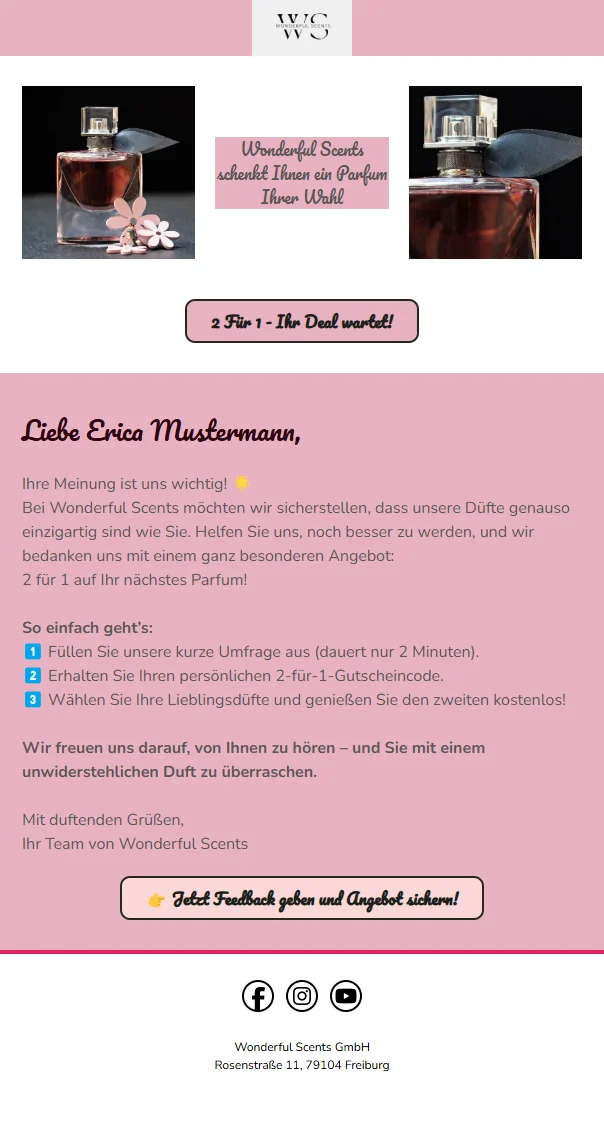
- 🛍️ Tempting promotions: “Buy 2, get 1 free: your deal is waiting!”
- 🚚 Free delivery: “Order now and we’ll cover the delivery costs!”
- 🎀 Exclusive gift: “A little thank-you with your next order!”
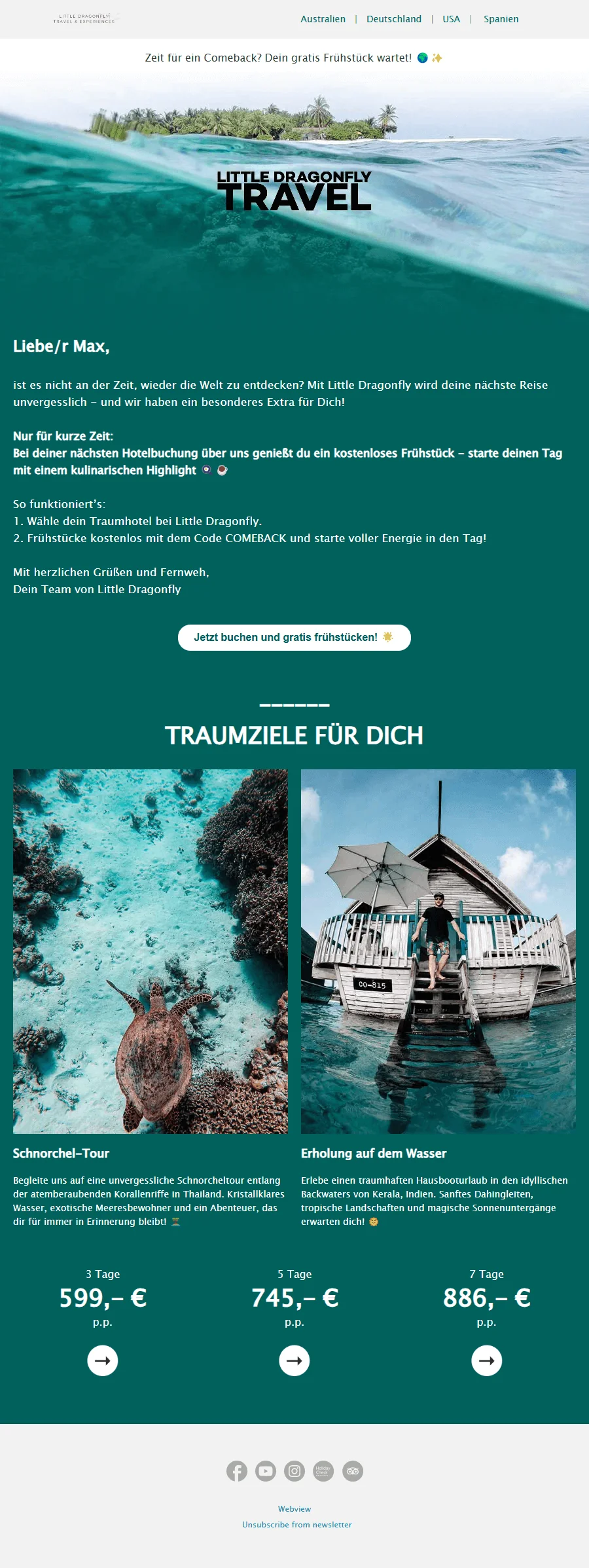
- 🛎️ Free additional services: “Free breakfast with your hotel booking.”
- 📖 Free resources: “Get our free ebook for inspiration!”
- ✏️ Ask for feedback: “What could we do better? Share your opinion with us!”
The right content ensures that your email is not only opened but also genuinely acted upon, rekindling your contacts’ interest in your business. Create an eye-catching reactivation email that makes your customers curious!
💡 rapidtip
Finding interesting, tailored email content can become quite difficult over time. After all, you do not want to keep repeating yourself or eventually annoy your own subscribers. Take a look at our blog post, where we have collected 10 ways to find relevant newsletter content for you. 🤓
55 creative ideas: How to keep your newsletter fresh
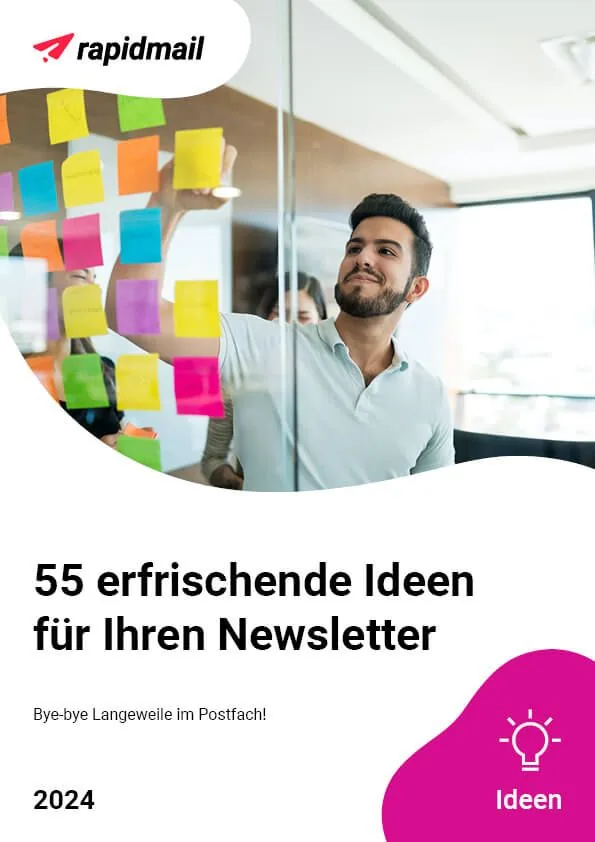
Want even more inspiration? Our collection of 55 creative newsletter ideas will keep your campaigns engaging and prevent your subscribers from becoming inactive in the first place.
This collection includes:
- 🧲 Original tips on how to strengthen your relationship with newsletter subscribers.
- 📖 Practical know-how on building your expert status with outstanding content.
- 👑 Inspiring examples that show you how to present your company’s success perfectly in your campaigns.
- 💡 Creative ideas to keep your newsletters engaging and ensure they never become boring!
Download 55 newsletter ideas for free now (PDF in German)
A clear call to action with CTAs
Simply opening the reactivation email is not enough, as you also want to achieve a goal. This is where calls to action come in. A call to action (CTA) is a clear prompt that encourages your contacts to take a specific action, such as opening a link to an offer. Why is this so important? Because it makes the next step clear and guides contacts exactly where you want them to go. Well-placed, appealing calls to action in the form of buttons in your reactivation campaigns encourage customers to take the desired action.
Examples of motivating calls to action for your reactivation emails:
- “Claim your discount now”
- “Reactivate account”
- “Redeem offer”
- “Get free delivery”
- “Don’t miss out: keep receiving the newsletter”
Position the call-to-action button prominently, ideally in an eye-catching color, and preferably include it more than once, for example once near the top and again at the end of the email. This ensures that nobody simply scrolls past it. Of course, you should still make sure that your reactivation email remains easy to read and that too many call-to-action buttons do not confuse readers, leaving them unsure where they should click.
The right timing for reactivation
Timing is like your morning coffee: when you get it right, everything runs smoothly. The right newsletter timing influences how well customers respond to your reactivation email. Instead of sending it at random, you should follow your target audience’s daily routines: perhaps early in the morning on the tram, during a quiet moment on the weekend or late in the evening before the bedside light goes out. Perfect timing increases the likelihood of reaching your contacts precisely when they are receptive to your message.
👀 Did you know?
Automated reactivation emails help ensure that your emails always reach your contacts at exactly the right time, without repeated manual effort.
With the rapidmail email automation tool, you can run reactivation campaigns in your sleep:
- 📬 Automatic emails after a configurable period of inactivity
- 🔁 Follow-up campaigns based on click behavior
- 💌 A practical email workflow template for your reactivation emails
- ⏳ Flexible waiting times between multiple reactivation attempts
- 📊 Detailed performance analyses to optimize your campaigns
- 🎯 Segmentation options for even more precise targeting
- 🛠️ An intuitive user interface for quick and easy setup
3. Effective reactivation email examples: From discounts to emotions
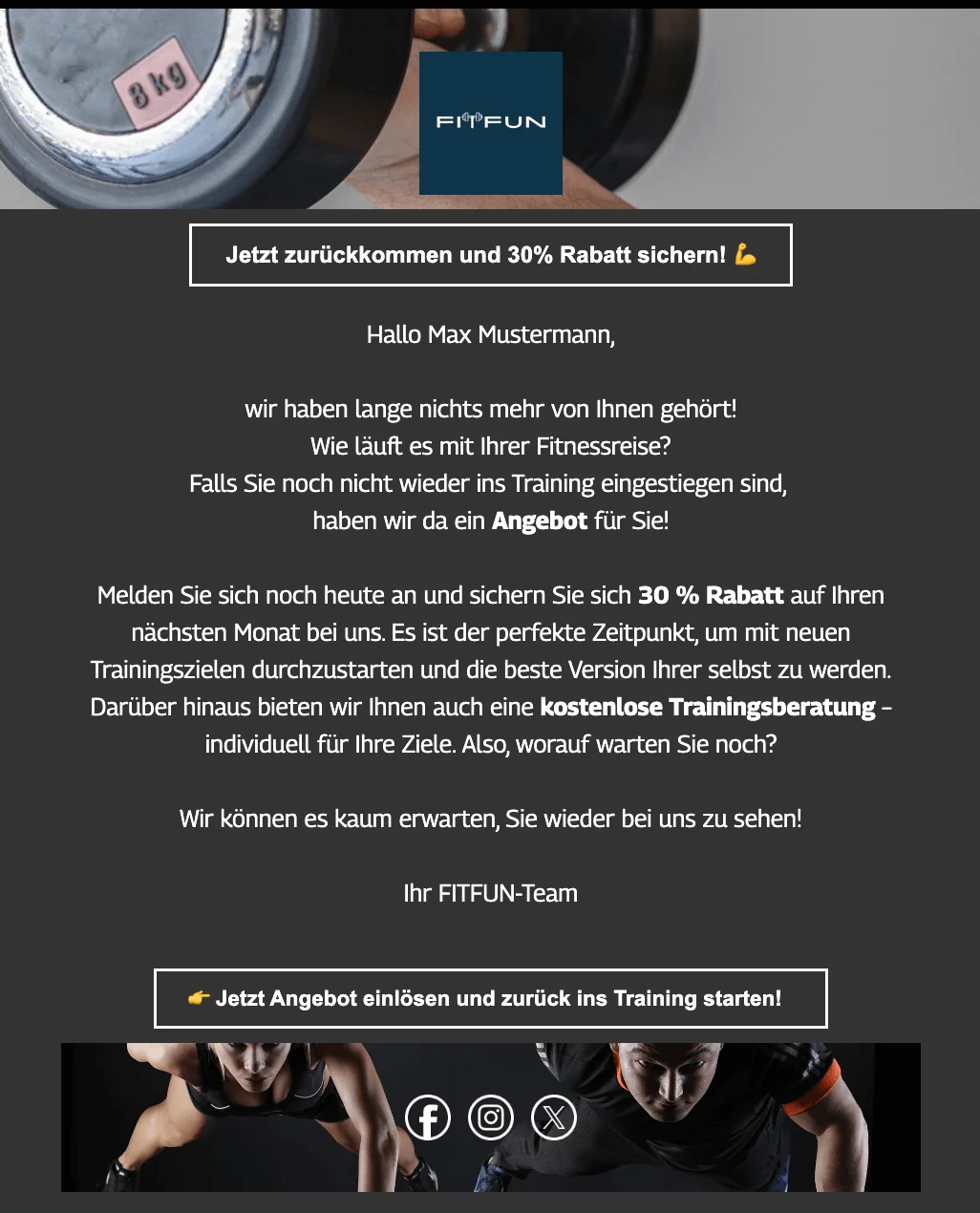
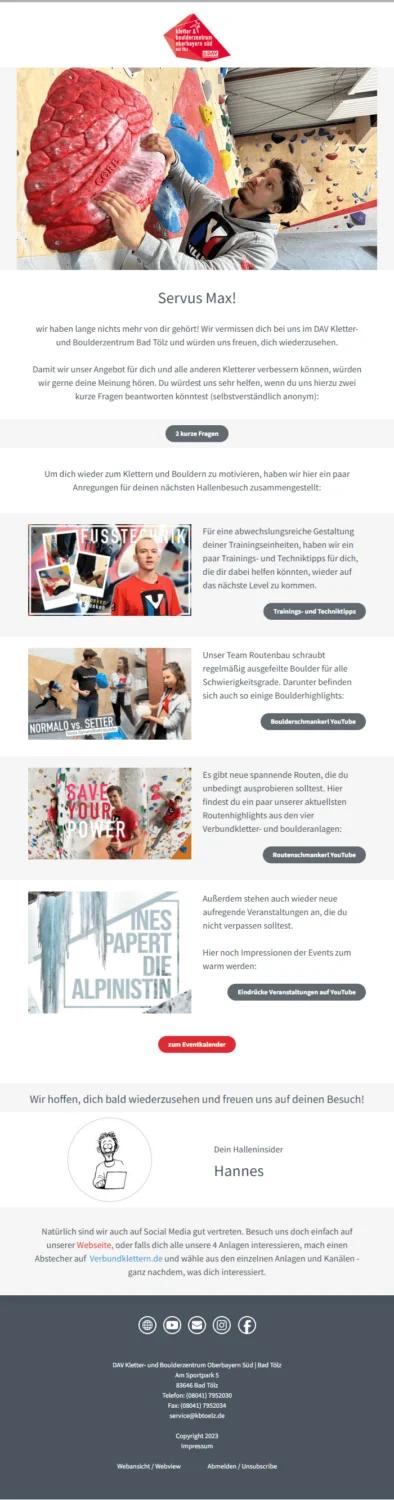
Looking for inspiration and examples? Using successful reactivation email examples, we show you what effective emails for winning back customers can look like. You can take direct inspiration from them and see what your own reactivation campaign could look like.
Reactivation email example from a gym
Create a reactivation email now
Reactivation email example from the Oberbayern Süd Climbing and Bouldering Center
👀 Have you seen this? The benefits of email automation
Using practical examples, our Content Manager Wiebke explains why email automation is worthwhile for every business. Roll the film! 🎬
Open video transcript
Chapter 1: Introduction
Did you know that email automation is a real secret weapon in marketing? Automated emails such as annual birthday greetings, appointment reminders or multi-part email sequences allow you to provide every contact with exactly the content that is relevant to them, at a time tailored specifically to them.
Hi, I’m Wiebke, and in this video I will show you exactly what email automation is and how automated emails can take your marketing strategy to the next level. To help you get started straight away, we will explore the three most popular email automations together.
Chapter 2: What exactly is email automation?
Email automation means using a specialized tool to send marketing emails automatically. You create the emails once, and they are then sent automatically to the specified target groups as soon as certain conditions arise. These conditions can be triggered by a particular action taken by a contact, such as signing up through a form or clicking a link in a newsletter. A certain pattern of behavior over a defined period can also be a trigger, for example if a contact has not opened any of your emails in the last three months. Alternatively, an email can be sent at a specified time regardless of contacts’ behavior, such as when new course lessons are released every two weeks or appointment reminders are sent.
For example, if you own a florist, you could set up an appointment reminder for early February to remind your contacts that Valentine’s Day is approaching. Add some beautiful pictures of your bouquets and an offer of free delivery, and you are almost guaranteed to receive advance orders.
Within an email automation, you can create an entire workflow of individual automated messages that are sent in a defined sequence.
Chapter 3: How does it differ from regular newsletter sends?
Newsletters are regular emails sent simultaneously to a list of contacts and usually contain more general information such as news, discount promotions or product presentations. Email automation is quite different. A newsletter needs to be created afresh each time and its delivery triggered or scheduled manually, whereas automation emails are sent automatically to the right target group. However, the two forms of email marketing complement each other well. Newsletters keep readers up to date and strengthen customer loyalty, while automation emails are tailored to each contact’s individual situation and accompany them throughout the customer lifecycle.
Chapter 4: Benefits of email automation
If you are already familiar with email marketing, you will probably know the usual benefits, such as its cost-effectiveness compared with other marketing methods, direct communication with the target audience without relying on algorithms or platforms, and the high measurability of results. Email automation offers many more benefits beyond these.
Automated emails allow you to send targeted offers that are perfectly tailored to your target groups’ interests and purchasing behavior. This helps you increase sales opportunities and revenue. At the same time, regular and personalized emails strengthen trust in your company and foster customer loyalty.
Let us return to the florist example. You could reward your customers’ loyalty by sending a little surprise to their inbox one year after their first purchase. You can also win new customers by convincing leads with relevant content and offers.
Another benefit is cost savings. If-then branches in your workflows and precisely defined sending triggers ensure that your automated emails reach only the contacts for whom the message is currently relevant. This saves you from sending emails to huge recipient lists full of contacts who are not currently interested in your offer.
Automating recurring tasks such as welcome messages, appointment reminders or course lessons also saves you valuable time and increases your efficiency.
You need not worry that your contacts will feel bothered by too many automated emails. If you structure and personalize your automations carefully, recipients will not notice any difference from a manually created email. Instead, they receive precisely the content that is most relevant to them.
A high-quality email marketing tool such as rapidmail also gives you access to various control features, such as the preview function and free test sends for all automation emails in the workflow. Of course, you can deactivate or reactivate your automations at any time.
Chapter 5: Requirements for email automation
For your email automation to work successfully, you need a powerful email marketing tool with automation features, such as rapidmail. A well-structured and properly maintained contact list is also essential. You must always comply with data protection requirements: automated emails may only be sent to people who have expressly given their permission.
Chapter 6: Three email automations for every business
Different automations can make sense depending on your company, industry and target audience. However, these three email automations are always worthwhile:
Welcome greetings for new contacts are important because first impressions count. Give subscribers who have just signed up for your newsletter a warm welcome with a single email or a whole email series. Use this opportunity to introduce yourself, point to future content and thank them for signing up with a small discount.
Birthday greetings are another great way to strengthen customer loyalty. Heartfelt congratulations and a small gift are guaranteed to delight your contacts. If you run a florist, for example, you could surprise the birthday person with a free bouquet.
Reactivation emails to inactive recipients help you reconnect with customers who have drifted away from your brand over time. A targeted reactivation email can remind them of you, motivate them to make another purchase or invite feedback.
Chapter 7: Conclusion: Get started with email automation easily
As you can see, email automation makes it simple and straightforward to address your contacts in a targeted and personalized way. This allows you to accompany your customers throughout the entire lifecycle and build long-term customer loyalty.
With rapidmail as your email automation software, you can choose the pricing package that best suits your needs. The Starter package lets you create one automation sequence from just €15.00 per month. You can find all the details about the various packages and their respective features on our pricing page.
Do you have any questions or comments? I look forward to answering them in the comments. I wish you every success and lots of fun with your first email automation! Thank you for watching, and see you soon.
Reactivation email example from an online perfume shop
The rapidmail newsletter
Tips, ideas and news about email marketing, straight to your inbox.
Reactivation email example from a travel agency
Create a campaign with this template
4. Now it’s your turn: Create a successful reactivation campaign with rapidmail
If you are worried that a reactivation campaign will involve a great deal of work, we can reassure you. rapidmail saves you the stress of repeated manual sends and lets you use marketing automation workflows to plan customer reactivation effectively, prepare it just once and automate it completely. You can quickly win back your customers’ hearts, almost as if by magic! Simply follow these steps to implement your reactivation email effortlessly, for example as part of a drip campaign:
Step 1: Select a workflow template for reactivation emails
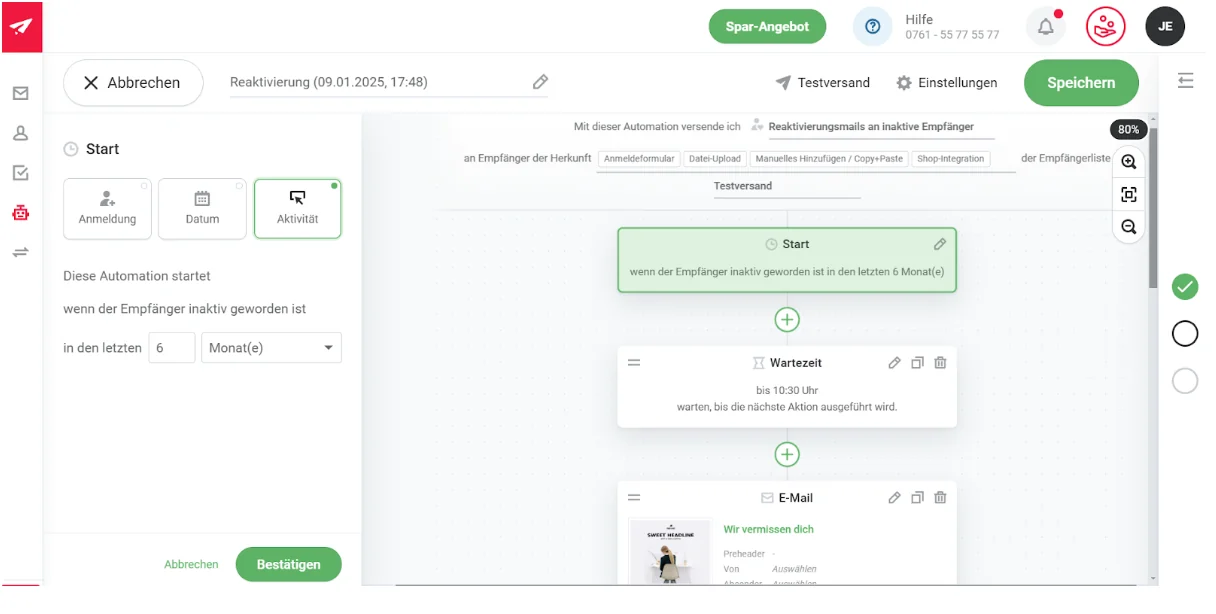
Use the practical template to plan reactivation workflows that wake up your customers. You have complete flexibility to determine how long a contact should be inactive before your email is sent. For example:
- 😴 30 days of inactivity: After 30 days without interacting with your previous newsletters, rapidmail automatically sends a reactivation email containing a special discount.
- 😴 6 months of inactivity: After your contact has shown no interest for six months, it is time to follow up. Tell your contact that you miss them and give them one last chance to keep receiving your newsletter by clicking the button.
Discover rapidmail email automation now
Step 2: Design your reactivation email with personalized content and offers, then activate the automation
Everyone wants to feel seen, so address your subscribers directly and personally! Use rapidmail’s personalization options to design emails that win back your customers’ hearts in no time. Include exclusive offers in your reactivation emails to pique your contacts’ curiosity.
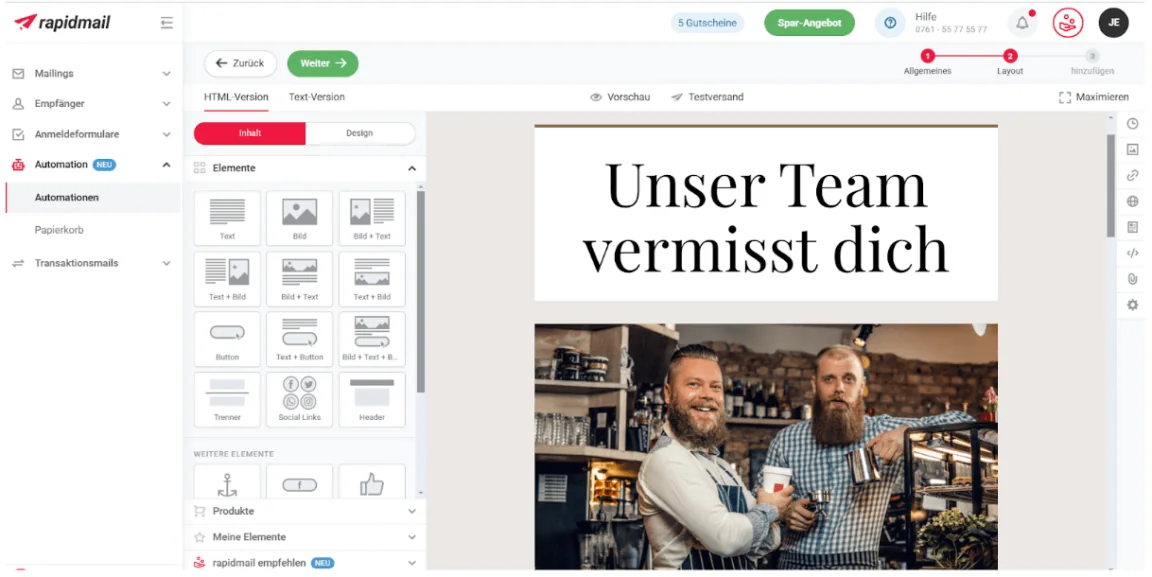
Once you have finished designing your reactivation email, you can activate your email automation, and all your inactive contacts will receive your email completely automatically. 😎
Step 3: Measure and optimize the success of your reactivation campaign
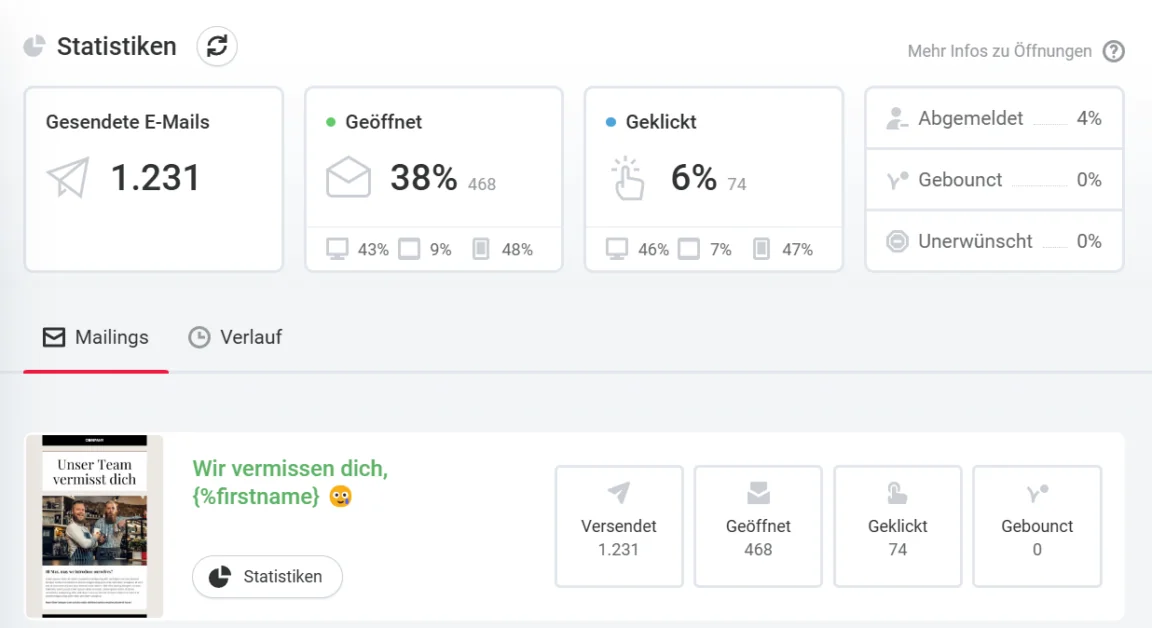
Check what works and what does not. To take your reactivation campaigns with rapidmail to the next level, you can use our analytics tools. Keep an eye on key open, click and delivery rates to continuously improve your campaigns.
Create a free rapidmail account now
Step 4: Unsubscribe contacts when all else fails
The more contacts respond to your reactivation attempts, the better! You can continue contacting these people through your newsletter. However, it is important to remove subscribers who remain inactive from your recipient list. Regularly clearing out your list saves money while improving your newsletters’ deliverability.
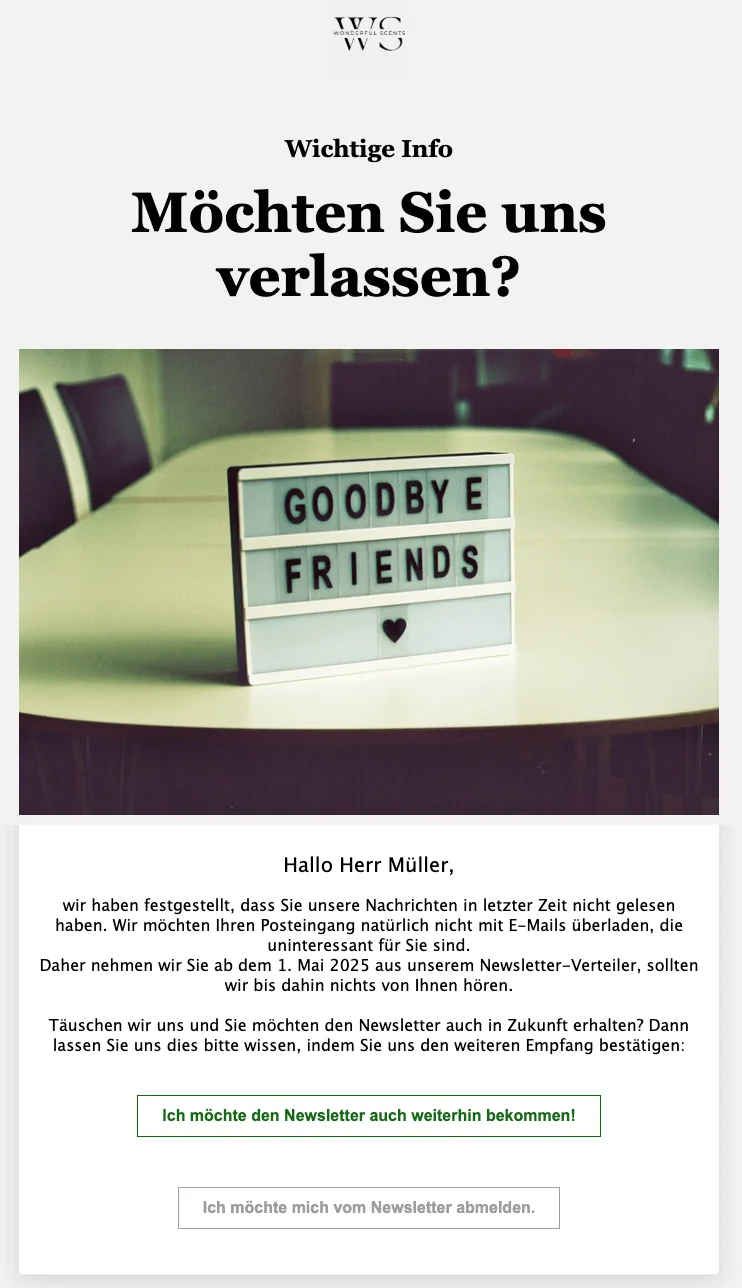
Use a farewell email to tell affected recipients that they will no longer receive the newsletter in the future. However, give them one last chance to remain on the mailing list by including a call to action that they must actively click to confirm their interest. Read our blog post to find out what you need to consider from a data protection perspective when unsubscribing newsletter contacts.
5. Conclusion: Your recipe for active customers and subscribers
Inactive subscribers do not have to be a serious problem. See them as an opportunity to maintain your recipient list regularly and rekindle your subscribers’ interest with engaging, personalized reactivation emails.
With a well-considered strategy and clever use of automation, you can win back inactive customers quickly and easily. Your reactivation campaigns ensure that your contacts only take a brief power nap instead of snoozing in your newsletter mailing list forever. 🦥❌
Create a reactivation campaign now
Would you like even more inspiration for different email automation workflows? Then take a look at our free guide. It contains 7 exciting examples of email automations for different industries.
Our guide provides inspiration for:
- 👋 clever welcome emails that help you build a good relationship with new contacts right away
- 🎉 celebratory birthday greetings that express your appreciation and put a smile on your contacts’ faces
- 💤 effective reactivation emails that bring inactive contacts back on board
Download the guide for free now (PDF in German) (PDF in German)