Reduce your newsletter unsubscribe rate: 9 useful tips

Time to say goodbye? Ideally, you would prevent newsletter unsubscribes altogether. After all, you invest a great deal of energy and resources in regularly providing your contacts with interesting content. And yet your newsletter unsubscribe rate shows that you keep losing subscribers. We can reassure you: every newsletter sender experiences this! Our tips will help you reduce your newsletter unsubscribe rate over the medium term and even find something positive in the unsubscribes that remain!
1. Reduce your newsletter unsubscribe rate: 9 simple tips
Moving to another city where the mail-order company has no branch, changing jobs to a completely new role with different responsibilities or changing your diet because of a food allergy: alongside the most common reasons why subscribers unsubscribe from newsletters, there are also many personal reasons for unsubscribing from a newsletter. In such cases, no matter how much effort and care you put into your newsletter content, you unfortunately cannot prevent an unsubscribe.
The occasional newsletter unsubscribe is therefore no reason to panic. It is completely normal for your contacts’ circumstances and interests to change, meaning they may eventually no longer need the content you offer. Would you continue reading your butcher’s weekly newsletter if you had become vegetarian? 🤔
The fact that interests can change over time is not only a disadvantage for you: changing needs, circumstances and interests are what make it possible for you to keep winning new subscribers for your newsletter in the long term. As long as the unsubscribe rate does not consistently exceed the number of sign-ups, there is no cause for concern.
However, if your unsubscribe rate rises significantly over several newsletters, you should investigate what is behind it. The following tips will help you get to the bottom of the issue and prevent further waves of newsletter unsubscribes:
Tip 1: Test a lower sending frequency
First things first: there is no ONE ideal sending frequency in email marketing. How often you should send your newsletter always depends on the industry, company, activity and target audience.
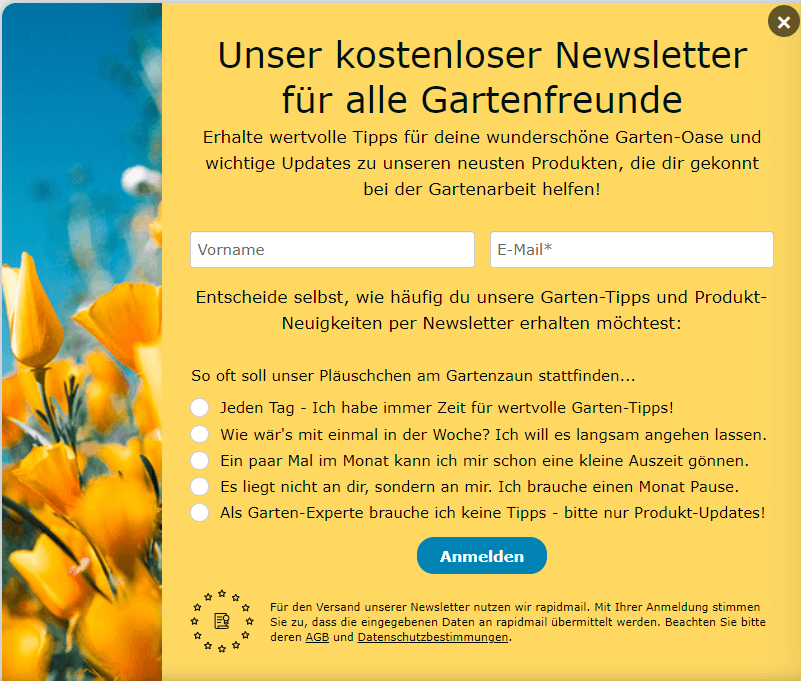
If your product range changes weekly, as is the case with supermarkets, restaurants or cinemas, it makes sense to send a weekly newsletter. If, for example, your newsletter offers expert tips on tax returns, one newsletter a month is probably enough: recipients will not deal with tax returns every week, especially if they only filed their last return recently. It is therefore important to find out what your contacts expect from your newsletter and which sending frequency they prefer. You can segment subscribers into different groups according to their preferred sending frequency when they sign up for the newsletter, for example by adding a checkbox to the sign-up form that allows interested people to choose a particular frequency. You can then simply select the relevant recipient group for each of your newsletters (daily, weekly or monthly) and send your newsletter.
👀 Did you know?
With rapidmail, you can create tags for the different sending frequencies and ask new subscribers directly in the newsletter sign-up form how often they would like to receive your newsletter:
Tip 2: Create relevant content for the different personas within your target audience
Your subscribers did not sign up for your newsletter just for the sake of it. They have specific expectations that you need to meet with relevant newsletter content.
To reduce your newsletter unsubscribe rate, you should therefore think very carefully about which products are of interest to your recipients and when, and which useful content, such as guides, comparisons or tests, will help them most at that moment. Since not all subscribers are interested in the same content, you should divide your target audience into different subgroups or personas and send different newsletter content according to their needs and interests.
To understand exactly what your contacts want, you could, for example, send a survey by newsletter or allow your subscribers to sign up for specific newsletter topics during registration. For example, if you run a gym and want to regularly send visitors tips and motivating challenges by newsletter, it makes sense to segment your sends by preferred sport. This means that an athlete who only trains on the treadmill will not constantly receive new yoga exercises by newsletter. By providing your recipients with their own profile page, which they can edit themselves later (for example, if their interest changes from “yoga” to “running”), your newsletter content will always reflect your contacts’ current interests, even if they change their minds.
For example, segment your recipients into different interest groups:
- 🌴 Tourism industry: Interest in cruises, all-inclusive vacations, camping, etc.
- 🎉 Event industry: Interest in trade fairs, parties, open-air events, etc.
- 🖥️ Online shops: Interest in menswear, womenswear or childrenswear
- 🥦 Food industry: Interest in baby food, pet food, vegetarian food
- 💪🏻 Sports industry: Interest in ability level (beginner, advanced, professional) or sport (tennis, golf, horse riding, swimming)
This allows you to send the right newsletter content to each customer group and reduce your newsletter unsubscribe rate over time.
Tip 3: Vary your newsletter content
If, after a while, your readers already know what to expect before opening the newsletter, the element of surprise disappears. For example, if they receive a new last-minute offer for a dream vacation every week, opening the newsletter will eventually stop being exciting. This is especially true if they have no annual leave left for travel that year. 😢 There is then a high risk that their interest in your newsletter will continue to decline, which will become apparent in your open rates, click rates and, in the worst case, your unsubscribe rate.
So bring a little variety to your campaigns! Alongside last-minute dream vacations, readers with no upcoming annual leave are sure to be much more interested in what to look out for when hiring a car abroad on their next vacation. Or which gelateria in Italy sells the best ice cream. Or how to make it out of the five-lane roundabout around the Arc de Triomphe in Paris alive.
In short, the right mix of relevant and varied content, with something exciting or humorous every now and then, makes all the difference!
Need a little more inspiration for your newsletter?
We can help with 55 creative newsletter ideas!
Among other things, you will find customer retention tips and helpful examples.
This will help you stand out from the crowd and bring fresh energy to your contacts’ inboxes. 🚀
So, what are you waiting for?
Download newsletter ideas for free now (PDF in German)
Tip 4: Share different content from your other communication channels
If a newsletter contact also follows you on other channels such as LinkedIn, Twitter or Instagram, they will probably receive all the important information and updates about your products there much sooner. Your subscribers will soon lose interest in campaigns whose content they have already seen in a Facebook or Instagram post.
Make sure your newsletter offers clear added value compared with the information you provide on other communication channels. Exclusive discounts or ebooks reserved for newsletter subscribers, for example, are compelling reasons not to unsubscribe.
Tip 5: Create your newsletter with an appealing design
If your first newsletter does not impress subscribers visually when they open the email, it will be difficult to retain them. A few images that bring the text to life, colored elements and an appealing, uncluttered layout with a clear structure immediately make a newsletter more attractive.
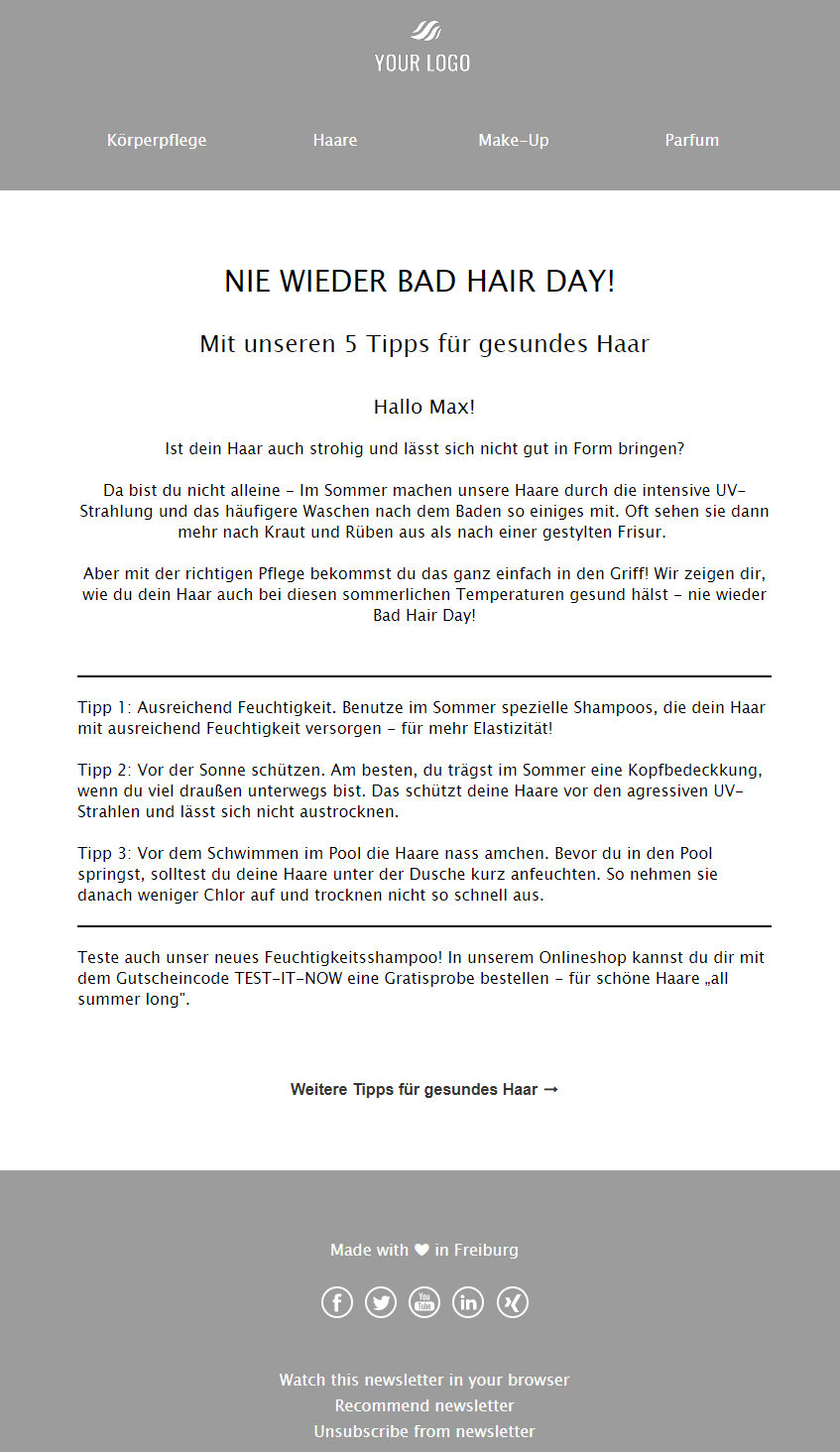
So take the time at the outset to develop an attractive newsletter design that delights your readers. A careless design like the following campaign will lead to more newsletter unsubscribes over time:
To ensure this does not happen to you, rapidmail has the ideal solution. With 1-click design for branded newsletter templates and 12 ready-made design templates, creating your campaigns is quick and straightforward. If you are short of inspiration for an effective newsletter design, take a look at some newsletter examples from our customers.
It is as simple as this: click on the background, your logo or the text area, for example, and adjust it as required. Then all you need to do is apply the design and you will have a wide range of excellent templates in your own corporate design.
💡 rapidtip
As part of your newsletter marketing strategy, consider how you can design your newsletter to stand out from the crowd and prevent an increase in unsubscribes. Alongside an attractive design, emojis in the subject line can help you attract attention in the inbox. ✨
Tip 6: Make your newsletter user-friendly on smartphones
Almost everyone now reads emails on their smartphone, whether on the tram to work or in a doctor’s waiting room. From personal experience, it quickly becomes frustrating when you cannot tap the link you want in an email, or when all the content is jumbled up because it is displayed on a smaller screen. If this happens repeatedly, there is a high risk that a contact will click the unsubscribe link.
To avoid newsletter unsubscribes caused by poor smartphone usability, it is important to use a responsive layout when sending. After all, only newsletters that are “mobile-friendly” are read today! We have put together some tips to help you make emails user-friendly on smartphones!
👀 Did you know?
With rapidmail, you do not need to worry about this: our editor automatically makes your campaigns responsive in all common email clients. All our templates have also been optimized for display on desktops, tablets and smartphones. You can also check your own design on different devices. Simply display the preview in the editor and then select the device you want from the menu at the top.
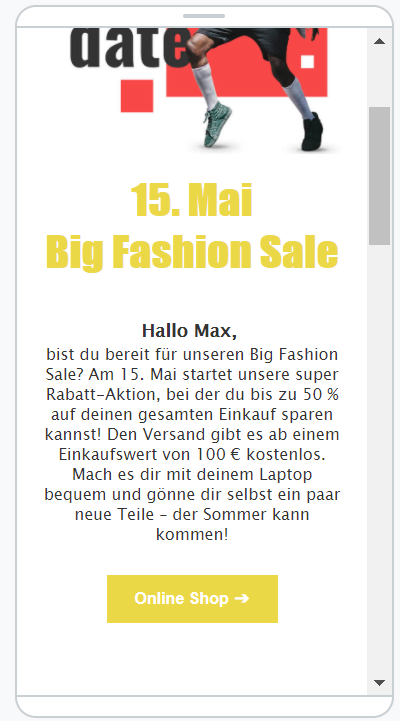
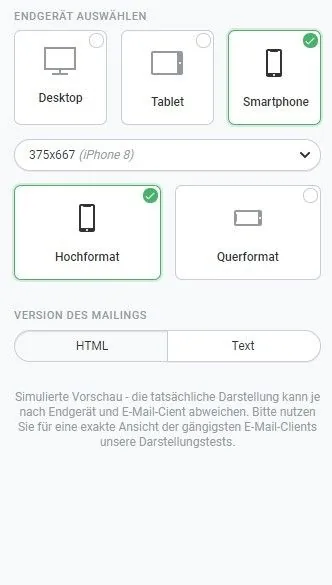
Use rapidmail’s preview function to check that your newsletter is displayed correctly.
Tip 7: Optimize your email deliverability
Emails often end up in the spam folder. This can happen for several reasons, such as:
- You use a free email address as the sender address
- Links are incorrect
- Your subject line is written in capital letters
- Your recipient list is of poor quality
- The email’s file size is too large
- You do not use important authentication methods such as DKIM, SPF and DMARC
You should therefore try to improve and optimize your email deliverability so that your emails no longer end up in spam.
The rapidmail newsletter
Tips, ideas and news about email marketing, straight to your inbox.
Tip 8: Avoid too much advertising
Do your newsletters focus exclusively on advertising your own brand, with too much emphasis on sales? This will not work well in the long term either. It gives your subscribers the feeling that they are constantly expected to buy something. A good newsletter should primarily provide interesting information and useful tips, and only promote products as a secondary aim or from time to time.
So make sure you provide informative input, for example through:
- varied newsletters for public holidays, birthdays and special occasions
- relevant offers for your target audience
- useful content with clear added value
- personal communication with recipients
Tip 9: Send your newsletter only to people who are genuinely interested
Unfortunately, many companies still assume they can buy their readers’ interest: they buy email lists online and then send their newsletter to those contacts.
This achieves nothing because purchased contacts are not automatically interested in the products or services you advertise. It also makes newsletter unsubscribes more likely, and recipients may mark your newsletters as spam because they never signed up for them. This in turn increases the risk that your newsletter will be caught by spam filters more often and will not reach your contacts in the first place.
👀 Did you know?
At rapidmail, we check the quality of every new customer’s recipient lists before their first send to prevent campaigns from being sent to purchased lists like these.
2. A 0% newsletter unsubscribe rate does not exist: how to use unsubscribes to your advantage
When you put a great deal of effort into creating an appealing and interesting newsletter, it is naturally disheartening to see that its unsubscribe rate simply will not fall. As a sender, however, you should not lose heart and should always remember that newsletter unsubscribes cannot be prevented completely.
Make the most of them instead! After all, there is no point in desperately trying to hold on to contacts who are no longer interested in your newsletter. The likelihood of a newsletter sent to an inactive contact still leading to a conversion is zero. And just because you have to say goodbye to a newsletter contact, it certainly does not mean that you are losing a paying customer. Perhaps that person would rather follow you on Facebook or visit your website directly to view your latest products.
Do not try to prevent newsletter unsubscribes at all costs, for example by simply omitting an unsubscribe link from the email. This will not only make you unpopular with your contacts, but it is also unlawful, as an unsubscribe option is a mandatory component under the GDPR for every newsletter.
Nor will it help to hide the unsubscribe link from your contacts, for example by using a font color that does not stand out from the newsletter background. This would only cause readers to mark the newsletter as spam so that it no longer reaches their inbox. In many cases, making the process more complicated is pointless anyway, as many email providers now allow newsletter unsubscribes with a single click directly in the email client.
There is therefore only one correct way to handle newsletter unsubscribes: accept them and focus even more on winning new newsletter subscribers and preventing future unsubscribes.
How newsletter unsubscribes benefit you
Here is the good news: newsletter unsubscribes have a positive side too! Since you cannot prevent them entirely anyway, you should use them to your advantage and to further optimize your email marketing.
Benefit 1: Your recipient lists almost maintain themselves
An important prerequisite for successful newsletters, which is unfortunately neglected far too often, is maintaining your contact lists regularly. Inactive subscribers who neither open nor read your emails not only cost you money unnecessarily, but can also damage your reputation as a reputable sender and therefore your newsletter deliverability in the long term.
You should therefore be pleased when contacts who are no longer interested unsubscribe from your newsletter rather than simply deleting the campaign every time. The more uninterested subscribers unsubscribe themselves, the “cleaner” your email list remains, and the less effort you need to spend identifying and unsubscribing inactive contacts yourself.
Benefit 2: You can draw important conclusions from unsubscribes to optimize your newsletters
Although it is good when inactive recipients unsubscribe themselves, it would be even better if they did not lose interest in your emails in the first place. To reduce your newsletter unsubscribe rate in the future, you should investigate the reasons behind unsubscribes.
The best way to do this is to create a dedicated unsubscribe page to which you direct all subscribers who want to opt out of your newsletter by clicking the unsubscribe link. By asking your contacts whether they are unsubscribing because the sending frequency is too high or the content is uninteresting, for example, you can optimize your newsletter marketing in response to the feedback. In this case, you might send fewer newsletters or use segmentation to tailor the content even more closely to the needs of your target audience personas.
3. Learn from unsubscribes: the ideal structure of an unsubscribe page
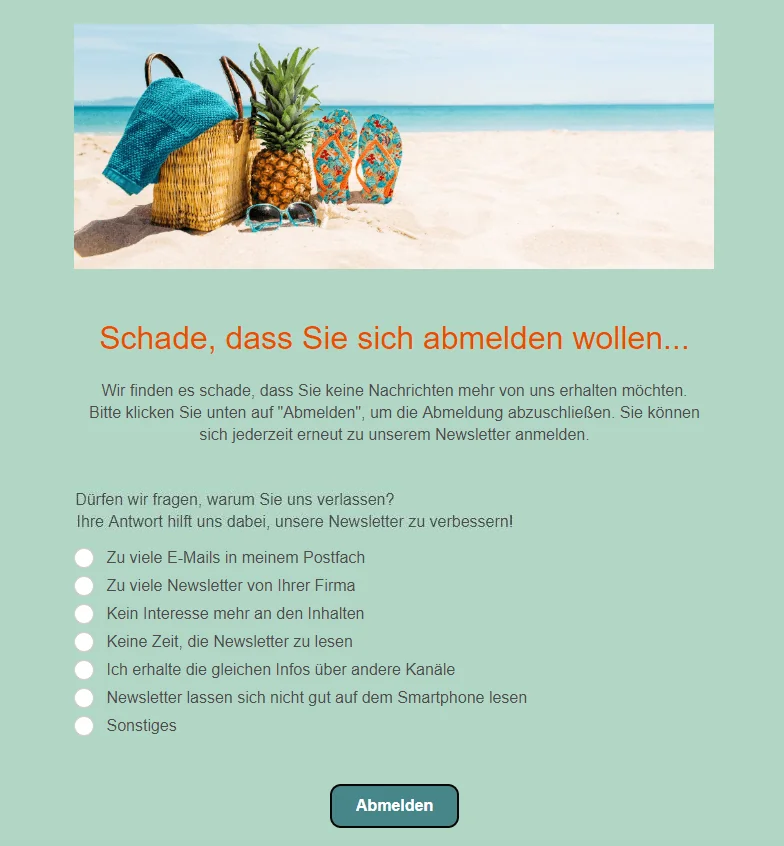
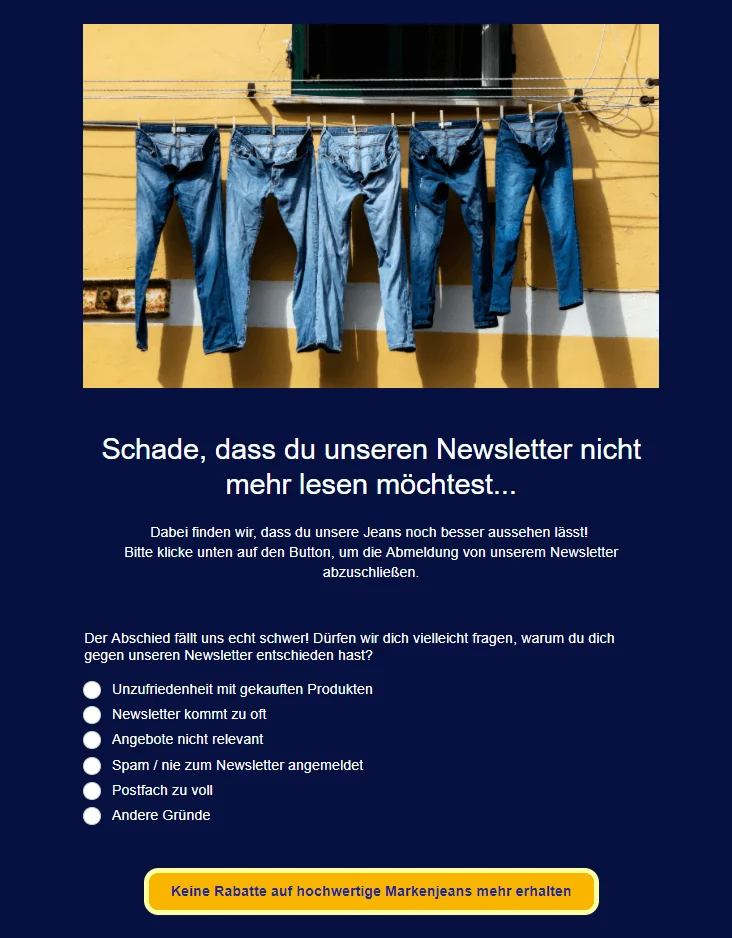
Providing reasons for unsubscribing on an unsubscribe page, which subscribers reach after clicking the unsubscribe link in the newsletter, should not be mandatory. To encourage your contacts to take the time to participate in your short survey anyway, you should also design the unsubscribe page attractively and show them that you are sorry to see them go.
Our tips for the ideal structure of a newsletter unsubscribe page will help you obtain valuable feedback from unsubscribers while encouraging them to give your newsletter a second chance after all:
- ✨ Thoughtful design: Try to evoke emotions in your subscribers with appealing images and a suitable color scheme. Whether you use a logo or an image that makes them long for a vacation and therefore for more newsletters with travel offers, or an image expressing how sorry you are that the contact wants to unsubscribe, try to make it a little harder for your recipients to “leave” you on an emotional level. Ideally, they will give your newsletter and its content a second chance.
- 🤗 Honest and personal copy: Use heartfelt text on the unsubscribe page to show your subscribers that you are sad to lose a fan. Explain that you naturally do everything you can to send good, interesting newsletters that are useful to readers. By apologizing that this does not seem to have been the case for this contact, you create a sense of personal connection and empathy. In this way, you increase the recipient’s willingness to take part in your short survey about their reason for unsubscribing, which will help you continue improving your newsletters.
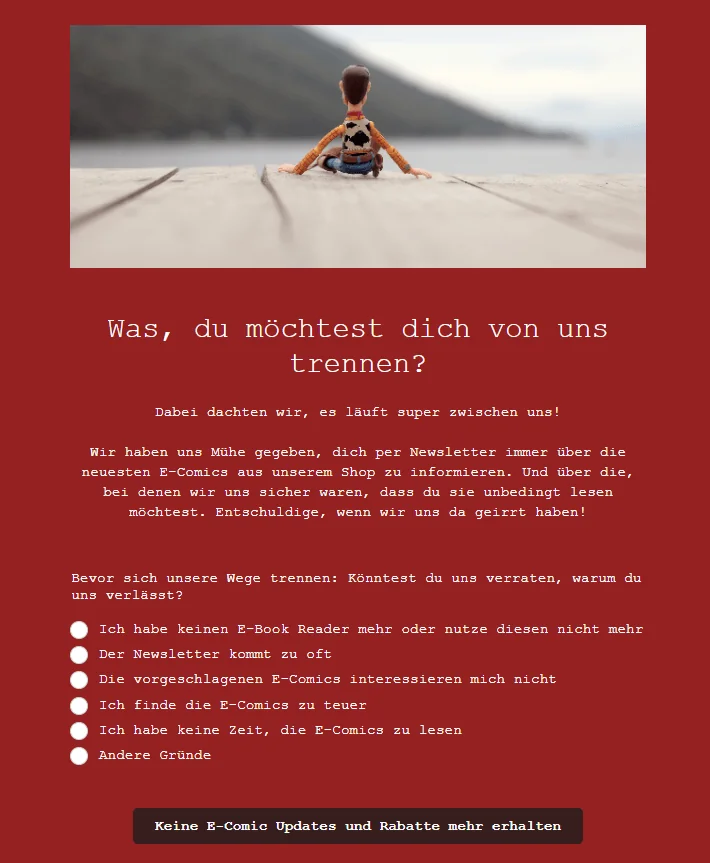
- 📄 Offer precise reasons for unsubscribing: Nothing is more frustrating than discovering only when evaluating the results that some of the options for the reason behind an unsubscribe do not actually say anything. Think carefully in advance about whether you can derive specific optimization measures from each available reason. For example, “I receive the newsletter too often” suggests that you should consider longer intervals between newsletters, whereas “I no longer want to receive the newsletter” and “The newsletter is not suitable for me” provide no more information than giving no reason at all.
- ✅ Highlight the benefits of your newsletter once more in the unsubscribe CTA: The call-to-action button that a contact must click on the newsletter unsubscribe page to finalize the unsubscribe is your last chance to change their mind and rekindle their interest in the newsletter. Choose the wording so that the recipient must consciously decide once again to give up the greatest benefit they gained from your newsletter.
4. Create an unsubscribe page and ask for reasons: how it works with rapidmail
One of our highlights, the rapidmail form editor, lets you create professional newsletter sign-up forms that suit your company and encourage people to subscribe in just a few steps. You can also use the form editor to customize the unsubscribe page and add options for the reason behind the unsubscribe with just a few clicks.
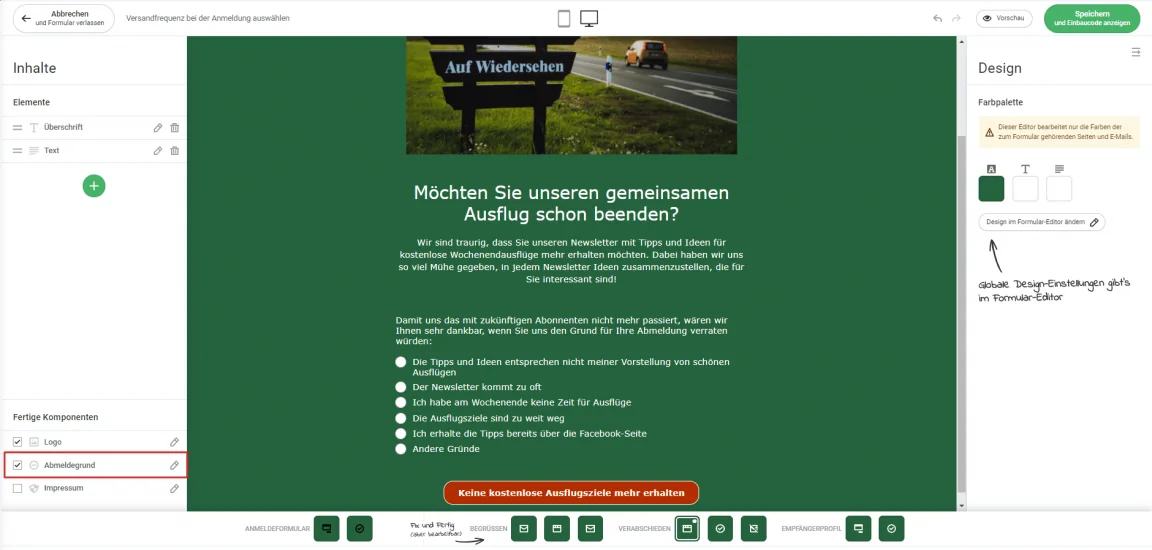
In your recipient list statistics, you can then see how many contacts gave each particular reason when unsubscribing. Our help article explains how to view the reasons for unsubscribing provided so far.
Design your own sign-up page now
5. Conclusion: newsletter unsubscribes are both frustrating and helpful
Although newsletter unsubscribes are naturally frustrating, they can never be 100% prevented. This also means you will never be able to reduce your newsletter unsubscribe rate to 0%. The reasons for unsubscribing are too varied, and in some cases too personal, for you to optimize your newsletter in a way that retains every subscriber in the long term.
But there are also certain causes of unsubscribes that you can easily counteract, such as sending too frequently. In these cases, it is worth asking readers why they are unsubscribing and taking the appropriate action. Simply keep an eye on the unsubscribe rate in your newsletter reporting. This allows you to learn from unsubscribes, and saying goodbye to a contact feels less serious if it helps you prevent numerous unsubscribes in the future.
Always bear in mind that unsubscribes not only help you optimize your email marketing, but also keep your recipient lists “clean” and ensure maximum newsletter deliverability. Only emails that reach your recipients can be opened and read!
Saying goodbye to a newsletter contact is therefore not the end of the world. And with rapidmail’s clear statistics, you can always keep track of all unsubscribes and easily evaluate which content resonates best with your target audience! 🙂