Optimize newsletter deliverability: How to keep your emails out of spam

Only newsletters that arrive and do not land in spam can be read. The best possible deliverability, often simply called “deliverability”, can therefore be the biggest challenge in successful newsletter marketing. In our comprehensive guide, we show you how, as a sender, you can actively improve your newsletter deliverability step by step. A special highlight: the rapidmail email spam test checks every newsletter for the risk of spam classification before you send it and automatically provides valuable optimization tips for optimal newsletter delivery.
🥜 In a nutshell: Your newsletters are landing in spam, here is what you can do
If your newsletter lands in spam, this is often due to missing authentication methods, a weak sender reputation or problematic content. With the right technology and tidy recipient lists, you can sustainably improve your newsletter deliverability.
Take these steps to avoid the spam folder:
- 📬 Correctly configure important authentication methods such as SPF, DKIM and DMARC
- 📬 Use your own sending domain instead of generic free email addresses
- 📬 Use double opt-in for newsletter sign-ups and only contact confirmed recipients
- 📬 Clean your recipient list regularly and remove inactive contacts and hard bounces
- 📬 Do not use purchased or rented address lists
- 📬 Keep an eye on bounce and open rates as well as spam reports
- 📬 Avoid spam triggers in subject lines, copy and the image-to-text ratio
- 📬 Use clean HTML and responsive templates
- 📬 Avoid attachments wherever possible and link to landing pages instead
- 📬 Keep your sending frequency consistent without sudden spikes in volume
- 📬 Send relevant content and secure a positive reputation through high engagement
👀 Did you know? rapidmail makes it easy to implement the most important authentication methods. With integrated bounce management, useful features such as the pre-send spam test and legally compliant double opt-in, our tool actively helps you keep your newsletter deliverability high over the long term.
1. Your newsletters are landing in the spam folder: The reasons why
To protect inboxes from unwanted messages, all major email providers use powerful spam filters. These automatically scrutinize every incoming email against many different spam factors before it reaches your contacts’ inboxes.
If the filter detects anything unusual, the message is either rejected outright or classified as spam (also known as “junk mail”) and sorted into the spam folder. Almost every second email worldwide is identified as spam. According to recent data (Kaspersky, 2026), around 44.99% of global email traffic was spam in 2025, meaning that almost every second message sent between servers was considered unwanted or potentially harmful.
From a recipient’s perspective, this is of course very useful and helps keep their email inbox as free from spam as possible. For you as a sender, however, it can become a problem if spam filters conclude that your newsletters should be classified as spam.
👀 What exactly are spam emails?
Spam emails are messages sent in bulk without recipients’ prior consent. In addition to unauthorized advertising, spam senders often pursue fraudulent aims.
Typical characteristics of spam emails include:
- 💸 Sending to purchased email address lists
- ❌ no double opt-in
- 🤨 aggressive or misleading advertising content
- 🍄 phishing links or malicious attachments
Legitimate email marketing is fundamentally different: it is based on recipients’ explicit consent, transparency and relevant newsletter content.
How spam filters work
Spam filters assess incoming emails against a wide range of technical and content-related criteria. These include:
- 🖊️ certain words or phrases (classic spam triggers)
- ‼️ conspicuous formatting
- 🙈 an unbalanced image-to-text ratio
- 📭 missing authentication methods (SPF, DKIM, DMARC)
- 📉 a poor sender reputation
- 😠 high complaint or bounce rates
The more of these factors apply, the more likely your newsletter is to land in spam.
Unfortunately, legitimate newsletters can also be affected by a misjudgement. This means your newsletter may sometimes land in your contacts’ spam folders even if you comply with all the legal requirements for sending newsletters. This may happen because your newsletter inadvertently meets some of these spam criteria and is therefore incorrectly flagged as an unwanted message by spam filters.
Permanent spam classification: A risk to your reputation
It becomes a problem for your email marketing if your newsletters are repeatedly marked as spam. Your sender reputation will suffer and, in the worst case, your sending domain or IP address will be placed on a blacklist by email providers.
Once that happens, getting the blacklist entry removed can be far from straightforward.
What is a blacklist?
An email marketing blacklist is a list of senders classified as untrustworthy, for example because they have attracted attention by sending unwanted spam emails. Email providers’ spam filters use these lists to block problematic senders immediately and protect recipients.
If your sending domain or IP address is on a blacklist, your emails will no longer be delivered by the provider concerned, which will naturally reduce your newsletter delivery rate.
This is precisely why it makes sense to send newsletters through a specialist provider. Professional newsletter tools such as rapidmail continuously monitor their sending infrastructure and actively manage IP reputation and blacklist prevention, so you do not have to worry about it.
Understand spam filters and improve deliverability systematically
If you understand early on how a spam filter checks your emails and which characteristics it filters for, you can take care not to trigger warning signals when creating a newsletter.
This allows you to minimize the likelihood of spam classification in your email marketing and helps ensure that your newsletter emails are successfully delivered to your contacts’ inboxes.
The following measures from our guide significantly reduce the likelihood of spam classification and help your newsletters arrive reliably in the inbox.
👀 Did you know?
The term “spam” originally comes from the American canned meat “SPAM” (“Spiced Ham”). It was made famous by a 1970s sketch from Monty Python’s Flying Circus in which the word is repeated more than 100 times, as relentlessly as unwanted bulk email. Since the 1990s, “spam” has therefore been used to describe unwanted bulk email.
2. 9 simple steps to improve newsletter deliverability
Many senders underestimate how much they influence their newsletter’s deliverability while creating it. Yet technical settings, sending structure and content play a decisive role in whether your emails land in the inbox or the spam folder.
The good news is that the right measures enable you to systematically improve newsletter deliverability and keep it stable over the long term.
Here are the 9 most important steps for an optimal delivery rate:
🐾 Step 1: Choose a newsletter tool with whitelisting
To improve deliverability for your email marketing, the first thing you should do is make sure that your newsletter provider is included on a whitelist.
What is a whitelist?
A whitelist is a list of trusted email senders. If a sender’s IP address or domain is on such a list, many spam filters give their emails preferential treatment and deliver them more reliably.
One of the best-known whitelists in the German-speaking market is the CSA (Certified Senders Alliance). It is run by eco, the Association of the Internet Industry, and is considered a quality standard for reputable email senders.
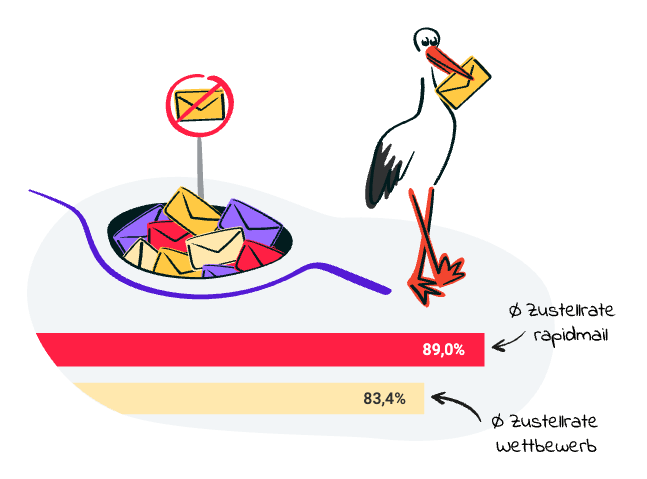
Spam filters use public whitelists such as the CSA, of which rapidmail is also a member as a newsletter provider. This means that all newsletters sent via rapidmail automatically benefit from a verified sending infrastructure and a recognized sender reputation, resulting in better delivery. This therefore allows you to minimize the risk of your newsletters being classified as spam.
Why the sending IP is crucial to your newsletter’s success
A shared, professionally managed sending IP from an email marketing tool is particularly useful for senders with low or irregular sending volumes.
Because many emails have already been sent via these IP addresses, they generally benefit from a good reputation, meaning they have a good standing with email services. If you use rapidmail for your newsletter marketing, for example, and send through our IP addresses, you automatically benefit from our good reputation as a legitimate sender.
👀 Did you know?
For your newsletter delivery, rapidmail uses shared, carefully maintained IP addresses with an established reputation. Because high-quality emails are sent continuously through these IPs, providers have a high level of trust in them.
You therefore benefit directly from:
- 💌 a stable IP reputation
- 📈 continuous monitoring
- 🛡️ active blacklist prevention
- 🤓 technical support from deliverability experts
Shared IP addresses only work, however, if they are strictly monitored. The behavior of individual senders affects everyone’s reputation. In other words, if a spam sender damages trust in the sending IP, delivery rates may fall for all senders.
That is why rapidmail carefully checks new senders and takes consistent action when quality standards are breached. In addition, our deliverability experts work every day to maintain the excellent reputation of the sending infrastructure.
The result: Independent tests such as the one conducted by EmailToolTester (2024) regularly show that rapidmail ranks among the industry’s leaders in terms of deliverability.
🐾 Step 2: Use the right sender address
The sender address you use to send your newsletters is a key trust signal for spam filters and affects deliverability. Alongside the email content and technical factors, it plays a crucial role in whether your newsletter lands in the inbox or the spam folder.
Why free email sender addresses are problematic
It is best never to send newsletters from free email addresses such as @gmx.de, @web.de, @t-online.de or @gmail.com. Many email providers classify such senders as insecure or unprofessional, or reject them outright, especially when a newsletter is sent to a large recipient list.
Popular providers such as Gmail, Yahoo and Outlook have tightened their delivery guidelines considerably since 2024. Under these guidelines, emails sent to a large number of recipients from a free email sender address are no longer delivered at all as a safeguard against spam.
Other strict requirements now apply to newsletter senders, including:
- ✅ mandatory authentication through SPF, DKIM and DMARC
- 🔎 a clearly identifiable sender domain
- 👋 working unsubscribe options
Newsletters with a free email sender address often fail to meet these requirements and are therefore filtered out more frequently and more strictly. If you want to improve newsletter deliverability, you should always use your own domain for the sender.
No-reply sender addresses also harm your delivery rate
We also advise against no-reply addresses, which are still frequently used as newsletter sender addresses. No-reply senders are intended to prevent the sender’s inbox from being flooded with replies from readers. They signal: “Please do not reply”.
This has two negative effects:
- You prevent direct interaction with your contacts, which can weaken brand loyalty
- Spam filters do not register positive reply signals from newsletter recipients
Spam filters can mistakenly interpret the absence of interactions such as replies or forwards as evidence of an unwanted email, which in turn harms your sender reputation and the delivery rate of subsequent newsletters.
The solution: A sender address that supports dialogue and uses your own domain
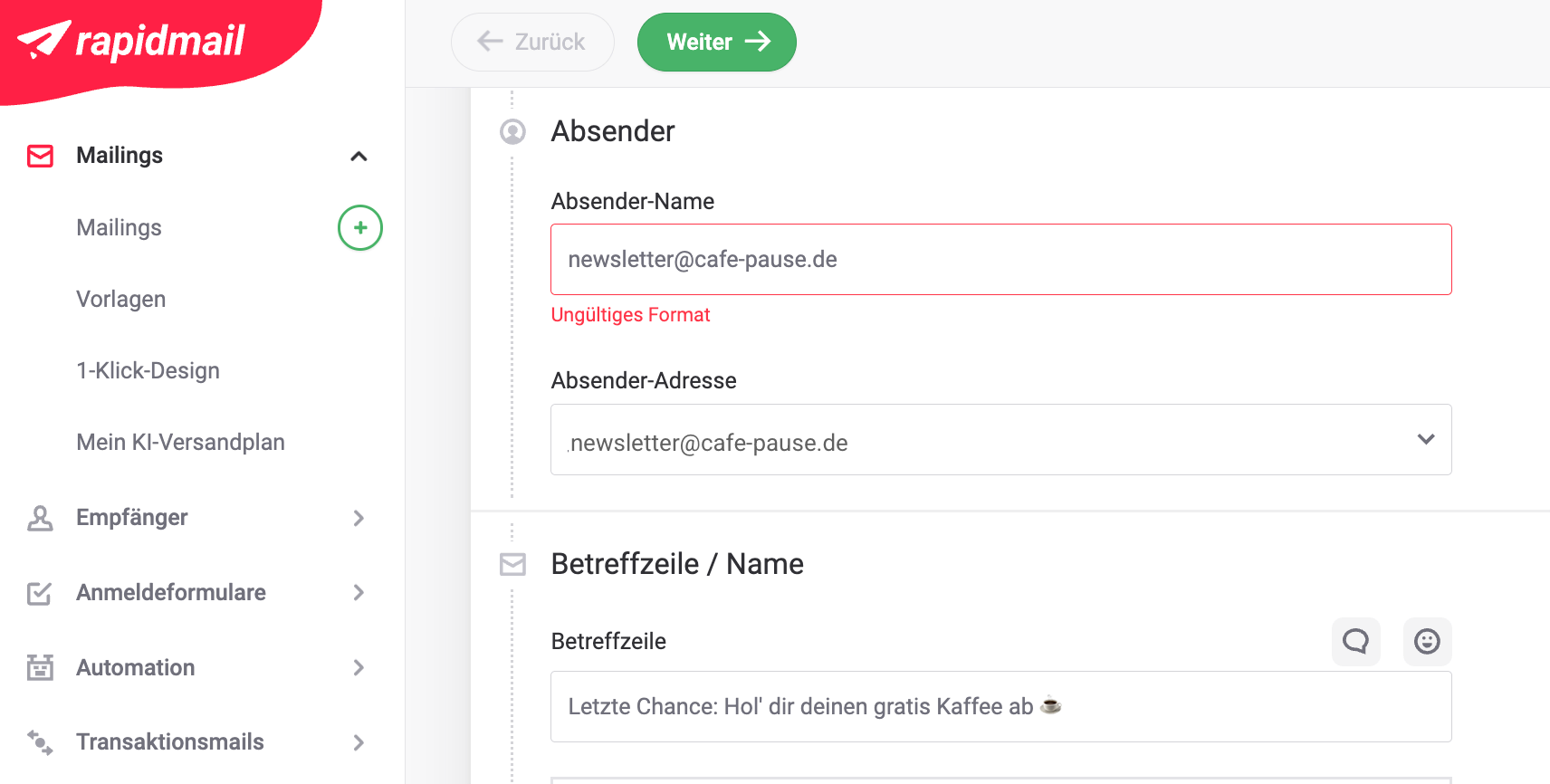
Instead, we recommend a sender address that includes your company details, such as info@mycompany.com or newsletter@mycompany.com.
Sender addresses using your own domain provide your contacts and spam filters with:
- ✅ greater credibility and the ability to authenticate the sender
- 💌 stronger brand awareness and loyalty
- 🔙 positive engagement signals such as replies and forwards
Email providers view replies from readers to your newsletters as positive engagement, an important factor for stable delivery rates.
👀 Did you know?
In addition to the sender address, professional newsletter tools also let you specify a custom sender name, such as “Lisa from Café-Pause”. However, avoid entering an email address here too, as this could cause your campaign to be classified as spam. To prevent this, rapidmail does not give you the technical option of entering an email address as the sender name in the first place.
🐾 Step 3: Write an email subject line without spam triggers
You can give your creativity free rein with your newsletter subject line: the more personal and original it is, the more contacts will usually open your newsletter.
You should nevertheless bear a few points in mind because spam filters also check the subject line for various spam factors, meaning it affects newsletter deliverability.
Conspicuous wording or excessive styling can, for example, cause your newsletter to land in the spam folder. The good news is that following a few simple rules will significantly reduce the spam risk of your email subject line.
For maximum deliverability, follow these newsletter subject line guidelines:
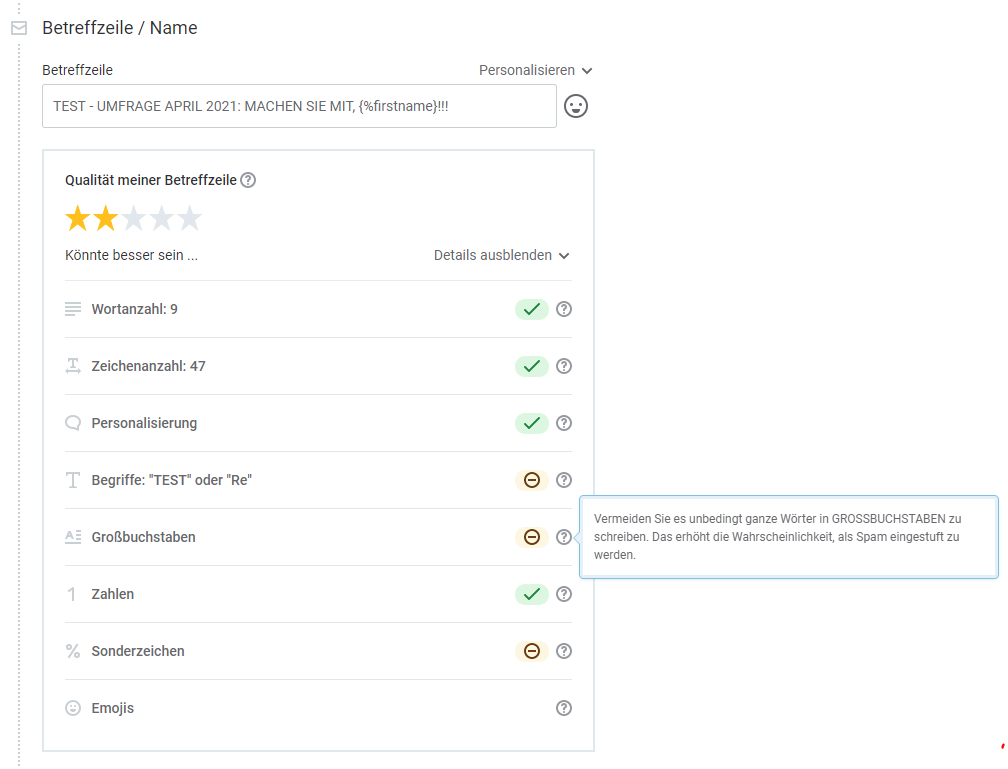
- ⚡ Do not use ONLY CAPITAL LETTERS in the subject line: Subject lines such as “SAVE NOW” appear aggressive and are considered a classic spam pattern.
- ⚡ Avoid spam-prone terms such as “test”, “free” or “make money”: Spam filters assess such spam trigger words critically, especially in combination with excessive special characters.
- ⚡ Do not pretend a message is a reply by adding “Re:” to the beginning of the subject line: Suggesting an existing conversation that cannot be technically verified can harm your delivery rate.
- ⚡ Do not string multiple exclamation marks together: Subject lines such as “Today only!!!!!” are a typical spam signal, so use exclamation marks sparingly.
⚡ Do not use more than two special characters (such as € or %) in the subject line: Too many symbols such as €, %, $, ⭐ or ❗ can increase the likelihood of spam classification. As a rule of thumb, use no more than one or two carefully chosen special characters.
🐾 Step 4: Do not include email content that looks like spam
Technology and the sender address are not the only factors affecting deliverability; spam filters also closely analyze your newsletter’s content.
Modern spam algorithms assess text against certain patterns, terms and structures. Their aim is to identify unwanted or fraudulent content at an early stage.
If the system detects typical spam signals, your newsletter is more likely to land in the spam folder, even if your contacts actually want to receive it.
We have therefore compiled our most important tips for email content without spam factors:
- 🚩 Avoid typical trigger words: Spam emails frequently feature content relating to pharmaceuticals and medicines, adult content, drugs, unrealistic promises or gambling. Where possible, you should also avoid typical trigger words such as “free”, “prize”, “congratulations” and “profit” in your email copy.
- 🚩 Use correct spelling: Always pay attention to correct spelling and grammar in newsletter marketing. This not only strengthens your contacts’ trust in your business, but also forms part of the spam check. A newsletter with too many spelling and typing errors is more likely to be classified as spam.
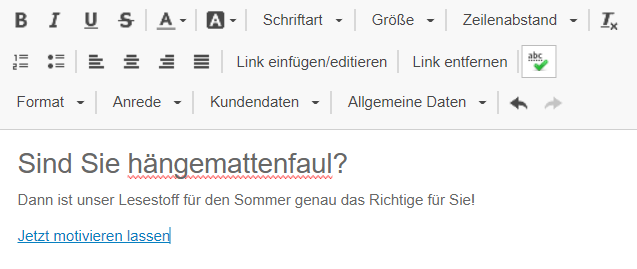
- 🚩 Use unfamiliar words sparingly: Terms that do not officially form part of the English language (a good dictionary is still your best friend here) should not appear too often in your newsletter. These include creative coinages such as “hammock-lazy”, your own product names and brand names. Spam filters often fail to recognize them and therefore treat them as misspellings.
👀 Did you know?
You can activate the spell checker in the rapidmail newsletter editor with a single click. This helps you keep track of how many words spam filters might interpret as spelling errors.
- 🚩 Use special characters sparingly: Only use special characters such as “@”, dollar, euro or percentage signs and exclamation marks when necessary. Using these characters several times in a row is often an indication of spam.
- 🚩 Avoid excessive formatting: Avoid red text and capitalizing every letter of a word. Spammers often use both types of formatting. Too many different text colors, sizes, fonts or web fonts also set alarm bells ringing for spam filters.
- 🚩 Pay attention to the image-to-text ratio: Spam filters cannot see images. You should therefore not design your newsletter entirely with images, but ensure a balanced image-to-text ratio. Otherwise, the filter only detects an empty campaign, which can indicate spam.
- 🚩 Do not send excessively large attachments: Spam filters are often suspicious of newsletter attachments because they can be used to send malicious programs. It is therefore best to send attachments as image or PDF files and ensure that they do not exceed 1 MB. Other newsletter attachment formats (such as Microsoft Office files) can lead to spam classification in the worst case.
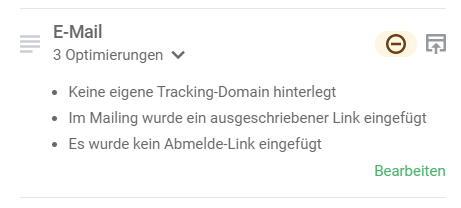
- 🚩 Provide an unsubscribe link: Aside from the fact that an unsubscribe option is a mandatory legal component of an email, it has another simple benefit: contacts can unsubscribe from the newsletter. An easy unsubscribe option prevents recipients from manually marking your email as spam if they no longer want to receive the newsletter. Spam filters remember such spam reports: too many reports can restrict deliverability to such an extent that the email provider filters out your newsletter for all its users.
- 🚩 Use the right target language: Exercise caution if your contacts are spread around the world. Some spam filters respond critically to emails in other languages if the contact has never previously received a campaign in that language. For example, if a contact has only received German and English emails, the spam filter will probably remove a newsletter written in Cyrillic or Chinese script.
- 🚩 Be careful with your own HTML code: Do not use JavaScript in your code and make sure the HTML meets current standards and is cleanly written. If spam filters cannot read your code, the campaign may land in the spam folder as a result. Make sure that your newsletter’s HTML and text versions match.
- 🚩 Set links correctly in your newsletter: As a rule, only link to reputable and trustworthy pages. Where possible, you should also avoid writing out full URLs in newsletter copy. Instead, link phrases or call-to-action buttons to the desired URL, for example. Using your own domain for tracking links in the newsletter also improves email deliverability.
📖 Even more tips for optimal deliverability

You can also take a look at our help article with tips on email content for ideal deliverability.
🐾 Step 5: Minimize the email file size
The overall file size of your newsletter also has a direct impact on deliverability, loading time and the user experience.
Some providers may clip or incompletely display emails that are too large. The best-known example is Gmail, which clips messages when they exceed a certain HTML size. Recipients then see only part of your newsletter, together with a notice such as “Message clipped”.
This looks unprofessional and can significantly reduce engagement.
What is the maximum recommended newsletter size?
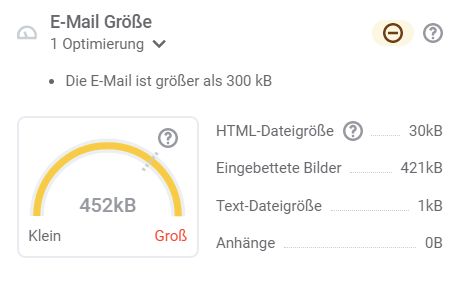
As a guideline for an optimal email file size, we recommend a maximum total size of 300 kB per email. The “leaner” your newsletter’s structure, the more stable its performance will generally be.
These are the benefits of newsletters with a small email size:
- ⌛ smaller files load faster
- 📱 lower bounce rates on mobile devices
- 🤩 a better user experience
- ⚙️ a lower risk of technical restrictions
- 📬 a positive assessment by spam filters
How to reduce your newsletter’s file size
Email size includes not only the images you embed, but above all your newsletter’s HTML code. You should therefore keep both in mind when you design your newsletter.
Our tips for keeping newsletter file size as low as possible are:
- ✂️ Compress images and embed them in a web-optimized format
- 🧹 Avoid unnecessary HTML code
- 📦 Reduce nested tables
- 🚮 Remove external scripts or unnecessary formatting
- 📎 Do not attach large files to the email (link to them instead)
As a professional newsletter tool, rapidmail automatically supports you with clean template structures and optimized code, leaving you to focus only on your email attachments and embedded images.
🐾 Step 6: Use important authentication methods
Technical email authentication is another key factor in achieving high newsletter deliverability.
The email validation methods DKIM (DomainKeys Identified Mail) and SPF (Sender Policy Framework), together with DMARC (Domain-based Message Authentication, Reporting and Conformance), are used around the world to ensure maximum security in email communications, for both recipients and senders.
What exactly do SPF, DKIM and DMARC achieve?
Email providers use DKIM, SPF and DMARC to check whether a message really comes from the specified domain, or whether someone is merely impersonating the sender. If these authentication methods are missing, your emails are far more likely to land in the spam folder or even be rejected outright.
As a newsletter sender, these three methods therefore help establish your reputation as a legitimate sender. This in turn has a positive influence on newsletter deliverability. To keep your newsletters out of the spam folder, we therefore strongly recommend setting up DKIM, SPF and DMARC records with your web host.
When set up correctly, DKIM, SPF and DMARC therefore ensure that:
- ✅ your sender domain is clearly verified
- 📬 spam filters classify your emails as trustworthy
- 🎣 misuse of your domain for phishing is prevented
- 📈 your sender reputation remains stable
In short: Authenticated newsletters have a significantly better chance of reaching your contacts’ inboxes.
👀 Did you know?

After Gmail and Yahoo tightened their delivery guidelines in 2024, Microsoft, and therefore Outlook, introduced new delivery guidelines in May 2025. More and more providers are increasing their security requirements and only allowing emails from authenticated senders. This is one more reason to configure the common DKIM, SPF and DMARC authentication methods so that your campaigns continue to reach your contacts’ inboxes in the future.
Deliverability checklist for your sender domain
Before sending your newsletter, you should therefore have configured the following authentication methods:
- ✔ The DKIM key is stored in your web host’s DNS: Each of your emails receives a cryptographic signature that confirms its authenticity and ensures it is not a spam or phishing attempt.
- ✔ The SPF record is stored in your web host’s DNS: This specifies which servers are authorized to send emails for your domain.
- ✔ The DMARC record is stored in your web host’s DNS: This defines how email providers should handle unauthenticated emails.
These three settings form the technical basis for stable newsletter deliverability.
Authentication with rapidmail: Quick and straightforward
Setting up these authentication methods may initially sound technical and complicated. Now for the good news: With rapidmail, DKIM, SPF and DMARC can be implemented easily and without any technical expertise through our service partner Entri.
All you need is an email provider supported by Entri and the login details for your web host or domain provider. Entri then completes the remaining DKIM, SPF and DMARC authentication for your rapidmail account automatically.
👀 Have you seen this?
In her video, our content manager Wiebke shows how easy it is to authenticate your sender with rapidmail through Entri and how you can improve newsletter deliverability with very little effort:
Open video transcript
Do you want your emails to land in your contacts’ spam folders? No? Then you should definitely authenticate your sender domain.
The reason is that email providers such as Gmail and Yahoo want to prevent dubious spam emails from constantly reaching inboxes. To prevent your emails from being classified as fraudulent, you can use email authentication to prove that you are a legitimate sender and that your emails are not up to anything sinister.
You can think of it a little like Schufa, the German credit bureau. If you have positive entries there, people are more likely to trust you because you are solvent and therefore reliable. Email authentication works in the same way. In effect, you provide digital proof that your sender domain is trustworthy.
What is a domain anyway? It is quite simple: your internet address, such as alpenblick-hotel.de. If you want to send a newsletter from an email address such as info@alpenblick-hotel.de, you should authenticate this sender address in advance so that email programs can recognize that the email really was sent by your company.
Authenticating your domain not only shows that you are genuine. It also helps ensure that your newsletter reliably reaches the inbox and that your open rate increases. It protects your brand too: no one can send emails in your name or impersonate your brand without being detected.
And do not worry, the whole process is easier than you might think. With rapidmail, you can configure the security records through our service partner Entri in just a few minutes, and fortunately you do not need any technical knowledge!
Simply start the guided setup and have the login details for your domain provider or host ready. Entri will then take care of the rest. And, as always, if you ever get stuck, our support team will be happy to help and advise you!
So, if you have not yet authenticated your sender domain, I would really recommend doing so straight away, so that you can truly get the most out of your email marketing and do not waste your potential in the spam folder.
Do you use a different email provider or web host that Entri does not support? Do not worry: with just a few clicks, you can have rapidmail generate DKIM keys for all your sender domains and then add them to your web host’s DNS yourself. You can also simply copy the SPF and DMARC records and paste them into your DNS.
How exactly does it work? Simply take a look at our step-by-step instructions:
- 👉 How to create a DKIM key for your sender domain with rapidmail
- 👉 How to create an SPF record for your sender domain with rapidmail
- 👉 How to create a DMARC record with rapidmail
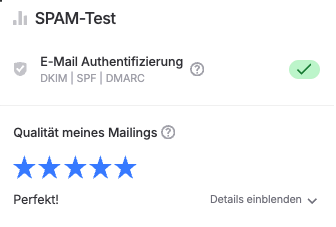
To make sure that email authentication via DKIM, SPF and DMARC has been successfully configured and that you have not missed an important setting, the rapidmail spam test checks before every newsletter send whether authentication is active in your account.
If authentication is missing for a new sender domain, for example, you are notified immediately. This ensures that your newsletters are optimally prepared from a technical perspective and that your deliverability remains consistently high! 📈
🐾 Step 7: Optimize email for mobile devices
A large proportion of all emails are now read on mobile devices. Current email marketing statistics (such as Go Beyond, 2025) show that around 60% of users mainly open their emails on a smartphone or tablet, often while traveling, during their lunch break or in between other tasks.
It is therefore crucial that your newsletters work just as well on mobile devices as on a desktop. The most important requirement for this is a responsive, or “mobile-friendly”, email design.
Responsive newsletters automatically adapt to the screen size of the device being used. Text, images and buttons are always displayed in a way that makes them just as easy to read on smartphones as on larger screens.
Why mobile optimization is important for newsletter deliverability
If, contrary to our recommendation, a newsletter design is not optimized for mobile devices, opening it on a smartphone or tablet can quickly lead to problems:
- ✂️ Text wraps in awkward places
- 🖼️ Images are arranged incorrectly
- 🖱️ Buttons are difficult to tap
- 🌪️ Content appears cluttered or clipped
This significantly impairs the experience for your contacts. Recipients often delete such newsletters immediately, or even mark them as spam in the worst case.
These negative interactions are an important signal for spam filters. If your contacts’ engagement rate falls, it can also affect your sender reputation and deliverability in the long term.
In short: The more pleasant your newsletter is to read on mobile devices, the better your opens, clicks and future delivery rates will generally be.
💡rapidtip: Send automatically responsive newsletters with rapidmail
If you create your newsletter with rapidmail, you do not need to worry about how it displays on mobile devices: All newsletters designed with rapidmail are automatically responsive in all common email programs. Our editor ensures that your email always adapts automatically to your contacts’ screen width. This ensures that your newsletter looks professional everywhere, without any extra effort.
Once you have created your newsletter with rapidmail, the preview function lets you verify that it displays perfectly on every device.
Is your newsletter based on your own HTML file? Unfortunately, for technical reasons we cannot guarantee that it will display correctly on mobile devices. Nevertheless, we have a few tips to help improve the presentation of your HTML emails: How to optimize the presentation of your HTML newsletters.
The rapidmail newsletter
Tips, ideas and news about email marketing, straight to your inbox.
🐾 Step 8: Encourage positive engagement with relevant newsletter content
The most important tip for ideal newsletter deliverability is probably this: Send campaigns your contacts love. ❤
When your contacts enjoy reading your newsletters, open them regularly and engage with them, they send a strong signal to email providers. The providers recognize that your messages are wanted and popular and are more likely to deliver them to the inbox in the future.
All the previous steps help reduce technical spam risks. In the long term, however, it is primarily your contacts’ behavior that determines your sender reputation.
In short: The more relevant your content, the better your newsletter deliverability. 📈
How email providers assess the quality of your newsletters
Spam filters do not just check technical factors before delivery. They also observe how recipients engage with your newsletters after receiving them.
They distinguish between positive and negative interactions.
The more positive signals are recorded, the more trustworthy your newsletter content is considered, and the more likely your newsletters are to be delivered successfully in the future. This makes it all the more important to know your target audience well and inspire them with relevant content.
Positive interactions
The following activities by your contacts show email providers that your newsletters are wanted and can be delivered normally:
- 👍🏻 Newsletter opens: Your contacts open your newsletter regularly, ideally more than once or on different devices.
- 👍🏻 Newsletter clicks: Your recipients click links, images or call-to-action buttons.
- 👍🏻 Replies to the newsletter: Your readers respond directly and click the reply button to answer your email.
- 👍🏻 Forwards: Your contacts find the content interesting enough to share it with others.
- 👍🏻 Address book entries: Your recipients add your sender address to their email address book.
- 👍🏻 Moving messages between folders: Your subscribers move your newsletter from Gmail’s “Promotions” folder to the “Primary” inbox, for example. It also counts as a positive interaction if your contacts reverse a previous spam classification for your newsletter.
Negative interactions
Email providers register the following activities as negative signals, and they may negatively affect your delivery rate:
- 🚩 No email opens: Your contacts no longer make the effort to open your newsletter, instead ignoring it or perhaps even deleting it without reading it.
- 🚩 Spam reports: Recipients actively mark your emails as spam in their mailbox, the interaction with the greatest negative impact on your newsletter deliverability.
You should therefore always keep an eye on the spam complaint rate in your campaign statistics. If it exceeds 0.2%, you should take action to prevent further spam reports.
One important point here is to make unsubscribing from your newsletter as easy and visible as possible. If subscribers are no longer interested, they should be able to unsubscribe without difficulty instead of simply marking your email as spam out of frustration.
Compared with the possible positive interactions, there are very few negative ones that play a role in assessing email quality. However, spam filters give negative interactions far greater weight in their assessment.
You should therefore do everything possible to prevent negative interactions. The magic words here are: regularly maintaining your recipient lists. 🧹
🐾 Step 9: Keep recipient lists clean
A well-maintained recipient list reduces the number of negative interactions and creates ideal conditions for optimizing newsletter deliverability.
Ideally, you should retain interested and active contacts as newsletter subscribers over the long term by providing the right content. By contrast, inactive newsletter subscribers who ignore or delete your newsletter in their inbox are no longer useful to you: not only because they no longer open your emails, but above all because this sends your delivery rates plummeting in the long term.
Checklist for a well-maintained newsletter distribution list 🧹
To create a high-quality, well-maintained recipient list that leads to plenty of positive engagement with your newsletter, you should take the following measures:
- 🚮 Remove all invalid email addresses (hard bounces) from the list: Hard bounces occur for email addresses to which messages repeatedly cannot be delivered, for example because they no longer exist. The rapidmail email marketing tool automatically removes bounces from your active contacts and assigns them to the “bounced” category. This prevents you from repeatedly contacting incorrect email addresses and harming newsletter deliverability.
- ⏰ Reactivate or unsubscribe inactive contacts: Try to win back all inactive recipients who have not opened or clicked your newsletter in the last 6–12 months with a reactivation email. If an attempt to rekindle their interest with a voucher, for example, is unsuccessful, you should unsubscribe them from your recipient list.
- 💸 Never send to purchased addresses: Buying email addresses cheaply online may seem tempting at first. What people often forget is that the purchased contacts are not interested prospects. The result is numerous unsubscribes and spam reports, as well as poorer delivery rates. Purchased lists also often contain email addresses that have been inactive for years and are therefore used as spam traps by service providers. If you contact such an address, the spam filter immediately knows that the message is unwanted. As a result, the email is marked as spam and your delivery rate falls. Sending to purchased addresses would also breach the legal requirements for sending newsletters anyway. Our well-intentioned advice is therefore: focus on quality, not quantity!
- ✔️ Only use double opt-in for newsletter sign-ups: The double opt-in procedure, which requires an additional click in a confirmation email, is not explicitly required by law in itself. From a legal perspective, however, subscribers must have given their explicit consent to receive your commercial messages, including newsletters. The double opt-in procedure makes this consent easy to prove. It offers you another advantage too: your list then only contains contacts who are genuinely interested in your messages. Spam bots do not confirm the sign-up and are therefore filtered out immediately. As a result, the engagement rate is far higher, which also improves newsletter deliverability.
- 🧹 Maintain existing recipient lists instead of creating new ones: Wherever possible, do not create completely new recipient lists for new newsletter campaigns. Instead, import new contacts into your existing distribution list. This preserves your recipients’ status, such as unsubscribes or bounces. Otherwise, you risk accidentally contacting people who have already unsubscribed, which can quickly lead to spam reports.
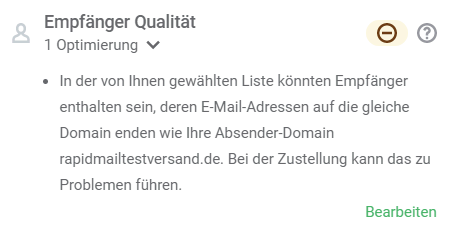
- 🔎 Do not send to recipient addresses that use the same domain as your sender address: If the sender and recipient addresses use the same domain, this can cause delivery problems with some mail servers. The server could classify the send as unusual and block your email or move it to the spam folder. You should therefore remove internal test addresses from your mailing list before sending your newsletter. If you want to send an internal newsletter to your employees, there is a trick for avoiding the problem without jeopardizing deliverability when sending internally.
👀 Will your newsletter land in spam if you do not follow all the deliverability tips?
Your emails are not automatically classified as spam simply because you do not follow all the steps described for optimal newsletter deliverability. Spam filters use the stated deliverability criteria to calculate a rating, meaning a value that indicates the likelihood that your emails are spam. What matters is not only how many criteria you “violate”, but also which ones, as they are weighted differently. Your newsletter only lands in spam once a certain threshold is exceeded. Nevertheless, the more tips you can implement, the lower the risk of triggering a spam filter!
3. Conclusion: Maximum newsletter deliverability made easy with rapidmail
Good newsletter deliverability is no accident. It results from the interaction of several factors: a sound technical setup, a well-maintained recipient list and relevant content that genuinely interests your target audience.
If you observe the most important fundamentals, from an authenticated sender domain and a mobile-optimized newsletter to a recipient list that is cleaned regularly, you create optimal conditions for your emails to reach your contacts’ inboxes reliably.
A professional newsletter tool such as rapidmail makes it particularly easy to meet these requirements. In addition to automatic list maintenance, responsive templates and the simple configuration of authentication methods such as SPF, DKIM and DMARC, our integrated spam test helps you identify common deliverability problems at an early stage.
Our spam test helps you get the most out of your newsletter, including through:
- 🆘 Guidance on email size, sender address quality and the subject line
- 🔧 Specific optimization suggestions, such as whether all important links are included in the newsletter
- 📝 Checks of key deliverability factors such as DKIM authentication and whitelisting
- 📱 A check of the mobile display, so your newsletter also looks its best on smartphones👍 Analysis of recipient list quality to identify potential deliverability risks at an early stage
This allows you to keep an eye on all the important factors for a high delivery rate before your newsletter is sent.
Simply try it out and create your next newsletter for up to 2,000 contacts free of charge with rapidmail:
FAQ: Frequently asked questions about newsletter deliverability
Why do my newsletters land in spam?
Newsletters usually land in the spam folder when spam filters identify a risk. Common reasons include missing email authentication (SPF, DKIM or DMARC), a poor sender reputation, suspicious content or a poorly maintained recipient list. A high number of spam reports or low open rates can also cause email providers to filter your messages more strictly in the future.
How can I prevent my newsletter from landing in spam?
To prevent your newsletter from landing in the spam folder, you should consider several factors:
- Set up email authentication with SPF, DKIM and DMARC
- Use a sender address with your own domain
- Avoid suspicious subject lines and content
- Clean your recipient list regularly
- Only email contacts who have signed up via double opt-in
A spam test before sending also helps you identify potential delivery problems early.
What role do SPF, DKIM and DMARC play in deliverability?
SPF, DKIM and DMARC are technical authentication methods that email providers use to check whether a message really comes from the specified domain. If these records are missing, your emails are more likely to be classified as spam or not delivered at all. Correctly configured authentication therefore improves your sender reputation and increases your delivery rate.
Does the subject line affect newsletter deliverability?
Yes. Spam filters also analyze an email’s subject line. Excessive capitalization, lots of special characters or typical spam terms such as “free”, “prize” or “make money” can increase the risk of spam classification. By contrast, spam filters are more likely to view a clear, natural subject line without sensational wording positively.
Why is a well-maintained recipient list so important?
A clean recipient list leads to better engagement rates and therefore higher deliverability. Invalid email addresses, inactive contacts or purchased address lists can result in poor open rates, numerous bounces or spam complaints. These negative signals weaken your sender reputation and increase the risk of landing in the spam folder.
What is the maximum recommended newsletter size?
The recommended maximum size of a newsletter is around 300 kB. Some email providers may clip large emails or load them more slowly. A compact email structure improves the user experience and can have a positive effect on deliverability.
Why should newsletters be optimized for smartphones?
A large proportion of all emails are now read on mobile devices. If a newsletter is not mobile-optimized, its content may display poorly on smartphones. This often leads to fewer clicks or quick deletions, negative signals that can also affect deliverability in the long term.
How can a newsletter tool improve deliverability?
Professional newsletter tools such as rapidmail help you with many important factors for good deliverability. These include:
- automatic bounce management
- spam tests before sending
- responsive newsletter templates
- support with SPF, DKIM and DMARC records
This allows you to identify and avoid common delivery problems at an early stage.
What should the maximum spam complaint rate be?
As a guide, the spam complaint rate should remain below 0.1–0.2%. If this level is regularly exceeded, it may indicate that your content is not relevant enough or that your recipient list needs cleaning.
Why is a spam test worthwhile before sending a newsletter?
A spam test checks important factors that affect deliverability, such as the subject line, sender address, technical authentication and email structure. This allows you to identify and resolve potential problems before your newsletter is sent to your recipients.