Sending newsletters with attachments: yes or no?

Would you like to send a newsletter or email with an attachment? This is a simple way to share all the important information with recipients without overloading the campaign itself with text, whether you are sending price lists, information brochures or menus. However, if you send an email or newsletter with an attachment, there are a few details to consider so your campaign still reaches recipients safely.
1. What are the advantages of sending emails with attachments?
The longer your newsletter and the more text it contains, the more off-putting it looks when recipients open the email. The chance of them reading all that text and taking in every important detail is then very low.
Instead, use short, concise newsletters with a modern email design and engaging copy. You can provide further information or additional details on your website, or simply send them directly as an email attachment. Compared with linking to your website, this has the advantage that readers can download and save the attachment directly from the email, on their smartphone for example. Suppose you run an online platform where you regularly share new local hiking routes with members. In this case, it makes sense to send a newsletter with a hiking route attached. Readers can download and save the document on their smartphone with one click. They can then view the route while hiking even when there is no internet connection in the mountains. In this case, your mail merge with an attachment will guide your readers safely home!
Unlike providing information on your website, sending a newsletter with an attachment also has the advantage of increasing the exclusive value of your newsletter content. The document, such as an ebook or white paper, is reserved exclusively for subscribers and cannot be accessed online by every website visitor. Exclusive content is an ideal incentive that can help you win many new newsletter subscribers!
2. Examples of possible email attachments
When you write your email, different types of email attachment make sense depending on your sector and the newsletter’s purpose. Examples include:
- ⚽ For clubs and associations: an annual review or the new year’s events calendar for all members, ideal for printing and displaying!
- 📰 For online or print newspapers and magazines: new media data for business partners, including all advertising formats and prices for the next six months
- 🏢 For internal newsletters: product presentations or project plans, for example (the trend toward working from home since the coronavirus shutdown has made internal newsletters increasingly important for transparent employee communication!)
- 🌴 For the tourism sector: price lists covering winter or summer stays, with or without breakfast, reduced prices for children and more. A clear price list helps prospects plan their vacation!
- 🍽️ For the hospitality sector: the current weekly or daily menu, or the general menu for new newsletter subscribers
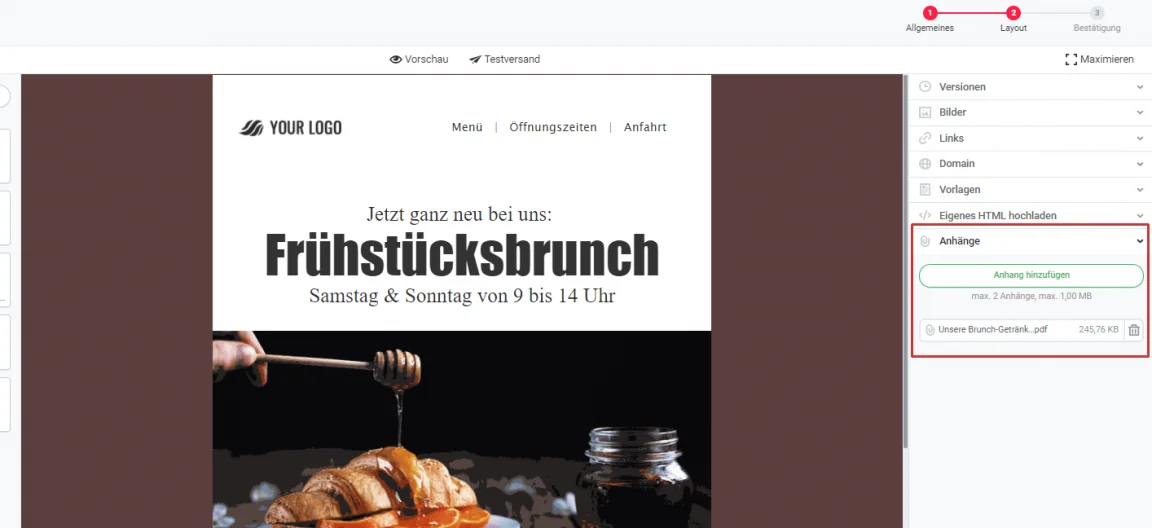
Add an overview of all the specialities served at the breakfast brunch to this newsletter as an attachment, and readers will want to book a table straight away!
3. What should you consider when sending newsletters with attachments?
Sending emails with attachments can also have disadvantages in certain cases. When deciding whether to send your newsletter with an attachment or provide the information elsewhere, such as on your website, consider the following points:
Email attachment size
Attachments automatically increase the file size of your campaign. This can make sending take much longer or prevent the email being delivered at all because it exceeds the recipient’s mailbox size limit. If an email attachment is too large, the email will also take longer to load all its content for the recipient. This can happen, for example, when too many images are sent as email attachments.
Always try to keep your attachments as small as possible. You can find numerous online tools that let you reduce the size of images or PDFs free of charge before uploading them as email attachments. For optimum newsletter deliverability, keep the maximum email size to 300 KB wherever possible. Compressing your documents into a ZIP file is another way to reduce the email attachment size.
Attachment file format
When sending email attachments, make sure that you save and attach the document in a commonly used file format. Your recipients will only get the information they need if they can open the email attachment! In general, we recommend sending email and newsletter attachments only as PDFs or in common image formats such as JPG or PNG to ensure your document really reaches every recipient. We advise against Microsoft Office file formats such as XLS or DOC, as there is a greater risk of email programs’ spam filters treating them as a threat.
The rapidmail newsletter
Tips, ideas and news about email marketing, straight to your inbox.
Risk of being classified as spam
Spam emails often contain attachments that spread harmful content such as viruses when downloaded. For this reason, email programs are more likely to classify emails with attachments as spam. Depending on the spam filters’ criteria, your campaign may not reach some recipients.
Spam filters are not the only ones suspicious of attachments. Recipients also generally open attachments only if they know and trust the email sender. Therefore, never send an empty email with an attachment. Explain in the newsletter or email what information the attachment contains. Before sending your first newsletter with an attachment, it is also advisable to send a few campaigns without attachments first to earn the trust of your recipients.
No analysis options
Your newsletter statistics cannot show how many readers opened or downloaded the attachment. You can therefore only track how many recipients opened the newsletter, not how many received the information in the attachment.
4. Alternatives to sending email attachments
To optimize the deliverability of your newsletters and emails and measure exactly how many prospects your information has reached, consider the following alternatives to email attachments:
Put the information in the email
Which details in your newsletter attachment are really relevant to your readers, and how much of that information do they need? Try to present the essential information briefly and concisely in the newsletter copy itself. Depending on the content, you could also split the information across several newsletters. Rather than attaching your menu, for example, you could present it attractively as simple text in the email itself. Try our matching newsletter template!
Make the information available online
Alternatively, you can offer any content and documents that are too extensive for your newsletter on your website, either to download or read online. In the newsletter, simply direct your readers to the relevant page with a linked call-to-action button.
Link to a Dropbox or OneDrive file in the campaign
Include a link in your newsletter to a file you have stored in Dropbox or OneDrive. A OneDrive or Dropbox file is particularly suitable if you do not want to make your document or information publicly accessible on your website.
5. Conclusion: should you send emails with attachments?
Depending on the purpose of your email attachment, such as offering exclusive content to newsletter subscribers, making a document quickly and easily available offline, or sending an internal document to employees, it can certainly make sense to send your newsletter with an attachment. However, you must consider important points such as the file format and email size to ensure your campaign reaches recipients in the first place.
As a rule, however, we recommend checking whether one of the alternatives to email attachments presented above might be suitable for your campaign. This increases the probability of your email being successfully delivered to recipients, which is the essential basis for your target audience finding the newsletter in their email inbox at all.
6. How do you send a newsletter with an attachment using rapidmail?
When you create a new campaign in rapidmail, the first step lets you define a preheader, in other words a second subject line, or send the campaign as an A/B test. In the second step, you can also add an attachment.
You can add up to two attachments to your newsletter with the rapidmail email marketing tool. The total attachment size is limited to 1 MB per send. This safeguards your campaign’s delivery quality and prevents it being rejected because of the recipient mailbox’s size limit or spam filter. If you nevertheless want to add more than two attachments, please contact our support team.
Send a newsletter with an attachment now