Newsletter structure: All the essential elements of a successful email
 Lena·
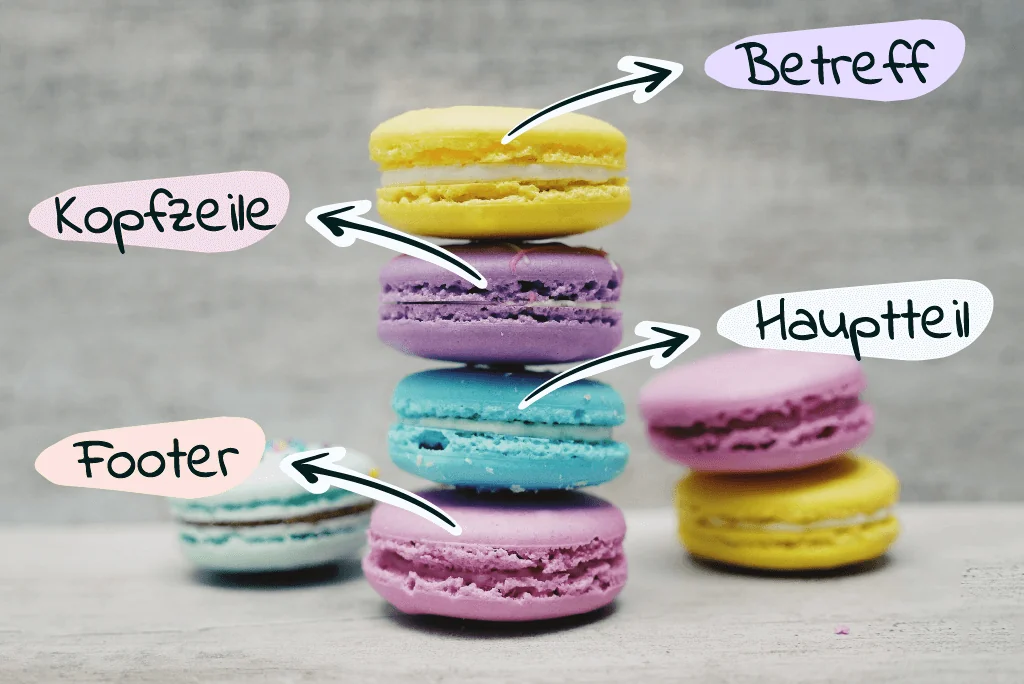
A well-structured combination of graphic, informative and text elements in your marketing emails and newsletters is important for guiding readers toward the most important areas. As a sender, you should therefore consider not only the message you want to convey to your target audience, but also the structure of the newsletter so that it achieves the desired results.
Newsletter structure: the essential elements at a glance
Ideally, every newsletter follows the same basic structure: header, main section and footer. These are complemented by the sender name shown in the inbox, the email subject line and the preheader. This combination of essential email elements should be carefully considered, because the structure plays a decisive role in the success of your newsletter and should never be underestimated.
A well-structured newsletter helps you to:
- guide your readers toward the right places in the newsletter
- create recognition value for your brand and newsletter
- increase your subscribers’ motivation to read the entire newsletter
👀 Have you seen this? How to become a newsletter expert
Are you new to sending newsletters and would you like to watch the most important email marketing basics and tips in one compact video? No problem. Our Content Manager Wiebke explains how beginners can get started with email marketing and become experts in no time. Roll the film! 🎬
Open video transcript
Chapter 1: Introduction
Isn’t email marketing completely outdated? It’s a fair question, given that email has been around for more than 50 years. Today, I want to show you that email marketing is far from dead. In fact, it is one of the most effective and popular marketing activities. But what exactly is email marketing? And how do you get started? There are plenty of questions, and I’ll answer them for you today. Hi, my name is Wiebke, and I’d like to accompany you on your email marketing journey.
In this video, you’ll learn the essential email marketing basics you need to get off to a successful start. Together, we’ll look at exactly what email marketing is, what its advantages are and what you need to start email marketing as a beginner.
I’ll also explain how to find the right email marketing tool and how to build your newsletter mailing list.
Ready to get started with email marketing? Let’s go!
Chapter 2: Definition: what exactly is email marketing?
Email marketing is one of the best-known and most popular forms of online marketing.
Emails, such as newsletters, are used to build a relationship with your target audience and send them various marketing messages. This produces a whole range of positive effects:
Email marketing can help you acquire new customers.
Once you have attracted the interest of potential customers and convinced them to subscribe to your newsletter, for example, you can use emails to stay in touch and continually build their interest with suitable content until they
eventually become paying customers.
Newsletter marketing also helps strengthen your customers’ relationship with your company.
Marketing emails establish a direct connection with your contacts and keep your company at the forefront of their minds. If your content appeals to them, they will associate your emails, and ultimately your brand, with a positive feeling.
Emails sent in your company’s name act as a mouthpiece. This gives you a valuable opportunity to share exactly the information that matters to you. In other words, you can actively ensure that your company makes a positive impression. Recurring emails containing your company name, products or other brand features increase your visibility and, over time, your brand recognition.
Naturally, all of this is also reflected in your revenue:
Marketing emails offer plenty of ways to encourage your target audience to make a purchase, for example by sending discount codes or promoting special offers.
But take care: one of the most important basic rules of email marketing is that you may only contact people who have explicitly agreed to receive your emails in advance.
Instead of sending unwanted spam messages to thousands of people, you contact only interested contacts with messages tailored to them and their target group. There is therefore a world of difference between unlawful spam and data-protection-compliant, interest-based emails.
That dispels the first misconception, namely that newsletters are nothing but spam. Let’s move straight on to the next one: is email marketing still worthwhile today?
Chapter 3: Is email marketing still worthwhile today? (Display and highlight chapter heading)
TikTok, Pinterest, Instagram… Of course, email marketing is not the newest advertising method. However, it is every bit as effective as forms of advertising such as social media marketing or search engine advertising. In fact, email marketing is the ideal complement. It is always advisable to combine different communication channels to reach as many people as possible.
A study by the German Retail Federation showed that emails and newsletters are still the second most popular channel for communication between consumers and companies. Only face-to-face contact ranks higher.
That is why more and more companies are discovering email marketing. We conducted a survey on this very subject and found that over 90% of the nearly 800 companies surveyed use email for marketing purposes. Most respondents said they believed email marketing had become more relevant, and many expected its importance to grow even further.
If you would like to read our study at your leisure, follow the link in the video description.
Chapter 4: The advantages of email marketing
But why exactly is email marketing so popular? Let’s take a look at the advantages of this marketing channel.
Compared with other marketing channels, email marketing offers affordable, transparent pricing. With rapidmail’s email marketing tool, for example, you can get started from just €15 per month. And the investment is worthwhile:
Email marketing has a particularly good return on investment (ROI). In concrete terms, every euro spent on email marketing generates an average return of €44. This makes email marketing the advertising channel with the best cost-benefit ratio.
If you are now thinking that you lack the staff, time or prior knowledge to start email marketing yourself, let me reassure you. A professional email marketing tool lets you create and design your emails quickly and, above all, easily, before sending them to as many contacts as you like at the same time.
The right email marketing tool gives you access to practical features that minimize the time required for email marketing, such as a drag-and-drop editor, stylish design templates that automatically adapt to your corporate design, and the option to edit images directly in the tool.
Email has an enormous reach, as almost everyone has at least one email address.
At the same time, you can reach your contacts by email virtually anytime and anywhere. After all, emails are now read not only on computers, but also on smartphones and tablets while people are on the move.
Your recipients do not even have to check their inboxes actively, as push notifications automatically alert them to new emails.
This means you can plan exactly when and under what circumstances you want to reach your target audience. Would you prefer to contact them in the morning on their way to work, during working hours or while they are relaxing after work?
You already know that data-protection-compliant email marketing only allows you to contact people who want to hear from you. At first, that might sound like an annoying restriction, but it is anything but.
Consent means that only contacts who are genuinely interested in your brand and advertising end up on your list. This helps you present yourself as a trustworthy, credible company and avoid excessive wasted coverage, because you are not throwing your advertising budget at people who have no interest in your products or offers anyway.
What’s more, email marketing even lets you address interested contacts by name using a salutation that automatically draws on recipient data. This creates a personal, trustworthy foundation for communication.
You can easily use customer data such as name, place of residence, gender, purchasing behavior and interests to tailor your emails to each individual contact.
Would it be even better not only to tailor the content of your emails to your contacts, but also to ensure the messages always reach their inboxes at the right time? Automated emails make this possible.
They are either triggered by a specific action taken by a contact, such as signing up for your newsletter, or sent at a specified time, such as on November 30 or at intervals of 5 days.
For example, an online shop for babies and children could send customers a campaign about balance bikes 1 year after they ordered a pushchair, allowing it to respond perfectly to those contacts’ current situation.
However, the emails are not simply sent out blindly. As soon as you have sent them, you can observe and measure how successful they are.
Email marketing continuously collects important metrics that reveal whether your emails appeal to your target audience and how well they perform.
For example, you can check how many contacts received your emails, how many opened them and how many clicked a link in the email. An additional tracking tool such as Google Analytics can also tell you how much revenue an email generated. If your figures still leave room for improvement, you can optimize your marketing emails with a few simple adjustments.
Have all these advantages persuaded you to start email marketing too? If so, I’ll now explain how to get started.
Chapter 5: Requirements: how can I start email marketing as a beginner?
You only need 3 simple things: an email marketing tool for creating and sending your emails, a website where you can place a sign-up form, and website visitors or contacts whom you can contact in the future.
But why do you need a dedicated email marketing tool? In principle, you could send marketing emails using an email provider such as Outlook, but this is not advisable. These programs lack the right sending infrastructure for a large group of recipients and other important features, such as recipient management, a wide range of design options and email display tests.
To take full advantage of email marketing, including quick and easy email creation, personalization and reporting options, you need professional applications designed specifically for the job.
Chapter 6: How do I find the best tool for me?
Choosing an email marketing tool is not quite so simple, because there are countless providers on the market. To find out which tool suits your company, start by getting a clear overview of the requirements your ideal email marketing tool needs to meet.
I recommend first considering whether you need a very extensive range of features or whether ease of use for the most important basic functions matters more to you.
You should also look at the level of data protection offered by the tools you are considering. In my opinion, you should not compromise on support either, because receiving fast, expert help when you get stuck is extremely valuable.
The video description contains a link to our tool comparison. We took a close look at several popular tools and compared their features, data protection standards, prices and other important decision criteria. Perhaps it will make choosing your email marketing tool a little easier.
Chapter 7: How do I build a mailing list for my marketing emails as a beginner?
Once you have chosen an email marketing tool, you can turn your attention to your contacts. But how do you build a newsletter mailing list?
If you are just starting out with email marketing, you probably do not yet have a huge mailing list. But with the right steps, it is not difficult to build your own contact list little by little.
Buying a large list of email addresses in one go is not a good idea. Contacting these purchased contacts is unlawful because they have not given you permission to do so. They are also unlikely to have much interest in your messages anyway. It is far safer and more sensible to collect contacts who are genuinely interested in your company and your products or services.
You therefore need to encourage people to sign up for your newsletter voluntarily. The easiest way to do this is with a sign-up form on your website.
You can easily create this form using your email marketing tool. When website visitors complete the form, their data is
automatically added to your contact list in the software.
However, it must be clear why signing up is worthwhile. Otherwise, why would potential contacts provide their data at all? You should therefore consider which incentives might spark your target audience’s interest in your emails.
You could use special offers, such as a discount code or early access to new products. It may also be enough to explain clearly that your newsletter will keep interested readers up to date with new collections, new resources, current events, contests or exciting company news.
If not enough people are finding your sign-up form through your website, you can promote your newsletter through other channels too, such as social media. You can also draw attention to it offline with signs and posters. Building your mailing list does require a little patience, however. Your contact list will grow gradually, step by step.
Chapter 8: Conclusion: what happens next?
That covers all the email marketing basics, and you are now ready to create your first newsletter and send it to your contacts. Our tutorial shows you how to do this with rapidmail.
Thanks for watching, and see you next time!
1. The sender profile: first impressions count
When your recipients check their email inboxes for new messages, the sender names and subject lines are naturally the first things they notice as they scan their messages. A credible sender profile is therefore an essential newsletter element because, together with the subject line, it influences your subscribers’ decision to open the email.
A successful sender profile consists of the email sender address and the sender’s name. Because the sender profile helps determine whether your newsletters are opened, it is particularly important to choose a credible sender name and reliable email sender address.
Newsletter sender address
Instead of sending from an uninformative “noreply” address, such as noreply@company-xyz.com, we recommend using a sender address containing an employee, department or company name, such as marketing@company-xyz.com. Many companies also use a dedicated sender address such as newsletter@company-xyz.com.
This has the advantage that your newsletter can immediately be associated with your company and is less likely to be incorrectly classified as unwanted advertising or spam. Your recipients can also contact you directly using the reply function in their email program if they have any questions, whereas a noreply address forces them to look for another way to get in touch.
Newsletter sender name
For the sender name, you can choose simply to use your company name or, for example, the name of the employee responsible. A combination of the two has also become common for regularly sent newsletters. If you follow our regular rapidmail newsletter closely, you will probably have noticed that it is sent by “Julia from rapidmail”. In our experience, a combined sender name consisting of a first name and company name receives the best response from our recipients.
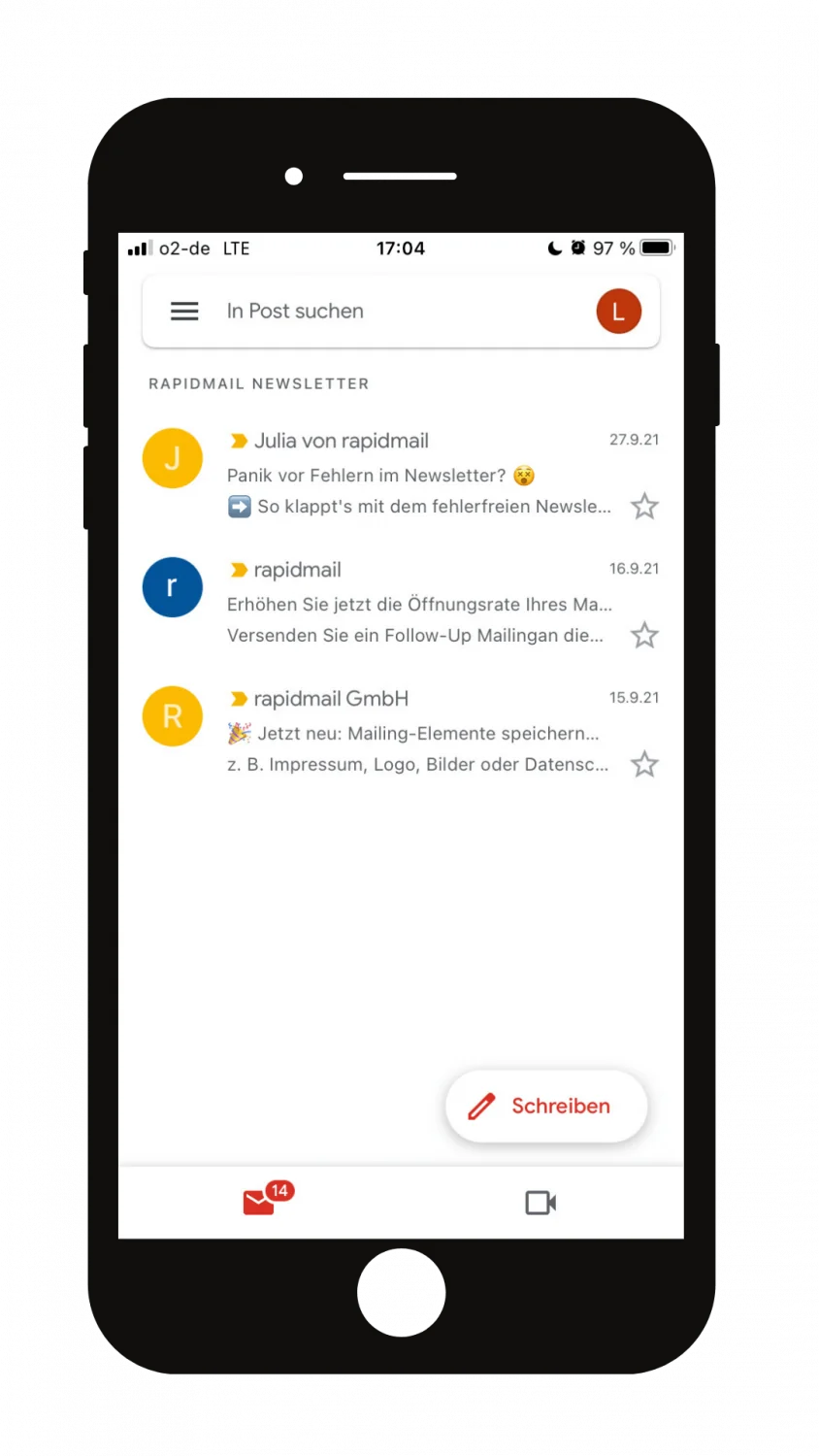
❗ But take care:
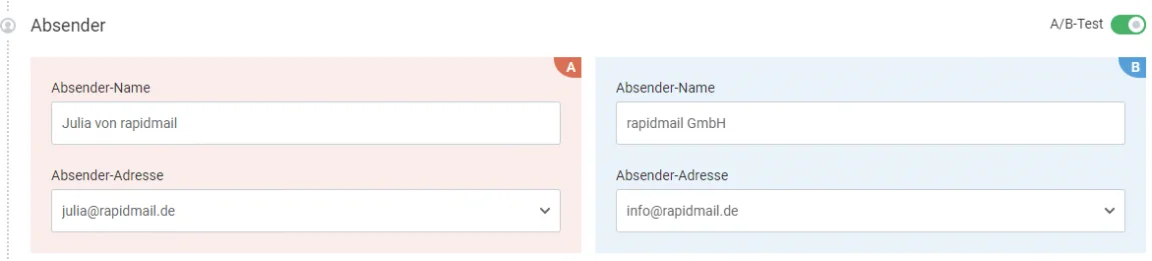
You need to find out for yourself which sender name works best for your target audience, industry and chosen newsletter topic. An A/B test using your email marketing tool is ideal for this. It lets you test different sender profiles at the outset and measure how your recipients respond:
2. Make your newsletter subject line stand out: the first point of contact in the inbox
A carefully considered subject line is another part of a successful newsletter structure. It presents your newsletter effectively in the inbox. That is why a newsletter subject line usually involves more thought and finesse than you might initially assume. There are good reasons for this. Alongside other criteria, the wording of the subject line determines not only whether your newsletter reaches your contacts’ email inboxes at all or is classified as spam. It also determines whether they open it or immediately discard it using the delete button.
💡rapidtip
Trying to entice subscribers in their inbox with subject lines such as “FREE”, “No charge” and “Exclusive, just for you and today only!!!” is rarely a good idea. In the worst-case scenario, subject lines like these can even cause email programs to classify you as a spam sender, harming your newsletter deliverability. We therefore recommend using the subject line to tease what recipients can expect in the newsletter in a creative, specific way. Discounts and special offers can be presented in the subject line as “Our gift to you” or “A surprise is waiting for you”, for example.
Take the time to consider exactly how your subject line can spark your subscribers’ interest.
Your newsletter subject line should always:
- …be short and to the point: Depending on the email client and device your readers use, they will only see a limited number of characters from the subject line. On many mobile devices, it is cut off after about 35 characters. Keep it brief and place the most important keywords at the beginning. Use creative wording that leaves readers wanting more to stand out from your competitors’ newsletters. As well as creative wording, you can use emojis to make your newsletter or subject line stand out in subscribers’ inboxes. Avoid uninformative subject lines such as “May 2022 newsletter rapidmail GmbH”.
- …not contain spam words or special characters: Try to avoid words such as “discount”, “free” or “special offer” in your newsletter subject line. Find creative alternatives that draw readers’ attention to your great bargains.
- …address your recipients personally: Most newsletter tools, including rapidmail, allow you to personalize your subject line. This means you can include recipients’ first or last names in the subject line, for example, to establish a personal connection.
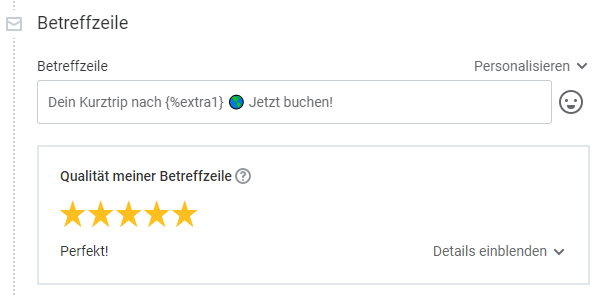
If you have other information about your subscribers, such as preferences they specified when signing up for the newsletter, you can incorporate these into the subject line in a personalized way. This is an excellent way to stand out from your competitors’ newsletters. At the same time, it builds trust among your contacts, because spam senders, who may even have bought their email addresses, do not usually know their recipients’ preferences.

❗ But take care:
Although personalizing the subject line is an excellent way to capture your recipients’ attention, you should use it in moderation. Only use it in informal wording where the personalization does not feel artificial. You must also make sure that the subject line displays correctly for recipients whose place of residence you do not know.
- …be tested first: Play it safe and use an A/B test to try out two different subject-line variants on a small proportion of your recipients before the main send.
The rapidmail newsletter
Tips, ideas and news about email marketing, straight to your inbox.
3. The preheader: space for a newsletter preview
Let’s move on to the next element of a successful newsletter structure:
Many email clients, especially on smartphones, display a newsletter’s sender and subject line as well as a “preheader” in recipients’ inboxes. This short preview is normally taken automatically from the first lines of text in the email. With rapidmail and many other newsletter programs, you can set the wording of the preheader independently of your newsletter’s text. This allows you to avoid potential repetition between the newsletter subject line and the heading that might otherwise be displayed automatically as the preheader.
The preheader is ideal for including additional information and details that complement the subject line and build your recipients’ interest in the rest of the newsletter. It helps readers decide whether a newsletter is worth reading. It can therefore have an important influence on whether the email is opened while it is still in the inbox.
You should see the subject line and preheader as partners. Together, they reinforce each other and can make the most of your newsletter’s first impression on your target audience. The preheader can complement the subject line with the right information to tease the newsletter topic in an engaging way.
To unlock the preheader’s full potential, you can also use a personalization option here and address readers even more directly.
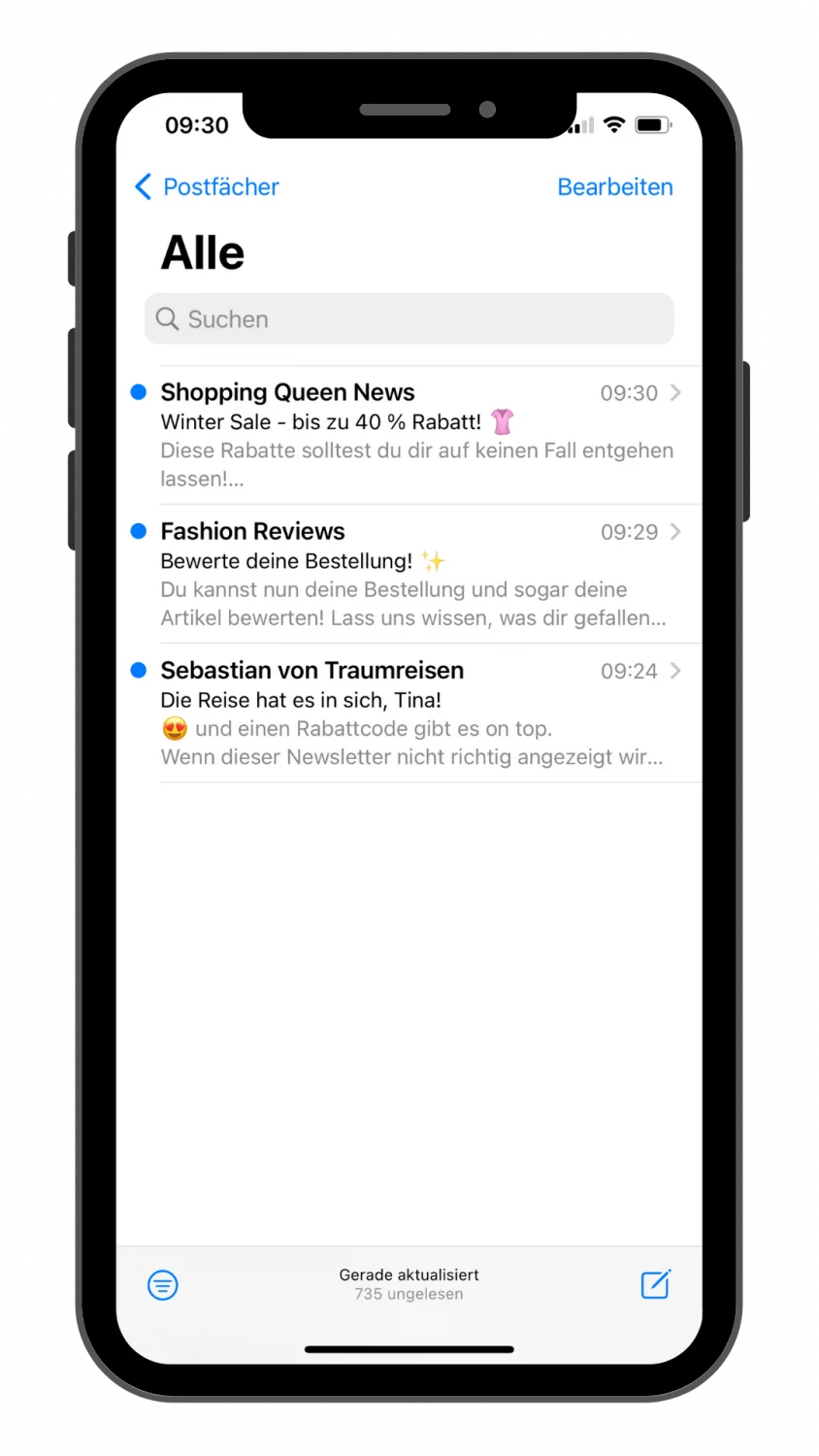
The sender, subject line and preheader determine whether your newsletter is opened, making them the foundation of its success. Give all three elements particular attention.
👀 How long can the preheader be?
Different email clients display different numbers of characters in the preheader. To prevent it from being cut off for any recipient, we recommend a maximum preheader length of 80 characters.
4. Hit the mark with your newsletter header
You have cleared the first hurdle of a sensible email structure: your recipients have opened the newsletter.
Now you need to convince them within the first few seconds to take the time to read the entire newsletter. That means the top section of the email, known as the header, needs to have plenty of impact.
The header is a newsletter element that always has a similar structure and therefore contains the same components. As a sender, you can use a newsletter tool such as rapidmail to create your preferred header with the necessary information and save it as an element. You then do not need to recreate it for every subsequent newsletter. Simply drag and drop the header into the newsletter and update it with a new header image.
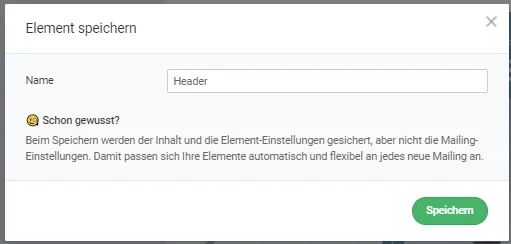
The company logo
One typical element no newsletter header should be without is a linked company logo. It helps readers immediately recognize which company the newsletter belongs to. This builds trust among your subscribers and makes your company appear credible in its campaigns. The logo is also particularly useful for linking to your website or online shop from the newsletter. Many subscribers tend to click images and logos in campaigns. A header containing a logo can therefore drive subscribers to your website and take them to your desired destination, for example if your newsletter aims to generate sales. To find out exactly where your recipients click in your campaign, take a look at the click map in the newsletter statistics in your rapidmail account.
Example of a newsletter header with a linked company logo, header image and engaging heading.
The right header image and a suitable heading
The next element that should not be underestimated is an engaging, colorful header image. Many newsletters also feature the newsletter name on the header image, along with an energetic heading that immediately shows readers how they will benefit from reading the rest of the newsletter.
A picture is worth a thousand words. The header is the first major visual point of contact readers have with your newsletter. If they like the header image, they will want to keep reading. It should therefore be imaginative and relevant to the newsletter content. Depending on the content of your campaign, you may want to place one or two important pieces of information on the image. This creates a consistent thread running through the subject line, preheader and now the header image, guiding readers through the topic.
💡rapidtip
To ensure your newsletter, and especially its header image, appears in high quality on every device and with every email provider, make sure you only use high-resolution images in your campaign. rapidmail gives you access to a database of over 1.5 million free images. The integrated image editor lets you edit and style your newsletter images however you like.
As an alternative to a static header image, you can place an animated GIF at the beginning of your newsletter. This attracts even more attention from your readers. Here too, you can use graphics and other design elements to give your animated header that special something, while adding a touch of your company colors.
You can be a little creative with your newsletter heading, as long as it fits your company and the rest of your newsletter design. The new web fonts in the rapidmail Editor let you choose from more than 40 fonts to add a creative highlight to your header or present your brand message or the newsletter’s key statement.
The header can also include:
- a navigation bar
- a concise menu
- a link to the online version
- and more
5. The main section of the newsletter: what matters
Newsletter content
Now we come to the heart of the matter. The main section contains the actual newsletter content, in other words, what you want to tell your recipients. It is the reason you created your newsletter online and sent it in the first place.
A personal salutation is the icing on the cake, so start with an individual greeting. Say hello instead of diving straight in. After all, you probably prefer newsletters that address you by your first or last name rather than using a generic “Dear reader”. Besides looking better, “Dear Lisa” can also mean that newsletter personalization contributes significantly to the campaign’s success.
Then explain in a few paragraphs and short, easy-to-understand sentences why you are contacting your recipients:
- Do you have an interesting offer for them?
- Is there an exciting event or important company news that your readers should not miss?
- Are there interesting blog posts you would like to share with your readers? A newsletter is ideal for introducing the topic in an engaging way and linking to your blog.
Depending on the company and industry, there are many suitable reasons to send a newsletter.
👀 What should you bear in mind?
As a general rule, you should only send a newsletter if you genuinely have something to report. If you send one newsletter after another without providing any real added value for your subscribers, even the most beautiful newsletter structure will no longer help you. As a sender, it is therefore important to find the right balance between newsletter content and sending frequency. For every topic you present in the main section of your newsletter, you should also include clickable elements such as calls to action that direct your recipients to your online shop or website.
Visual appeal matters too: design and layout
You now know what an email’s structure should look like and which aspects of its content matter most. Now we come to the finishing touches, because visual appeal matters too, pun intended.
Use a few graphic elements or images to give readers’ eyes some variety. A minimalist design with a few striking color accents and carefully selected design elements presents your content to best effect. The following elements work perfectly in a simple but effective email layout:
- Alternative web fonts: Never underestimate the power of headings. They attract a great deal of attention in newsletters, add structure and make it much easier for subscribers to follow the content. If you use a classic font such as Arial for the body text in your campaign, you can afford to be more creative with the headings.
- High-resolution images: You should use only high-resolution images, not just in the header but throughout the rest of your campaign too. This ensures your newsletter looks appealing on every device and with every email provider.
- The text: Never underestimate or overestimate text size. When creating a newsletter on a computer, it is often difficult to tell what the final campaign will look like on your readers’ devices. A font size of 12 pt to 15 pt is particularly suitable because it displays well on all devices and is easy for most people to read. In the rapidmail Editor, you can always view a preview or send a test email to be on the safe side.
- Clickable elements: A call-to-action button does more than look good in a campaign. Positioned correctly and labeled meaningfully, it can generate new leads, sales or customers.
- Alignment in the campaign: To ensure your campaign displays correctly on all devices, a single-column newsletter structure is recommended. If you choose a multi-column email design, you can use the editor’s preview mode to check how it will appear on a mobile phone, for example. The responsive design activated automatically in the rapidmail Editor adapts the newsletter design to the screen width of the device used. Alternatively, readers can use the web-view link to see the complete newsletter exactly as you intended.
In summary, a simple but carefully considered newsletter design provides a strong foundation for your newsletter structure. You can then perfect the campaign with elements in your company colors and clickable components. Make sure you maintain an appropriate text-to-image ratio so that your newsletter does not look overcrowded.
6. From header to footer: the bottom section
Last but not least in the newsletter structure is the bottom section, also known as the footer. Precisely because it appears at the end of a newsletter, the footer’s importance is often underestimated. Just like the header, the footer retains the same design from one newsletter to the next and can therefore also be saved as a standalone element in the rapidmail Editor. In many cases, it stands out from the rest of the newsletter design, perhaps by using a different color from the rest of the email.
As well as several must-haves, the footer also has a number of nice-to-haves that should not be overlooked when structuring your email.
First, let’s look at the must-haves that newsletters need to include because of legal requirements:
- The email signature is a small block of text at the end of the email containing contact details and important information about the sender. This includes the company name and legal form, for example.
- Under the GDPR, every campaign must also include an unsubscribe link that allows recipients to withdraw their consent to advertising. The footer is the perfect place for it.
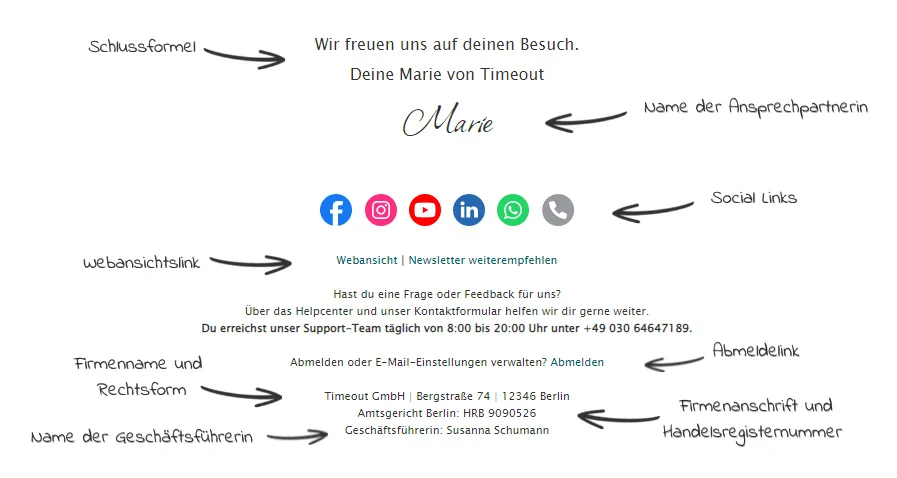
You can also use the space in your newsletter footer to add special extras to the campaign:
- How about an integrated email survey, for example? Firstly, it helps you get to know your readers better. Secondly, it allows you to send content that is even more closely tailored to your target audience. In the long term, this can help you avoid newsletter unsubscribes.
- The rapidmail Editor gives you access to more than 50 new social media icons. Alongside familiar social media platforms such as Instagram and Facebook, you can now add services such as Lieferando, TripAdvisor and Spotify. As a sender, you can use your newsletter to stay in touch with recipients on other relevant platforms too.
- Whether as body text or another icon, use the footer to tell recipients about your opening hours and contact options.
💡 rapidtip
About half of all campaigns are opened on mobile devices. That makes it especially important for them to display correctly and attractively on every device. The technical term is responsive display, which means that the content of a campaign adapts to the screen size and the design is displayed accordingly. rapidmail automatically displays all your newsletters responsively.
7. Conclusion: the elements that make up a newsletter
Example of a successful newsletter structure
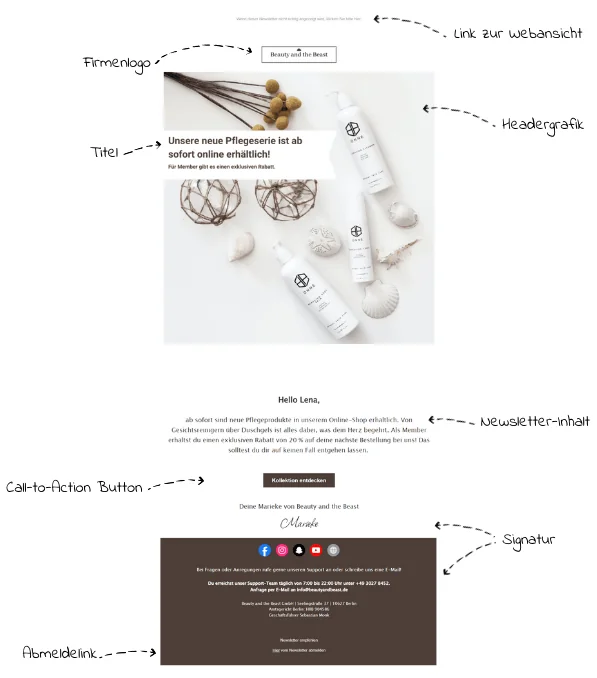
A newsletter’s structure can be divided roughly into three parts: the header or top section, the content section, and the footer at the end of every campaign. The first points of contact between readers and the newsletter are the sender name, subject line and preheader in the email inbox. They should therefore be credible and attractively presented to encourage subscribers to open the campaign. Alongside a simple but creative newsletter design, you should above all comply with the legal requirements for sending newsletters so that you can send them without unnecessary risk.
8. Bonus: remembered everything? Free newsletter checklist
Sender profile: check. Subject line: check… To make sure nothing goes wrong before you send it, we have prepared a checklist for the ideal newsletter structure.
You can easily download the interactive PDF document for free and check off each item with a click as you build your newsletter step by step. ✅
By the way, the checklist helps you review not only what is inside your newsletter, namely its structure, but also everything around it, such as your recipient list.
We hope you enjoy checking your newsletter structure.