Create email signatures and use them effectively in marketing

The email signature at the end of a newsletter or marketing email provides all the important contact details. It gives the message a personal touch and leaves readers with a professional impression of you and your brand. Alongside the subject line, salutation and an informative main section, the email signature is one of the essential elements of an email. With the right structure, all legally required information and an appealing design, your email signature helps you make a positive and lasting impression on your recipients.
1. What is an email signature?
From “With love, Julia” in a love letter to “Yours sincerely, your customer adviser John Smith” in a formal letter, the closing phrases in written correspondence can vary greatly. But digital correspondence also needs a signature.
An email signature is a short block of text at the end of an email containing contact details and important information about the sender. It concludes the main section of the campaign and tells your readers who is writing to them, which company you work for, what your role is and how they can contact you. This makes the signature an important part of customer communication in email marketing too.
💡 rapidtip: Make your email signature a real eye-catcher with web fonts
Web fonts are digital typefaces that can be used in emails to highlight certain sections of text, such as a heading or the signature. Web fonts give your newsletter a creative, playful or professional touch, depending on what you want and what suits your corporate design.
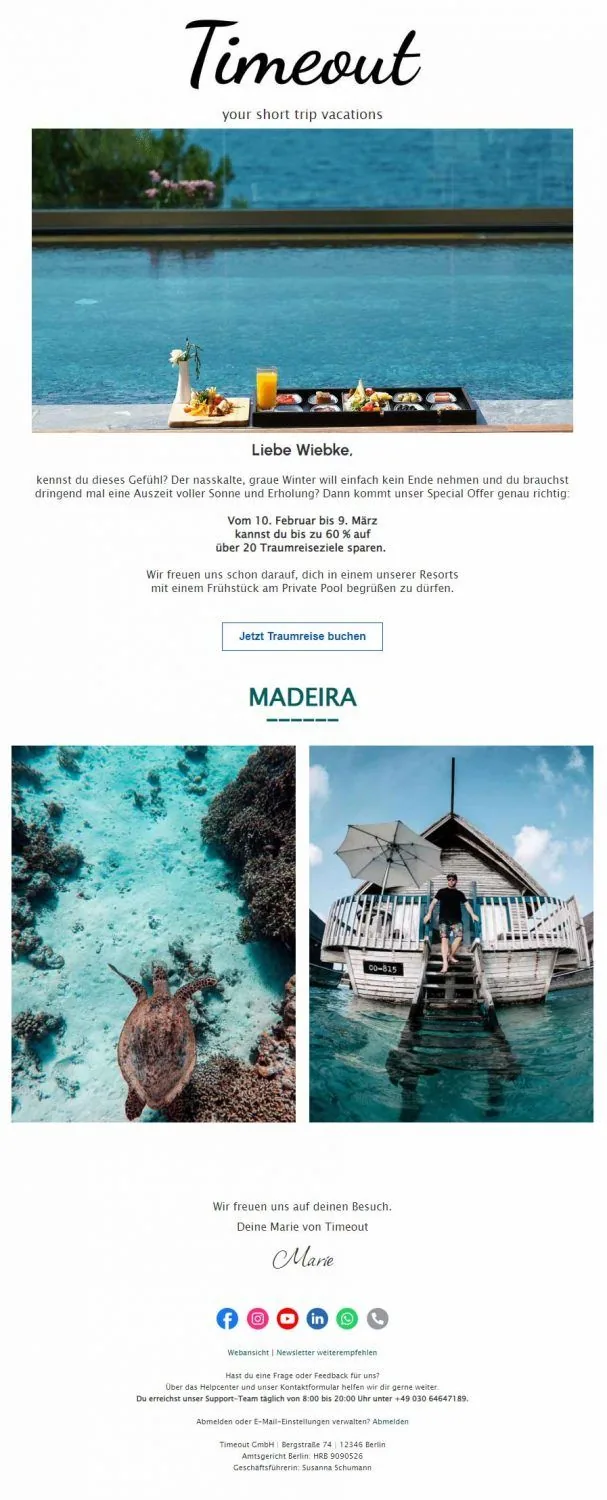
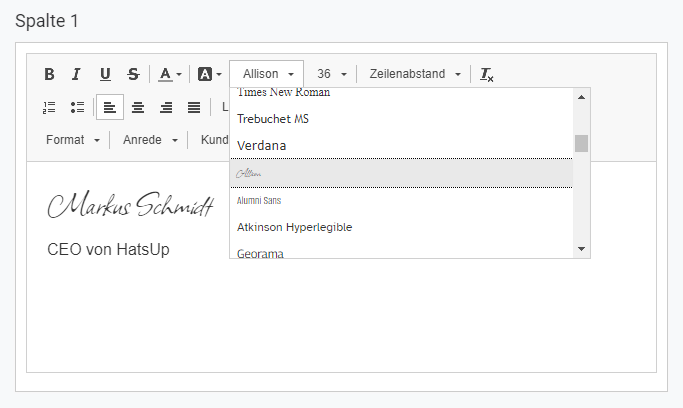
The following example shows an email signature that uses a web font to make the digital message look as though it had been signed by hand by the sender.
2. Structure and legally required information: what belongs in an email signature
Mandatory information for an email signature
In marketing, an email signature is more than a friendly closing greeting: it is also a legally required element of a newsletter. Since 2007, business and promotional emails in Germany have had to include certain mandatory information, which varies slightly depending on the company’s legal form.
The legal notice requirement for newsletters ensures that recipients can easily identify who sent the email. The law does not specify whether the information must appear directly in the newsletter or whether a link to the legal notice on the website is sufficient. To be on the safe side, however, we recommend including the following mandatory information directly in your newsletter:
| Legal form | Mandatory information for the email signature |
|---|---|
| Sole traders | – Company name– Owner’s first and last name– Address |
| Registered merchants (e. K.) | – Name of the merchant as entered in the commercial register– Legal form (e. K.)– Place of business– Registry court– Commercial register number |
| GmbH or UG | – Full company name as entered in the commercial register– Legal form (GmbH or UG)– Registered office of the company– Registry court– Commercial register number– Full names of all managing directors |
| Public limited company (AG) | – Full company name as entered in the commercial register– Legal form (AG)– Registered office of the company– Registry court– Commercial register number– Names of all members of the management board– Name of the chair of the supervisory board |
You must also comply with the requirements of the General Data Protection Regulation (GDPR) for sending newsletters to maintain your reputation as a reputable sender and avoid legal warning notices.
This means, among other things, that you must have your recipients’ clear consent, for example through the double opt-in registration process, and give them the option to withdraw this consent at any time. Of course, it is a shame if your recipients no longer want to receive messages from you. Nevertheless, you should never try to force them to remain subscribed to your newsletter. The easiest and best way for your contacts to unsubscribe from your newsletter at any time is an unsubscribe link in the footer of your campaigns.
💡 rapidtip
Another link that is not required under the GDPR but should be included in every newsletter is the web version link. If your readers experience display problems in their email client, they can simply click the web version link to open the newsletter in their browser and see the layout exactly as you intended. The web version link fits well in the newsletter signature area, for example in the email footer.
Social links
In addition to the mandatory information, you can include other elements in your email signature to make it even more appealing. Social icons are the ideal addition to your signature because they not only look good and make the bottom of your campaign more visually engaging, but also give you the opportunity to increase your reach on social media, improve your conversion rate and win new customers. In short, social links in your newsletter allow you to make new connections in no time.
👀 Did you know?
You can now choose from more than 50 social icons in the rapidmail email editor. Alongside social networks including Instagram, Facebook, LinkedIn, Twitter and now TikTok, there are other categories to choose from, such as Media & Content (including Twitch, Spotify and Dropbox), Chat & Meeting (including Facebook Messenger, WhatsApp and Slack) and Business (including PayPal and Lieferando). You can flexibly add the social media icons to your email signature using drag and drop.
You can also use our general icons to add your telephone number, email address, privacy policy or appointment calendar to your email signature.
Information about the sender
In addition to the mandatory information, which already reveals something about the newsletter sender, you can of course include further details to emphasize the personal touch of your newsletter signature. For example, you could:
- Give the name of a contact person,
- state their job title,
- include a friendly photo
- and provide a telephone number and email address for getting in touch.
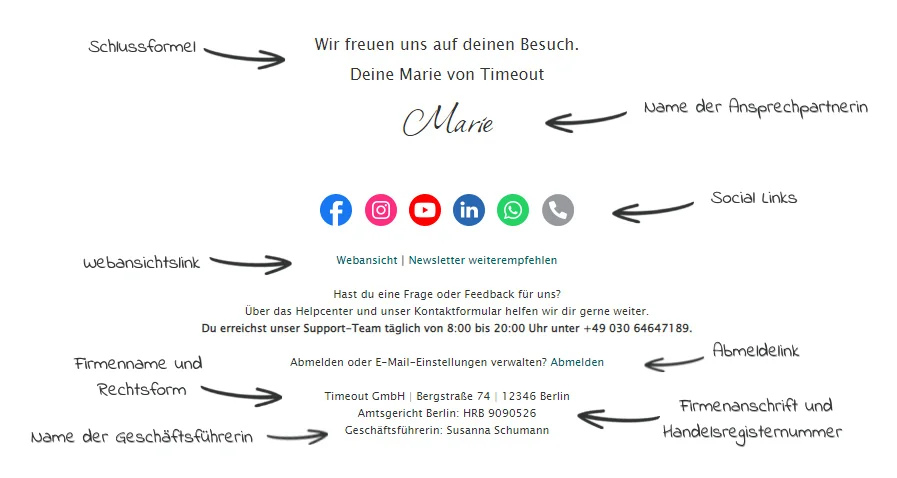
The order in which you arrange the information in your signature is up to you. Above all, however, the structure should be logical and clear, making all the important information visible without requiring a long search. So save your creativity for an interesting subject line and the call-to-action button in your campaign. Keep to a more traditional order in the signature (closing greeting, name, job title, company, social links, mandatory information, etc.) and place unwieldy information such as the company address or commercial register number right at the end of the email.
👀 What does not belong in an email signature?
We now know what an email signature is, what information it must contain and how additional details can give it a personal touch. But alongside these dos, are there also any don’ts for signatures in email marketing?
Yes, there are! Although more and more companies are discovering the email signature as a marketing channel and adding advertising banners to it, we advise against using excessively large advertising blocks in your signature. Sayings or quotations are also out of place here and can significantly reduce the professional appearance of your signature.
Oversized advertising banners can quickly make the bottom section of your newsletter or marketing email look cluttered. Their large file size can also cause deliverability problems.
We therefore recommend placing prominent advertising messages higher up in your newsletter and keeping the email signature to a friendly closing phrase with the most important contact details and mandatory information.
3. What are the benefits of a professional email signature?
A friendly and informative sign-off at the end of a newsletter is certainly part of good email marketing etiquette. However, rather than simply adding your “John Hancock” to your campaign, you should think carefully about the best possible structure and professional design for your email signature so you can enjoy a range of benefits.
Why a good email marketing signature is worthwhile
- Important contact details are available at a glance: When recipients see your name, perhaps your role, your company and your business address in the email signature, you not only tell them who you are, but also make it easier for your subscribers to contact you. They then know who to contact and how if they have questions or are interested in working with you or buying your products.
- Stay on the right side of the law: A complete and informative signature is more than just a nice extra: it is actually mandatory in email marketing. By complying with all legal requirements, you not only strengthen trust in your brand, but also avoid unnecessary legal warning notices or fines.
- Give your newsletter that special something: An attractively designed email signature looks stylish and professional, helping you present yourself as a reputable newsletter sender. At the same time, a personal signature can add a genuinely personal and authentic touch. If you sign off with a specific name rather than “Your Timeout Team”, readers can get a much better sense of who is actually behind the newsletter.

- Create a consistent brand image: By keeping your email signature consistent across several campaigns, you increase your newsletter’s recognition value and ensure that customers immediately know who to contact if they have questions.
- Generate leads and increase the click rate: Ultimately, the numbers have to add up too. A professional email signature attracts readers’ attention and encourages them to click on elements such as social icons, clickable images or links to your website. This means the signature also helps strengthen the connection between prospects and the brand, turning them into customers over the long term.
4. Put the finishing touches to your email signature with the right design
Have you gathered all the information for your email signature? You can now use the right design to ensure that your signature has the best possible impact on your readers. Here’s how:
- Do not insert the signature as an image. Saving the finished signature as an image and inserting it into future campaigns may seem simple and time-saving. However, it can impair your newsletter’s deliverability, while also costing you valuable features such as clickable social links in your email signature.
- Less is more: Do not try to include too much information at once, as this can quickly make your email signature look cluttered. Instead, prioritize only the most important information relevant to your target audience and legal compliance. Keeping it brief prevents unnecessary scrolling.
- Optimize your signature for mobile viewing. A large proportion of emails are now read on smartphones and tablets. A responsive newsletter design is therefore essential to ensure that your email signature is displayed correctly and has the intended impact.
- Use the fonts and colors from your corporate design. This increases your newsletter’s recognition value and ensures a consistent communication concept in the closing email signature too.
- Use dividing lines and plenty of white space to keep the newsletter signature clear and give your readers’ eyes a short break while they process the information.
The rapidmail newsletter
Tips, ideas and news about email marketing, straight to your inbox.
5. Create an email signature with rapidmail: here’s how
Are you finally ready to take action and create your own email signature? An intuitive newsletter tool such as rapidmail lets you create a professional signature in just a few simple steps:
- Design your closing phrase using the text element and give the signature that special something with striking handwriting-style web fonts.
- Would you like to include a picture of the sender in your signature? No problem. Simply add the picture in the drag-and-drop editor and link it to your website. You can also crop and edit images or apply a filter directly in the campaign using the image editor.
- The unsubscribe link and a web version link are added automatically to every new campaign.
- Choose your favorite platforms from more than 50 different social links.
- The mandatory information can easily be saved in the “My elements” section and inserted into each new campaign. This means your own email signature template is always available.