Create and send your first newsletter: tips for a successful start

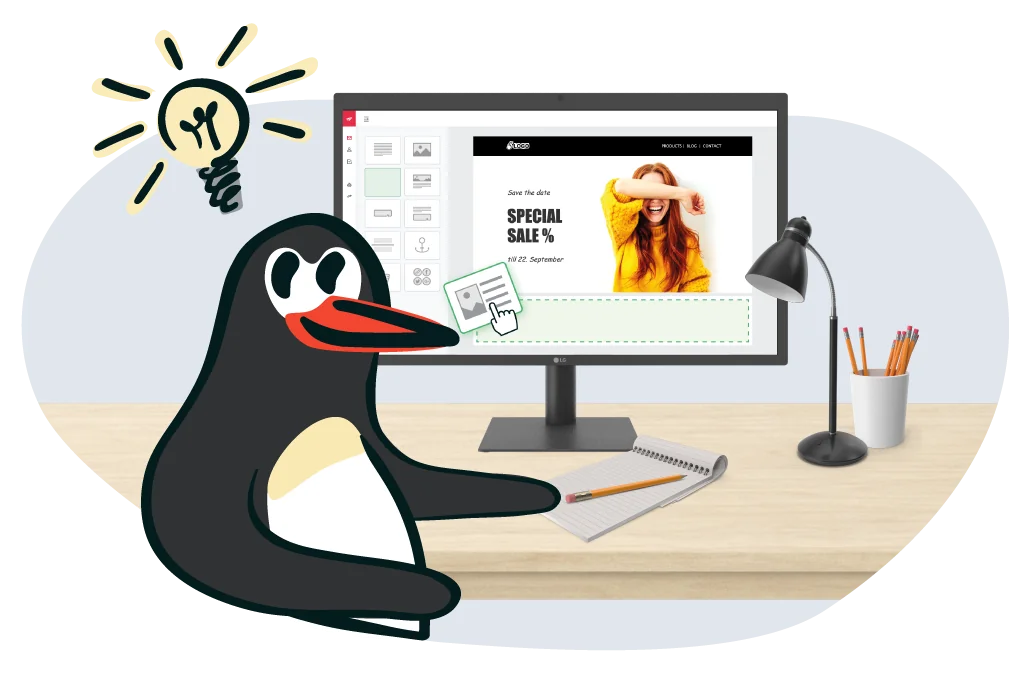
Creating your first newsletter may seem like a major challenge at first. But don’t worry: if email marketing is new territory for you, you have come to the right place! Our newsletter guide takes you through how to prepare, create, send and finally analyze a newsletter step by step, all without complicated jargon.
🥜 In a nutshell: the essentials for creating your first newsletter
Newsletter creation made easy: with our step-by-step instructions, you can successfully send your first newsletter even if you have never worked with email marketing before.
The key steps involved in creating a newsletter at a glance:
- ✔️ Definition: A newsletter is an electronic circular sent regularly by email to subscribers to provide information, build customer loyalty or increase revenue.
- ✔️ Essential preparation: Define your goals, identify your target audience, plan your content, choose a suitable email marketing tool and build a GDPR-compliant contact list.
- ✔️ Creation: Write a compelling subject line and preheader, produce engaging newsletter copy, create a professional design and add calls to action.
- ✔️ Sending: Perform a test send, choose the best time to send and adapt the frequency to your target audience.
- ✔️ Analysis: Measure the open rate, click rate and bounce rate, then continuously improve your newsletter.
- ✔️ Benefits of newsletters as a marketing channel: Low costs, high ROI, measurable results, direct customer communication, GDPR-compliant marketing and simple implementation.
👀 Did you know? With rapidmail, you can create and send your first newsletter to up to 2,000 contacts for free, complete with professional templates, an intuitive drag-and-drop editor and first-class deliverability.
1. First things first: what exactly are newsletters?
When we look at newsletters from an online marketing perspective, we arrive at the following definition: a newsletter is a type of electronic circular sent at regular intervals to people who have subscribed to it.
Today, a newsletter is generally sent by email, or in rarer cases as a WhatsApp newsletter, and, although now extremely uncommon, as a printed letter. Newsletters can serve different purposes: they may be sent purely to provide information or with the intention of increasing sales. They can also be used to increase or maintain customer loyalty.
Newsletters are an integral part of email marketing. They can be sent for a wide range of purposes and occasions. Here are some typical real-world examples:
- 🍕 Hospitality offers: Send weekly deals, new dishes or seasonal specials directly to hungry subscribers.
- 🛍️ Retail: Effectively promote Sunday openings, the start of a sale or exclusive discount campaigns.
- 🧑💼 Internal communication: Keep employees regularly informed about projects, events and news, without relying on the office grapevine.
- 🎫 Event invitations: Announce workshops, webinars or events and increase registrations.
- 🧰 Service and product updates: Present new features, security updates or useful tips for using a product.
- 🌱 Non-profits and associations: Share project successes, donation appeals or volunteering campaigns to encourage engagement and support.

The occasions on which you can send a newsletter are extremely varied. Newsletters are not limited to any particular industry either. Quite the opposite: their versatility means that your newsletters can enrich your subscribers’ inboxes with a wide range of content.
The most important thing is that your messages should always offer value to your contacts and ideally be perfectly tailored to their interests.
A good mix of the following newsletter topics can keep your contacts engaged over the long term:
- 💸 Offers and promotions: Discount vouchers, free delivery, loyalty gifts and more
- 🆕 New products and features: New collections, product launches, new features and more
- 📚 Resources and instructions: Blog articles, guides, tutorials, help videos or DIY ideas
- 🎫 Invitations to events: For example, webinars, workshops, concerts or company celebrations
- 📰 Industry trends and news: Share important developments, studies or trends from your industry and strengthen your expertise
- 🏢 Internal company news: Staff changes, team events or other important company updates and announcements that are well suited to an internal newsletter
- ❤️ Non-profit updates and campaigns: Launch donation appeals or collect signatures for good causes with non-profit email marketing
- 🙏 Show appreciation: Simply say “thank you” and show your customers how much you appreciate their loyalty and support
- ✨ Year in review: Share the year’s highlights and reminisce together
- 🎉 Seasonal greetings: Festive messages with suitable offers for holidays such as Easter, Halloween or Christmas
- ➕ And much more: Newsletters are suitable for countless other topics and occasions, depending on your industry and type of organization
If you work in email marketing and create and send newsletters, you naturally want to prevent your subscribers from unsubscribing after only a short time. You should therefore aim to offer your contacts varied and interesting content at all times to keep your newsletter unsubscribe rate low.
So do not only create newsletters designed to sell. For example, you could share information about products that are currently on trend, activities that everyone should try or amusing and informative facts from your industry.
💡 rapidtip: take legal requirements into account when creating newsletters
To make sure that your newsletters are not only well received but also legally compliant, you should always observe these basic legal requirements for newsletters:
- ✅ Consent is mandatory: Newsletters may only be sent to people who have actively agreed to receive them, ideally through double opt-in.
- 👋 An unsubscribe option must be provided: Every newsletter must contain a clearly visible unsubscribe link.
- 🔎 Transparency about content: During the sign-up process, subscribers must be told what content they can expect.
Email marketing for beginners: free ebook to download
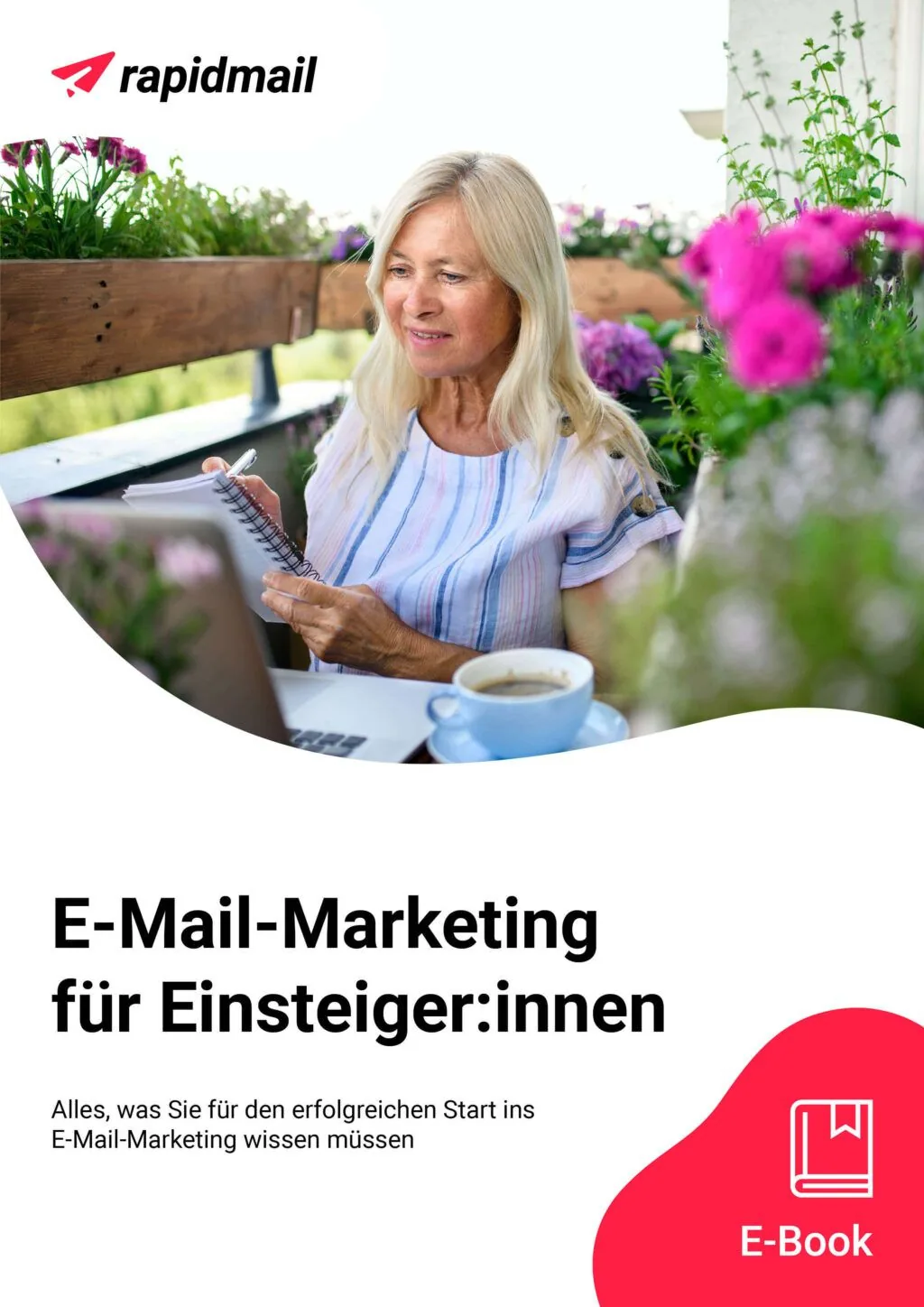
Back to basics: before you learn how to create and send your first newsletter step by step, you can first read about all the key email marketing principles in our free ebook.
It is the perfect introductory read for anyone new to the field or simply looking to refresh their knowledge, and it gives you a solid foundation for your first email newsletter. It covers everything from the benefits of email marketing for different types of organization to tips on building an email list.
Simply download it and get started! 🚀
Download the free email marketing ebook for beginners (PDF in German)
2. Benefits of email marketing: why sending newsletters is worthwhile
Newsletter marketing enables direct, cost-effective customer contact and remains one of the most efficient ways to acquire and retain customers in 2026. Alongside the latest marketing tools, including those based on intelligent chatbots, creating and sending newsletters might initially seem a little “old-fashioned”. But don’t be too hasty!
There are numerous reasons why businesses with direct and indirect customer contact should not miss out on sending newsletters, whether they operate in B2C or B2B:
- 💸 Low costs: A newsletter enables you to communicate with customers and promote your products effectively without significant financial outlay. 93.5% of businesses cite low costs as the most important reason for using newsletters as a marketing channel (rapidmail study, 2023). Our guide provides a detailed breakdown of the costs you should expect when creating a newsletter.
- 🤩 Greater awareness and expert status: A regular newsletter with relevant content quickly raises your profile and gradually establishes you as an expert. According to the rapidmail study (2023), 82.1% of businesses see the greatest potential of newsletters in increased reach, while 90.1% consider newsletters an effective customer retention tool.
- 🗓️ Stress-free send planning: A newsletter tool lets you schedule campaigns in advance and have them sent automatically at your chosen time. As 41.1% of businesses plan to increase their sending frequency in the future (rapidmail study, 2023), the ability to plan ahead is a crucial advantage in email marketing.
- ⌛ Minimal time required: Practical software lets you create newsletters in no time, even without previous marketing knowledge. With the wide range of free newsletter templates, you can choose a suitable theme, add your copy and send newsletters in just a few clicks.
- 🎯 A direct line to an interested target audience: The double opt-in process enables you to obtain subscribers’ consent to receive newsletters, so you only contact existing or potential customers who are genuinely interested in your offers.
- 📊 Measurable newsletter success: Automatically displayed open and click figures allow you to measure newsletter performance and track how successful your newsletter was. According to the rapidmail study (2023), 57, 1% of businesses report a positive impact on revenue, 54.7% report higher attendance at events and 40.8% report increased new customer acquisition.
Sending newsletters is therefore a real advantage for businesses of every size and in every sector, as well as for freelancers, online marketing agencies and associations. The findings from our study clearly show that email marketing is not only cost-effective, but can also noticeably increase reach, customer loyalty and revenue, often after just the first few sends. At the same time, professional newsletter tools make creating your campaigns so easy that even teams with little marketing experience can send successful newsletters.
In short, newsletters remain one of the most effective yet straightforward forms of marketing in 2026. If you would like to see for yourself just how easy it is to get started, simply try our newsletter tool. Your first newsletter to up to 2,000 contacts is always free!
Send your first newsletter now
Creating your first newsletter: benefits for different types of organization
Whether you are self-employed, run a business or create newsletters for your marketing agency’s clients, a professional email marketing tool helps you create your first newsletter efficiently, with clear objectives and minimal effort.
The specific benefits vary depending on the type of organization:
 |
|
 |
|
 |
|
 |
|
 |
|
👀 Have you seen this?
In episode 1 of our YouTube course “Learn email marketing”, our Content Manager Wiebke takes you through the most important basics for your first newsletter step by step: what exactly is email marketing? Why is it still worthwhile today? And what goals can you achieve with newsletters? Let’s roll! 🎬
Open video transcript
Chapter 1: Introduction
Welcome to my newsletter course, which will turn you from a beginner into a real professional. There are 12 episodes in total, where you will learn step by step how email marketing works and how you can achieve your goals.
Today, we are starting right at the beginning with the most important basics: what exactly is email marketing? Is it really still worthwhile today? And what can you actually achieve with newsletters?
Chapter 2: Definition: what exactly is email marketing?
As the name suggests, email marketing is a form of advertising that uses emails. For example, you send newsletters to a list of contacts to give them specific information or encourage them to make a purchase.
The most important point is that you only contact people who have previously agreed to receive the emails. When done properly, email marketing has nothing to do with spam or scams. Quite the opposite: your contacts actively sign up to receive your emails!
We will take a detailed look at how to collect contacts like these for your mailing list in episode 2.
Chapter 3: Is email marketing still worthwhile today?
I often hear people asking whether email marketing is still worthwhile today. That is understandable, because topics such as influencer marketing and social media are on everyone’s lips at the moment. BUT the relevance of email marketing has actually grown steadily in recent years. rapidmail discovered this in an extensive survey of almost 800 businesses! I’ll link the study in the information box so you can read through the findings at your leisure.
The fact is that email marketing is still one of the most profitable advertising channels. For every euro spent, you get between 35 and €42 back.
And that is just one of its many benefits:
Chapter 4: Benefits of email marketing
Unlike social media, email marketing does not leave you dependent on algorithms, apps or updates because your contact list belongs to you alone. Or think about expensive television adverts: so many people who have no interest in your offers still see your advertising. Email marketing gives you a direct connection to your potential customers and therefore involves much less wasted coverage than other advertising channels.
You alone decide which messages you want to send your readers. If you manage to match your content to your contacts’ tastes, they will develop trust and a close relationship with your brand.
Emails have an enormous reach because almost everyone has at least one email address. And we no longer read our emails only on a computer, but also on our smartphones while out and about. You can therefore reach your target audience virtually anytime and anywhere. You decide when.
Email marketing is also relatively inexpensive. Depending on the software, you can get started for between 7 and €20 per month. Alternatively, choose a tool that lets you try it out first and only pay for each actual send, with no monthly subscription.
Best of all, the emails are not simply sent out blindly. Immediately after sending, you can see how successful your emails are. Metrics such as open and click rates are collected automatically, showing you how well your emails resonate with your target audience.
If you are now thinking that you do not have enough staff or time, or that you lack the previous knowledge, I can put your mind at ease. Professional email marketing tools have many practical features, such as a drag-and-drop editor or stylish design templates, so you can create your emails really quickly and easily. You genuinely do not need to be a professional!
Sounds really good, doesn’t it? Now let’s look at what you can actually achieve with email marketing.
Chapter 5: Goals you can achieve with email marketing
You can attract new customers. Once you have sparked your contacts’ interest and they have subscribed to your newsletter, you can use your emails to stay in touch and gradually increase their interest until they are convinced by your offers or products and become paying customers.
You can then start strengthening customer loyalty too. If your contacts regularly receive positive, helpful emails from you, they are likely to return, remain loyal and identify with your brand, or even come to love it!
You can also shape your company’s image by deliberately using your emails as a platform. You have the opportunity to share exactly the information that matters to you, actively ensuring that your company makes a good impression and that your target audience associates it with positive values.
This also increases brand awareness. By sending regular emails that feature your company’s name, values and products, you increase your visibility and, over time, make your brand more recognizable.
And all of this is reflected in your revenue. Marketing emails offer plenty of ways to encourage your target audience to make a purchase, for example with discount codes or special offers.
Chapter 6: Conclusion
Now you know exactly what email marketing is and that it offers you plenty of benefits. In the next lesson of the newsletter course, you will learn how to build your contact list effectively and in compliance with the law. Feel free to watch the episode straight away.
If you enjoyed lesson 1 of “Learn email marketing”, please give the video a thumbs up.
What are you hoping to learn from this newsletter course? Let me know in the comments so I can cover it in the upcoming videos!
3. Step-by-step guide to creating your first newsletter
🐾 Step 1: Prepare your newsletter by defining your goals, content and target audience
Before creating your first newsletter, it is worth taking a quick look at the preceding step. A successful newsletter does not happen by chance, but starts with clear preparation. By considering the following points, you will create the ideal foundation for effective, targeted email marketing. Let’s get started!
First things first: Define your goals and target audience
Before diving straight into creating and sending your first newsletter, you should ask yourself two key questions:
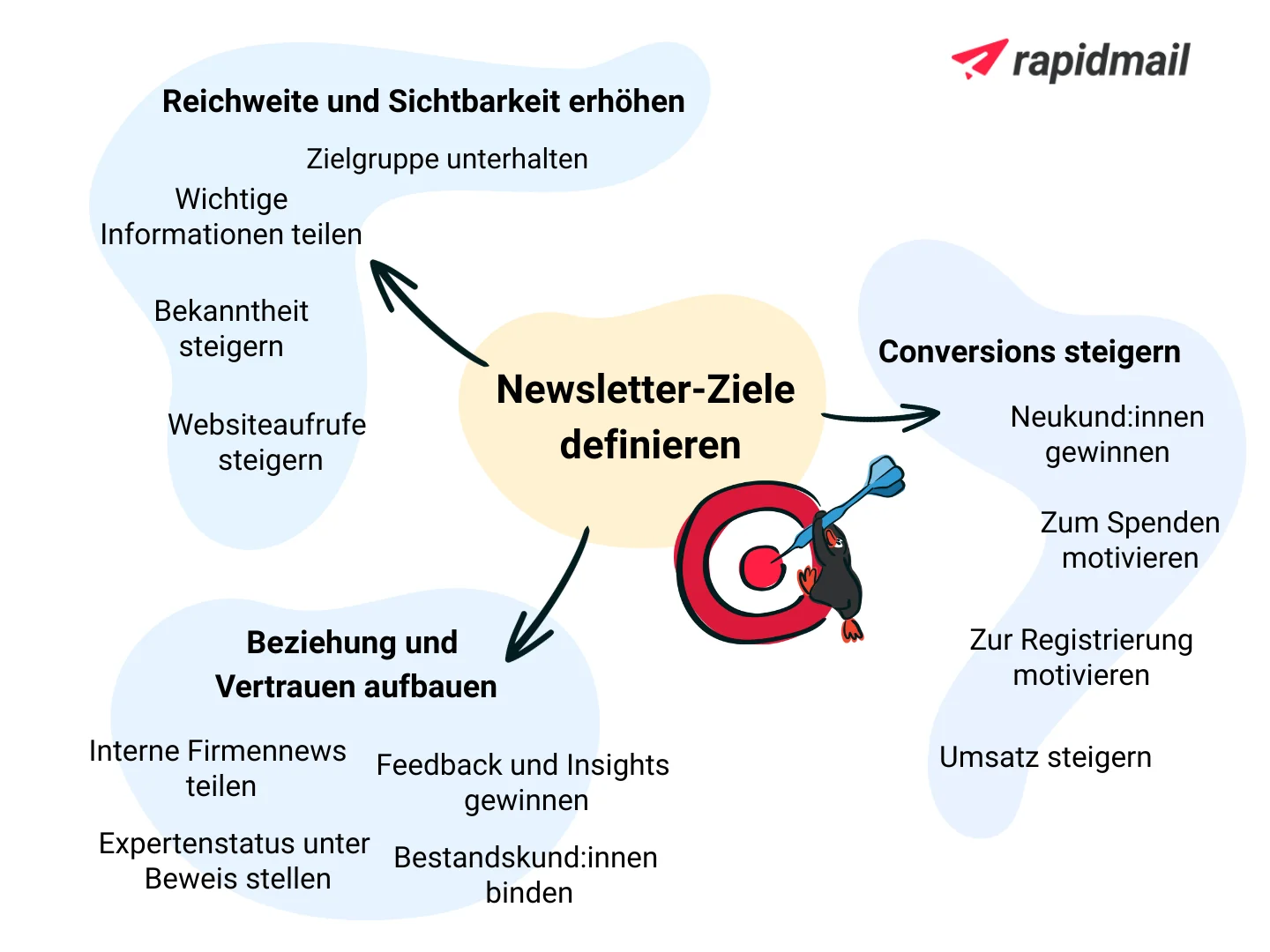
Question 1: What do you want to achieve by sending your newsletter?
Set a specific goal for your first newsletter, such as providing information, selling, building trust or strengthening customer loyalty. A clear goal will help you align all your subsequent decisions effectively.
Many factors depend on your goal:
- 🎯 which target audience you address
- ✍🏼 which content you select
- 🔗 which links and calls to action you use
- ⏰ when and how often you send your newsletter
- 💬 which tone of voice suits your message
Well-planned newsletters are essential for successful email marketing. When you know your goal and target audience, you create more relevant content, strike the right tone and significantly increase the chances that your newsletter will be read and clicked, rather than unsubscribed from.
Question 2: Who is your newsletter’s target audience?
Once you know what your newsletter aims to achieve, the next step is to decide who you want to reach with it. Your newsletter will only be opened, read and clicked if its content, tone and send time suit your target audience.
Who you are writing to makes a big difference. An internal employee newsletter can often be more personal and informal, while a newsletter for customers or business partners tends to be factual, informative and professional in many industries. Factors such as your contacts’ age, industry and expectations also have a significant influence on which style works well.
💡 rapidtip: Develop personas
Personas are part of an effective online marketing strategy and are fictional users from your target audience who, like real people, have specific characteristics, needs and expectations.
Instead of picturing a large group of anonymous people, imagine specific representatives of your target audience. This makes it much easier to put yourself in their shoes and allows you to make your newsletter marketing particularly user-friendly and audience-focused.
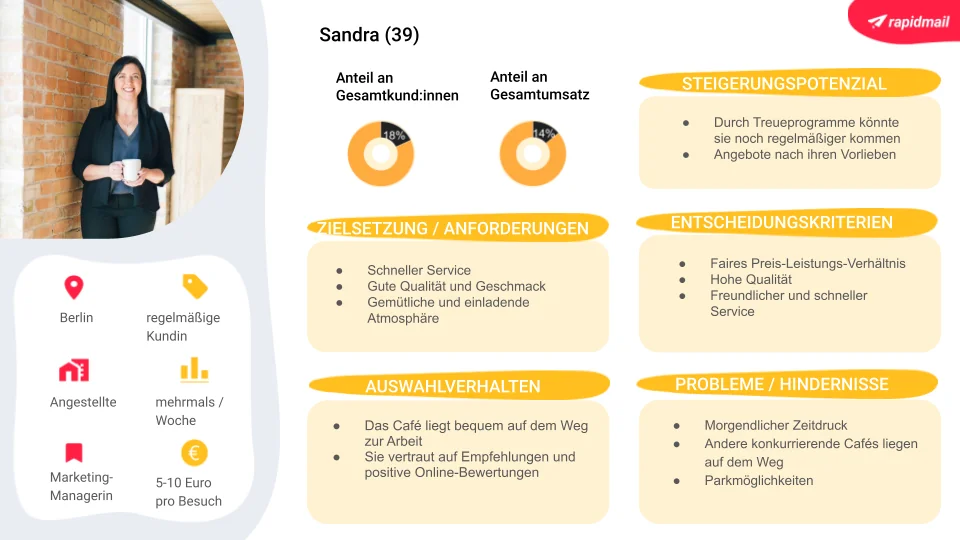
Typical, relevant target-audience characteristics for your first newsletter include:
- 👥 Demographic characteristics: gender, age or occupation
- 🛒 Purchasing behavior: shopping times, price range, purchasing frequency or preferred products
- ❤️ Personal attitudes: wishes, values, needs or motivation
- 🧠 Topic preferences: content or topics that particularly interest subscribers
- 🏠 Current circumstances: for example, family or single, urban or rural, studying or working
- 📱 Media use: preferred channels and typical usage times
- 🤝 Customer status: new customers, existing customers, prospects or former customers
- 📊 Engagement behavior: open and click behavior for previous newsletters
In your newsletter contact list, you can then assign the relevant tags to your subscribers or segment them into groups. This makes it easy to always send your newsletter to the right target audience and keep the content as relevant as possible for readers.
The mediapepp advertising agency confirms that segmentation pays off when sending newsletters. It is one of many case studies on successful email marketing with rapidmail:
When sending targeted campaigns to segmented contact groups with rapidmail, we have already achieved open rates of 55% and click rates of 12%. Those are excellent figures!
Dietmar Weil, Project Manager at mediapepp
What will it cover? Plan your newsletter topics and content
The key to compelling newsletter content is to keep your target audience and communication goal in mind. Think about why your subscribers signed up and what value they expect to receive:
- ℹ️ Do they want regular information about a particular topic?
- 💡 Are they looking for inspiration, such as recipes, leisure activities or new products?
- 💸 Are they waiting for exclusive discounts or special promotions?
The better you understand your readers’ expectations, the easier it is to choose content that matches their interests.
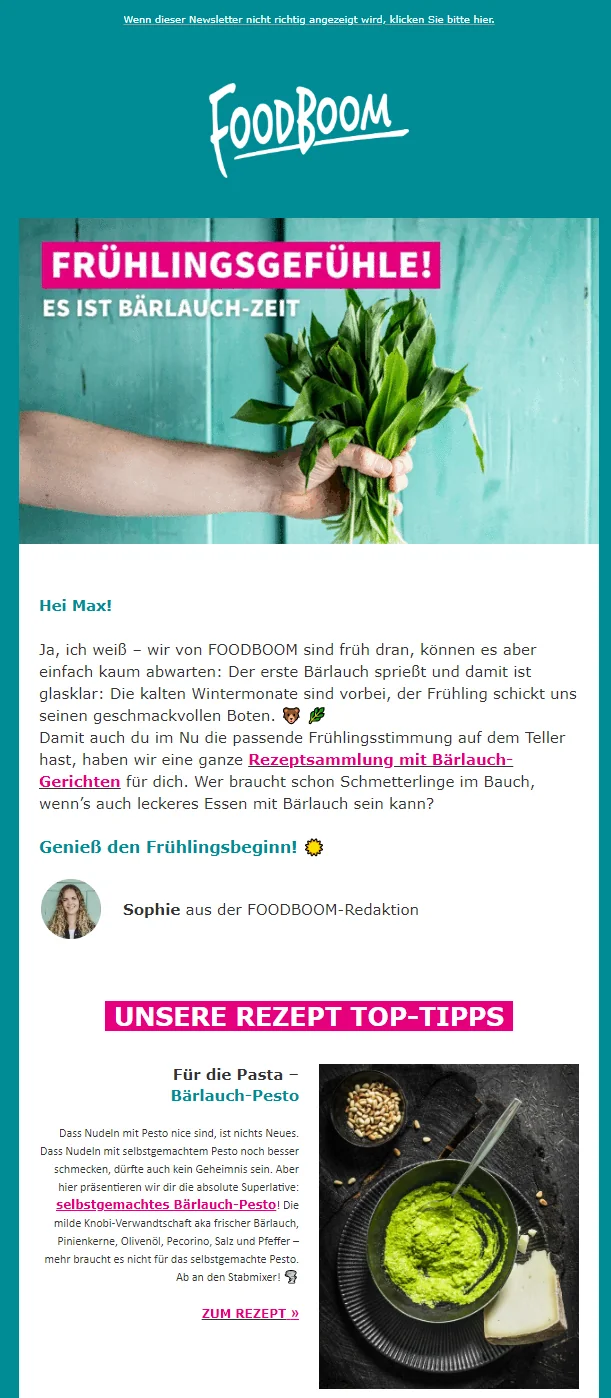
Relevant newsletter topics are at the heart of successful campaigns. They not only increase subscriber satisfaction, but also have a direct impact on your open and click rates. A newsletter that closely matches your readership’s interests is read more often and builds strong customer loyalty over the long term.
💡 rapidtip: Ask about topic preferences

An appealing signup form lays the foundation for relevant content. You may only make the email address a required field, but optional additional fields allow you to gather valuable information about interests and preferences, such as product categories, subject areas or content formats.
Alternatively, you can send your first newsletter as a survey and let your subscribers decide for themselves which topics they would like to hear about in the future.
Examples of potential content for your first newsletter:
- 🆕 Product and feature updates: presentation of new products, collections, services or features
- 💡 Helpful tips and guides: product use, how-to guides, blog posts and video tutorials
- 📆 Event invitations: webinars, workshops, talks and celebrations
- 🎭 Behind the scenes: team updates, everyday office life and company news
- 💌 Seasonal greetings: content for Christmas, Easter, Mother’s Day and other occasions
- ❗ Important organizational information: changes, announcements and internal news
- 💰 Offers and promotions: discounts, loyalty gifts, free delivery or exclusive deals
Occasions when sending a newsletter is particularly worthwhile
Whether seasonal highlights, major sales events or industry-specific topics, there are many times during the year when a well-planned newsletter attracts particularly high levels of attention. Use these occasions to reach your subscribers with relevant, inspiring or sales-focused content.
Alongside retail classics such as Black Friday or summer sales, seasonal themes also work well, such as the holiday season, the start of the year, spring cleaning or cozy wintertime. Celebrated holidays such as Christmas and Easter are also ideal opportunities to send newsletters with a suitable design and carefully coordinated messages. This is ideal for creating emotional value and strengthening your campaigns.
Examples of suitable newsletter occasions:
- 🎉 Holidays and special promotional days: Christmas, Easter, St Nicholas Day, Valentine’s Day, Mother’s Day, Father’s Day, Labor Day, International Women’s Day, International Day of Friendship, Halloween, New Year’s Eve, …
- 🌤️ Seasonal occasions: summer vacation, barbecue season, the start of ice cream season, the start of fall, winter wellness, the start of the school year, spring cleaning, gardening season, harvest festival and “Back to Work” after the holidays
- 🛍️ Retail and ecommerce highlights: Black Friday and Cyber Monday, the lead-up to Christmas, mid-season sales, end-of-season sales (summer/winter), Fashion Week, shopping festivals, product launches and anniversary promotions
- 🏢 Internal company or industry-specific occasions: company anniversaries, product updates, trade fairs and industry events, new services, team updates, annual or quarterly reviews and success stories
- 💌 Community and customer loyalty occasions: thank-you emails, welcome emails, loyalty programs, customer birthdays, milestones (for example, “1,000 subscribers”) and exclusive previews
Of course, these special occasions are just some of the many opportunities to send your subscribers an email. You can create and send additional newsletters at any time, guided by the goals you want to achieve through your email marketing.
Before sending your first newsletter, take the time to create a schedule for your newsletter campaigns. Each year, the plan can give you a useful overview of the next newsletters due for particular topics and occasions, as well as when they need to be prepared and sent. Although it takes a little time to set up at first, it is worth the effort!
To help you create this year’s campaign plan quickly, we are offering the model we use at rapidmail as a free download.
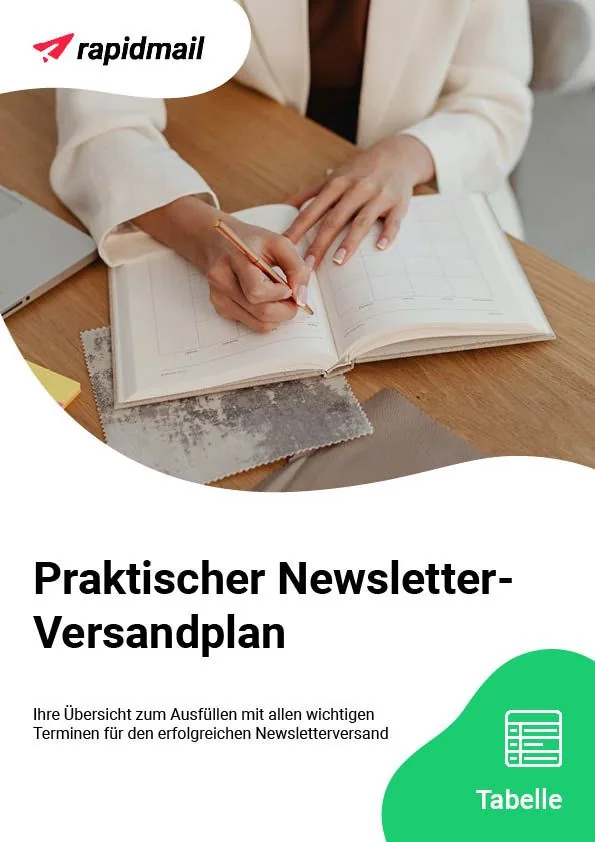
The practical newsletter campaign plan already includes all the key dates and topics for 2026, along with other helpful columns for planning and evaluating your campaigns. You can use our template for your planning to create the ideal newsletter campaign plan for your company and target audience. ✨
At the end of the year, the completed overview allows you to see immediately which newsletters you should definitely send again and which newsletter topics were less successful in 2026, without having to create an entirely new plan from scratch!
We hope you enjoy filling it in and wish you every success with your newsletter editorial calendar. 🚀
Download the newsletter campaign plan for free (Excel file in German)
🐾 Step 2: Spoilt for choice? Find the right email marketing tool
The main preparations for your first newsletter are complete. Now it is time for a crucial step: choosing the right email marketing tool. A good tool not only makes it easier to design your campaigns, but also ensures that your newsletter is delivered reliably and meets all legal requirements.
There are now numerous providers of professional newsletter tools on the market. Take a moment to compare the options and determine which features you actually need. Do you need design templates for your newsletter? Would you like to use email automation? Should a support team be available free of charge at all times? Do you want to start creating your first newsletter quickly, without a lengthy learning curve?
Most importantly, your chosen tool must comply with all data privacy requirements for newsletter marketing and provide features that make creating and sending newsletters as easy as possible. Our comprehensive email marketing tool comparison will help you find the right software for a successful start in email marketing!
One more quick tip: sending newsletters via Outlook is not a good idea, especially if you want to reach a large number of contacts or value professional newsletter design. Outlook is not designed for sending elaborately designed newsletters in bulk, so it can quickly lead to deliverability issues and display errors in your contacts’ inboxes.
👀 Have you seen this?
In the video, our Content Manager Wiebke takes a close look at the five best German email marketing tools to help you choose software that perfectly suits your needs:
Open video transcript
Chapter 1: Introduction
Are you looking for a German email marketing tool? In this video, you will find out why that is a very good idea and which providers from Germany could be right for you.
Today, we are taking a closer look at five German email marketing tools. Among other things, we will examine the benefits they offer, who they are particularly well suited to and how much they would cost you. Enjoy!
Chapter 2: The benefits of German tools
As I said, it is a very good idea to look for a German email marketing tool.
Data protection also plays a major role in Germany, and it is extremely important for German companies to meet all the requirements of the General Data Protection Regulation (GDPR). It governs how a company must handle the personal data of customers and contacts. And because email marketing inevitably involves this type of data, you need software that also meets all GDPR requirements.
This includes ensuring that personal data is processed and stored only on servers within the EU. Servers located in Germany are even more secure, however, because they are generally subject to stricter checks, and you can rely on particularly secure infrastructure and high quality.
So, with an email marketing tool from Germany, you are on the safe side when it comes to data protection. I will now show you five providers that could be a great choice for you and your business.
If you are not yet sure exactly what you need from your email marketing tool, take a look at my video on the subject. It is sure to make choosing one of the German providers easier in the end.
Chapter 3: rapidmail
rapidmail is an intuitive email marketing tool based in Freiburg. It specializes in making professional email marketing accessible to everyone, even without prior knowledge, a large marketing team or a big budget. That is why particular emphasis is placed on the software’s intuitive usability and the most important core features.
You have probably noticed by now that this is the rapidmail channel, so I may be quite fond of rapidmail. But I promise I will still be honest and tell you when rapidmail might not be the best fit for you, as well as what benefits the other German tools have to offer. After all, nobody benefits if you are unhappy with your choice of tool.
But back to rapidmail’s features: you can use our tool to design and send newsletters, measure their performance, manage and gain contacts, and create automated email workflows. We have always taken care to keep these processes as simple as possible, for example with our 1-click design, free email templates, workflow templates and AI subject line generator.
However, if you want to set up highly extensive marketing campaigns, you may reach the limits of rapidmail, as it does not offer complex automations such as abandoned basket emails or a landing page editor.
Alongside its intuitive usability, what sets rapidmail apart from other providers is its comprehensive data protection, with servers located exclusively in Germany, and its free customer support. Everyone can contact rapidmail free of charge by phone or through the ticket system, regardless of their plan. So if you ever get stuck, you can simply pick up the phone and chat to our support team.
rapidmail is therefore the right choice if you want an easy-to-use German email marketing tool that requires no prior knowledge and instead lets you rely on intuitive features, full GDPR compliance and friendly customer support.
Chapter 4: CleverReach
CleverReach is another well-known German email marketing tool and is based near Oldenburg. The tool is also fully GDPR-compliant and stores all data in the EU.
CleverReach also offers a wide range of features and, in my opinion, performs really well when it comes to email automation, enabling a variety of complex automation workflows.
However, I would deduct a point from CleverReach for service, as customer support is initially available only by email, with a response expected within 72 hours. If that is not enough for you, you would need to add premium support for just under €23 per month, which also allows you to contact CleverReach by phone. In that case, however, the software would be comparatively expensive. I will come back to pricing at the end of the video.
Even so, I would say that CleverReach is a good German tool for anyone who wants to set up complex email campaigns and needs less support, which means you may already have some experience or be willing to get to grips with marketing topics.
Chapter 5: Inxmail
Like rapidmail, our next German email marketing tool is also based in Freiburg and is GDPR-compliant! Inxmail is aimed more at larger companies and agencies with complex requirements and offers many professional features. What makes it special is that the platform is tailored to each customer’s individual needs and therefore comes with extensive personal advice. Logically, this also makes Inxmail more expensive than the other tools in this video. If you simply want to send a basic newsletter, Inxmail may therefore be more than you need.
Chapter 6: Evalanche
The Evalanche marketing automation platform is based in Starnberg and was developed specifically for medium-sized and large B2B companies to make their email marketing, lead management and digital communications efficient and automated. You have probably guessed it: like Inxmail, Evalanche’s capabilities extend far beyond email marketing alone. You should either have prior email marketing knowledge or the capacity to learn how to use its professional features and complex processes.
Evalanche can therefore be too extensive for beginners.
Chapter 7: Brevo
Strictly speaking, Brevo is not a German email marketing tool, but a French one. However, the former German provider Newsletter2Go is now part of Brevo, so I wanted to mention the tool briefly as well. Brevo was previously called Sendinblue, so you may still know the tool by that name.
In terms of features, Brevo leaves virtually nothing to be desired and is essentially more of an all-in-one marketing platform, including CRM and a landing page builder. Brevo also offers a very high level of data protection and support by email, ticket and chat. For phone support, however, you need at least the Business plan.
I would say Brevo is a good email marketing tool for experienced users and larger companies that want complex applications and either do not need phone support or are willing to choose a more expensive monthly package.
Chapter 8: Price comparison: How much does email marketing software cost in Germany?
Right, since prices naturally also play an important role when choosing a tool, let us quickly go through them and compare the cheapest plan from each provider when paying monthly. Some providers offer a discount for annual payments, so bear that in mind if you want to save some money. And of course, prices can change at any time. The figures I am using are correct as at September 3, 2025.
The most affordable German email marketing tool is Brevo. Plans start at €7 per month, allowing you to send 5,000 emails to up to 500 contacts.
rapidmail and CleverReach each start at €15 per month. With both providers, this price lets you send as many emails as you like to up to 500 contacts.
And as I have already mentioned, Evalanche and Inxmail are considerably more expensive, with Evalanche starting at €195 and Inxmail at €200.
Chapter 9: Conclusion
I cannot give you a general answer as to which of the five German providers is right for you. It all depends on your needs, of course, but let us go through them one by one again:
Of all the German email marketing tools I have shown you today, rapidmail is the simplest, without lots of bells and whistles. I would recommend rapidmail if you want to create and send effective newsletters in just a few clicks, without spending a long time learning how to use the tool. You can also get automated emails such as birthday messages, appointment reminders or welcome greetings up and running extremely quickly with rapidmail. And do not forget: free phone support is always included with rapidmail.
However, if you are already a little more experienced and also want to set up more complex campaigns, Brevo or CleverReach could be good options for you. And if you want to go one step further and have a large budget available in your, probably fairly large, company, Inxmail or Evalanche and their tailored platforms could be the ideal solution for you.
If you would like to learn a little more about the individual tools, I highly recommend OMR Reviews. There you will find not only a clear overview of all the features, but also reviews from real customers. Alternatively, take a look at the newsletter tool comparison on our website, where I have compared many different tools, including their features, level of data protection, pricing and much more. It does not cover only German email marketing tools, however, but international ones too. If you would like to see the comparison, just click the link in the information box.
I hope this video has helped you in your search for the perfect email marketing tool from Germany, and thank you for watching. See you next time!
Would you like to try the rapidmail email marketing tool? No problem. We guarantee you the following:
- ✅ No prior email marketing knowledge required
- ✅ 100% GDPR-compliant email marketing
- ✅ Fast, professional design with modern free newsletter templates and an intuitive drag-and-drop email editor
- ✅ Automatic creation of professional email templates in your own brand design
- ✅ Embedded website and pop-up newsletter sign-up forms that you can design to suit your brand or company perfectly, turning even more prospects into subscribers
- ✅ Newsletters that really do reach your contacts: rapidmail’s whitelisting and our professional sending infrastructure ensure the best possible deliverability for your email marketing, keeping you out of spam filters!
- ✅ Automatic newsletter reporting with the most important metrics in the newsletter statistics
- ✅ Straightforward A/B testing to optimize your newsletters
- ✅ Easily send transactional emails and marketing automation emails
What is more, rapidmail lets you start creating and sending your first newsletter for free. This gives you plenty of time to try out our editor and its features, and your first send to up to 2,000 contacts is always completely free!
👀 Have you seen this? Take a tour of rapidmail
In this video, our content manager Wiebke introduces you to our email marketing tool and shows you the features and benefits you can expect from rapidmail. Here is a little preview: with rapidmail, you do not have to be a newsletter expert to send professional newsletters!
So, tune in, sit back and become a newsletter expert as you watch. Roll the film! 🎬
Open video transcript
Chapter 1: Introduction
No time for lengthy onboarding and complex features? With rapidmail, you can easily create and send effective newsletters!
Email marketing with rapidmail gets you to your goal in no time, whether you want to gain new customers, attract more attendees to an event or boost sales in your online shop.
Hi, my name is Wiebke, and today I am going to show you that with rapidmail, you need neither prior knowledge nor lots of time to design great newsletters and get closer to your business goals. So let us not beat around the bush. Let us simply get started!
Chapter 2: Navigation and first steps
You can reach everything from the dashboard. For example, you can create a new campaign straight away. To make your newsletter a hit with your contacts, you can address them individually using our personalization fields, add emojis to the subject line and keep an eye on the automatic subject line checker. It shows you how effective your subject line is and where you could improve it.
Our 1-click design makes designing newsletters child’s play. Simply enter your website URL and ta-da, rapidmail conjures up a design template featuring your logo, brand colors and fonts. If you like, you can make further adjustments here and then save it.
Now simply choose from over 250 free templates, and your newsletter framework is ready! You can now replace and fill all the content as you wish.
Chapter 3: Design and customization
Particularly useful are the integrated image editor and our free image library, where you will find over 1.5 million high-quality, royalty-free images. This saves you extra steps and additional tools!
If you have an online shop, you can easily connect it to rapidmail using our free plugins, automatically synchronizing your customer and product data. Then use our one-click product import to drag products directly from your online shop into your newsletter.
Now it is time to inspect your draft using the preview feature: does the personalization work? Does the newsletter look good on different devices? You can then send test emails to up to ten email addresses, completely free of charge, of course!
Before the newsletter goes out, put its deliverability through a thorough check and make any final corrections if necessary. This ensures that your campaign does not end up in spam. Thanks to our excellent deliverability, rapidmail gets your newsletter to its destination particularly reliably.
Everything looking good? Then your newsletter can now set off on its journey, either immediately or automatically at a scheduled time. Your first send to up to 2,000 contacts is on us, so you can test rapidmail at your leisure.
Chapter 4: AI sending planner
If you ever lack inspiration for your newsletter content, our AI sending planner uses artificial intelligence to conjure up a personalized newsletter plan for your company. Simply enter the company name, a few keywords and a short description, and ta-da, there is your personalized newsletter plan with ideas for the whole year!
Chapter 5: Gaining contacts
rapidmail also helps you gain new contacts. Just as with 1-click design, you can create newsletter sign-up forms in only a few clicks that perfectly match your website design.
You can easily upload existing contacts to rapidmail from CSV, Excel or text files, or by copying and pasting. You can also assign as many tags as you like to your contacts to ensure they receive only the campaigns that genuinely interest them.
Chapter 6: Data protection and segmentation
Data protection is our top priority! At rapidmail, all processes are 100% GDPR-compliant. Your contact data is stored exclusively on servers in Germany, so you do not need to worry.
To target your contacts particularly precisely, you can divide them into segments, for example by age group, gender or place of residence, and then select these segments when sending so that your newsletter goes only to specific subgroups.
By the way, we are always happy to talk! If you have any questions or difficulties, our support team will be glad to help, free of charge by phone or via the ticket system directly in the tool.
Chapter 7: Reporting and analysis
After sending your newsletter, you can track its success in real time. Thanks to the automatically generated newsletter statistics, rapidmail gives you a clear view of all the important email marketing KPIs.
Our email statistics help you understand your target audience’s interests and wishes better and better, allowing you to send more successful newsletters.
Want to know every detail? In the activity history for individual contacts, you can see exactly which campaigns a recipient has received, opened and clicked. These reporting options allow you to get to know your contacts better and tailor your newsletter sends even more precisely.
Chapter 8: Email automation
If you want to tailor your email marketing even more precisely to your contacts, you should definitely try our email automation. You need no prior knowledge and can create personalized email sequences in just a few clicks, for example for welcome and birthday greetings or multi-part courses. We have practical workflow templates that make getting started even easier!
Chapter 9: Pricing
Finally, a few words about our pricing: if you want complete flexibility and to pay only when you send, our Pay per send plan is ideal for you. If, on the other hand, you want to send newsletters regularly, our monthly subscription packages “Starter” and “Premium” are perfect. You can get started from just €15 per month and send an unlimited number of emails. Our price calculator on the website helps you find the right package. Of course, you can change, pause or cancel your package at any time.
Sound good? Then simply try rapidmail for free and see for yourself that rapidmail lets you send professional newsletters without being a newsletter expert yourself!
🐾 Step 3: Build a sustainable newsletter contact list
Before you can send your first newsletter, you need a clean, high-quality contact list. After all, your content should reach the people who are genuinely interested in it. Building a legally compliant distribution list is therefore one of the most important first steps in email marketing.
Add newsletter contacts in compliance with data protection law
If you have not created and sent newsletters before, you first need a list of people who should receive your campaign: your subscribers. Because this involves processing personal data such as names and email addresses, certain legal requirements apply. The German Federal Data Protection Act (BDSG-neu), the Telecommunications Digital Services Data Protection Act (TDDDG) and the General Data Protection Regulation (GDPR) govern how you may store, protect and use this data.
When building your newsletter list, the rule is therefore: your contacts must have expressly agreed that they want to receive your newsletter, and you must be able to prove this consent if necessary.
This is precisely why German newsletter tools such as rapidmail automatically use the double opt-in process, which provides you with legal protection:
- ✍️ Users enter their email address in your signup form.
- ✅ Prospective subscribers receive a confirmation email at the address they entered to confirm their newsletter signup.
- 💌 Only after they click the confirmation link in the email are your new subscribers officially and legally signed up for your newsletter.
This ensures that only people who genuinely want to receive your newsletter end up on your list, a key element of successful email marketing in the long term.
💡 rapidtip: A deep dive into data protection requirements

Data protection matters wherever personal data is processed, including in email marketing. You should make sure you follow our data protection checklist for sending newsletters and familiarize yourself with it before sending your first email newsletter. In the worst-case scenario, breaching the rules can result in warning letters or fines, which you will certainly want to avoid.
You can also watch the video from our Content Manager Wiebke, in which she and data protection lawyer Nils Möllers from Keyed explain all the rules for sending GDPR-compliant newsletters. Roll the film! 🎥
Open video transcript
Chapter 1: Introduction
Wiebke: Does the GDPR sound complicated? Today, we’re making it simple. Together with data protection expert Nils Möllers from Keyed, we’ll show you step by step how to send GDPR-compliant newsletters, in a way that’s easy to understand and put into practice straight away.
Chapter 2: Why is it so important for newsletters to be GDPR-compliant?
Nils: Protecting personal data is extremely important, and companies that do not take this protection seriously may face penalties, compensation claims or, in the worst case, a loss of customer trust. The GDPR applies whenever we process personal data. Personal data is any data that makes it possible to identify a person. In this context, that includes their email address, first name and surname. But don’t worry, there’s good news: a few basic rules can protect you from these risks. My name is Nils Möllers, I’m the founder of Keyed, and we are a team of lawyers who provide companies with a comprehensive outsourced data protection service, including rapidmail.
Chapter 3: The essential basics: consent and DOI
Wiebke: Let’s begin right away with the most important requirement for legally compliant newsletter marketing: consent.
Nils: The GDPR should be understood as a general prohibition subject to permission. This means that, as a rule, no personal data may be processed unless you have an appropriate legal basis. Applied to sending newsletters, this means no consent, no newsletters, at least in most cases. There are exceptions when communicating with existing customers if contracts already exist between a company and the people concerned, but those are special cases that we won’t look at here. Consent must always be freely given, informed and, above all, unambiguous. This is very important because if the validity of consent is in doubt, it can often mean that the consent is treated as though it had never been given. Germany is in a particular position because the German Unfair Competition Act (UWG) also requires an additional, second confirmation of consent. This is known as double opt-in. It is a very effective way of meeting your accountability obligation because you can genuinely confirm that the owner of an email address has requested the newsletter. It also removes any doubt that consent was given. The process works as follows: the user normally enters their details on the website, after which a confirmation email is sent to them. Once they receive the email, they confirm that they consent to the processing, in this case the sending of the newsletter, and only then may the newsletter be sent.
Chapter 4: What else you need to consider during signup
Wiebke: There are a few other things to consider when people sign up. When you set up your signup journey, you should include a link to your website’s privacy policy in the signup form. With rapidmail, you can easily use ready-made components for this. In addition, only the email address may be a required field in your form. All other information, such as a name, date of birth or areas of interest, may only be optional fields. In other words, people must not be forced to provide this data.
Now you know what to consider when signing up new contacts to your newsletter.
So, now you know what to consider when signing up new contacts to your newsletter. Next, we’ll look at the elements that every legally compliant newsletter must include.
Chapter 5: Mandatory newsletter elements
Nils: To create a compliant newsletter, you need to meet three requirements. The first is to provide a clear sender, and please don’t use “noreply@” addresses, so that direct communication remains possible for complaints or unsubscribe requests. The second requirement is an unsubscribe link. You will generally find this at the end of a newsletter nowadays, allowing people to unsubscribe in one click. Unsubscribing must be just as easy as signing up or giving consent. There must not be any unnecessary barriers. The third requirement is to include a legal notice, a privacy policy, details identifying the provider and, where applicable, contact options. These must always be present.
Wiebke: As well as the signup process and the structure of your newsletter, there are also several factors to consider when choosing your newsletter software if you genuinely want to send GDPR-compliant newsletters.
Chapter 6: Choosing the right GDPR-compliant newsletter tool
Nils: Finding the right newsletter tool is certainly not easy. It becomes even harder when you want to find a data protection-compliant newsletter tool because, unfortunately, some providers claim to comply with data protection rules but ultimately fail to do so. I’ll therefore give you four aspects to consider so that you can stay on the safe side when making your choice. The first point is the data processing agreement. You must always enter into a compliant data processing agreement, or DPA, with the provider. If you are unsure whether the draft agreement is compliant, consult a knowledgeable data protection officer, who should be able to assess its compliance relatively quickly. The second important aspect is the storage location. It is always advisable to look for at least a European solution because this will save you a great deal of administrative work. If you want to use providers from non-secure third countries, you will always expose yourself to additional risks. These must be assessed and safeguards must be put in place, which will ultimately cost far more time and money than using European solutions. The third aspect is taking the rights of data subjects into account. If end customers contact you to exercise their “right to be forgotten” or “right to rectification”, it must be possible to export their data from the newsletter software in a machine-readable format and, of course, to delete or amend it. If this is not possible, you cannot implement the software in a way that complies with data protection law. This is extremely important. Following these points will largely keep you on the safe side. However, if you are unsure about the details, you can consult external data protection officers, such as those provided by Keyed. They will certainly be able to help you further.
Chapter 7: Common mistakes
Wiebke: Finally, we’ll run through a few common mistakes that you should definitely avoid.
Nils: In our day-to-day work as external data protection officers, we see several typical mistakes when newsletters are sent. A classic example is using purchased email lists to send newsletters. We strongly advise against this because there is no effective way to ensure that the data was obtained lawfully. You may not know when particular data was collected or whether it was collected in a way that made it clear you would use it to send a newsletter. This is generally not the case and creates an extremely high number of liability cases, so keep well away from purchased lists! Another frequent issue is an incomplete double opt-in process, which means it is not possible to provide effective proof that consent was given, as well as tracking without a notice or consent. We mentioned this at the beginning of the video: people often forget that newsletter software also includes performance measurement, for which tracking is essential. You must inform people about this and obtain their consent. Last but not least is the ultimate classic: sending openly using CC instead of BCC. This is not a newsletter software issue, but something that happens when no newsletter software is used at all. And, of course, it is a worst-case scenario when you disclose every recipient to all the others. This is often a reportable data breach and can lead to very severe penalties. It should be avoided, so you should start looking into compliant newsletter software at an early stage.
Chapter 8: Conclusion
Wiebke: If you follow the rules, set up a clear unsubscribe process with double opt-in, include all mandatory information in your newsletter and choose compliant software, you’ll definitely be on the safe side. We’ve also prepared a data protection checklist for you to work through. You can download it free of charge using the link in the video description and then take your time checking that you’ve covered everything. If you feel you need a little more support with data protection, you are very welcome to contact the Keyed team. They will be happy to help and advise you with a solution-focused approach. You can also find their contact details below in the information box. Do you have any other questions or comments about data protection in newsletter marketing? If so, please leave them in the comments. We can then record a second episode with Nils in which he answers all your questions.
Thank you for watching, and see you next time!
Aim high: Grow your contact list and extend your reach
Especially at the beginning, your newsletter list can still seem quite small, and that is completely normal. Initially, reaching the right people is much more important than having a large number of contacts: readers who are genuinely interested in your content and enjoy opening your newsletter.
Once you have built your list in compliance with the law, the next step is to expand it gradually in a sustainable and meaningful way. Many beginners face the same question: how can you win new subscribers without taking legal risks or annoying your readers with irrelevant content?
As tempting as it may sound, buying email addresses is not a good idea. Aside from the legal risks, there are compelling practical reasons not to do it. Purchased contacts generally have no genuine interest in your content, resulting in low open rates, high unsubscribe rates and an increased risk of ending up in the spam folder. This is therefore not a suitable way to make a successful start in email marketing.
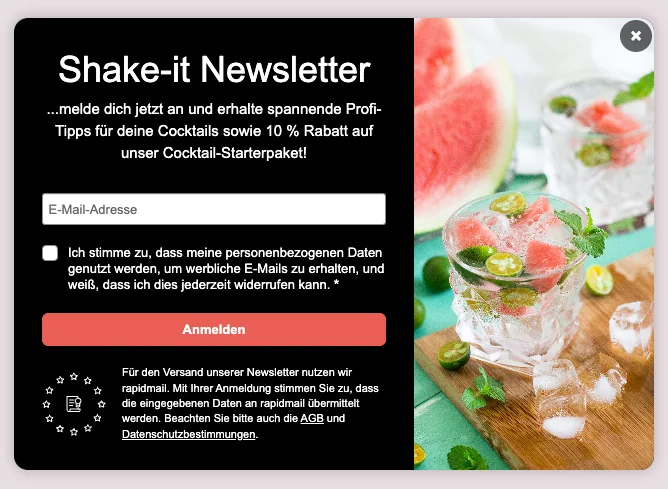
Instead, it is worth winning over potential subscribers with a clear benefit. Incentives, which you promote in your newsletter signup form, are particularly suitable when you are starting out. These are small extras that users receive as a thank you after signing up, for example:
- 🎁 Discount codes or exclusive offers for their next purchase
- 📘 Free downloads such as checklists, guides or mini e-books
- 🎥 Access to exclusive content such as videos, tutorials or webinars
- ✨ Early access to new products, promotions or content
These incentives significantly increase people’s willingness to sign up and ensure that new subscribers know what to expect from your newsletter right from the start.
👀 Have you seen this?
In a competitive market, deliberately building your own contact list is crucial for reaching and retaining customers in the long term.
prosatz Communication GmbH recognized this need and expanded its marketing strategy in a targeted way. By using email marketing and rapidmail as its newsletter tool, the company from Hückelhoven in the Lower Rhine region is taking a new approach to strengthening customer loyalty and optimizing communication with its target audience over the long term:
Keep it clean: Maintain your contact lists
A well-maintained contact list is the basis of successful email marketing, especially when you are just starting out with your first newsletter. Winning new subscribers is not the only important task; you also need to check the quality of your contacts regularly. Clean lists result in better open rates, fewer unsubscribes and higher newsletter deliverability.
For beginners in particular, the rule is: a smaller, active contact list is better than a large number of inactive contacts. If subscribers do not open your newsletters or are no longer interested in the content, it will have a negative effect on the performance of your campaigns in the long term.
Regularly cleaning up your newsletter list has several benefits:
- 📬 Better deliverability: Active contacts signal to email providers that your newsletters are relevant, so they are less likely to end up in the spam folder.
- 📊 More meaningful statistics: Open and click rates give a more realistic picture of how well your content is being received and where there is still room for optimization.
- 🤝 Greater relevance for your target audience: Your subscribers only receive content that genuinely suits them.
How to get started with clean list management
To ensure successful newsletter marketing in the long term, it is worth keeping your list organized from the outset:
- 🧹 Regularly remove inactive contacts who have not opened your newsletters for a long time. Before doing so, make one last attempt with a reactivation email.
- ✂️ Use segmentation to target different audiences effectively (such as customers, prospects, partners or internal teams).
- 🎯 Send content that matches the relevant contact list, so that no one feels they are being addressed inappropriately.
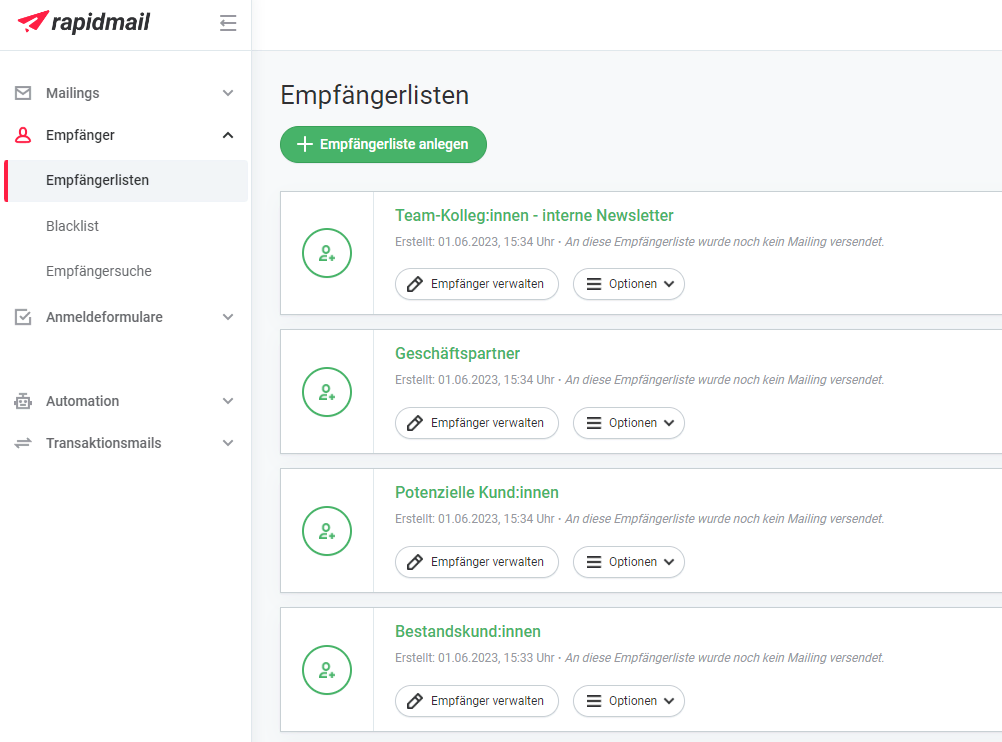
Professional and intuitive newsletter tools such as rapidmail help you stay on top of everything. You can create different contact lists and specifically select which contacts should receive your newsletter when you send it. This is particularly useful if you send different content, for example to customers, B2B newsletters to business partners or an internal newsletter.
This allows your list to grow with you step by step, while remaining structured, clearly organized and well maintained.
🐾 Step 4 – Create your newsletter: Subject line, newsletter copy, design and more
Let’s get started! All the preparations are complete, so you can now create your newsletter in your chosen newsletter software. What steps do you need to follow? We’ll explain step by step how to create your first newsletter and make it a complete success.
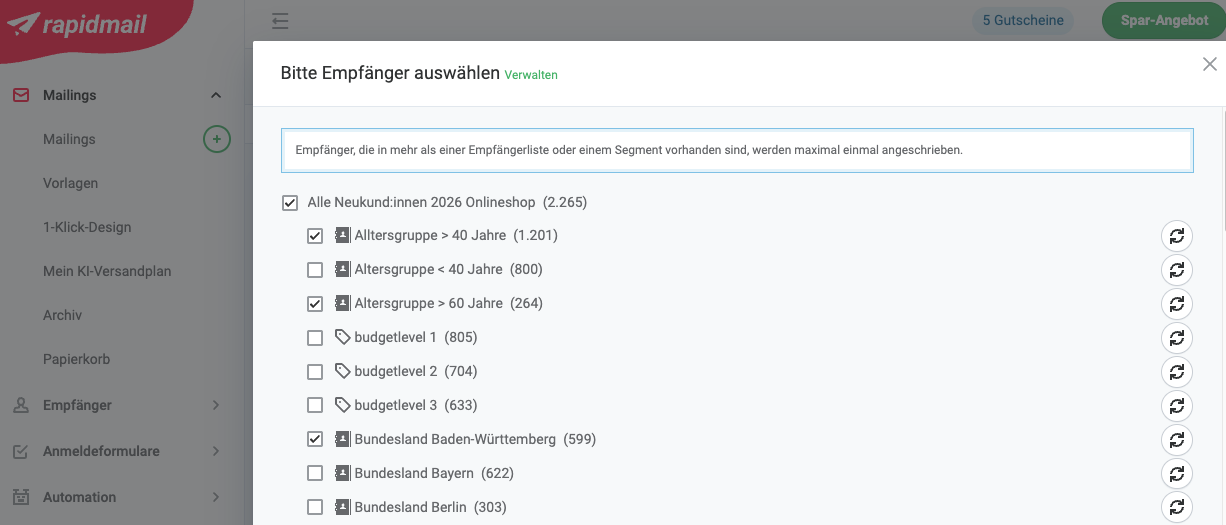
Select the right contacts
Before you start on your newsletter’s subject line, copy or design, there is one important first click to make: select the contacts who should receive your newsletter.
If you created different lists or groups when setting up your tool (such as “Customers”, “Prospects”, “Business partners” or “Internal”), select the exact list or group that matches your planned newsletter content. This ensures that your message only reaches the right people and is not accidentally sent to contacts for whom the content was not intended or relevant.
Newsletter tools such as rapidmail, which are ideal for getting started with email marketing, also let you divide your contact lists into different segments or keyword groups (tags). This allows you to select your contacts in an even more targeted way, for example by interests, location or purchasing behavior. However, when starting out, a simple selection such as “All newsletter subscribers” is usually enough for your first newsletter while you get a feel for email marketing.
Hello, it’s me: Create a sender profile
In most newsletter tools, you will of course need to create a sender profile before sending your first newsletter. But what needs to go in the sender profile? A sender name and an email address that you use to send your newsletters, preferably on a consistent basis.
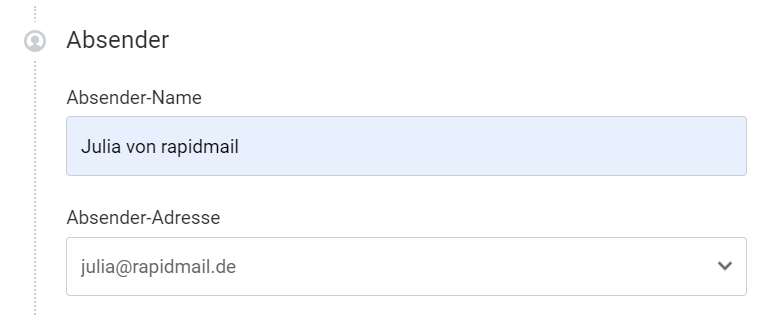
For your sender name, we recommend choosing something memorable. You can, of course, simply use your company or business name as the sender name. However, if you would like to make it a little more personal, we recommend including the first name of the person responsible for the newsletter in the sender name, for example.
For example, compared with “Eisträume GmbH”, it is much more appealing in your readers’ inboxes if the newsletter comes from “Marieke from Eisträume” or “Lukas from Eisträume”. Your company name or brand should nevertheless always appear somewhere in the sender address so that your contacts can immediately associate the newsletter with your company or brand.
💡 rapidtip: Don’t use a no-reply sender address

We advise against using a no-reply sender address such as “no-reply@eistraeume.de”, as it could immediately give contacts the impression that you do not want them to get in touch. However, you should keep the option open for feedback or questions about your newsletter.
No-reply addresses also have a negative effect on newsletter deliverability and increase the likelihood of your newsletters being caught by spam filters.
If different departments in your company create and send newsletters, it makes sense to name the relevant department before the @ sign, such as “communications@eistraeume.de” or “hr@eistraeume.de”. This lets your readers know immediately which topics the newsletter will cover and what kind of information they can expect.
On the rapidmail blog, we explain in detail which email sender is right for your newsletter.
Write your newsletter subject line
Capture your subscribers’ interest with an original newsletter subject line! After all, it is the first thing your readers see in their inbox. The subject line should be short and snappy, but still relevant and persuasive, so that the newsletters you worked so hard to create are opened and read.
Use these subject line tips to increase your newsletter open rate:
- 🎭 Use personalization: Address your subscribers personally in the subject line, for example by including their first or last name or where they live. Newsletter tools such as rapidmail have a useful feature that lets you personalize the subject line easily and exactly as you wish.
- 📫 Share important news: Mention the email’s current topic or occasion (a Black Friday promotion, a new winter collection, etc.) in the subject line and provide important answers or information, such as “How big is the discount?”, “When does the promotion end?” or “What makes your new collection special?”. Use the limited space in the newsletter subject line to make your readers curious.
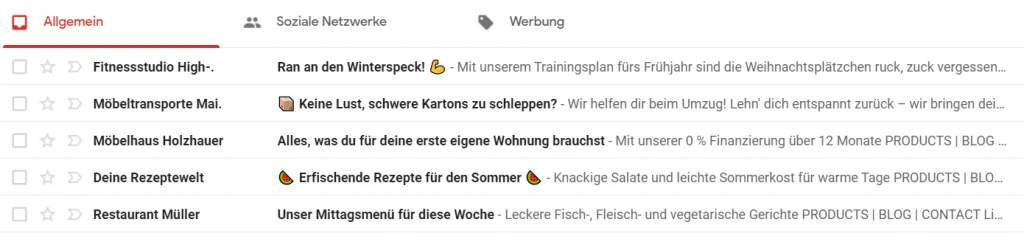
- 📏 Keep it short and snappy: Make sure you keep the newsletter subject line short (50 to a maximum of 70 characters). Shorter email subject lines are displayed in full in different email clients and on different devices, rather than being cut off just as things get interesting.
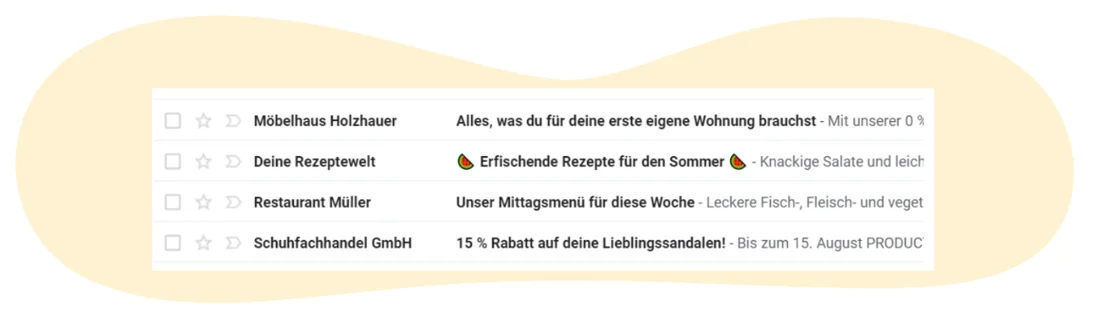
- 🤗 Include emojis: These colorful little images are genuine eye-catchers in an email inbox. If you include emojis in your subject line, you can be sure they will attract your readers’ attention. Stand out among the many other emails in their inboxes and enjoy plenty of opens.
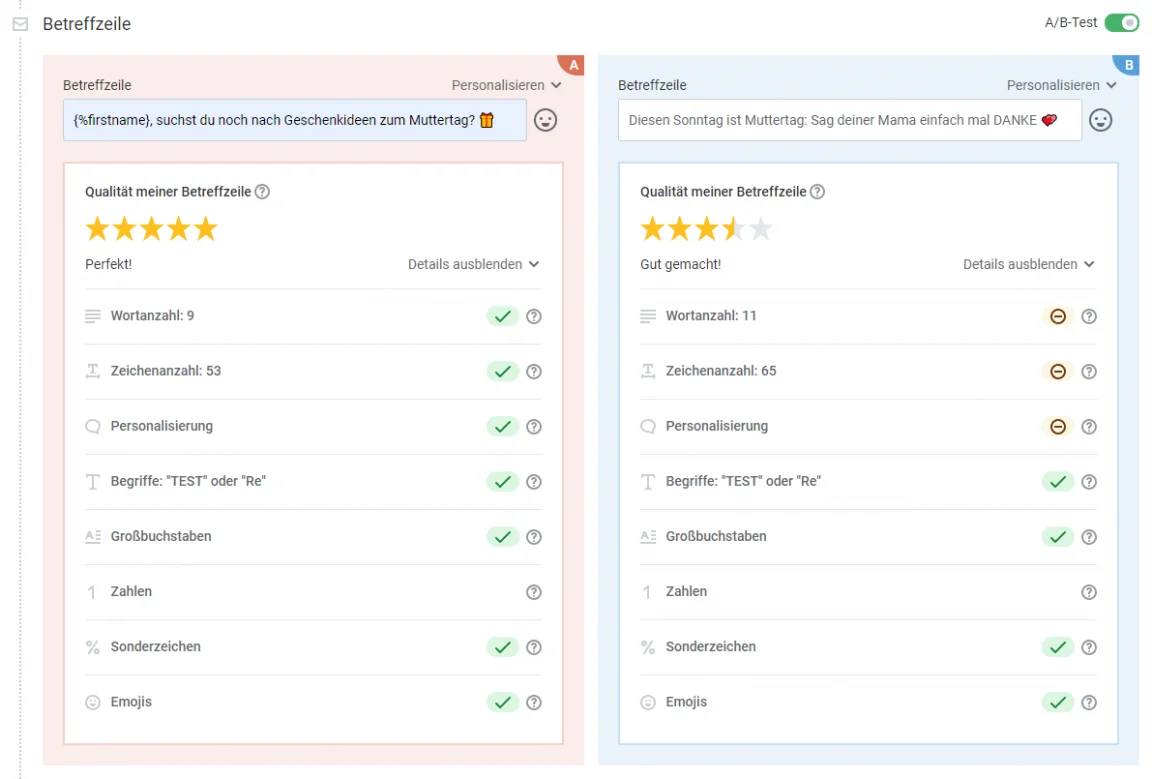
Before you send the final newsletter, you can also write two different subject lines and use an A/B test, which you send to only a small portion of your contact list, to compare which subject line (with or without a personal form of address, for example) appeals more to your readers. You can determine this by looking at the newsletter open rate, for instance. You then send the winning version to the rest of your subscribers.
The rapidmail newsletter tool also gives you live feedback on the quality of your subject line: Is it too long? Is it likely to be flagged as spam? Does it contain too many special characters? This lets you keep optimizing your subject line until it earns five out of five stars.
Looking for even more tips on the perfect subject line? We have compiled examples and tips for effective newsletter subject lines for every industry.
👀 Did you know?
With rapidmail, you can use AI in email marketing to your advantage and have individual subject lines generated in no time that perfectly match your brand.
Simply enter the URL of your company website in the email editor. Once you enter a keyword, it will suggest subject lines tailored to your company, products or services.
Creating your first newsletter can be this easy: the AI learns about your company from the URL and provides suitable, individual subject line suggestions. The AI’s suggestions are not only appealingly worded, but also automatically tailored to your company and writing style!
Come up with preheader text
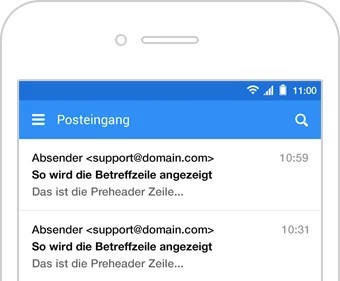
A newsletter preheader is the text that most email providers display in the inbox as preview text beneath the newsletter subject line.
The newsletter preheader is particularly prominent below the subject line on mobile devices, such as smartphones, although this is not always the case in desktop applications.
See the preheader as an opportunity: use it to complement the subject line, for example, or provide an additional incentive to read your first newsletter. The preheader is also part of the “golden trio” that can significantly influence your open rate: the sender name, subject line and, of course, the preheader.
Do you use rapidmail as your email marketing tool? If so, you can set the preheader text flexibly and, just like the subject line, personalize it or add emojis so that your email stands out even more in your contacts’ inboxes.
Create or select a newsletter template
That’s another step completed! Now that you have decided on your contacts and the first building blocks, such as the subject line and preheader, it is time to think about the visual design of your newsletter. Don’t worry: you do not need to be a design professional to create your first newsletter. With the right template, you can quickly create a professional newsletter that looks good and suits your company.
Many companies use a consistent structure and recurring design for their newsletters. There is a good reason for this: a consistent appearance ensures that your subscribers recognize your newsletter immediately, even before they have read the text. Colors, fonts and layouts play a major role in anchoring your brand in their minds.
💡 rapidtip: Follow the latest trends

Take inspiration from the latest newsletter design trends, but stay true to your brand. A clean layout, easy-to-read copy and clear call-to-action buttons ensure that your newsletter not only looks modern, but is also enjoyable to read. After all, visual appeal matters, and an attractive design increases the chances that readers will remember your newsletter positively. So create newsletters that leave readers wanting more!
Newsletter design made easy with rapidmail
With rapidmail, you have two easy ways to create a suitable newsletter template, with no prior design knowledge required:
Option 1: Create your own newsletter template with 1-click design
With 1-click design, you can create individual newsletter templates featuring your company’s look in just a few seconds. Simply enter your website URL and rapidmail automatically imports:
- 🏙️ Your company logo
- 🎨 Your brand colors
- ✒️ Suitable fonts
- 📢 Your social media links
You can then adjust the design flexibly if necessary, such as changing button colors or optimizing font sizes. Save these settings once and then conveniently use them for all future newsletters.
Option 2: Choose from free newsletter templates
Alternatively, you can choose from numerous free, professionally designed newsletter templates to find exactly the one that best suits the purpose of your campaign or your brand. All rapidmail templates can be customized or expanded with your own images, text and colors, making them ideal if you want to get started quickly.
Whether you need a newsletter featuring travel offers, seasonal discounts, business campaigns or newsletters for online shops, rapidmail has the right template for every occasion, and you can customize it further at any time.
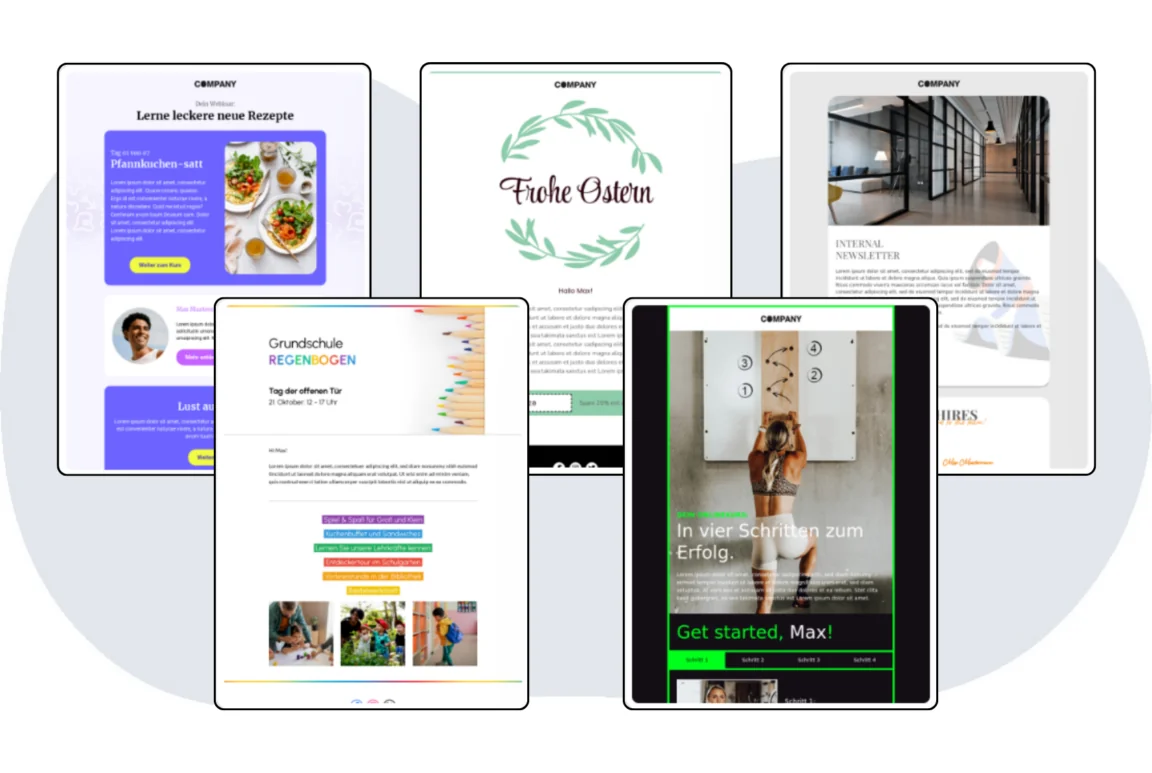
Choose a newsletter template now
💌 Our conclusion for beginners:
Of course, rapidmail also gives you the option of designing your newsletter entirely yourself and customizing it to your own corporate design. This offers maximum design freedom, but involves more work and usually requires some newsletter design experience.
We therefore recommend starting with one of the two simpler options: 1-click design or one of our free templates. This allows you to create a professional newsletter quickly, save time and focus entirely on your content. Once you have gained more experience, you can customize and expand your newsletter design further at any time.
The rapidmail newsletter
Tips, ideas and news about email marketing, straight to your inbox.
How to write good newsletter copy
During the preparation stage, you already decided which topics and content your newsletter should cover. Now it is time to start writing: how do you write your newsletter copy so that people enjoy reading it and are motivated to take action?
The most important rule from the outset is to always keep your target audience and communication goal in mind. Good newsletter copy is not based on what you want to say, but on what interests your readers and provides them with added value.
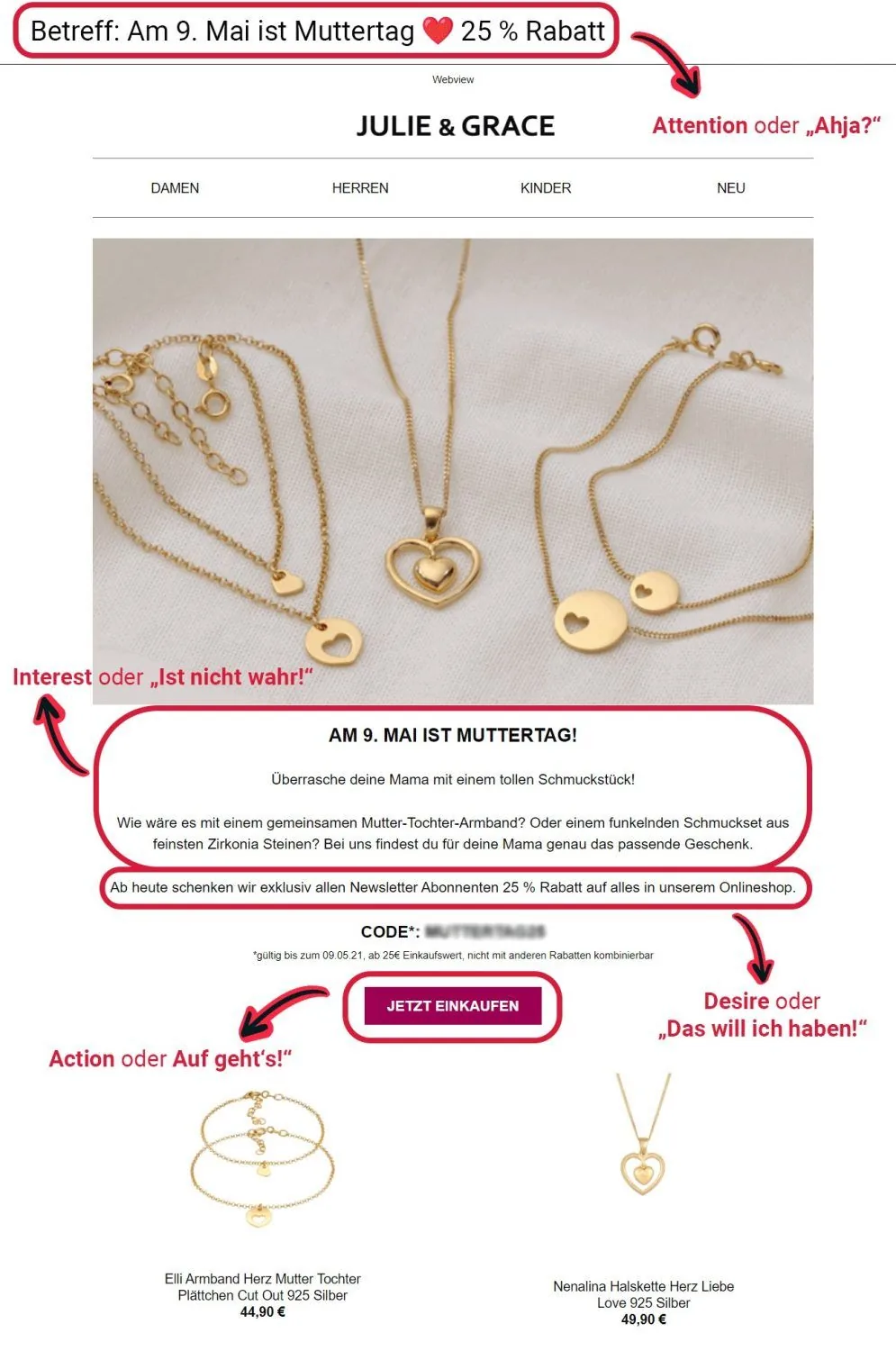
Beginners can also benefit from following tried-and-tested communication models when writing. One of the best known is the AIDA model, which works extremely well for newsletter copy.
Use the AIDA model to write structured newsletter copy
The AIDA model describes four consecutive stages of successful communication:
- 🙋 A – Attention: Capture your readers’ attention, for example with a strong headline or an engaging opening.
- 💡 I – Interest: Show why the topic is relevant. What problem do you solve? How do your readers benefit?
- 🤩 D – Desire: Leave them wanting more, for example through specific benefits, examples or exclusive content. This awakens your contacts’ desire to own your product, attend your event or take a similar action.
- 🖱️ A – Action: Clearly invite your contacts to take an action that will directly fulfill their desire, for example with a call-to-action button that takes them to your online shop to buy your product or to your event registration page when clicked.
👉 For your first newsletter, this means: a clear structure helps your readers follow the content effortlessly and increases the likelihood that they will not only read your newsletter, but also click through.
Choose your tone and form of address carefully
The tone of your newsletter plays a major role in whether your message is read or disappears into the inbox unopened. Studies such as the DMA Email Benchmark Reports (2023/2024) make it clear that relevance and an appropriate form of address are among the most important success factors in email marketing.
Emails that are clearly tailored to their target audience achieve significantly higher open and click rates than generic campaigns. Contacts also respond particularly positively to newsletters when the tone and content match their expectations.
For the tone of your first newsletter, this means:
- 📬 For an internal newsletter, the tone can be more casual, personal or humorous to suit your company culture.
- 📨 For an external newsletter to customers or partners, your language should reflect your website, social media channels and other brand communications.
💡 rapidtip: Consistency pays off
When you use a coherent, recognizable writing style across all your communication channels, the tone of your newsletter eventually becomes familiar. This strengthens trust in your brand and builds recognition, two decisive factors for long-term customer loyalty and an important foundation for successful online marketing.
Use concise, clear storytelling to persuade readers
Newsletters are usually read quickly and alongside other activities, often on smartphones for B2C target audiences. Research by the Nielsen Norman Group (“How Users Read on the Web”) has shown for years that users primarily scan digital content instead of reading it word for word. That is why one rule is particularly important in newsletter marketing: get to the point quickly. The longer the text, the less likely your readers are to read it to the end.
At the same time, emotionally engaging content is more memorable. According to research in communication psychology (for example, Chip Heath & Dan Heath, 2007), information conveyed in the form of stories is remembered significantly better than bare facts.
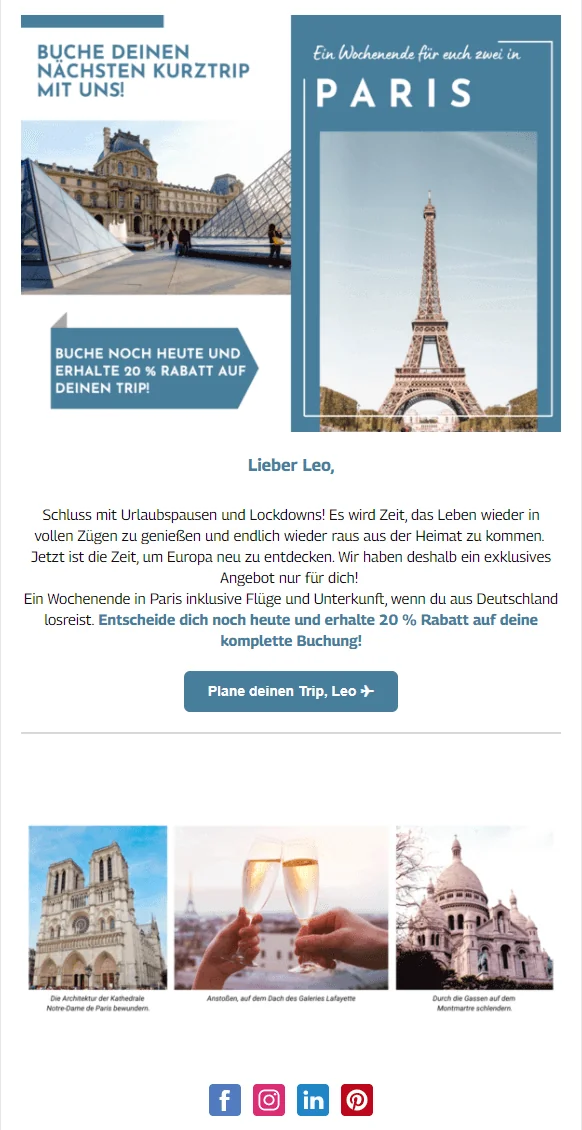
The recipe for a successful first newsletter therefore consists of these ingredients:
- 💡 A clear, easy-to-understand opening
- 🪡 A consistent thread with a clear benefit
- 💌 An emotional or practical connection
- 📢 A clear call to action
Focus and structure for better readability and more clicks
A successful newsletter depends on clarity, both in its content and its visual presentation. When creating your first newsletter in particular, it is worth deliberately setting priorities and organizing the content clearly. Too many topics at once can quickly overwhelm readers and distract from the main objective.
Studies on information processing show that an excess of information (“information overload”) reduces attention and makes decisions more difficult. The same therefore applies to email marketing: focus on one central main topic that carries the newsletter instead of presenting lots of smaller pieces of content in parallel. This keeps your message clear and helps your readers find the common thread more quickly.
The structured presentation of your content is equally important. Today, newsletters are often only skimmed, especially on mobile devices. A clear structure helps your subscribers grasp the most important information in a short time and demonstrably increases interaction.
The following points have proven effective for an easy-to-read newsletter:
- ✂️ Short paragraphs: Ensure good readability and make the newsletter easy to absorb on a smartphone too.
- 🏷️ Meaningful subheadings: Provide orientation and help readers scan the content quickly.
- ✨ Visual highlights: Direct attention to important statements, offers or calls to action.
- ✅ Clear bullet-point lists: Present key information concisely and make the content easier to grasp quickly.
A clearly focused and well-structured newsletter not only provides an enjoyable reading experience, but also delivers better open and click rates. This allows you to guide your readers through the content and makes it easy for them to follow the desired call to action.
👀 Have you seen this? How to write newsletters like a professional
Would you rather watch a video and learn how to write successful newsletters as you go? No problem! In this video, our content manager Wiebke shares our 11 professional tips for really good copy. Roll the film! 🎬
Open video transcript
Intro
Do you regularly sit in front of a blank screen and wonder how to write your newsletter?
I certainly know the problem, but in my day-to-day work as a content manager at rapidmail, I have collected 11 tips to help you tackle writer’s block in the future. So, let’s simply write a newsletter together!
Tip 1: Write a compelling headline
The headline is the first thing your contacts see, so it should immediately spark their curiosity. Ask yourself what the newsletter’s main message is and sum it up concisely in a suitable headline. Try to use as few lines as possible. You can, for example, use a main headline and a subheading. Incidentally, particularly large headlines with eye-catching fonts are on trend this year.
If you want to start writing your own newsletter straight afterwards, I have a little surprise for you! The first link in the video description gives you a 50% discount on your first rapidmail invoice!
Tip 2: Build a connection through personalization
In email marketing, you can make things personal and greet your contacts by name. This instantly makes your newsletter copy feel much more personal and makes you and your brand appear approachable and likeable.
Different greetings may be appropriate depending on the industry and company:
If you are choosing between “Dear Mr/Ms …”, “Dear …” or simply “Hello …”, it is best to follow the communication style you usually use.
In my experience, however, email marketing tends to be a little more relaxed. After all, you want to use your newsletter to connect with your target audience and build a long-term relationship. A warm “Hello Mr Müller” comes across as much more personable and automatically builds a closer connection than a formal “Dear Mr Müller”. The latter sounds more distant, cooler and, in my opinion, a little old-fashioned by comparison.
For a personalized greeting, you will of course need your contacts’ first and/or last names and, depending on the form of address, their gender.
One more tip:
Subscribe to other newsletters too. This puts you in the reader’s shoes and lets you see for yourself which subject lines, headings or phrases appeal to you more, and which appeal to you less.
Tip 3: Make sure your structure is clear
Before I start writing the newsletter, I first make a bullet-point list of all the information I want readers to take away. Then put the different points in a suitable order and consider which aspects fit best in the introduction, main section or conclusion of your newsletter copy. The clearer and more structured your newsletter is, the better you can communicate your message and achieve your goal.
In the introduction, you should build on the curiosity sparked by your heading and show your contacts why they should keep reading.
For example, I could begin with a question such as “Have you ever wondered how you can captivate your readers with really good copy?” This creates an immediate connection with readers and places them in a specific situation they will probably recognize.
The main section then conveys your central purpose, such as informing, selling or entertaining. As I want to provide information in this newsletter, I give a brief, concise list of tips for good newsletter copy here.
The conclusion is about winning over your contacts completely and encouraging them to click the CTA. Clearly explain why they should do so and what benefits they can expect. This is followed by an eye-catching, clickable CTA button that takes them to your website!
As I want to encourage readers to watch this video, I link to it with an eye-catching button and point out that they can get more tips there while sitting back and relaxing.
The AIDA model can also help you write your newsletter. A cruise ship? No: the AIDA principle is a marketing formula. A stands for “attention”, I for “interest”, D for “desire” and A for “action”.
- Attention: Capture your subscribers’ attention by sparking their curiosity with an appealing subject line and a modern header image.
- Interest: An attractive heading and an engaging opening sentence increase the interest of recipients who now want to find out more.
- Desire: The newsletter copy presents all the benefits and shows your readers THE solution to their problems. This makes them want to buy your product or visit your website to learn more about the topic you have introduced.
- Action: An eye-catching call to action with clever wording gives your readers an extra incentive to click the button, and just like that, they arrive on your website!
That gives you the basic framework for your newsletter! Now I’ll show you how to improve your copy even further.
Tip 4: Keep it as brief as possible
When writing your newsletter, keep it as brief as possible. The information on the main topic, including the CTA, should also appear “above the fold”, meaning in the upper part of the email that readers can see without scrolling.
Subtopics or further articles can be placed below this to provide more reading material for interested readers who have the time.
Need a little more inspiration for what a good newsletter looks like? We have collected 33 successful real-life examples for you in a compact PDF. As always, you can download it for free via the link in the video description!
Tip 5: Remove unnecessary filler words
I really do have to admit that I should take this tip to heart myself. Filler words such as actually, perhaps, really, just, already, quite, relatively, simply and somehow needlessly pad out your newsletter copy and make it longer. Once you have finished, read the entire text again from top to bottom and remove all unnecessary words that can be deleted without making the text harder to understand.
Tip 6: Avoid spam words
To prevent your newsletter from being classified as spam, it is better to avoid certain words. Words such as prize, free and no spam, as well as lots of exclamation marks or capital letters, can increase the likelihood of email providers classifying your email as spam. This reduces your newsletter’s deliverability and means fewer contacts will read your emails.
Did you know that rapidmail has an automatic spam check? Before sending, you can use it to assess the risk of your newsletter being classified as spam. We also provide optimization tips to ensure that nothing stands between your newsletter and your readers’ inboxes.
A few clever phrases in the right places can help you get even more from your newsletter copy, for example with a clever call to action:
Tip 7: Choose a clever call to action
You will probably want your newsletter not only to give readers something to read, but also to encourage them to take action. Whether you want them to visit your website, buy a product or find further information on a topic, a call to action directs contacts from your newsletter to another page.
To encourage clicks on the button, your recipients should understand what awaits them after clicking. Describe this in the preceding text and give the CTA button an unambiguous label. It should be brief, punchy and motivate readers to click.
“Get more tips”, for example, is more suitable here than “Go to video” or similar wording because it puts the benefit for readers front and center. The popcorn emoji is also an eye-catcher and reinforces the message.
When writing your newsletter, you can of course use AI to give you a helping hand. AI tools can be extremely useful when you are looking for inspiration or wording ideas. But do not forget to review AI-generated copy and add your own style so that you stand out from the competition.
Tip 8: Motivate with active verbs
To make your newsletter copy flow smoothly and read easily, avoid unnecessary nominalizations and use positive, active verbs instead.
Here is an example:
“The division of your newsletter into an introduction, main section and conclusion is essential for your readers’ easy comprehension of the content.”
To make the message easier to read, more memorable and simply more personal, you can easily rewrite the complex sentence as follows:
“Divide your newsletter into an introduction, main section and conclusion so that your readers can understand the content easily.”
Imagine that you are talking to a colleague or speaking to a customer on the phone, and write your newsletter in the same way that you would explain it aloud.
Tip 9: Be clear and direct
Beating around the bush will not get you anywhere. Instead, provide information that is as specific as possible, helps your readers and does not leave them guessing what you mean.
Of course, not every topic is always positive. Price increases or the news that you are removing a particular product from your range, for example, may be met with considerable frustration. In precisely these situations, it is even more important to remain positive in your newsletter copy, show empathy and demonstrate that you can put yourself in your readers’ shoes!
When writing your newsletter, you should therefore always ask yourself the following questions:
How would I react to this message?
What advantages and disadvantages does this have for my subscribers?
What solution is available to recipients who may react negatively to my message?
How can I show my subscribers that they matter to me?
There are just a few final checks to complete before you can send your newsletter, such as whether your readers are at the heart of it:
Tip 10: Put your readers first
You should not try to sell as much as possible in every newsletter. Constant advertising would probably quickly annoy your contacts and lead to lots of unsubscribes.
So provide variety and put yourself in your readers’ shoes: What interests them? What do they expect from your newsletter? How can you offer them added value?
Helpful newsletters containing important tips, step-by-step instructions, recipes, analyses and creative ideas show your contacts that you are thinking of them. In the long term, this creates a bond between your subscribers and your company or brand. In turn, this bond increases the chance of a successful newsletter conversion.
Tip 11: Have someone proofread your newsletter
Once you have finished writing your newsletter, you should definitely ask someone to proofread it.
We have probably all experienced this: you spend ages working on a piece of copy, rewriting a sentence here and there, and replacing a few words with better-sounding alternatives each time you read it. In the end, you are more or less happy with the result and put the copy aside. The next day, you get a bit of a shock when you notice how many typos you missed and how awkward some of the sentences sound.
That is completely normal! This is why it is always helpful to ask colleagues for feedback. Two pairs of eyes are always better than one! Your colleagues are also not as immersed in the copy as you are and can easily assess whether the newsletter is understandable and error-free, or whether important information may even be missing.
Naturally, rapidmail lets you send test emails free of charge.
Conclusion: Say goodbye to writer’s block!
You now have the perfect guide to writing a successful newsletter! Try it right away and leave me a comment: Which of these tips did you find most helpful?
Do not forget: the link in the description gives you a 50% discount on your first rapidmail invoice!
Until next time, and have fun writing your newsletters! 🚀
Using the right fonts and font sizes in your newsletter
Fonts and font sizes have a greater influence on the success of your newsletter than you might think at first. They determine how pleasant your newsletter is to read and how professional it looks, as well as whether your content is noticed at all.
For your first newsletter in particular, remember: readability comes before design flourishes. Clean, well-structured copy ensures that your message gets through, regardless of whether the newsletter is read on a desktop or mobile device.
Which fonts are suitable for newsletters?
The rapidmail editor gives you access to more than 40 different newsletter fonts. That offers plenty of choice, but can also quickly become overwhelming.
For a successful start when creating your newsletter, we recommend:
- ✒️ Simple, highly legible fonts for longer body copy
- ✒️ More distinctive but clearly legible fonts for headings to attract attention
Avoid combining too many different fonts. Two fonts are more than enough, one for the body copy and one for headings. This keeps your newsletter calm, clear and professional.
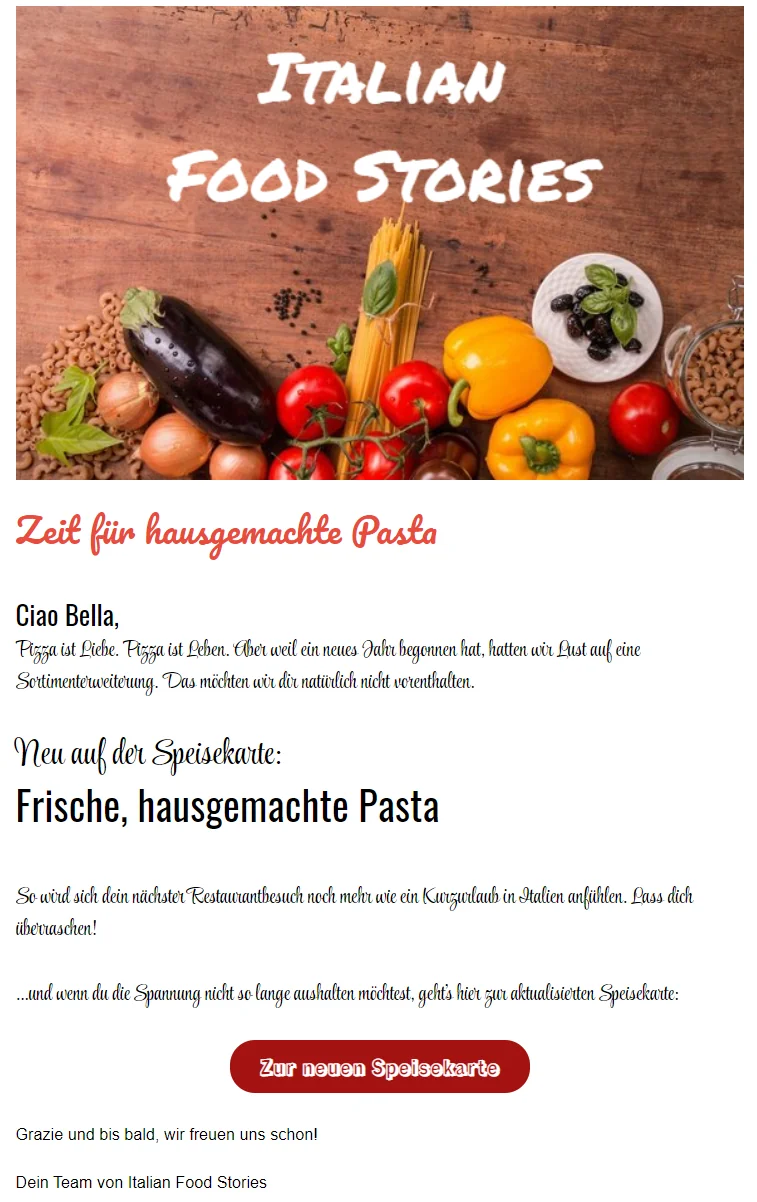
Choosing the right font size
Alongside the font itself, font size also plays a crucial role, particularly because many newsletters are now read on smartphones.
When creating your first newsletter, you can use the following guidelines:
- 📜 Body copy: at least 14 pt so that it is easy to read on every device
- 🔘 Buttons and calls to action: slightly larger so that they catch the eye immediately
- 🏷️ Headings and newsletter titles: significantly larger than the body copy to provide structure and orientation
This guides readers visually through the newsletter and makes important content immediately recognizable.
💡 rapidtip: Do not reinvent the wheel

If you are unsure, use tried-and-tested templates or your corporate design guidelines as a reference. A clearly structured newsletter with easy-to-read fonts not only looks professional, but also ensures that people enjoy reading your content, which is exactly what you want from your first newsletter.
Increase newsletter clicks with images
Images play a central role in newsletters: they attract attention, convey emotion and support your message. For your first newsletter in particular, however, less can sometimes be more. A balanced image-to-text ratio makes for a pleasant reading experience and helps subscribers absorb the content quickly.
Make sure your images fit the content of the text and serve a clear purpose, such as sparking curiosity, showing a product or conveying a mood. Well-chosen images speak for themselves and support your storytelling without distracting from the actual content.
Images do not just make your newsletter look better; they can also make an active contribution to its performance. Add links to your images deliberately, for example to further content, product pages or blog posts. This creates additional clickable areas and increases the likelihood that readers will interact with your newsletter.
👀 Did you know?
rapidmail gives you access to an image library containing more than 1.5 million free, royalty-free images for your newsletters, perfect for every occasion and sector. You can also use the integrated image editor to:
- ✂️ crop images
- 🔄 rotate and flip them
- ✍🏼 add text
- 🧑🏻🎨 apply filters
- 🎨 match their colors to your newsletter design
This lets you create visually appealing newsletters in no time, giving them a professional look that makes people want to keep reading.
Rotate, crop and flip newsletter images, apply filters, or adjust their colors and size, all thanks to the image library and image editor.
From interest to action: calls to action
Without a call to action (CTA), even a strong newsletter often has no effect. Call-to-action buttons are clickable elements that let you prompt readers to take a specific action and achieve your newsletter goal, for example:
- 💸 attract more visitors to your website or online shop
- 🖱️ generate additional clicks on blog posts or landing pages
- 📈 gain new followers for your social media channels
How to position CTAs correctly in your newsletter
For your first newsletter in particular, it is crucial to make the next step as easy as possible for readers. A well-positioned call to action guides them through the newsletter and clearly shows them where to go next.
When adding CTAs to your newsletter, pay attention to the following points:
- 👁️ Position them prominently: Place your call to action where it catches the eye immediately, for example directly after a section of content or at the end of the newsletter. This lets readers see at a glance what they can do next.
- 🎨 Highlight them with color: Choose a color for your CTA button that stands out clearly from the rest of the newsletter design while still matching your brand. A high-contrast button attracts attention without looking intrusive.
- 📐 Leave enough space: Do not place CTAs between long blocks of text. White space around the button prevents it from getting lost and makes it easier to click, especially on mobile devices.
- 📍 Position them logically in the reading flow: Place the CTA where readers are ready to click based on the content, such as after a product introduction, a story or a clear benefit statement.
- 🧭 Show a clear next step: The button label should make it clear what will happen, for example “Learn more now”, “Get the offer” or “Go to the guide”. This removes uncertainty and increases the likelihood of a click.
A clearly positioned call to action tells readers: This is where you go next, and makes it easy for them to accept your invitation.
Come up with suitable CTA labels
The impact of a call-to-action button depends on more than its design: the right words make all the difference. A well-chosen CTA label makes the decision easier for readers and immediately shows them why clicking is worthwhile.
Instead of generic standard phrases such as “Buy now”, feel free to be more creative and appeal to emotions. Studies such as those by Nielsen Norman Group (2022/2023) also show that clear, benefit-led calls to action increase people’s willingness to click, especially when they suit the mood and content of the newsletter.
Our beginner’s tips for effective newsletter CTAs:
- 🎯 Communicate the benefit clearly: Show the value of clicking straight away, for example “Get the recipe free” or “Download the tips”.
- 💬 Use natural, active wording: Write as you would speak to your customers. Active verbs such as “discover”, “get” and “start” are more inviting than passive phrases.
- ❤️ Evoke emotion: Good CTAs appeal not only to reason, but also to feelings, such as curiosity (“Reveal the secret now”), anticipation (“Get your ticket now”) or inspiration (“Discover the latest trends”).
- 💭 Consider the context: The CTA label should always match the newsletter content. After presenting a range of travel offers, for example, “Let the adventure begin” feels more appropriate than a matter-of-fact “Learn more”.
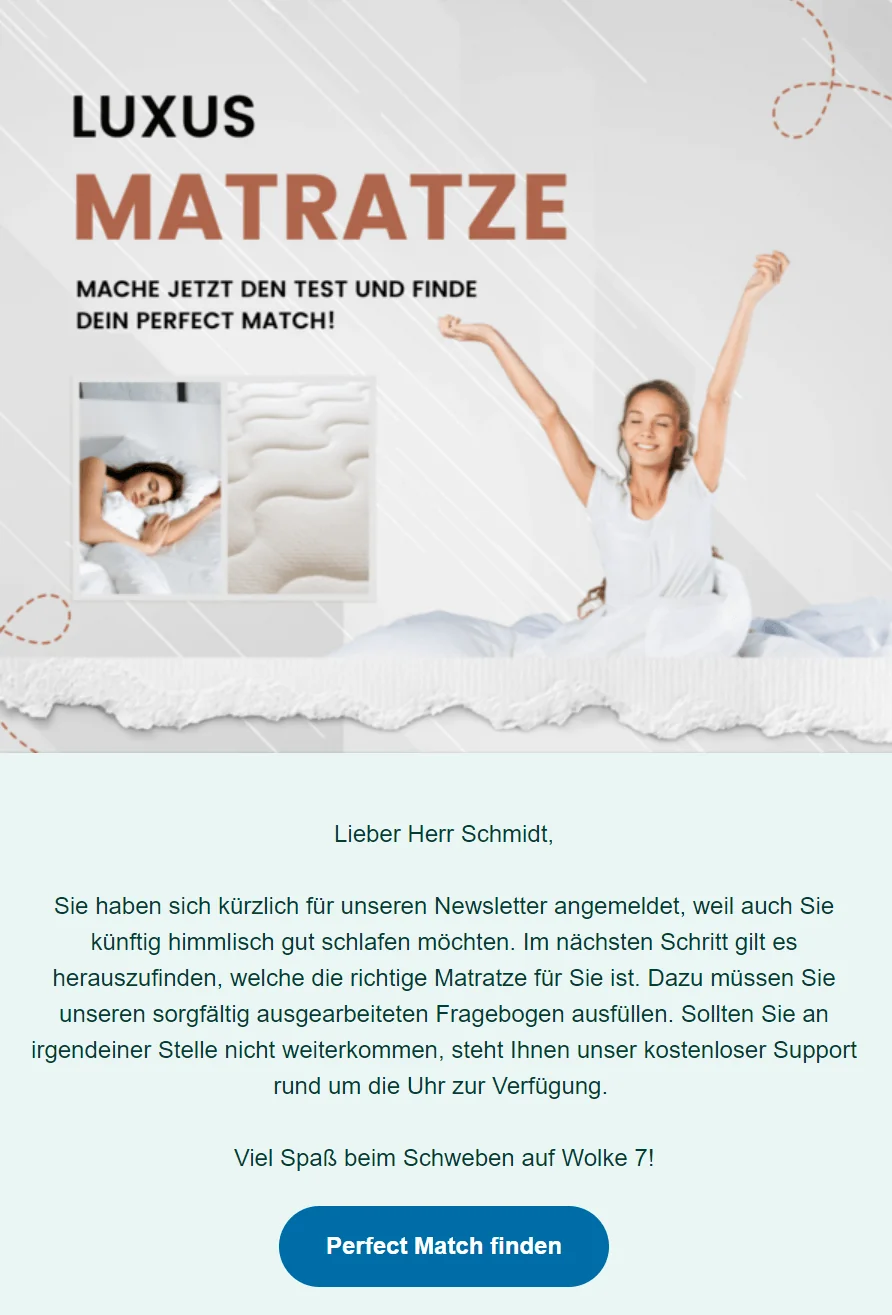
Pre-send checklist: Final newsletter design and structure review
Before sending your first newsletter, it is worth carrying out a brief but thorough check. Even small details can determine whether people enjoy reading your newsletter or leave it unread in their inbox in the future. A clear newsletter structure, good readability and a coherent design ensure that your content is easy to absorb and looks professional.
Use this newsletter design checklist to make sure you have considered everything when creating your newsletter:
Checklist: Is your newsletter ready to send?
- 🎨 Coherent design: Do the colors, images and fonts match the topic, your content and your brand?
- ⬆️ Important content first: Are the key messages and offers visible in the upper section of the newsletter?
- ✂️ Short sections of copy: Is the copy well organized, easy to understand and pleasant to read?
- 🔍 Good readability: Is the body copy set to at least 14 pt, including on mobile devices?
- 🖼️ Balanced text-to-image ratio: Do the images support the content without distracting from the text?
- 📷 Images embedded correctly: Do you want to embed images in the newsletter, and have you enabled the corresponding display setting?
- 👉 Clear call to action: Is there at least one clearly visible CTA that directs readers to the next step?
- 🔗 Social icons included: Do the social media icons link appropriately to your other channels?
- ⚖️ Unsubscribe link included: Is the legally required unsubscribe link easy to find?
- 🏷️ Legal notice added: Does the newsletter contain a complete and correct legal notice?
This final check helps you avoid common beginner mistakes and produces a newsletter that looks impressive and works properly.
👀 Have you seen this? See how others do it
Get inspired! Looking at successful newsletters from other companies shows just how effective a clear structure and appealing design can be. Our selection of successful newsletter examples from rapidmail customers gives you plenty of ideas for layout, copy and design when creating your own newsletter.
In her video, our Content Manager Wiebke also presents the latest newsletter trends for 2026, which you will not want to miss! It is well worth watching:
Open video transcript
Chapter 1: Introduction
Seven trends and developments could radically change email marketing in 2026. To help you prepare now, today we’re going to look at the most important email marketing trends for 2026, which will determine whether your emails are still successful this year.
But first things first: emails and newsletters will remain among the most effective marketing channels in 2026. So we can still answer the question of whether newsletters are completely outdated with a resounding no.
However, this makes it all the more important to keep up with the times. Technologies and user behavior are currently changing rapidly, and anyone who does not develop their strategy will lose visibility and relevance in the long term.
Chapter 2: Trend 1 - Smart inboxes
The inboxes of Apple, Gmail and other providers are becoming increasingly intelligent. Providers want to prevent users from being constantly overwhelmed by irrelevant emails, so they are making more and more decisions themselves about which messages should be prioritized and which should be filtered directly into the promotions or even the spam folder.
This means that purely promotional newsletters with no real benefit for recipients will find it increasingly difficult to land directly in the “primary” inbox and catch contacts’ attention without any detours.
But you can still earn your place in the primary inbox by completing a few tasks:
Make sure you authenticate your sender domain. To do this, you need to add a few security records so that email providers recognize that you are a legitimate sender with no malicious intentions. This two-minute video tells you more about sender authentication.
You should also let go of the idea that you can cover your entire target audience with a single campaign. A generic email like that will never reach the inboxes of many recipients when inboxes are filtering more aggressively and rewarding relevance. Instead, focus on reaching the right contact at the right moment. You achieve this by segmenting your list, which means dividing it into different subgroups, for example by gender, area of interest or place of residence. You should also use email automation. You set up the emails once, and they are then sent automatically to specified target groups when certain conditions are met, for example when a contact takes a particular action and clicks a link in a newsletter, or when a contact has not opened any of your newsletters for three months. A specific time can also trigger your automation, such as an appointment reminder.
These two levers, automation and segmentation, allow you to tailor your content precisely to individual contacts and secure a place right at the top of their inboxes.
Chapter 3: Trend 2 - Goodbye, open rate!
At first glance, the open rate may seem like an extremely important metric. Of course, if you put lots of work and effort into an email, you want people to read it! Nevertheless, the open rate should no longer be your most important metric in 2026. In recent years, it could no longer be measured reliably due to factors such as email providers’ privacy updates, and the new smart inboxes will amplify this effect further.
But if you think about it, email marketing is rarely just about contacts reading your email. You also want to encourage them to take action, such as registering for an event, making a purchase or trying a new feature. The open rate cannot tell you whether they have done that anyway.
So, in 2026, focus much more on the click rate and conversion rate when analyzing performance.
Chapter 4: Trend 3 - Regular touchpoints instead of peak campaigns
Short-term promotions are becoming less and less effective in 2026. What really works is long-term trust, and that develops through relevant, regular touchpoints.
Customers no longer make decisions only during seasonal peaks such as Black Friday or Christmas. Purchasing decisions happen much more often in between.
Regular newsletters ensure that you remain visible. They keep the relationship warm, build trust and make sure recipients think of you when they are ready to act.
I would therefore advise you not to launch just a few big campaigns in 2026, but to provide smaller, valuable and consistent prompts instead. It does not really matter whether you send weekly, fortnightly or monthly. Simply choose a regular schedule that you can maintain in your working day and use it to build strong brand loyalty.
Chapter 5: Trend 4 - AI as a creative sparring partner
In 2026, AI is no longer the “cool new tool”, but an established part of everyday work. However, the best results do not come from AI taking over the work entirely, but from using it as a sparring partner.
AI can help you generate newsletter ideas more quickly, optimize subject lines, structure content or define target audiences. AI can suggest personalized variants or even plan your automation flow.
However, the creative direction, tone of voice and emotional quality should still come from you. This allows you to improve efficiency without losing your brand personality.
Chapter 6: Trend 5 - Accessibility
Since 2025, accessibility has also been mandatory for digital products and is therefore no longer seen merely as “nice to have”, but as a genuine factor in quality and success. An accessible email does not only benefit people with disabilities or those who find technology difficult to use; it is fundamentally easier for everyone to consume.
In 2026, you should therefore design your emails as follows: use sufficiently large fonts of at least 14–16 pt, provide strong contrast and always add alt text. Create a clear structure with headings, and make your buttons large enough and easy to read. Use understandable language and clear messages. The more clearly you express yourself, the more people can easily understand your content.
Would you like to read about the topic at your leisure? Take a look at the video description, where I have linked our detailed newsletter guide on the subject.
Accessibility not only makes your emails more inclusive, but also improves usability and increases your chances of clicks and engagement, particularly in smart inboxes, which increasingly reward good readability.
Chapter 7: Trend 6 - Minimalist designs
Minimalism remains very popular in 2026 and will continue to shape newsletter design. It is no wonder: a pared-back look, clear structures, plenty of white space and short sections ensure that your message comes across immediately without forcing readers to battle through clutter or make an effort.
A restrained design does not have to be boring. It thrives on clear lines, calm areas and deliberate use of color! rapidmail also gives you access to 12 clean newsletter design templates that you can easily customize and fill with your own content!
Do not forget to optimize your newsletter for mobile devices either! Most emails are now read on smartphones and tablets while people are on the move. Every rapidmail email is automatically optimized for mobile, and you can double-check the display using the preview function.
Chapter 8: Conclusion - Relevance first, reach second
In email marketing, relevance will be much more important than reach in 2026. The winner will not be the sender with the largest recipient list, but the one who builds long-term relationships through regular, tailored content. If you also pay attention to accessibility and minimalist designs and get support from AI tools, you already have a huge head start!
What are your expectations for 2026? Let me know in the comments.
Thank you so much for watching, and see you next time.
🐾 Step 5 - Send your first newsletter: Consider technology and timing
Hooray, your first newsletter has been created and is (almost) ready to send! So let’s go ahead and send the newsletter, right? Hang on: there are still a few things to consider before you send your first newsletter on its way.
Editor preview: Check the final result
You are almost there! Before you finally send your newsletter, you should definitely look at the final result in advance. The preview function in the rapidmail email editor is designed for exactly this purpose. It helps you spot any final errors and ensure that your newsletter looks good everywhere.
The preview lets you check how your newsletter appears on different devices, including smartphones, tablets and laptops. This is especially important if many of your contacts read your newsletter on mobile. Something that looks perfect on a desktop can quickly become confusing on a phone if the spacing, images or font sizes are not optimally adjusted.
Use the preview function to check the following points:
- ✅ Is the copy easy to read, even on small screens?
- ✅ Are images displayed correctly and scaled appropriately?
- ✅ Are buttons and calls to action easy to reach and clearly recognizable?
- ✅ Does the newsletter structure remain clear?
This prevents readers from seeing a broken campaign on their smartphone and instead ensures a professional, coherent appearance on every device.
👀 Did you know?
All newsletters created with rapidmail are automatically responsive. This means that your newsletter automatically adapts to the device, whether it is a smartphone, tablet or desktop computer. Copy remains easy to read, images are scaled correctly and buttons are easy to click even on small screens. This ensures that your newsletter looks professional everywhere, with no additional work required.
Once you have created your newsletter, you can use the rapidmail preview function to check that it displays perfectly on every device.
Carry out a test send: Better safe than sorry
Before sending your first newsletter to your entire contact list, you should play it safe and carry out a test send. This final trial run helps you spot any remaining errors, avoid display problems and click “Send” with confidence.
The test email function in the rapidmail editor lets you send your newsletter to up to 10 selected email addresses free of charge in advance, for example to team members who can put your newsletter through its paces. Feel free to send the newsletter to yourself as a test email too. During a final check in your own inbox, you will often spot small details that you previously overlooked.
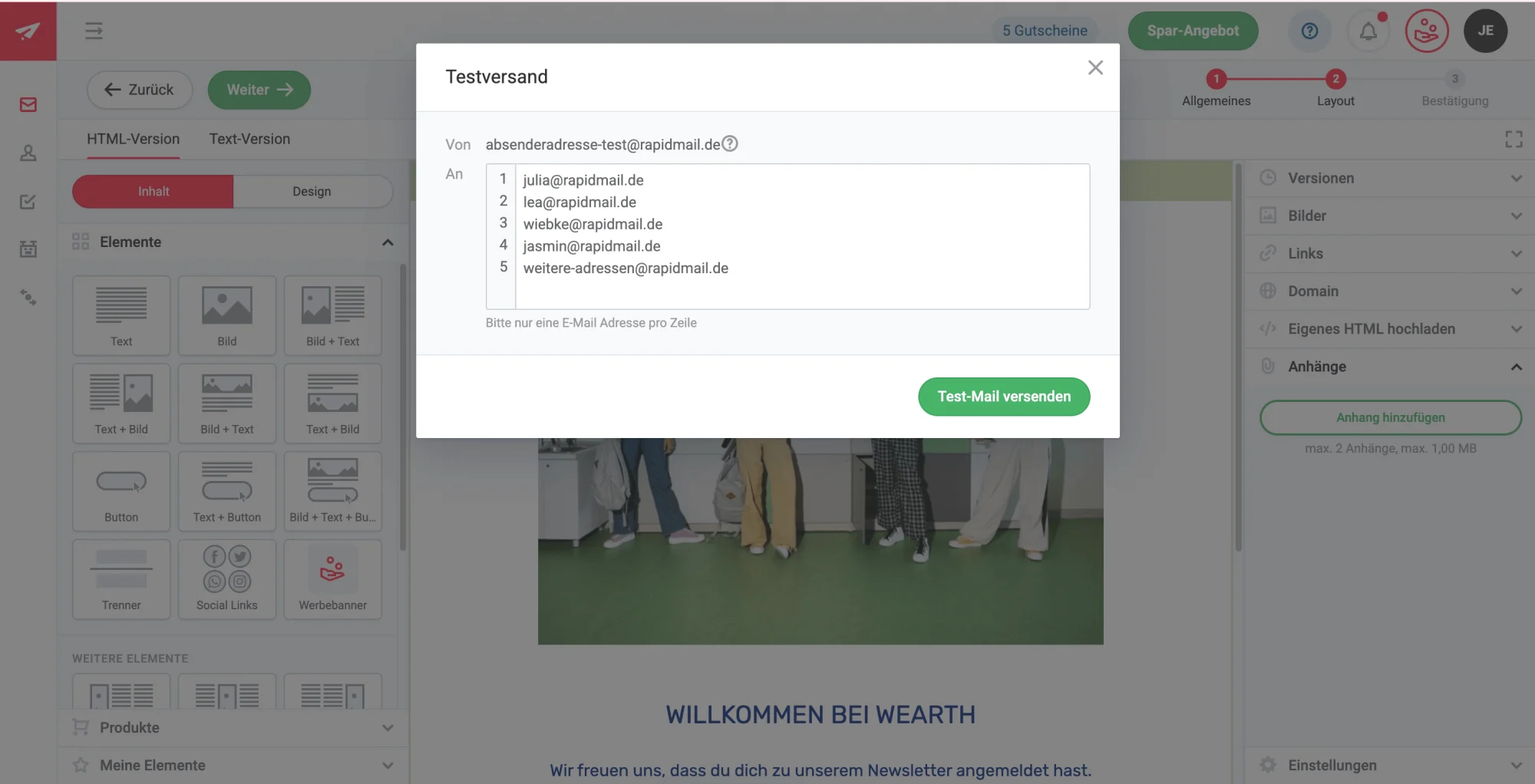
Depending on the recipient, newsletters are opened in different email programs, such as Outlook, Gmail or web.de. You should therefore also send test emails to ensure that your newsletter displays correctly in different email clients and on different devices.
Checklist for your newsletter test send:
- 📬 Subject line and preheader: Is the subject line displayed correctly? Is the preheader complete and worded appropriately?
- 🏷️ Logo in the header: Is your company logo visible and linked to your website?
- 🔗 Working links: Can every link be clicked, including those in the copy, buttons and images?
- 🖼️ Image display: Do all images load correctly and display appropriately?
- 📱 Responsive view: Does the newsletter look good on PCs, tablets and smartphones?
If everything is in order, you are perfectly prepared for the final send of your very first newsletter!
💡rapidtip: Always use checklists

Things can go wrong with more than just your first campaign. Use our checklist for successful newsletter sending so that you can continue sending your newsletters confidently and without errors in the future.
Find the right time to send your first newsletter
Your newsletter has been designed, checked and is ready to send. Now the time you send it will determine whether your message is opened or disappears unread in the inbox.
Especially for your first newsletter, it is worth using tried-and-tested time slots instead of sending it at random. This ensures that you reach your subscribers when they are most likely to have the time and attention to read your newsletter.
If you use rapidmail as your email marketing software, you have the advantage of being able to set the time for your newsletter to be sent flexibly and in advance. It will then be sent to your chosen contacts entirely automatically at the specified time.
When is the best time to send newsletters?
The best time to send always depends on your target audience. It naturally makes a difference whether you are sending to B2C or B2B contacts, which sector your company operates in and exactly what you want to achieve with the newsletter.
However, recent studies and trend reports provide useful guidelines for the ideal time to send newsletters that you can test when getting started:
- 💌 Based on our own experience at rapidmail (2026), B2B newsletters are opened most often on Tuesday and Thursday mornings between 10 am and 11 am.
- 💌 According to research by Campaign Monitor (2022), Monday, Tuesday and Wednesday are the best days to send newsletters. Monday is cited as the day with the highest open rates, Tuesday as the day with the highest click rates, and Tuesday and Wednesday as the days with the highest click-to-open rates.
- 💌 According to the GetResponse Email Marketing Benchmark 2024, newsletters achieve particularly good open rates when they are sent early in the morning between 4 am and 6 am or in the late afternoon between 5 pm and 7 pm.
Looking at these different findings, you can already see that the key question remains: which sending time works best for your own target audience? Over time, you will find out automatically by testing different time slots and comparing the results.
💡 rapidtip: Use your website visits as a guide
Check when your website receives the most visits. Your subscribers may also have time to open and read your first newsletter during the same periods. If your newsletter is aimed at consumers (B2C), sending it early in the morning, in the evening or on the weekend could work well. By contrast, if your target audience consists of business owners and employees (B2B), sending it during normal office hours is probably more suitable.
How often should you send newsletters?
Your newsletter sending frequency is right when it neither leaves your subscribers wanting more nor overwhelms them. However, there is no one-size-fits-all ideal sending frequency. It depends on the content you want to communicate, your sector and your target audience’s expectations. You can also adjust the frequency after a while if, for example, your subscribers tell you that they would like to receive newsletters from you more or less often.
We recommend starting with 1-2 newsletters per month. This keeps you in your readers’ minds so they do not forget you, without making a poor first impression by sending newsletters too often and triggering large numbers of newsletter unsubscribes.
Around important events, such as the peak marketing period between Black Friday and Christmas, the interval between newsletters can sometimes be shorter. Your contacts appreciate bargains and great money-saving offers on these key retail promotion days.
💡 rapidtip: Actively involve your readers
A short survey in your newsletter helps you find out how often your subscribers want to hear from you. At the same time, take the opportunity to ask which topics and content interest them most.
This gives you valuable first-hand feedback, enables you to tailor your newsletter specifically to your readers’ expectations and helps you avoid unnecessary unsubscribes. Your subscribers also feel that you take them seriously, which strengthens their connection with you and increases engagement with your newsletters over the long term.
Ready, set, send: Send your first newsletter
You’ve done it! 🎉 All the preparations are complete, and now the big moment has arrived: your first newsletter is on its way. With one click on “Send campaign”, your content will go straight to your subscribers’ inboxes.
Before that happens, rapidmail gives you another clear overview of the key details of your newsletter.
Use this final sending overview to pause briefly and check once more:
- ✅ Is the correct sender address set?
- ✅ Do your subject line and preheader still look compelling at a final glance?
- ✅ Is the correct contact list selected?
- ✅ Have you added the correct attachment to the campaign, if applicable?
- ✅ Does the newsletter pass the integrated pre-send spam test, giving it the best possible chance of reaching the inbox?
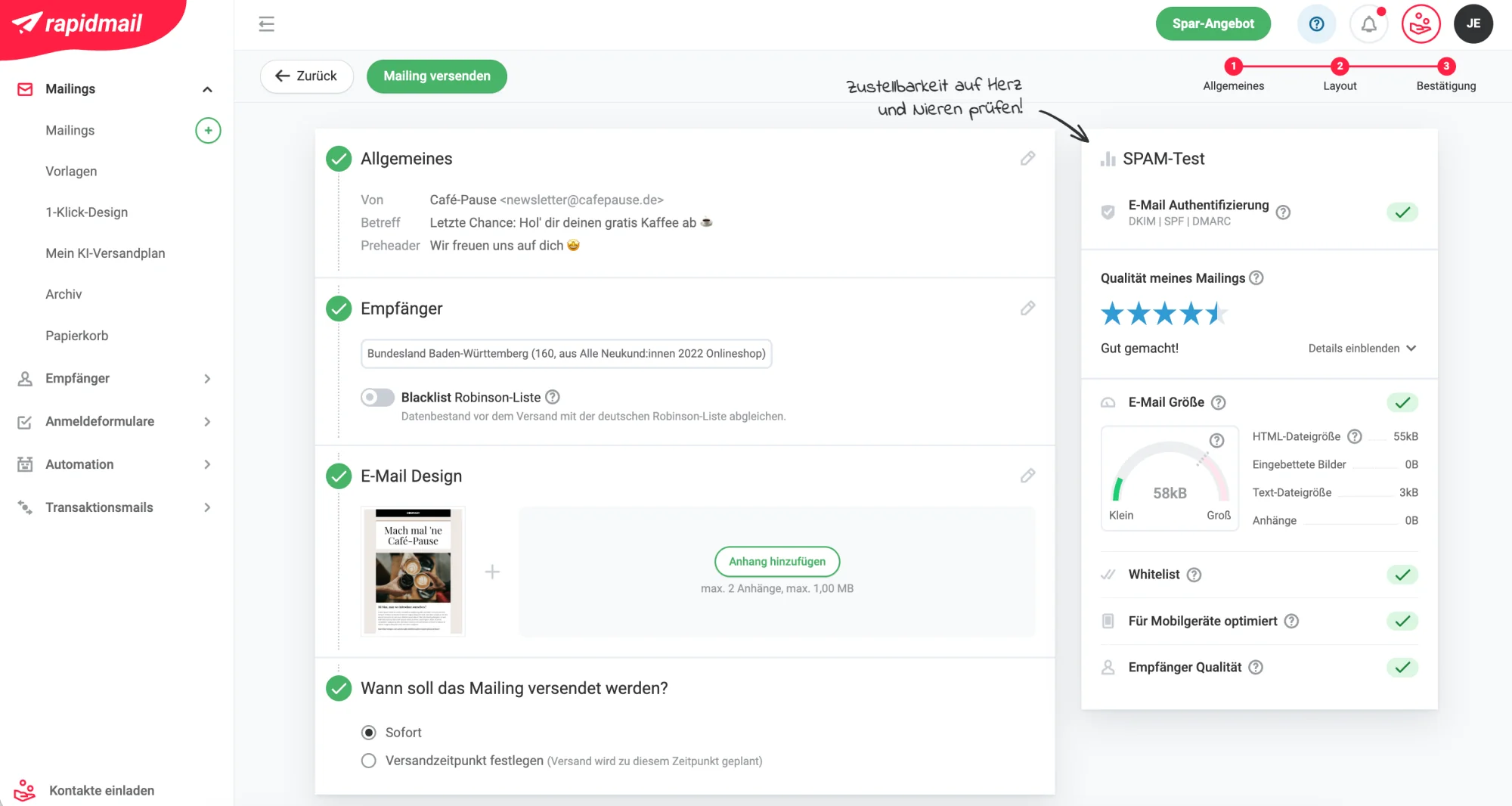
If everything is correct, rapidmail gives you two simple options for sending your first newsletter:
- ⚡ Send the newsletter immediately: Don’t want to wait any longer? Set the sending time to “Immediately” and click “Send campaign” at the top to send your newsletter straight away.
- ⏰ Set the sending time: Alternatively, you can easily schedule your newsletter to be sent later. Select the date and time under “Set sending time”, click “Send campaign”, and rapidmail will take care of the rest. Your newsletter will be sent automatically at the time you selected.
Bravo! 🎉 Your first newsletter has now been sent and is making its way to your subscribers’ inboxes. You have taken a major step in email marketing and laid the foundation for regular, successful newsletters.
If you like, the next chapter will look at analyzing your first newsletter results, because once you have sent it, it is time to start optimizing.
🐾 Step 6 – Newsletter reporting: The most important statistics and metrics
Hooray 🎉, your newsletter has been sent! But the process does not end there, because once you have sent one newsletter, it is time to prepare for the next! After allowing a little time to pass, another equally important step follows: analyzing the success of your newsletter.
Here you will learn what worked well and what you can do even better next time. The rapidmail newsletter tool automatically displays the most important metrics and statistics in a clear newsletter report.
You can see the key metrics for all sent campaigns directly in your campaign overview and keep track of:
- 👀 how often your newsletter was opened,
- 🖱️ how many recipients clicked links,
- 📭 and whether any emails could not be delivered.
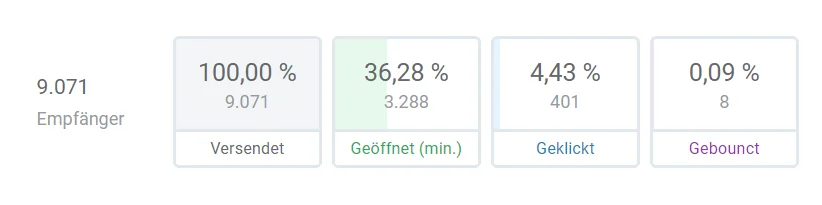
Especially at the beginning, it is worth looking at these figures for every newsletter. By analyzing your newsletter results, you will gradually develop a feel for which content, subject lines and calls to action appeal to your target audience, and how you can increase your click rate.
The most important newsletter metrics explained simply
| Open rate | The open rate indicates how many of your subscribers opened the newsletter. It is a useful indicator of how interesting your readers found the newsletter subject line you chose. 👀 Did you know? Due to privacy updates in Apple Mail and other providers, the open rate is no longer quite as meaningful as it once was. It remains useful as a rough guide but should always be considered alongside other metrics. You will find all the important information in our blog post on the subject. |
| Click rate | The click rate allows you to see how many recipients clicked at least one of the links in your newsletter. The click rate therefore gives you an impression of how interesting your linked content was and whether your calls to action were sufficiently compelling. |
| Bounce rate | The bounce rate shows the proportion of emails that could not be delivered, for example because email addresses were invalid or no longer existed. You should not overlook this figure because, in the long term, a consistently high bounce rate can result in you being classified as a spam sender. |
| Unsubscribe rate | The unsubscribe rate indicates how many subscribers unsubscribed after a newsletter was sent. It provides important information about how well your newsletter’s content, sending frequency and relevance are received by your target audience. A slight increase in the unsubscribe rate is normal, but noticeable spikes and persistently high unsubscribe rates may indicate that you should reconsider the content or sending frequency. |
Measure success and improve your newsletter
For now, you can use these metrics to measure the success of your newsletter and take appropriate steps to make your email marketing even better in the future.
Use these insights in your next newsletter to:
- 📈 optimize subject lines
- 🎯 select content more precisely
- 📢 make calls to action clearer
🎉 Congratulations, you’ve done it!
Not only have you sent your first newsletter, you have also analyzed its results. You have now laid the foundation for sustainable and successful email marketing.
4. Conclusion: A summary of the essentials for getting started with newsletters
Phew, that was a lot of information all at once, it’s true. But don’t worry: getting started with newsletter marketing is easier than it might first appear. Once you have worked through the initial steps, creating and sending newsletters will quickly become routine.
You only need to complete many tasks once, such as setting up the tool, creating your contact list or choosing a suitable design, and you can make occasional adjustments later. Once this framework is in place, sending newsletters becomes easier, faster and more efficient step by step.
Most importantly: just get started! Your first newsletter does not have to be perfect. What matters far more is that you begin, gain experience and continuously improve your campaigns with the help of your reports.
To help you keep track of everything, we have once again clearly summarized all the key steps for getting started with your newsletter, providing a practical guide for now and for future campaigns.
You are now perfectly prepared to use your newsletter to remain visible over the long term, build relationships and reach your target audience regularly.
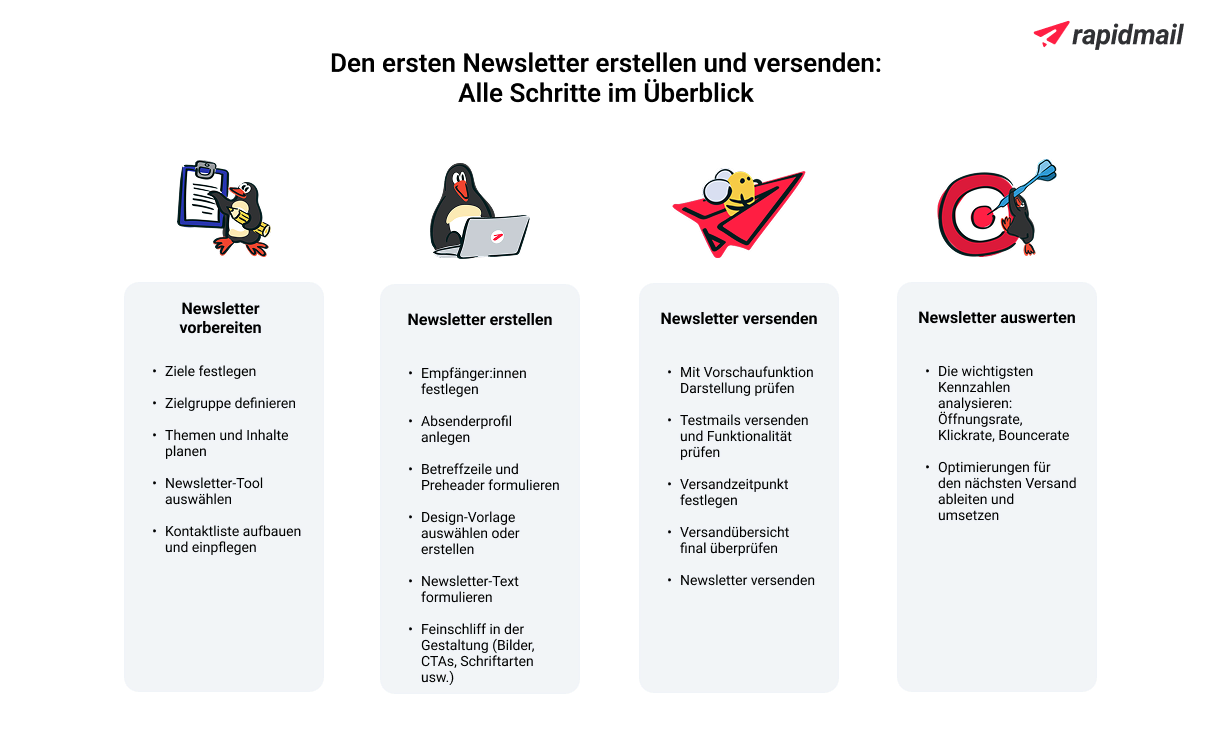
For questions about sending newsletters, you will find plenty of useful articles on the rapidmail blog, guides in our help center, and you can of course contact our support team at any time if you are still unsure about anything.
Try rapidmail now and create a newsletter
FAQ: Frequently asked questions about getting started with newsletters
Are newsletters still worthwhile?
Yes, absolutely! Newsletter marketing is and will remain one of the most efficient forms of online marketing. At low cost, you can reach your target audience directly in their inbox, measure your success accurately and continuously optimize your campaigns. Newsletters enable you to retain existing customers, win new customers and establish your expert status. Unlike on social media, your newsletter list belongs entirely to you.
How do I create my first newsletter?
With a newsletter tool such as rapidmail, you can simply select a template, add your content and get started. Beforehand, you should think about your target audience and your goals. You can then tailor your content to provide your readers with relevant value in the newsletter.
Can I create a newsletter for free?
Yes, you can start sending newsletters free of charge with rapidmail. Your first send to up to 2,000 contacts is free, giving you plenty of time to try out our editor and its features. You do not need any previous experience and can get started straight away. You only choose a suitable subscription package from €15 per month when you want to send regularly, or you can use our Pay per send newsletter plan instead.
What should a newsletter include?
A newsletter consists of a compelling subject line and well-structured, engaging content enhanced by headings, images and specific calls to action. Also, do not forget the unsubscribe link and legal notice, which are mandatory legal elements of your newsletter.
Do I need to use newsletter software for successful newsletters?
We recommend using newsletter software such as rapidmail because it offers many benefits, including optimized newsletter deliverability, effective display on every device and easy management of your newsletter contacts.
Which newsletter tools are recommended for beginners?
Tools that are intuitive to use and require no previous technical knowledge are particularly suitable for beginners. rapidmail is hosted in Germany, in the EU, is 100% GDPR-compliant and is therefore perfect for anyone who wants to remain on the right side of the law. With 1-click design, free templates and an intuitive drag-and-drop editor, you can create professional newsletters in just a few minutes. Our free support team is always happy to help if you have any questions!
How do I create a good newsletter?
A good newsletter begins with a clear objective and the right content for your target audience. Make sure you have an engaging subject line, a clear structure with paragraphs and formatting, and a balanced mix of text and images. Use call-to-action buttons to encourage your readers to take the action you want. Keep your copy short and snappy because less is often more!
How do I send a newsletter?
To send a newsletter, all you need is a good idea for newsletter content that provides value, along with contacts to whom you can send your newsletters. You can add your contacts to the newsletter tool of your choice, then design and send your newsletter straight away.
What do I need for my own newsletter?
For your newsletter, you first need email marketing software such as rapidmail, a list of contacts who have consented to receive it (through double opt-in) and, of course, interesting content for your target audience. You should also define a clear goal that you want to achieve with your newsletter. An appealing design that suits your brand and content that is relevant to your target audience complete the package and make your newsletter a resounding success.