Hard bounces and soft bounces in newsletters: everything you need to know

You may have experienced this yourself: your newsletter goes out, you eagerly await the first opens, and suddenly the statistics show that some emails were not delivered at all, but “bounced”. Instead of reaching the inbox, they have quite literally “bounced back”. But don’t worry: bounces are normal and are not immediately a cause for concern. In this article, you’ll learn exactly what newsletter bounces are, the difference between hard bounces and soft bounces in email marketing, how newsletter bounce rates are calculated and, most importantly, how you can significantly reduce bounces with the right measures.
🥜 In a nutshell: the key facts about newsletter bounces
In email marketing, bounces are newsletters that could not be delivered successfully. There are two different types of bounce: soft bounces indicate temporary problems (e.g. a full mailbox or a server that is temporarily unavailable), while hard bounces indicate permanent problems (e.g. the email address does not exist). A consistently low bounce rate protects your sender reputation and increases the likelihood that your future emails will also reliably reach your contacts’ inboxes.
Our top 10 tips for preventing newsletter bounces:
- 🧹 Maintain your recipient lists: Remove inactive and invalid addresses regularly
- 🚫 Don’t buy addresses: Grow your list properly through genuine newsletter sign-ups instead
- ✅ Use double opt-in: Only email genuine, confirmed contacts
- 🧩 Add a CAPTCHA: Stop bot sign-ups at the form itself
- 🗜️ Keep email size down: Compress images and try to avoid attachments
- 🧠 Avoid spam triggers: Use a reputable subject line, correct language and a good text-to-image ratio
- 🔗 Only use trustworthy links: Make sure you use HTTPS and working destinations, and avoid anonymous short links
- ✍️ Include enough text: Make content clearly readable for both people and spam filters
- 📆 Send regularly: Find a suitable frequency (weekly/fortnightly/monthly)
- 🛠️ Use a professional tool: Look for automatic bounce handling and SPF/DKIM/DMARC
With rapidmail, you can keep an eye on your bounce rate at all times thanks to clear statistics, automatic bounce management and verified authentication.
1. What are bounces when sending newsletters?
The term “bounce” comes from English (“to bounce”) and can be translated into German as “to spring back” or “to rebound”. Imagine sending letters, only for them to come back through your letterbox marked “undeliverable” instead of reaching their recipients. That is exactly what happens with bounces when you send newsletters: an email cannot be delivered and “bounces back”.
In technical terms, a bounce means that a sent email has been rejected or could not be delivered by the receiving mail server. Instead of placing the message in the recipient’s mailbox, the mail server will usually send an automatic response back to the sender. This notification often explains why delivery failed, for example “mailbox full” or “unknown address”. These responses are known as “bounce messages” or “non-delivery notifications (NDNs)”.
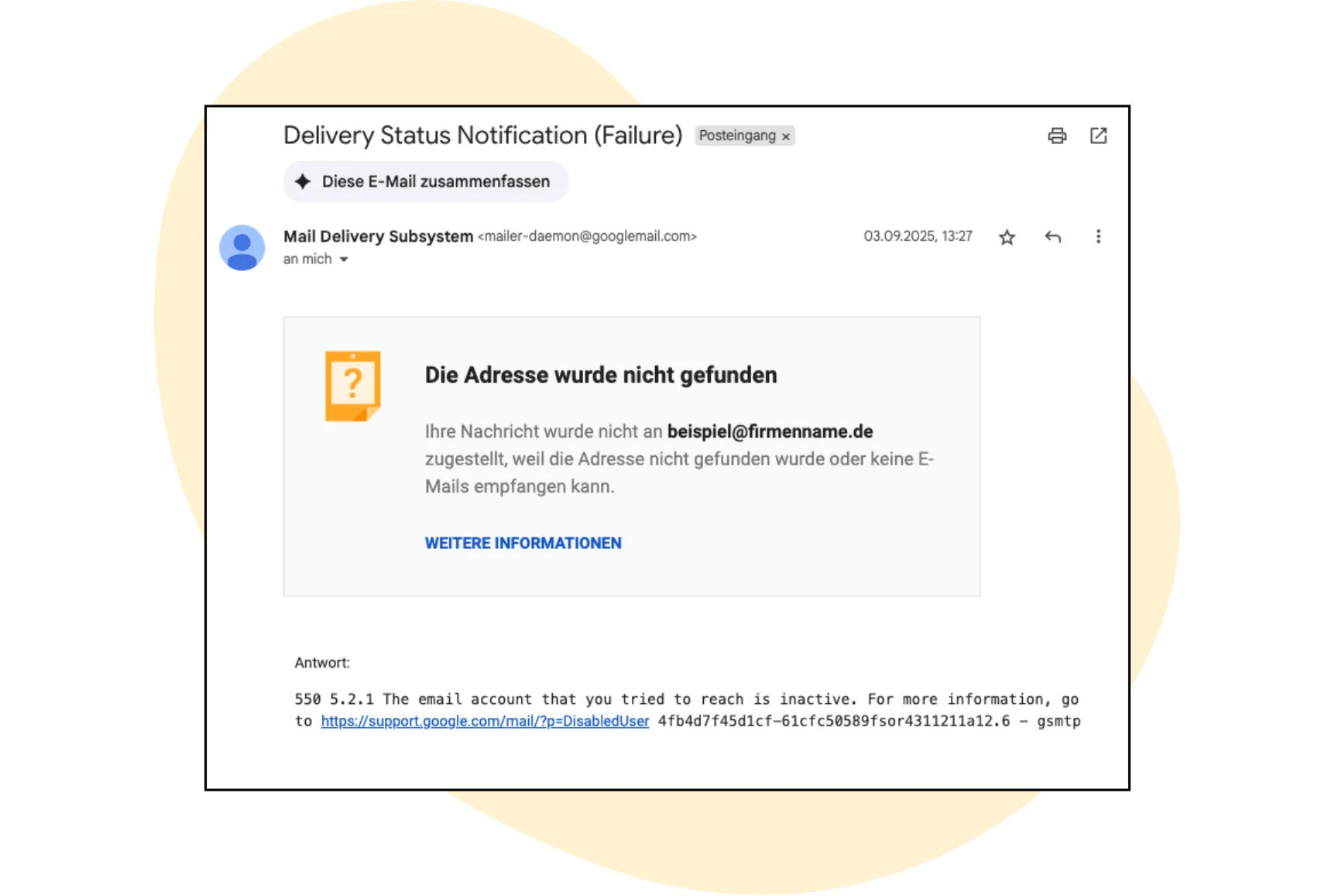
The bounce message tells you which email address could not be reached and why delivery failed. Depending on the provider, the message often also identifies the newsletter concerned, for example through the subject line shown. This is especially useful if several emails were sent in quick succession and you want to find out which newsletter caused the bounce. Bounce messages therefore tell you not only which contacts did not receive the newsletter, but also why, whether because of a full mailbox, an invalid address or a technical block at the recipient’s end.
2. What causes bounces in email marketing?
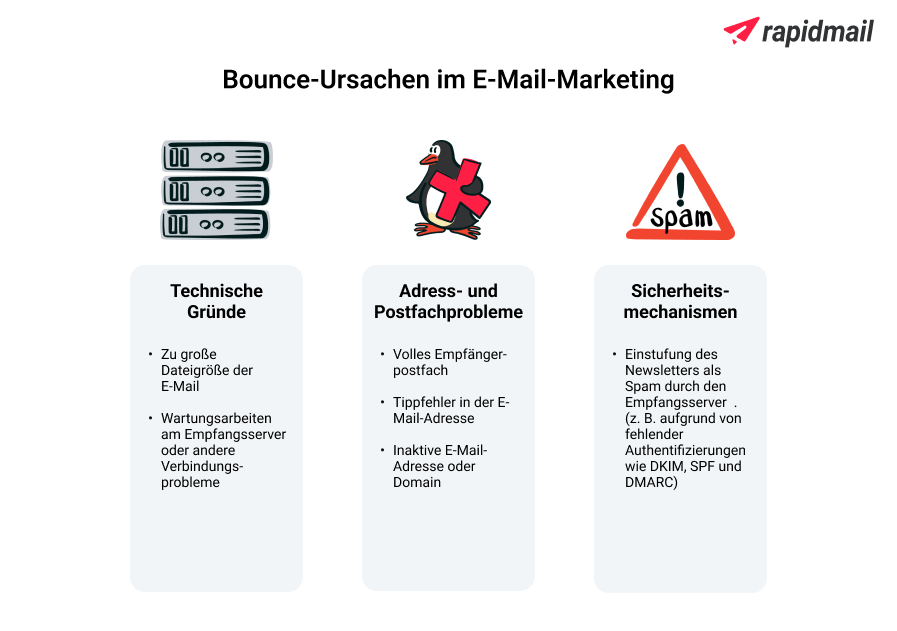
A bounce, meaning the failed delivery of an email or newsletter, can have several different causes. The most common causes of a bounce are:
- 🖼️ The newsletter is too large (e.g. too many images)
- ❗ The contact’s mailbox is full, so there is effectively no more room in their letterbox
- 🫣 The recipient address contains a typo
- ⚡ The recipient’s server is undergoing maintenance or has other technical problems that make it temporarily unavailable
- 📨 Too many emails are sent to the receiving server at the same time
- 🔒 The newsletter is classified as spam by the receiving server because of suspicious content, following a failed authentication method such as DKIM or SPF or DMARC
- ❌ The contact’s email address or the domain being contacted does not exist (or no longer exists)
3. The difference between hard bounces and soft bounces
“Bounce” is the umbrella term for all sent emails that have not reached recipients’ inboxes. The number of bounces is an important indicator of the quality and deliverability of your campaigns in email marketing.
There are two types. If the cause of the bounce is only temporary, for example because the mailbox is currently full or the mail server was briefly unavailable, it is known as a soft bounce. If, on the other hand, the message is permanently undeliverable, for example because the email address does not exist or the domain is invalid, it is a hard bounce.
When a newsletter generates a soft bounce, the recipient address therefore exists and can technically be reached, but the email still did not make it into the inbox. Fortunately, this means that your newsletter, which initially comes back as a soft bounce, may well be delivered successfully the next time you send it.
The situation is different with a hard bounce: your newsletter cannot be delivered permanently, for example because the email address no longer exists or the domain name is incorrect. If you try to send the email again, delivery will unfortunately still fail.
The following overview shows at a glance when a soft bounce occurs in email marketing and when a hard bounce occurs. It helps you quickly recognize the difference between temporary delivery problems and permanently undeliverable email addresses:
| Possible reasons for a soft bounce (delivery temporarily unavailable) | Possible reasons for a hard bounce (delivery permanently unavailable) |
|
|
What happens to recipient addresses that cause hard bounces
Exactly how hard bounces are handled always depends on the tool you use for your email marketing. If you use our email marketing tool, rapidmail, email addresses that are permanently unavailable are automatically detected and excluded from your active contacts. After sending, they are assigned to the “bounced” category and will not be contacted in upcoming campaigns.
This prevents invalid addresses from being contacted repeatedly, which would not only distort your sending statistics, but could also damage your sender reputation. Many email providers regard sending too often to invalid email addresses as a sign of poorly maintained mailing lists. This, in turn, can reduce your newsletters’ overall deliverability. Having hard bounces removed automatically is therefore an important step in newsletter delivery if you want to ensure a high delivery rate over the long term.
What happens to recipient addresses that cause soft bounces
If sending a newsletter causes a soft bounce, it means that the email address exists, but delivery is temporarily unavailable. The bounce message will then contain a corresponding error code, such as “mailbox full” or “server unavailable”. Unlike a hard bounce, this does not immediately block the address; the newsletter contact will receive the campaign as usual the next time it is sent.
👀 Did you know?

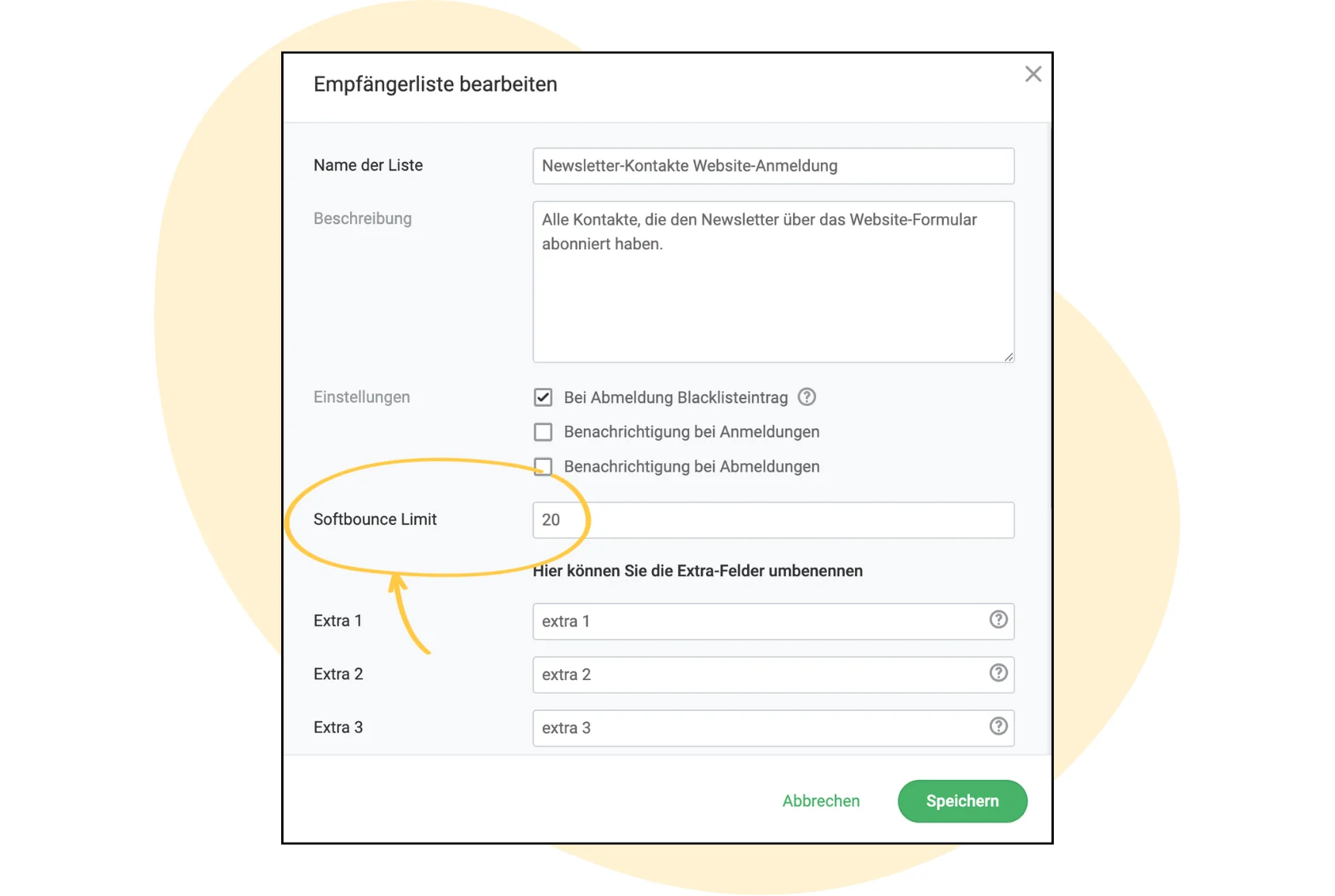
Only soft bounces caused by a full mailbox are automatically converted into a hard bounce by rapidmail after a certain number of occurrences. By default, this happens after 20 repetitions, although you can set a different soft-bounce limit for your recipient lists. Other causes of soft bounces, such as an oversized email, are not counted.
What exactly are “block bounces”?
A block bounce occurs when the receiving mail server rejects your newsletter because it classifies your message as potential spam or because your sender domain or IP address is on a blacklist. In this case, the recipient’s server blocks and immediately rejects your emails, so the messages never reach the inbox at all.
If you suspect a block bounce, you can simply contact our support team at rapidmail. Together, we’ll investigate the possible causes and help you resolve the problem. In some cases, it may also be helpful to contact the recipient’s email provider to clarify the background. This can quickly clear up misunderstandings and, in many cases, lift the block.
4. The bounce rate in email marketing: a definition
The bounce rate is a key metric in email marketing newsletter reporting. It shows the proportion of undelivered emails in relation to the total number of newsletters sent. A low bounce rate is therefore a good sign: it shows that your recipient list is well maintained and your emails are being delivered reliably.
Conversely, a high bounce rate can damage your sender reputation. It also signals to email providers that your mailing list is not properly maintained or contains outdated addresses. Suspected spam and missing authentication methods such as SPF, DKIM and DMARC are among the most important factors email providers use to assess your newsletters. If these requirements are not met, you risk your campaigns landing in the spam folder more often or, in the worst case, not being delivered at all.
📐 rapidmail cheat sheet
The bounce rate is easy to calculate:
Bounce rate = (undelivered newsletters/newsletters sent) * 100
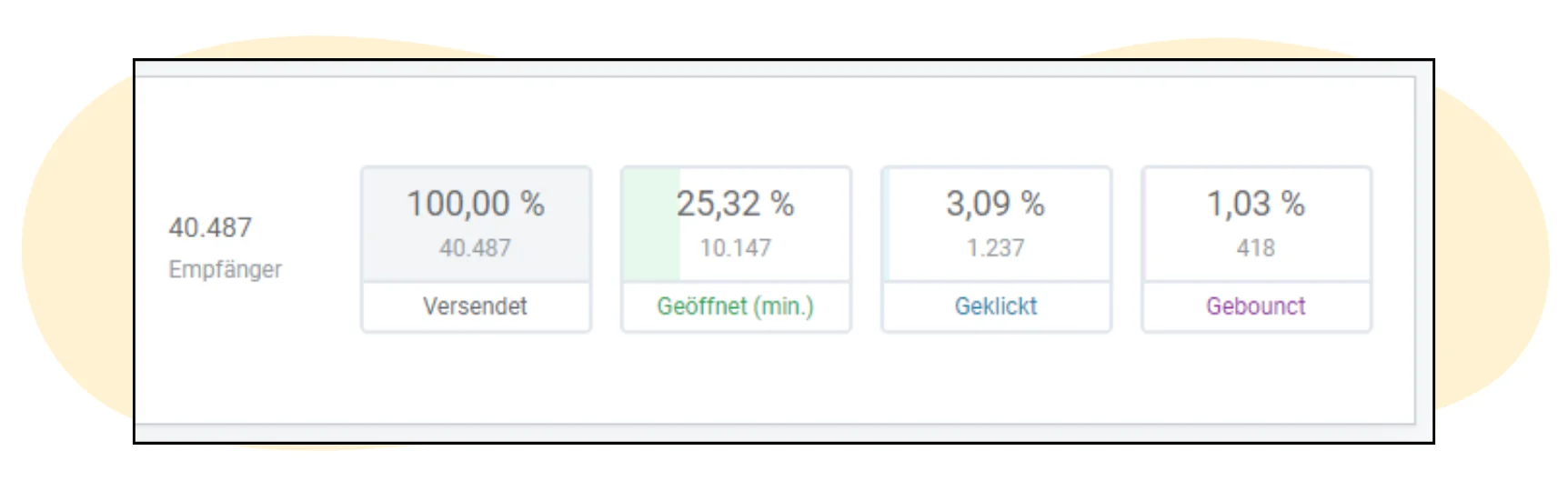
Let’s say you sent a newsletter to 10,000 contacts and delivery failed for 100 recipient addresses. Your newsletter’s bounce rate is then 1.0%, which is nothing to worry about!
Especially with very large recipient lists, it is completely normal for a small proportion of addresses to be unreachable each time a newsletter is sent. As long as the bounce rate is below about 2%, there is no cause for concern. However, if the figure rises above this, you should take a closer look at your contact list: could it contain typos or outdated or invalid email addresses among your subscribers?
By keeping an eye on your bounce rate with newsletter analysis, you’ll always have the latest information and can respond promptly as soon as it rises above the normal range.
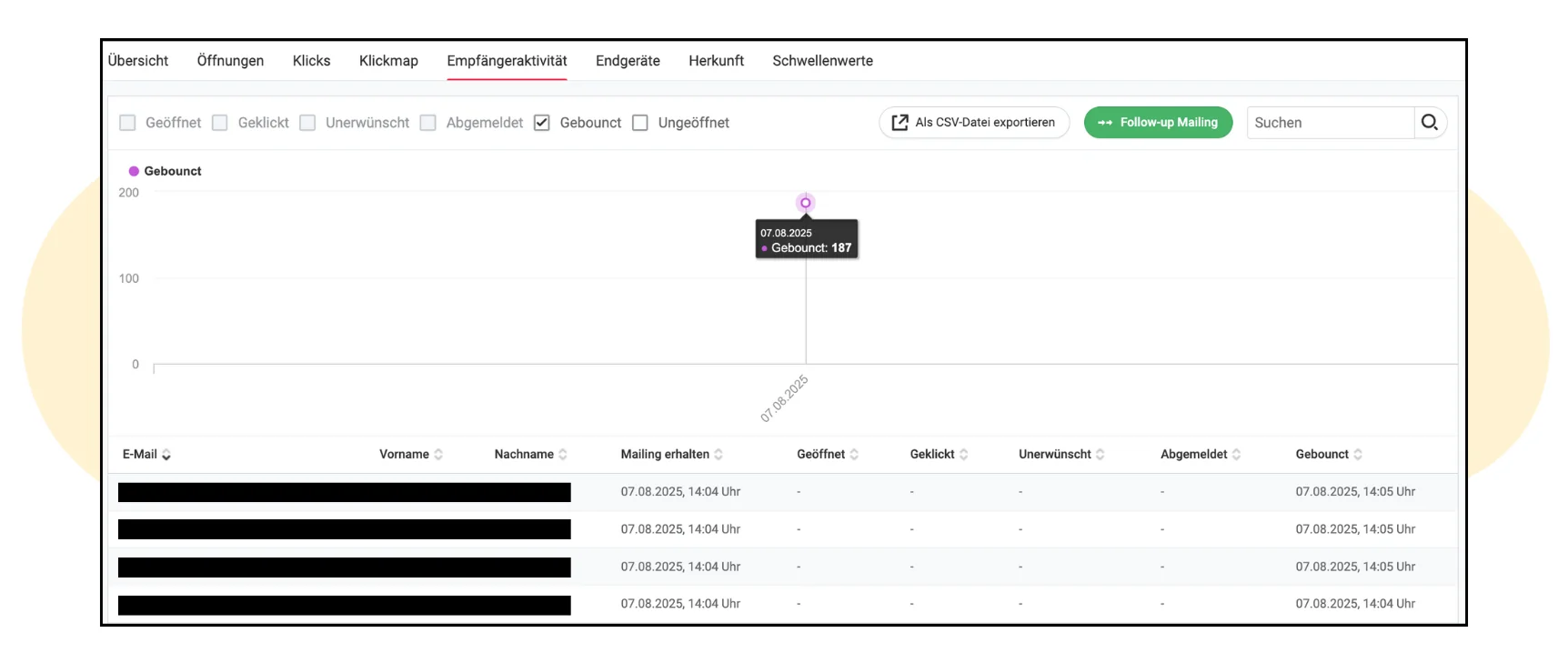
Under “Recipient activity” in the individual newsletter statistics, you can also display only the recipient addresses for which sending resulted in a bounce. This lets you check, for example, whether the bounces can be traced to a particular email provider. If they can, it is most likely because the provider has placed you on its blacklist. If this happens, we recommend contacting your newsletter provider’s support team. After an initial investigation, they may refer you to the relevant email provider so that you can get to the bottom of the issue and find a solution.
5. Our 10 tips for preventing bounces in email marketing
In the long term, a high bounce rate can seriously affect your newsletter deliverability. You should therefore always monitor bounces in the reporting after every send and check whether the figure is still within the normal range.
Our 10 tips for a low bounce rate also give you several strategies for preventing bounces and actively ensuring that your campaigns reliably reach the inbox rather than getting stuck along the way.
Tip no. 1: Maintain your newsletter recipient lists and keep them up to date
A high bounce rate often indicates that maintaining your recipient list has fallen by the wayside. The rule is therefore: a clean list is the foundation of good deliverability. Regularly remove inactive newsletter recipients or invalid addresses to prevent hard bounces from recurring and unnecessarily increasing your newsletter’s bounce rate.
This may seem counterproductive at first because it reduces the size of your list, but regularly cleaning up your recipient list is just as much a part of email marketing as sending the newsletter itself. After all, it is perfectly normal for some of your contacts’ interests and habits to change and for your newsletter content simply to stop being relevant to them after a while. After attempting to win them back with reactivation emails, consistently remove such contacts. This shows email providers that your mailing list is actively maintained, and your campaigns will reach the inbox rather than the spam folder far more often.
The rapidmail newsletter
Tips, ideas and news about email marketing, straight to your inbox.
Tip no. 2: Don’t buy email addresses
As tempting as it may seem at first, buying email addresses is not a good way to gain new subscribers for your newsletter. Purchased lists are often full of outdated or incorrect contacts and directly harm your deliverability, because the number of bounces automatically increases.
Choose a sustainable approach instead: offer interested website users attractive incentives to sign up for your newsletter, such as vouchers, discounts, free samples or exclusive advance offers. This allows you to build an active recipient list of people who are genuinely interested in your content and to keep your bounce rate low in the long term.
👀 Have you seen this?
Would you like to know how to successfully gain contacts for your newsletter? No problem. Our content manager Wiebke shows you how to build an email list full of (potential) customers who are genuinely interested in your content and offers. Roll the film! 🎬
Open video transcript
Chapter 1: Introduction
Welcome to lesson 2 of my newsletter course, which will turn you into a real expert even if you’re a beginner! In the last episode, you learned exactly what email marketing is and what you can achieve with it. Today, we’ll look at how to gain contacts for your email list in the first place. After all, no recipients means no opens. Logical, right?
So how do you get people to sign up for your newsletter voluntarily? That’s what we’ll look at in this lesson of “Learn email marketing”!
Chapter 2: Why you shouldn’t buy email addresses
In email marketing, you regularly handle sensitive personal data. It is therefore important that you comply with the applicable data protection regulations.
Rule no. 1 is: only people who want to receive your newsletter may be sent it.
To contact someone by newsletter in a GDPR-compliant way, they must have explicitly consented to receive it in advance. In a dispute, you may even have to present and prove this consent.
I would therefore strongly advise you against buying email addresses. Contacting these purchased addresses would not make sense anyway, because these people are highly unlikely to be interested in your content.
You should instead build your own email list of contacts who have a genuine, voluntary interest in your messages.
The best thing about it is that this email list belongs to you alone. You can then communicate directly with your subscribers and, unlike on social media, you aren’t dependent on platforms and their algorithms.
Okay, so now we need to collect contacts, but how does that actually work?
Chapter 3: What you need to build your email list
First, you need an email marketing tool. You’ll use it not only to design and send your emails later on, but also to manage your email list.
If you’re still looking for the right email marketing tool, you’re very welcome to watch this video on the subject. In it, I explain the key requirements for newsletter tools step by step and show you how to find the software that best suits your needs.
By the way, if you already have contacts, for example from your online shop, and they have already given you permission to send them newsletters, you can simply import them into the software.
To collect new contacts, however, you need a sign-up form, which you can easily create with your email marketing tool. Your new contacts can then enter their information into the form. The email address is of course the most important piece of information, but you can also ask for other optional data. You can use this later to tailor your emails precisely to the target audience through personalization and segmentation. We’ll take a detailed look at this topic in lesson 4 of Learn email marketing.
Once you have created your sign-up form, you should place it in important locations on your website or online shop, for example in the footer, on particularly popular pages or as a pop-up window after a visitor has spent a certain amount of time on the site.
Chapter 4: How to persuade new contacts to sign up for your newsletter
To encourage website visitors to enter their contact details in the form voluntarily, you should give them good reasons to sign up. Think of relevant incentives that might appeal to your target audience.
A classic example is a discount code or a voucher for their first order, but contests or advance access to new products can also be persuasive. Lead magnets such as e-books or checklists are also extremely popular. Contacts can download these for free in exchange for their data. Alternatively, explain to potential contacts what content and promotions they can expect in the newsletter to show them that signing up is worthwhile.
Chapter 5: Playing it safe: the double opt-in sign-up process
Once your new contacts have entered their details in the form, however, they are not immediately added to your email list. Entering their details is only the first step in the two-stage sign-up process. The double opt-in process is designed to ensure that the new contact has genuinely consented to receive emails.
After all, anyone could enter someone else’s email address in a newsletter sign-up form. To prevent this, the second step is to send an email containing a confirmation link to the address entered. The subscription only becomes active once the person clicks this link and confirms that they genuinely want to receive the emails.
With GDPR-compliant tools such as rapidmail, double opt-in is used by default. You therefore don’t have to configure the process manually, because it already runs automatically in the background. You can, however, customize the various emails and pages as you wish.
Chapter 6: Conclusion: how to build your email list step by step
With these essentials, namely your email marketing tool, sign-up form, compelling incentives and double opt-in process, you’re ready to get started and can gradually build your email list. Of course, it won’t happen overnight, so be patient and appreciate every genuinely interested contact. I hope you have lots of fun and success!
Have you already gained some experience with this topic and perhaps have another tip for building an email list easily? If so, please share it in the comments.
The next lesson of “Learn email marketing” is all about design. You’ll learn how to design your emails so that your newly gained contacts enjoy reading them. Why not watch the video straight after this one?
Thank you for watching and see you next time!
Tip no. 3: Use the double opt-in process for newsletter sign-ups
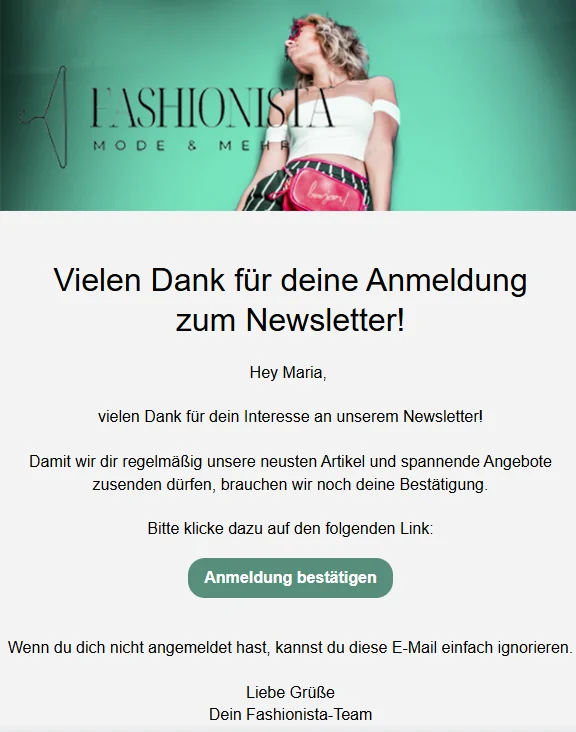
The double opt-in process is legally the safest way to gain new subscribers for your newsletter. Interested users confirm their subscription by clicking a link in the confirmation email. This ensures that only genuine and active email addresses are added to your recipient list.
There is another advantage: bots that enter their details in your newsletter sign-up form cannot complete this confirmation step, so they never reach your recipient list. This keeps your lists clean and your bounce rate low. At the same time, it sends a clear signal to email providers that you operate responsibly.
Best of all, double opt-in not only ensures that the quality of your list is maintained, but also that your subscribers are genuinely interested in your content. This reduces the risk of your newsletters later being marked as spam, with a positive long-term effect on your deliverability.
Tip no. 4: Add a CAPTCHA to your newsletter sign-up form
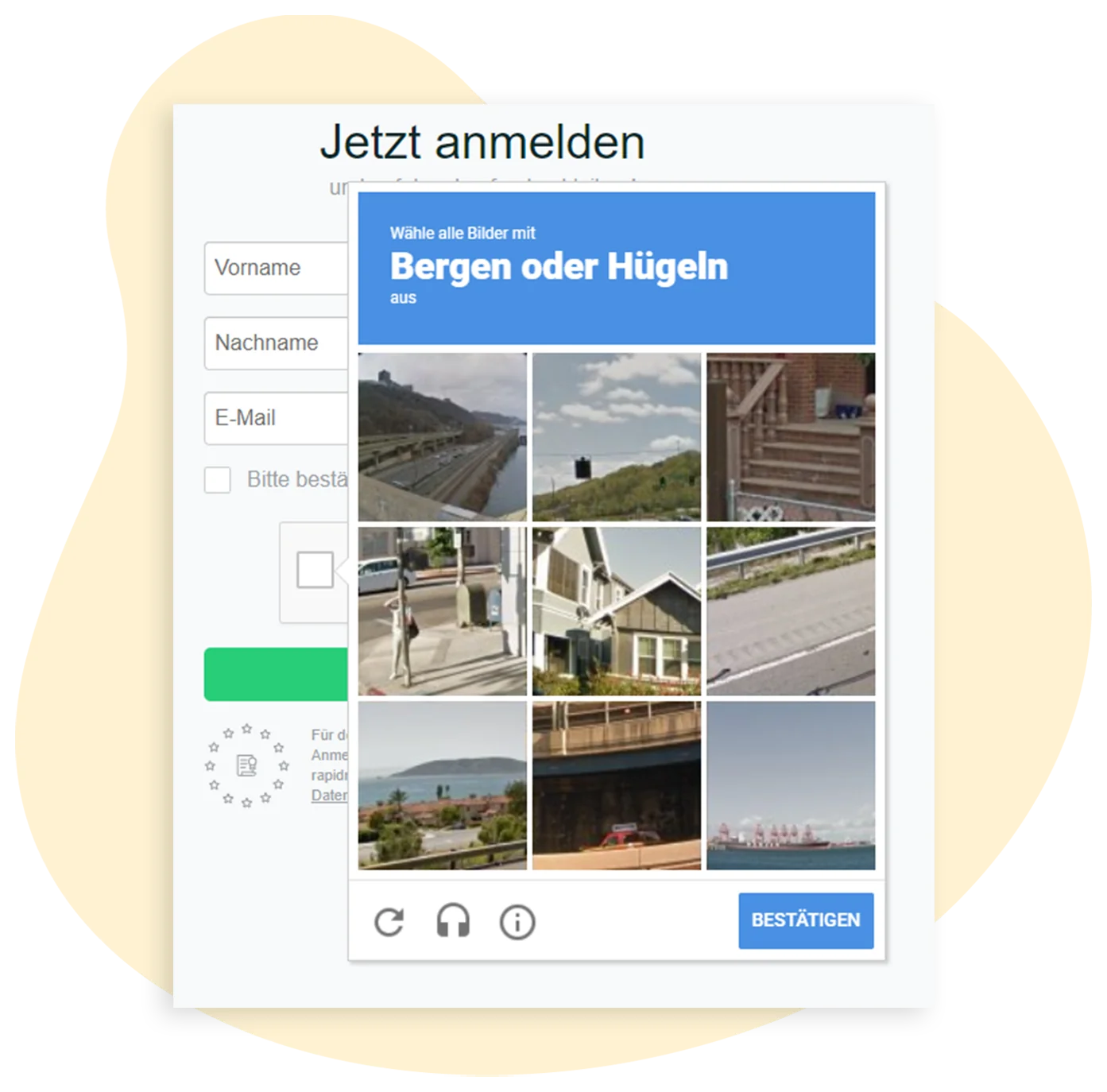
You now know that unusual or cryptic email addresses in your recipient list often indicate bot sign-ups. If you use rapidmail, the automatic double opt-in process generally keeps you on the safe side: bots cannot complete this confirmation step, so they never reach your recipient list.
There is another way to prevent bot sign-ups during the registration process: we recommend adding a CAPTCHA to your newsletter sign-up form. This is a small test that people can easily pass, but bots generally fail. Typical examples include:
- ✅ checking a checkbox (“I’m not a robot”)
- 🔢 recognizing images or sequences of numbers
- 😶🌫️ invisible CAPTCHAs in the background
This ensures that only real people can subscribe to your newsletter. It protects your list from invalid addresses and keeps your bounce rate consistently low.
Tip no. 5: Keep email size down
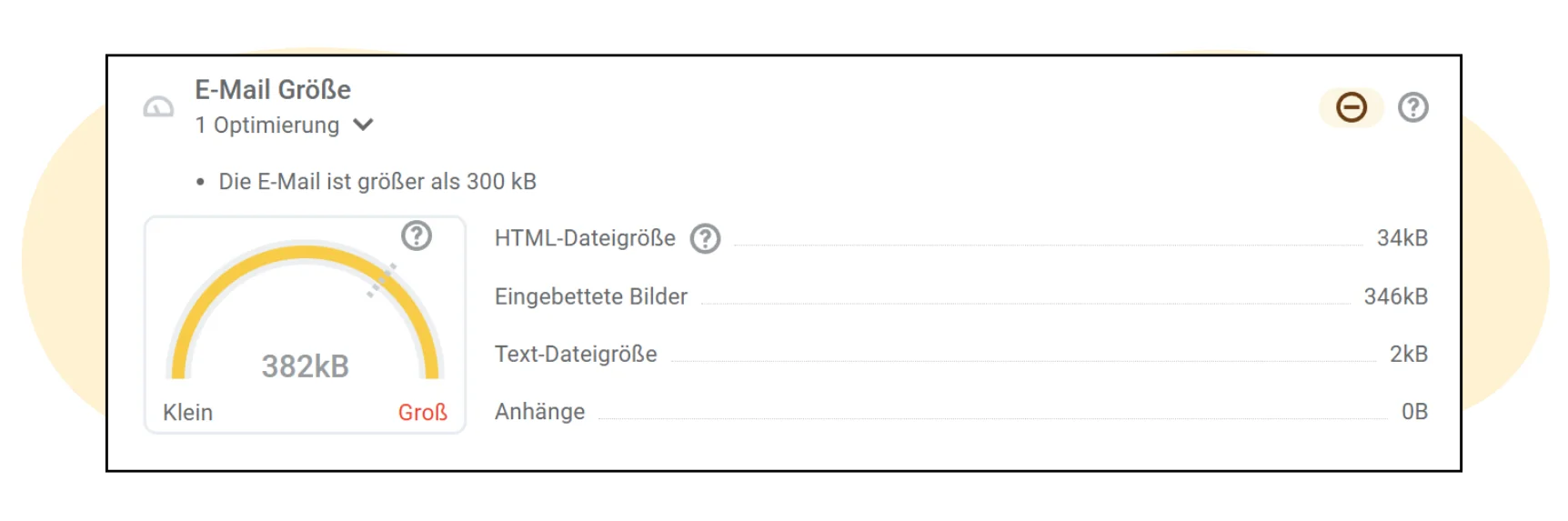
The campaign’s file size can also determine whether it reaches your contacts or results in a newsletter bounce. If an email is too large, some receiving servers reject it or delay delivery until a soft bounce occurs.
Our recommendation is therefore: keep your newsletters as small as possible. Be sure to compress images and avoid unnecessary attachments. We recommend that you do not exceed a maximum newsletter file size of around 300 KB. This ensures that your emails are delivered reliably even by providers with strict limits.
💡 rapidtip

Use links to your website or landing pages instead of embedding large files directly in your newsletter. This saves storage space and also generates more clicks.
Tip no. 6: Avoid terms that appear suspicious to spam filters in the newsletter subject line and content
Newsletters are often blocked by spam filters, resulting in a bounce. To prevent this, you should avoid terms that appear suspicious to spam filters both in the newsletter subject line and in the content of your email. You should also use correct spelling and grammar. Typos are a classic indication of spam and can cause mail servers to reject your message.
The overall picture also matters: a reputable subject line, a balanced text-to-image ratio and clearly structured content all increase the chance of your newsletter reliably reaching the inbox rather than the spam folder or bouncing back.
For example, you should not word your newsletter subject like this:
❌ “!!! You have won !!! Claim you’re gift noww…”.
This is better:
✔️ “Max, you’re the chosen one…🎁🎉”.
Downloadable checklist: what makes a good newsletter
Does your campaign meet all the criteria for the ideal newsletter? You can find out with our interactive checklist. ✅
It contains all the key criteria for a successful newsletter, which you can conveniently check off with a click.
Simply download the checklist for free, take another look at it before each newsletter send and delight your contacts with excellent campaigns from start to finish.
Have fun checking!
Discover our free checklists and e-books
Tip no. 7: Only link to trustworthy pages in your newsletter
Links are an important part of every newsletter, but they can also trip you up. Spam filters check very carefully where a link leads. If it points to a disreputable or even unsafe page, your campaign can quickly land in the spam folder or be blocked completely. This can not only reduce deliverability, but also increase the number of newsletter bounces.
To prevent this, send a test email before every campaign and check your links carefully:
- 🔗 Correct links: Check that all links work and do not lead nowhere.
- 🫂 Trustworthy destinations: Only link to safe, reputable websites.
- 🔐 Use HTTPS: Make sure your links are encrypted (https://).
- 🕶️ Don’t use anonymous link shorteners: Spam filters are sensitive to shortened URLs from services such as bit.ly or TinyURL, as these are often misused by spammers. Use your own domain or a branded tracking domain instead to build trust and maintain deliverability.
This ensures that your contacts reach the right content directly and that your newsletters are delivered reliably.
Tip no. 8: Include enough text in the newsletter
When a newsletter consists almost entirely of images, GIFs or videos and contains very little text, alarm bells start ringing for many spam filters. The reason is that spammers often try to “hide” suspicious terms in images so that filters cannot detect them. If your campaign contains too little text, it can therefore be blocked more easily, which in turn has a negative impact on your deliverability.
The solution: make sure your newsletter has a balanced text-to-image ratio. This ensures that your content is clearly understandable to both spam filters and your newsletter contacts. It also has a positive effect on your newsletters’ bounce rate, because your campaigns are delivered more reliably.
💡 rapidtip
As a rule of thumb, around 60% text and 40% images is a good benchmark for a suitable text-to-image ratio.
Tip no. 9: Send newsletters regularly
The regularity of your newsletter sends also plays an important role in preventing bounces in email marketing. If your subscribers do not hear from you for months or even a year, your newsletter will quickly be forgotten. As a result, some contacts will mark your email as spam instead of simply unsubscribing, damaging your reputation and deliverability.
You should therefore send regularly, but not too often. A balanced newsletter frequency keeps your subscribers active and reduces the risk of soft bounces, which occur more often with inactive contacts. Whether you send weekly, fortnightly or monthly, the right schedule depends on your target audience and content. Use your open rates and click rates as a guide to find out how often your recipients want to hear from you.
The ideal sending frequency may look like this depending on the industry, target audience or newsletter, for example:
Weekly sends
- 🛒 Online shops with constantly changing offers or deals
- 📱 Fast-moving sectors (e.g. fashion, technology, food delivery services)
Fortnightly sends
- 👨💼 B2B companies with specialist insights or product updates
- 📚 Content-driven newsletters (e.g. blog articles, tutorials, guides)
Monthly sends
- 🤓 Service providers or education providers with event updates and newsletters about seminars or training courses
- 🔎 Target audiences that are more interested in overviews or summaries
Tip no. 10: Use a professional newsletter tool
Particularly when sending to extensive recipient lists, it is worth working with a professional newsletter tool. This means you don’t have to handle complex bounce management yourself, as dealing correctly with hard bounces in particular requires experience and technical expertise.
Specialist providers also include important features as standard that improve your deliverability:
- ✅ Automatic bounce handling – invalid addresses are reliably detected and removed
- 🔒 Automatic double opt-in process – ensures that only genuine, confirmed contacts are added to your list
- ⚙️ Technical standards such as whitelisting, SPF, DKIM and DMARC – strengthen your sender reputation
A newsletter tool therefore not only saves you time, but also ensures that your campaigns reach your recipients’ inboxes reliably, securely and with the greatest possible chance of success.
Let rapidmail handle bounce management
👀 Have you seen this?
With rapidmail, you can send your first newsletter to up to 2,000 contacts for free to test whether our tool offers all the features you need for your company’s email marketing. Take your time and look around! Our content manager Wiebke will be happy to take you on a short video tour of rapidmail:
Open video transcript
Chapter 1: Introduction
No time for lengthy training and complex features? With rapidmail, you can easily create and send great newsletters!
Email marketing with rapidmail gets you to your destination in no time, whether you want to win new customers, encourage more people to attend an event or boost sales in your online shop.
Hi, my name is Wiebke, and today I’m going to show you that you need neither prior knowledge nor a lot of time to design great newsletters with rapidmail and get closer to your business goals. So let’s not beat about the bush. Let’s get started!
Chapter 2: Navigation and first steps
You can get anywhere from the dashboard. For example, you can create a new campaign straight away. To make your newsletter a hit with your contacts, you can address them individually with our personalization fields, add emojis to the subject line and check it with the automatic subject-line checker. This shows you how good your subject line is and what you could improve.
Our 1-Click-Design makes designing newsletters child’s play. Simply enter your website URL and, ta-da, rapidmail creates a design template featuring your logo, company colors and fonts. If you like, you can make further changes here and then save it.
Now choose one of more than 250 free templates, and your newsletter’s basic framework is ready! You can then replace and populate all the content as you wish.
Chapter 3: Design and customization
The integrated image editing and our free image database containing more than 1.5 million high-quality, royalty-free images are particularly useful. They save you extra steps and additional tools!
If you have an online shop, you can easily connect it to rapidmail using our free plugins, allowing you to synchronize your customer and product data automatically. Then use our one-click product import to drag products directly from your online shop into the newsletter.
Now it is time to inspect the draft using the preview function. Does the personalization work? Does the newsletter look good on different devices? You can now send test emails to up to 10 email addresses, completely free of charge!
Before the newsletter goes out, put its deliverability through its paces and make any final corrections. This ensures that your campaign does not end up in spam. Thanks to our excellent deliverability, rapidmail gets your newsletter to its destination particularly reliably.
Everything looking good? Your newsletter can now begin its journey, either immediately or automatically at a scheduled time. The first send to up to 2,000 contacts is on us, so you can try rapidmail at your leisure.
Chapter 4: AI sending planner
If you ever lack an inspiring idea for your newsletter content, our AI sending planner uses artificial intelligence to create an individual newsletter campaign plan for your company. Simply enter the company name, a few keywords and a short description, and ta-da, there is your individual campaign plan with newsletter ideas for the whole year!
Chapter 5: Gaining contacts
rapidmail also helps you gain new contacts. Just like with 1-Click-Design, you can create newsletter sign-up forms that perfectly match your website design in only a few clicks.
You can easily upload existing contacts to rapidmail from CSV, Excel or text files using copy and paste. You can also assign as many tags as you like to your contacts to ensure that they only receive campaigns that genuinely interest them.
Chapter 6: Data protection and segmentation
Data protection is our top priority! At rapidmail, all processes are 100% GDPR-compliant. Your contact details are stored exclusively on servers in Germany, so you don’t need to worry.
To address your contacts with particular precision, you can divide them into segments, for example by age group, gender or place of residence, and then select these segments when sending your newsletter to send it only to specific subgroups.
By the way, we’re always happy to talk! If you have any questions or difficulties, our support team will be happy to help, free of charge by telephone or via the ticket system in the tool.
Chapter 7: Reporting and analysis
After sending your newsletter, you can track its success in real time. Thanks to the automatically generated newsletter statistics, rapidmail gives you an overview of all the key email marketing KPIs.
Our email statistics help you understand your target audience’s interests and wishes better and better, enabling you to send more successful newsletters.
Want to know exactly what happened? In an individual contact’s activity history, you can see exactly which campaigns a recipient has received, opened and clicked. These reporting options allow you to get to know your contacts better and tailor your newsletter sends even more precisely.
Chapter 8: Email automation
If you want to tailor your email marketing even more closely to your contacts, you should definitely try our email automation. You need no prior knowledge and can create individual email sequences in only a few clicks, for example for welcome messages, birthday greetings or multi-part courses. We have practical workflow templates that make getting started even easier!
Chapter 9: Prices
Finally, a few words about our prices. If you want complete flexibility and to pay only when you need to, our pay-per-send plan is ideal for you. If, on the other hand, you want to send newsletters regularly, our monthly Starter and Premium subscriptions are perfect. You can get started from just €15 per month and send an unlimited number of emails. Our price calculator on the website helps you find the right plan. Of course, you can change, pause or cancel your plan at any time.
Sound good? Then simply try rapidmail for free and see for yourself that rapidmail lets you send professional newsletters without being a newsletter professional!
6. Conclusion: how to prevent bounces in email marketing
Bounces are part of sending newsletters and, unfortunately, cannot be avoided altogether. What matters is how you handle them. A hard bounce indicates that an address is permanently undeliverable, while soft bounces usually only indicate temporary problems. In addition, only hard bounces in email marketing affect your bounce rate, and therefore your deliverability and good reputation as a sender.
You can significantly reduce the likelihood of newsletter bounces by maintaining a clean recipient list, sending regularly and using double opt-in. The quality of your content also plays a role: words that appear suspicious to spam filters, excessively large files or unreliable links can cause your emails to “bounce back” just as quickly as a full mailbox.
It is especially important to use a professional newsletter tool. This gives you the benefit of automatic bounce management, verified authentication (SPF, DKIM, DMARC) and clean processes that safeguard your delivery rates.
So what are you waiting for? Try rapidmail now and discover how easy professional bounce management can be! 🚀