Analyze and optimize newsletters: All the basics to get started
Analyzing your newsletter helps you get the most out of every send. After all, once one newsletter is sent, it is time to prepare for the next! Once a campaign has been successfully created and sent, newsletter analysis is where things get really interesting: How is it received by your recipients? How many open it, and who clicks what? Looking at recipient activity and the key metrics is important if you want to find out what you can do even better next time. With our guide to effective newsletter analysis, you can analyze your newsletters confidently and get even more from them, even without specialist email marketing knowledge!
1. Why newsletter analysis is so important
More registrations, more orders, more sign-ups, more downloads or more website users: whatever long-term goal you want to achieve with your newsletters, well-planned content alone is not enough. Only through regular analysis can each new newsletter bring you one step closer to your communication goal.
As a sender, analyzing your newsletters is also incredibly interesting because it provides the basis for sending the next newsletter. Looking at the most important metrics and your contacts’ reactions shows whether the newsletter has been well received or what you should adjust to make your next one a real hit. 🚀
It is perfectly normal for your very first newsletters to leave room for improvement. Only by trying different newsletter variants and analyzing them after sending will you truly get to know your recipients: What interests and excites them, what inspires them, and what leaves them completely cold? When do they read the newsletter? Do they prefer clicking image links or text links?
Each newsletter analysis and comparison with previous results teaches you more about your recipients’ interests, habits and reachability. You can use these insights to tailor subsequent newsletters and sends, and gradually turn your newsletter into a successful communication tool that you would not want to be without.
👀 How long do I need to analyze my newsletters to find out what my contacts respond to best?
Especially at the start of your newsletter journey, it is important to analyze and compare your results after every send. But even later, when you have a good idea of what your contacts want to read, you should not stop analyzing your newsletters. Tastes vary and change, and so do your contacts’ habits and interests. Even as a newsletter professional, you should therefore regularly check whether your initial assumptions about recipient behavior still hold true.
2. The key newsletter metrics and measurements
As in almost every area of marketing, you can calculate and analyze many different figures for newsletters. But as a first step, to measure how successful your newsletter is and where there is still room for improvement, it is enough to focus on the most important metrics, also known as KPIs (key performance indicators):
Delivery rate
The delivery rate shows the percentage of contacts whose inbox the email actually reached. Just because you send your newsletter to 20,000 recipient addresses does not necessarily mean that all 20,000 people receive it.
If a contact’s email address is no longer active or contains a typo, for example, the newsletter cannot be delivered to that address. rapidmail’s newsletter tool then automatically displays this failed delivery as a “bounce”. For you as the sender, a bounce means an email was sent for no purpose.
To achieve the highest possible delivery rate, it is therefore important to regularly ‘clean up’ your recipient lists and remove inactive addresses. This saves both work and money: a high delivery rate helps you build a good sender reputation and prevents your newsletters from landing in recipients’ spam folders. Since the changes to Gmail and Yahoo guidelines in February 2024, authentication methods such as DKIM and SPF and DMARC have also become an important requirement for maximum campaign deliverability.
To calculate the delivery rate for a newsletter, you need the number of newsletters sent (= number of recipients for the campaign) and the number of emails that could not be delivered (= bounces):
📐 rapidmail cheat sheet
Delivery rate = ((newsletters sent – bounces) / newsletters sent) * 100
Example: If you send your newsletter to 20,000 recipients but delivery is not possible for 250 contacts, your newsletter’s delivery rate is 98.75%:
Delivery rate = ((20,000-250)/20,000) * 100 = 98.75
Bounce rate
The bounce rate is effectively the opposite of the delivery rate and shows the proportion of undeliverable emails relative to the total number of newsletters sent.
As already mentioned, the number of bounces (= emails that could not be delivered), and therefore the bounce rate, should be kept as low as possible so that your newsletters are not marked as spam in the long term.
If the bounce rate significantly exceeds the normal range of 0–2%, you should take another close look at your recipient data and check that it is correct. A good newsletter tool automatically removes email addresses with permanent delivery failures, known as “hard bounces”, from your recipient list.
📐 rapidmail cheat sheet
Bounce rate = (undelivered newsletters/newsletters sent) * 100
Example: In our example with 20,000 recipients, where delivery failed for 250, the newsletter bounce rate is 1.25%:
Bounce rate = (250/20,000) * 100 = 1.25
Open rate
This rate tells you how many subscribers opened your newsletter after it was successfully delivered. The wording of your newsletter subject line often determines whether recipients open an email. The number of newsletter opens is therefore a good indicator of how interesting your contacts find the subject line and, by extension, the newsletter topic.
However, the open rate should only ever be used as a rough guide. The reason is that an email open cannot always be counted as such by your email marketing tool. An Apple privacy feature is also making it increasingly difficult to use the open rate as a reliable metric.
If you use an email marketing tool to send your newsletters, you should also check how it calculates the displayed open rate. The reported value may refer either to the total number of opens or to the number of contacts who opened the newsletter at least once, without counting repeat opens.
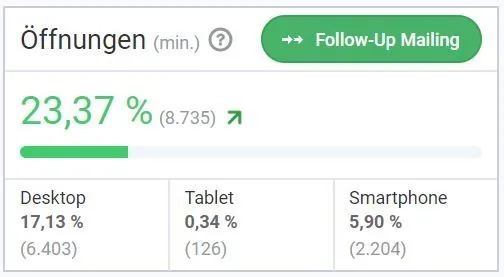
It is difficult to give a universally applicable ideal value. In our experience, the average newsletter open rate is around 20–25%. However, it varies by industry and depends heavily on the subject line, the chosen newsletter topic and the target audience.
It is therefore much more important for the number of opens to continue improving as you work on optimizing your subject lines and topics. This is how to calculate the open rate:
📐 rapidmail cheat sheet
Open rate = (newsletter opens/newsletters sent) * 100
Example: Let us assume that our example with 20,000 newsletter contacts produces 6,000 opens. The open rate is therefore 30%:
Open rate = (6,000/20,000) * 100 = 30
Click rate
Once your contacts open the newsletter, the biggest hurdle has been cleared! Now you need to win them over with appealing newsletter design and engaging content. Only then can you encourage your readers to click the included links and CTAs that lead to your website, online shop or social media profile. And that is exactly what you want your newsletter to achieve!
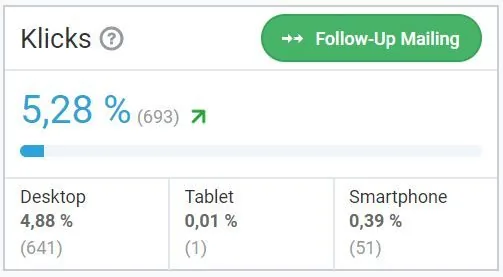
Did the content of your last newsletter win readers over? The click rate can help you find out by providing insight into your contacts’ clicking behavior. It indicates the percentage of recipients who clicked at least one of the links or call-to-action buttons included in your newsletter. This metric is particularly important when analyzing and optimizing your newsletters because it helps you determine whether the linked content sparks your readers’ interest.
If your click rate remains low, you should carefully review and reconsider how relevant the topics are to your contacts: Does the linked content help your target audience in any way? Is the description of the linked content in the newsletter informative and appealing enough? You can view the click rate as feedback from your recipients and use it as a helpful guide when optimizing your newsletter.
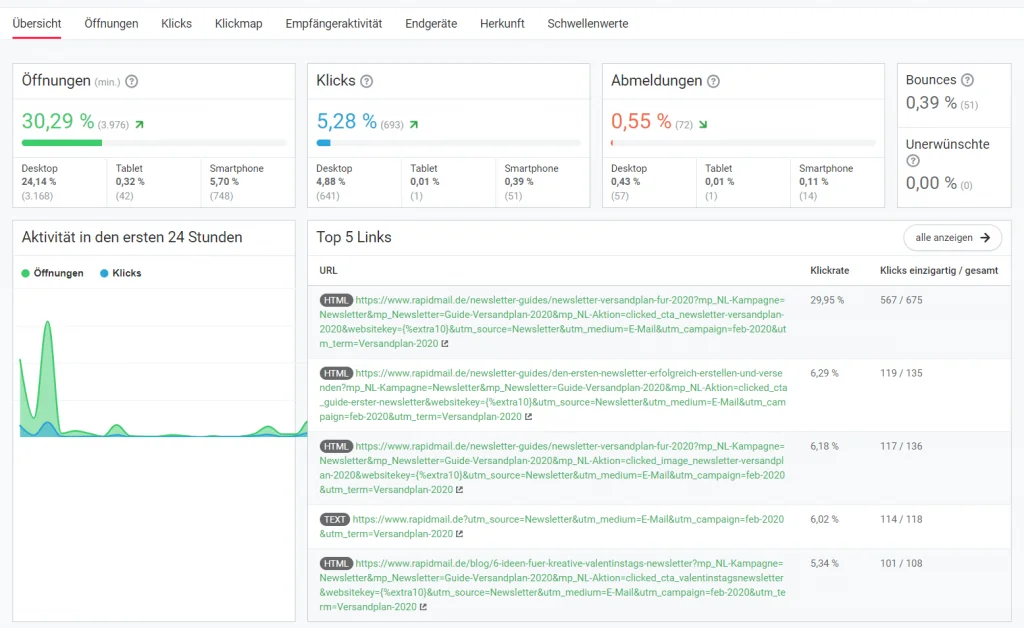
☝️ But be careful: As with the open rate, it is also possible to calculate the click rate using all the clicks generated by the newsletter. This means that the click rate can refer either to the number of contacts who clicked at least once (693 clicks in the image, also known as “unique” clicks) or to all clicks, where multiple clicks by one contact are counted individually (2,158 clicks in the image). For an accurate analysis, make sure you know how the click rate shown in your email marketing tool is calculated.
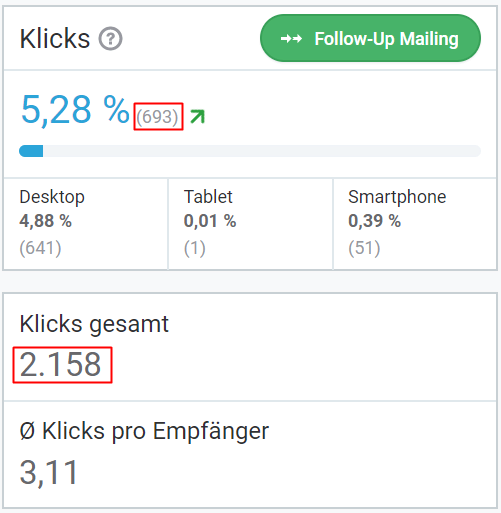
When analyzing click rates, a positive trend over a longer period is more important than a specific value. This is particularly true if the type of link destination, such as a new blog article, product offer or event announcement, varies from one newsletter to the next. In that case, you should not compare the click rates of those newsletters directly.
When the newsletter click rate is calculated, only emails that were actually delivered are taken into account. Bounces are therefore excluded:
📐 rapidmail cheat sheet
Click rate = (unique clicks / (newsletters sent – bounces))* 100
Example: Using our example figures again, with 20,000 recipients and 250 bounces (= undelivered newsletters), if our newsletter records 800 unique clicks, the click rate is 4.05%:
Click rate = (800 / (20,000 – 250)) * 100 = 4.05
To assess how often you achieved your newsletter goal in the next step, for example when a contact buys a product on the website, registers or downloads an ebook, you can track your newsletter conversion rate with Google Analytics!
👀 Did you know?
To use link tracking in email marketing analysis and collect data on your contacts’ clicking behavior, you need their consent. Subscribers can easily give this consent by accepting the terms and conditions when signing up for the newsletter. However, the terms and conditions must describe exactly which data is collected and for what purposes.
Unsubscribe rate
According to the GDPR rules on newsletter unsubscribes, every newsletter sent must legally contain an unsubscribe link that recipients can use to unsubscribe at any time.
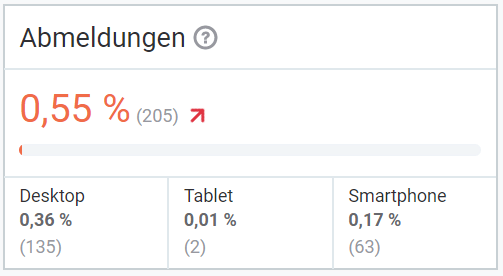
It is therefore also important to keep an eye on newsletter unsubscribes. A consistently high unsubscribe rate can indicate that your recipients are no longer interested in your newsletter content or find that you send too frequently. There is a great deal you can learn from unsubscribes to reduce your newsletter’s unsubscribe rate over the long term.
However, do not let the unsubscribe rate worry you straight away. It is completely normal for every newsletter sent to result in some contacts unsubscribing. So do not become discouraged and abandon your entire newsletter strategy just because a few readers leave. Features such as pop-up newsletter sign-up forms can help you gain far more new subscribers than you lose!
The unsubscribe rate is easy to calculate:
📐 rapidmail cheat sheet
Unsubscribe rate = (unsubscribes / (newsletters sent – bounces)) * 100
Example: If we again assume that a newsletter is sent to 20,000 recipients, resulting in 250 bounces and 100 unsubscribes, the unsubscribe rate is 0.52%:
Unsubscribe rate = (100 / (20,000 – 250)) * 100 = 0.52
3. How to analyze your newsletter KPIs with rapidmail
Let us be honest: very few of us jump for joy at the prospect of doing calculations and maintaining statistics. rapidmail therefore does the analysis work for you and automatically provides the key metrics after sending. In newsletter reporting, all you need to do is draw conclusions from the displayed values and decide whether and how to optimize your newsletter for the next send.
So that you can invest your time more effectively than in calculating metrics, rapidmail automatically provides the following analyses for every newsletter you send:
Open rate, click rate and bounce rate in the campaign overview
Immediately after sending, rapidmail automatically displays the most important newsletter metrics in the campaign overview. You can even follow in real time how many recipients’ newsletters are already on their way to their inboxes (“Sent”), how many have opened the newsletter (“Opened”) and how many have clicked at least one of the links it contains (“Clicked”). You can also see how many recipients could unfortunately not be reached (“Bounced”).
Displaying the key metrics in the campaign overview allows you to compare recently sent newsletters directly.
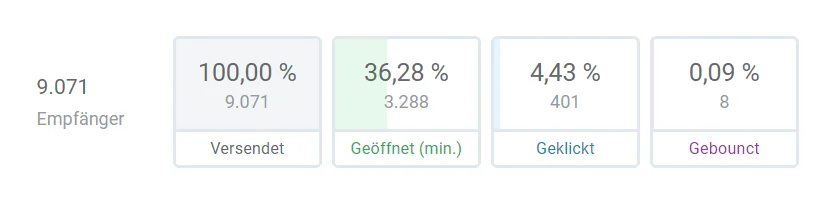
Newsletter dashboard: All the important metrics at a glance
Want to take a closer look? After sending your newsletter, the best place to start is the newsletter statistics. Here you will find the open and click rates, unsubscribe rate, bounce rate and abuse rate. The “Unwanted” flag refers to all contacts who have marked your newsletter as unwanted email, advertising or spam.
For opens, clicks and unsubscribes, our trend indicator uses green or red arrows to show how your newsletter compares with the most recent similar campaigns.
The list of the five most-clicked links in the newsletter also gives you a good impression of your subscribers’ clicking behavior. The chart at the bottom left of the statistics dashboard additionally shows how many opens and clicks your newsletter recorded in the first 24 hours after sending. This helps you determine the best time to reach your recipients.
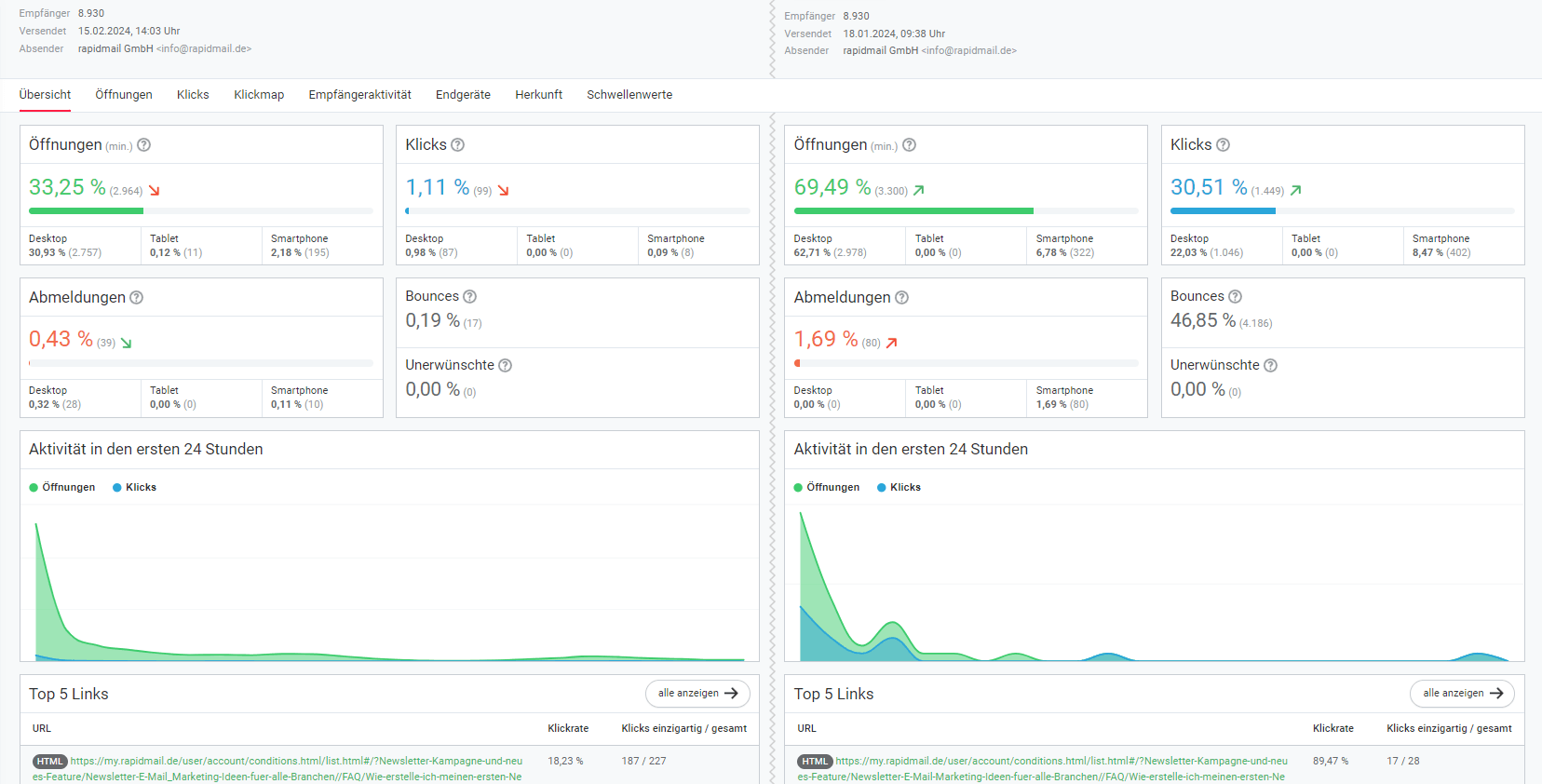
Direct KPI comparison between any two newsletters
To compare the results of two sent newsletters in detail, simply select the two newsletters from the list under “Compare” in a campaign’s statistics area. You will then see all relevant statistics at a glance.
This feature is very helpful, for example, when comparing two newsletters sent for the same occasion in different years. It also provides a clear way to view and analyze sends of different newsletters to different target audiences.
Email open and click times
The two “Opens” and “Clicks” tabs give you all the important information about your contacts’ behavior: How many open your newsletter on a computer, tablet or smartphone? How many email opens and clicks were there in total, and how many can be attributed to each contact on average? Which country achieved the highest open rates for an international send? Which linked content was clicked only once, and which attracted multiple clicks that suggest strong recipient interest? You will find all the answers here!
💡 rapidtip
To share an analysis of your newsletter’s success with your team, managers or business partners, simply download the statistics as a PDF export or send them directly from the tool.
Recipient activity in detail
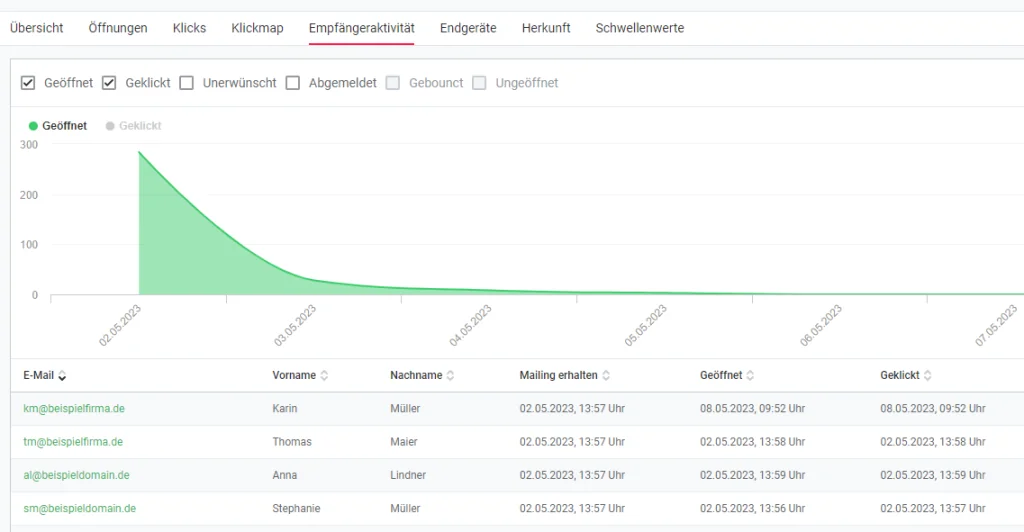
Our chart in the “Recipient activity” tab also lets you view all opens, clicks, unsubscribes and bounces per day since the time of sending. This allows you to find out, for example, which newsletters or topics are relevant enough for recipients to return to them days or weeks after sending.
In the table below, you can even track exactly which recipients opened and clicked the newsletter. Along with the email address, you will see the contact’s first and last name and whether they opened the newsletter or clicked a link. It also records which subscribers unsubscribed or marked your newsletter as spam, and which recipient addresses unfortunately could not be reached. The convenient search function also lets you search for specific contacts. This way, you learn an incredible amount about the interests and behavior of your customers and business partners!
👀 Did you know?
You can now also reverse the perspective and track which campaigns each contact has received so far and how that person responded. This allows you to track recipient activity even more precisely.
If you do not want to use recipient activity to analyze your campaigns, for example because you do not have your contacts’ consent, rapidmail lets you deactivate tracking for your newsletter. Please note, however, that some of our features will then be unavailable or only available to a limited extent, such as follow-up campaigns or A/B tests. Our Help Center explains the consequences of deactivating tracking.
🤔 Strange email addresses ending in “.emailsys1a.net” appear in my recipient statistics. What does this mean?
If you delete a contact in accordance with GDPR guidelines, they are completely removed from your database. To ensure that the statistics for newsletters already sent are not affected, the deleted contact’s data is then displayed anonymously. Their email address contains the cryptic ending “.emailsy1a.net”.
Newsletter performance by device
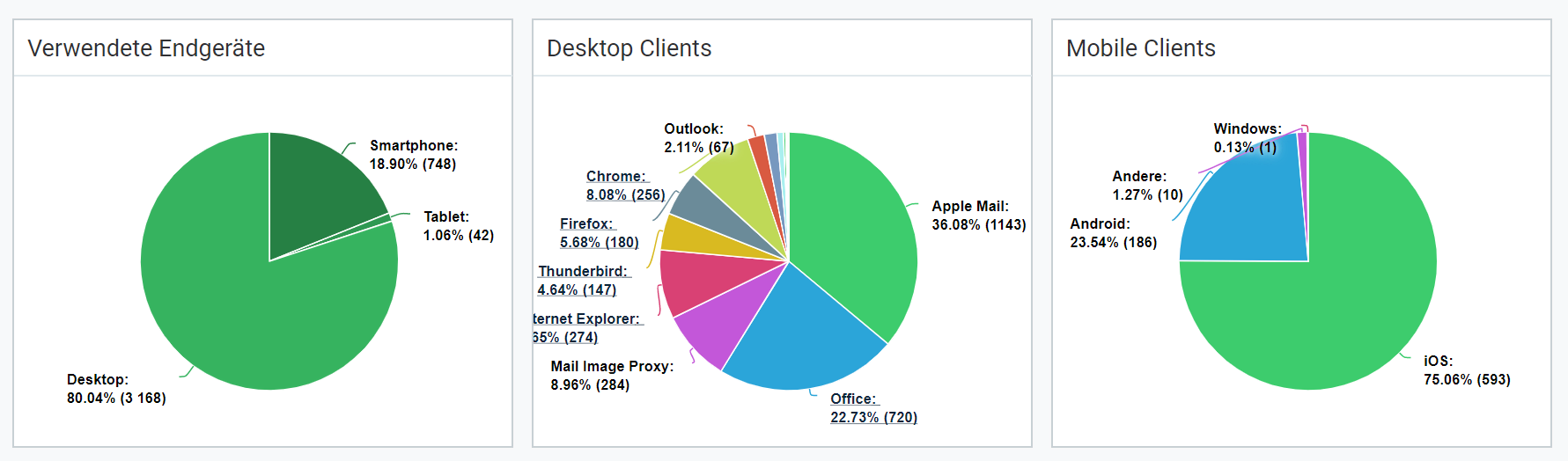
In rapidmail’s newsletter statistics, the “Devices” tab also provides a useful overview of which devices and email clients your recipients use to read your newsletter. You can click the underlined clients to see which client versions your contacts currently use.
Over time, this information helps you assess which devices and email clients you should use to check your newsletter display carefully before sending.
Where newsletter recipients come from
Our recipient world map lets you discover which countries your newsletter is read in. Geolocation is not only interesting for companies that send their campaigns internationally. Who knows? You may find the occasional surprise here, even if you assume that your newsletter only reaches recipients in Germany.
Newsletter opens have taken place in every country shaded green. The country shaded dark green is the one where the most contacts opened your newsletter. When you move your mouse over a country, you can see how many opens were measured there. Below the world map, we also list all recipients’ countries of origin with the corresponding open and click rates.
💡 rapidtip
Have you noticed that the USA has climbed very high in the list of countries of origin, even though your newsletter is not aimed at American contacts? This is because some email clients, such as Apple Mail and Gmail, open emails before delivering them to recipients. This can distort not only the open rate but also recipient locations, partly because Google IP addresses are registered in the USA and the automatic open is recorded there too.
But do not worry: this behavior by email clients does not affect the click rate, which gives you particularly interesting insights into your contacts’ behavior and interests. Knowing about these potential discrepancies also helps you understand and interpret your email marketing statistics more effectively. 🧠
Especially for senders who deliberately send newsletters to contacts in different countries, determining subscriber locations is also interesting from a marketing perspective. If you identify major differences between countries, you should consider adapting your newsletter to the interests and behavior of different nationalities and, for example, sending it in segments.
Click map and click rate for every link in the newsletter
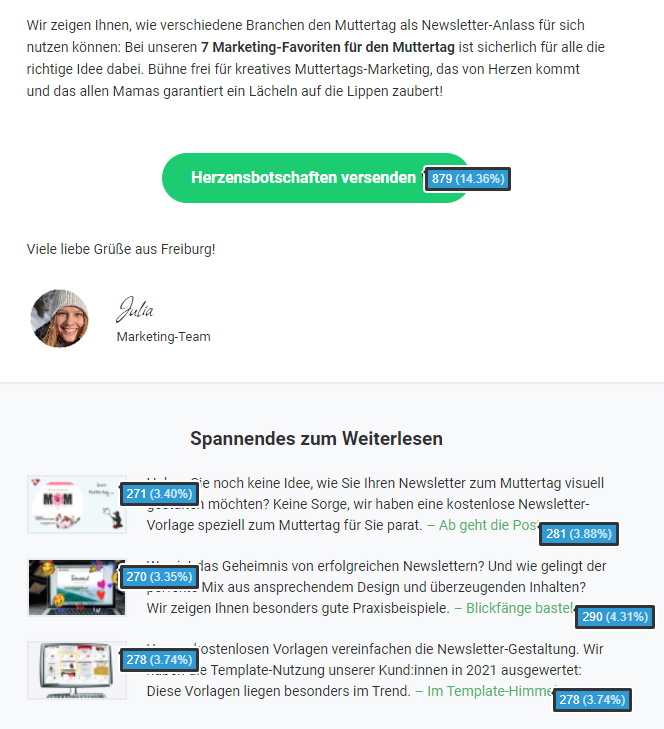
In our newsletter statistics, you can not only use the link list to see which linked content received the most unique or total clicks, but also view the click map. Here you can scroll through your newsletter again and see the click distribution for every link it contains, whether a text link or image link or a call-to-action button.
The click map helps you find out which types of links and content your recipients respond to particularly well. Comparing results over a longer period or between different target audiences can provide particularly interesting insights.
Send more targeted newsletters now
4. After the analysis: How to optimize your newsletters
Subject line
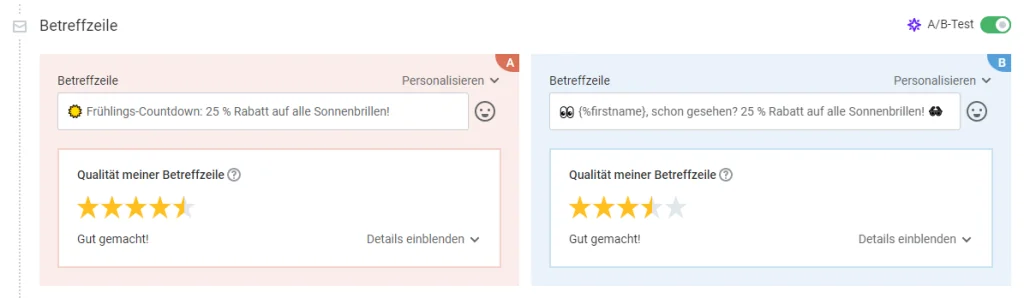
An interesting subject line that makes readers curious about the newsletter content is one of the most important factors when optimizing your newsletter. The best approach is to try different wording for your subject line. A personalized address or emojis in the subject line can also encourage your contacts to open your newsletter. An A/B test is ideal for testing different subject lines in one send!
💡 rapidtip
Still looking for inspiration? Our blog is full of ideas for your newsletter!
Layout and structure
Sometimes restructuring your newsletter can work wonders. Move all relevant information to the top, use less text, include one central call to action and add an image here and there. Try different approaches to find out what your recipients like best and what generates the most clicks! If you notice, for example, that your contacts only click in the top section of your email, try placing all the important links in the immediately visible area of your newsletter. If your newsletter is very long, it may also make sense to shorten it and increase the sending frequency slightly instead.
Writing style
Depending on your industry and topic, your newsletter copy can sometimes be written in a more relaxed style. This allows you to show your open and humorous side, which will undoubtedly strengthen your recipients’ connection with your company or brand. At the same time, it encourages them to click a link and learn more on your website.
🤫 Psssst: Do not reveal too much in the newsletter! Make your recipients curious about what you have waiting for them on your website without going into too much detail. Avoid long newsletter copy with so much information that readers feel completely up to date without visiting your website.
👀 Have you seen this? How to write newsletters like a professional
Need a little more support writing your newsletters? No problem, our Content Manager Wiebke is happy to help! In this video, she presents our 11 professional tips for really good copy. Roll the film! 🎬
Open video transcript
Intro
Do you regularly sit in front of a blank screen and wonder how to write your newsletter?
I definitely know the problem, but in my day-to-day work as a Content Manager at rapidmail, I have collected 11 tips that will help you beat writer’s block in the future. So, let us write a newsletter together!
Tip 1: Write a compelling headline
The headline is the first thing your contacts see, so it should immediately arouse their curiosity. Ask yourself what the newsletter’s main message is and summarize it briefly and concisely in an appropriate headline. Try to use as few lines as possible. You could, for example, work with a main headline and a subheading. Incidentally, especially large headlines in eye-catching fonts are very much in fashion this year.
If you want to write your own newsletter straight afterwards, I have a little surprise for you! The first link in the video description gives you a 50% discount on your first rapidmail invoice!
Tip 2: Build a connection through personalization
In email marketing, you can make things “personal” and greet your contacts by name. This immediately makes your newsletter copy feel much more personal and makes you and your brand appear approachable and likeable.
Different greetings may be appropriate depending on your industry and company:
If you have the choice between “Dear Mr/Ms …”, “Dear …” or simply “Hello …”, it is best to follow the communication style you otherwise use.
In my experience, however, email marketing is usually a little more relaxed. After all, you want to use your newsletter to connect with your target audience and build a long-term relationship. A warm “Dear Mr Müller” feels much friendlier and automatically creates more familiarity than a formal “Dear Sir or Madam”. The latter sounds comparatively more distant, cooler and, in my opinion, a little old-fashioned.
For a personalized greeting, you will of course need your contacts’ first name and/or surname and, depending on the form of address, their gender.
Another tip:
Subscribe to other newsletters too. This puts you in the reader’s shoes and helps you discover which subject lines, headlines or phrases appeal to you more and which appeal less.
Tip 3: Use a clear structure
Before I start writing the newsletter, I first make a bullet-point list of all the information I want to give readers. Put the different points in a suitable order and consider which aspects fit best in the introduction, main section or conclusion of your newsletter copy. The clearer and better structured your newsletter is, the more effectively you can communicate your message and achieve your goal.
In the introduction, you should build on the curiosity created by your headline and show your contacts why they should keep reading.
For example, I could begin with a question such as, “Have you ever wondered how you can captivate your readers with really good copy?” This immediately creates a connection with readers and places them in a specific situation they will probably recognize.
In the main section, you present your central purpose, such as informing, selling or entertaining. Because I want to inform readers in this newsletter, I list concise tips for good newsletter copy here.
The conclusion is about fully convincing contacts and encouraging them to click the CTA. Clearly state why they should do this and what benefits they can expect. This is followed by a prominently placed, clickable CTA button that directs them to your website!
Because I want readers to watch this video, I link to it with an eye-catching button and explain that they can get more tips while sitting back and relaxing.
The AIDA model can also help you when writing newsletters. A cruise ship? No, the AIDA principle is a marketing formula. A stands for “attention”, I for “interest”, D for “desire” and A for “action”.
- Interest: An attractive headline and an engaging opening sentence increase the interest of recipients who now want to find out more.
That gives you the basic framework for your newsletter! Now I will show you how to improve your copy even further.
Tip 4: Keep it as short as possible
When writing your newsletter, keep it as short as possible. The information on the main topic, including the CTA, should also appear “above the fold”, meaning in the upper part of the email that readers can see without scrolling.
Subtopics or further articles can be placed below it to offer more reading material to interested readers who have the time.
Need more inspiration for what a good newsletter looks like? We have collected 33 successful real-world examples for you in a compact PDF. As always, you can download it free of charge using the link in the video description!
Tip 5: Remove unnecessary filler words
I really must admit, I should take this tip to heart myself. Filler words such as “really”, “actually”, “just”, “quite”, “relatively”, “simply” and “somehow” unnecessarily pad out your newsletter copy and make it longer. When you have finished, read the entire text again from top to bottom and remove every unnecessary word that does not affect its meaning.
Tip 6: Avoid spam words
To prevent your newsletter from being classified as spam, it is better to avoid certain words. Words such as “prize”, “free” and “not spam”, as well as lots of exclamation marks or capital letters, can increase the likelihood of email providers classifying your email as spam. This reduces your newsletter’s deliverability, so fewer contacts will read your emails.
Did you know that rapidmail has an automatic spam check? Before sending, you can use it to check the likelihood of your newsletter being classified as spam. We also provide optimization tips so that nothing stands between your newsletter and your readers’ inboxes.
A few clever phrases in the right places can help you get even more from your newsletter copy, for example with a clever call to action:
Tip 7: Choose a clever call to action
With your newsletter, you probably do not simply want to send your readers something to read. You also want to encourage them to take action. Whether that means visiting your website, buying a product or accessing further information on a topic, a call to action directs contacts from your newsletter to another page.
To encourage people to click the button, your recipients should understand what will happen after they click. Describe this in the preceding copy and label the CTA button with a clear message. This label should be brief, punchy and motivate readers to click.
For example, “Get more tips” works better here than “Go to video” or something similar, because it puts the benefit for readers front and center. The popcorn emoji is also eye-catching and reinforces the message.
When writing your newsletter, you can of course use AI to help you get started. AI tools can be extremely helpful when you need inspiration or ideas for wording. But do not forget to check AI-generated copy and add your own style to stand out from the competition.
Tip 8: Motivate with active verbs
To make your newsletter copy flow smoothly and remain easy to read, avoid unnecessary nominalizations and use positive, active verbs instead.
An example:
“Dividing your newsletter into an introduction, main section and conclusion is essential if your readers are to understand the content easily.”
To make the message easier to read, more memorable and more personal, you can simply rewrite the complex sentence as follows:
“Divide your newsletter into an introduction, main section and conclusion so that your readers can understand the content easily.”
Imagine that you are talking to a colleague or speaking to a customer on the phone, and write your newsletter as you would explain it aloud.
Tip 9: Be clear and direct
Talking around the issue will not get you anywhere. Instead, provide information that is as specific as possible, helps your readers and does not leave them wondering what you mean.
Of course, not every topic is always positive. Price increases or the fact that you are removing a particular product from your range, for example, may be met with a great deal of incomprehension. In those situations, it is even more important to remain positive in your newsletter copy, show empathy and demonstrate that you can put yourself in your readers’ position!
When writing your newsletters, you should therefore always ask yourself the following questions:
How would I react to this message?
What advantages and disadvantages does this create for my subscribers?
What solution is available for recipients who may respond negatively to my message?
How can I show my subscribers that they matter to me?
There are just a few final checks to complete before you can send your newsletter, such as making sure your readers are the focus:
Tip 10: Put your readers first
You should not try to sell as much as possible in every newsletter. Constant advertising would probably soon annoy your contacts and lead to many unsubscribes.
So provide variety and put yourself in your readers’ shoes: What interests them? What do they expect from your newsletter? How can you offer them added value?
Helpful newsletters with important tips, step-by-step guides, recipes, analyses and creative ideas can show your contacts that you are thinking of them. Over the long term, this creates a bond between your subscribers and your company or brand. In turn, this bond increases the chance of a successful newsletter conversion.
Tip 11: Have someone proofread your newsletter
Once you have finished writing your newsletter, you should definitely have someone proofread it.
We have probably all experienced this: you spend a long time working on a piece of copy, rewriting a sentence here and there and replacing a few words with better-sounding alternatives when you read it again. In the end, you are more or less satisfied with the result and put the text aside. The next day, you get a bit of a shock when you realize how many typos you overlooked and that a few sentences sound really awkward.
That is completely normal! This is why it is always a good idea to ask colleagues for feedback. Two pairs of eyes are better than one! Your colleagues are also not as immersed in the copy as you are, so they can judge whether the newsletter is clear and error-free or whether important information may even be missing.
With rapidmail, you can of course send test emails free of charge.
Conclusion: Bye-bye, writer’s block!
You now have the perfect guide for writing a successful newsletter! Try it straight away and leave me a comment: Which of these tips did you find most helpful?
Do not forget: the link in the description gives you a 50% discount on your first rapidmail invoice!
Until next time, and enjoy writing your newsletters! 🚀
Images
Brighten up your newsletter by adding a few images that support the content visually. An attractive header image, a bold call to action or a modern email template in your own corporate design makes the newsletter more appealing and leaves readers wanting more. Nevertheless, make sure you use the right text-to-image ratio!
Recipient segmentation
Use the insights from your newsletter analysis to divide your contacts into different target groups or personas. You can then either create different recipient lists, divide them into several segments or assign specific keywords to them. This allows you to address your readers’ different interests even more precisely in your newsletter.
The rapidmail newsletter
Tips, ideas and news about email marketing, straight to your inbox.
Sending time and frequency
Has your analysis of recent newsletters shown that your recipients are most active early in the morning or after work? Then make sure your newsletters arrive in their inboxes at exactly those times! A continuously rising unsubscribe rate can indicate, for example, that you should reduce your newsletter sending frequency slightly.
Conversely, if you contact recipients too infrequently by newsletter, they may forget about you. Monitor your open and unsubscribe rates carefully to settle on the optimal frequency for sending your newsletter.
Topics and linked content
Depending on the insights gained from your newsletter analysis so far, you should test whether other topics might generate more interest among your contacts. Instead of always linking only to new products, you could, for example, collect interesting information about how the products are made or their history on your website and share it with your recipients. A behind-the-scenes look at the sending company is always well received too!
Do you need more inspiration for your newsletter?
We can help with 55 creative newsletter ideas!
Among other things, you will find customer-retention tips and helpful examples.
This will help you stand out from the crowd and bring fresh energy to your contacts’ inboxes. 🚀
Download newsletter ideas for free now (PDF in German)
Do you have any questions?
If you are looking for more newsletter analysis tips or a suitable email marketing tool, simply get in touch with us. We happen to know someone who knows a thing or two about newsletters!