Apple’s email privacy feature – what email marketers need to know


Since its introduction, Apple’s email privacy feature has raised a number of questions among email marketers. In the fall 2021, the Californian company introduced a new privacy feature for its Mail app to improve data security for users. To achieve this, the feature restricted the tracking of email recipients who use Apple Mail. We explain exactly what Apple Mail Privacy Protection means for your email marketing and whether and how you can adapt it.
1. What Apple Mail Privacy Protection is all about
Since October 2021, an email privacy feature known as “Mail Privacy Protection” has been available for iOS 15, iPadOS 15, macOS Monterey 12 and watchOS 8 (and later versions). Its primary purpose is to improve the way Apple handles user data in relation to third parties:
- Users have more control over their data.
- Selecting “Protect Mail Activity” hides users’ IP addresses and loads all remote content privately.
- With the “Hide My Email” option, Apple Mail users can send their emails to recipients or senders via unique, randomly generated email addresses.
- Even with tracking pixels, sending servers can no longer identify recipients’ IP addresses. As a result, senders no longer know whether or not an email has been opened.
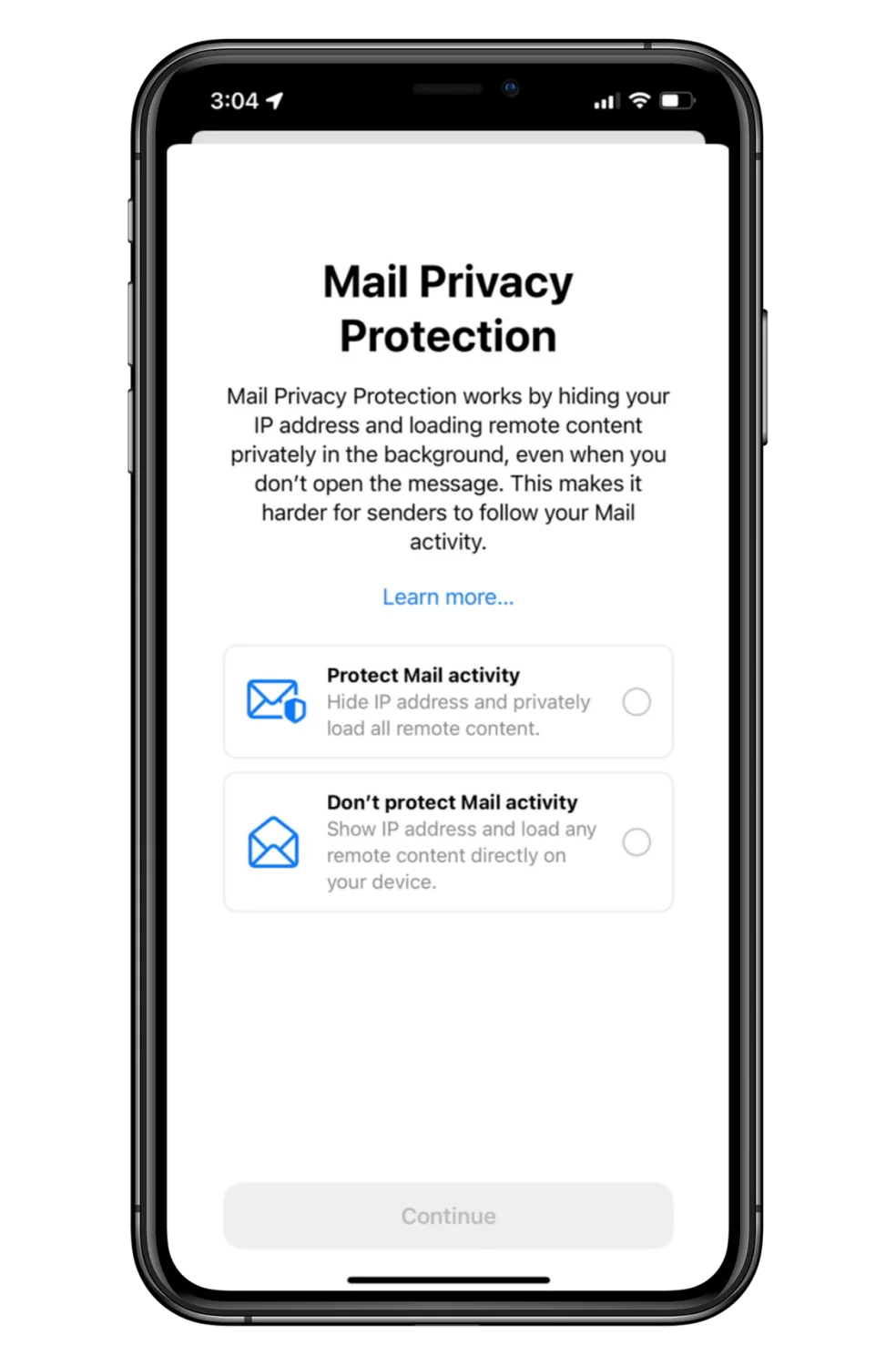
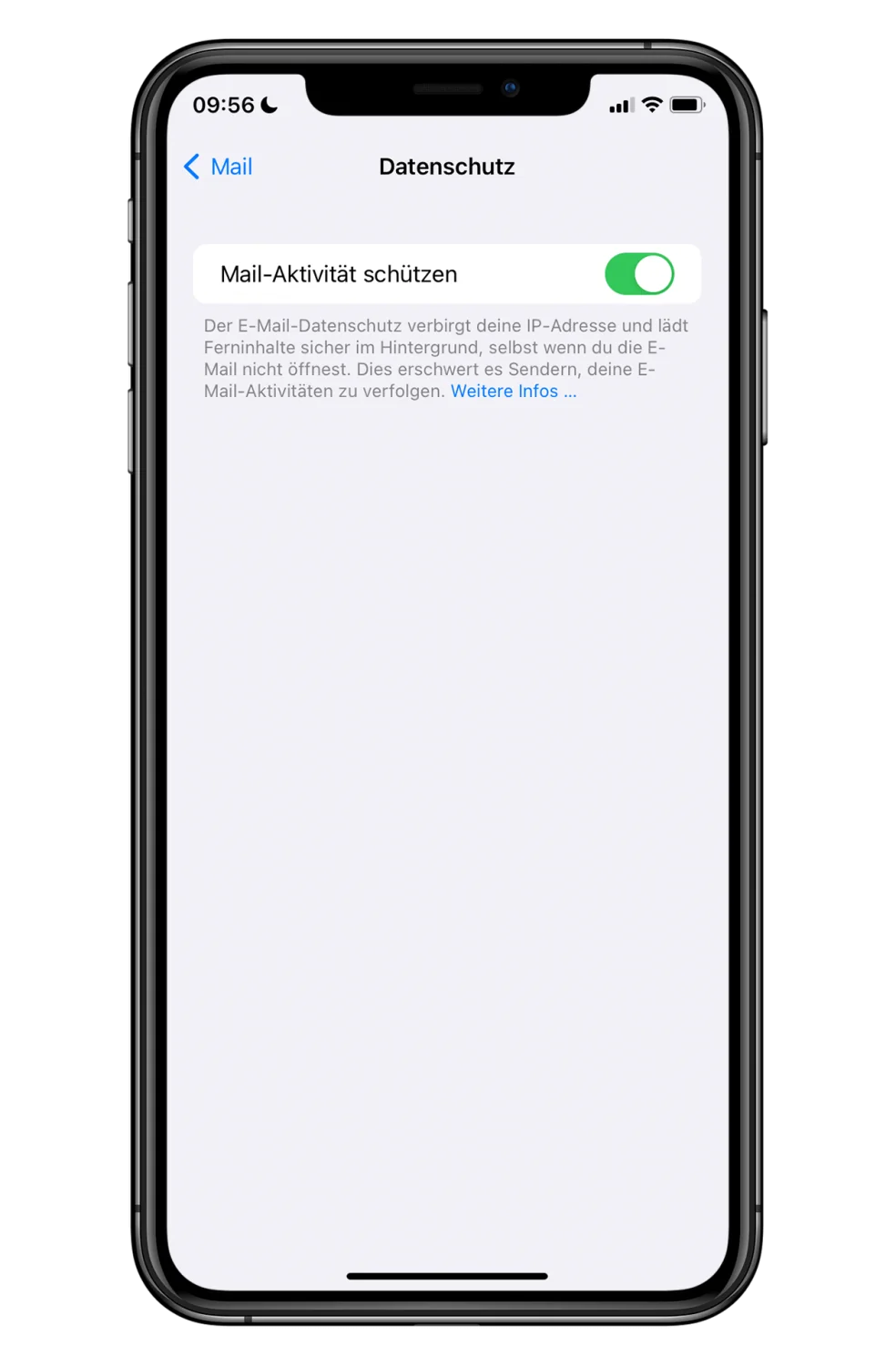
In the Mail settings, users can enable “Protect Mail Activity” to hide their IP address and make tracking more difficult for senders. (Source: Apple / rapidmail)
These features can only be enabled in Apple’s Mail app. This means that all emails read or sent using the Mail app on Apple devices are affected, regardless of the email provider used, such as Outlook, Gmail or Web.de. The privacy feature must be enabled in the app. Users of other mail apps on Apple devices, such as the Gmail app, are not affected by this feature.
With this feature, Apple is primarily adapting to current data protection laws, whose implementation is increasingly being demanded by consumers. The feature not only makes data more secure from third parties, but also makes it easier for its owners to monitor and control.
👀 Did you know?
When it comes to the privacy feature, Apple is merely acting as an intermediary, technically known as a “proxy”. IP addresses and email addresses can never disappear or be hidden completely. Apple therefore uses a proxy server to hide the email address or IP address from third parties. Instead of passing on this data, Apple sends the third party a newly generated IP address or email address.
2. How the feature affects email marketing
We now know what Apple’s email privacy feature does and what it enables Mail app users to do. But by this point, anyone working in email marketing is probably wondering what impact the feature has on newsletter reporting and other marketing emails.
Open rate and location data are distorted
If a user has enabled the privacy option and an email is opened in Apple’s Mail app, the sending server, such as the server used by the newsletter tool, can no longer record the open rate.
The reason is that every email contains a hidden tracking pixel. When recipients open an email, this pixel is downloaded from the sender’s server, allowing you as the newsletter sender to see that your email has been opened. When the privacy feature is enabled, this tracking pixel is always downloaded automatically, even if users do not open the email. This produces distorted, inflated open rates.
A masked IP address also prevents location-based information, such as the country from which the newsletter was read, from being generated. Features used to geolocate recipients may therefore work incorrectly in newsletter tools.
👀 Did you know?
An IP address does not refer to a single technical device, but is assigned to a local internet connection. Imagine the following situation: an office has a Wi-Fi router. The company uses several laptops and a few tablets, and the mobile phones on site are also connected to the Wi-Fi. Emails sent from these devices while they are in the office all contain the same IP address.
Segmenting newsletter contacts is more difficult
Some companies segment their customers based on the links they click in newsletters so that they can tailor email marketing more precisely to their areas of interest. The Mail app feature makes this more difficult too: because behavior can no longer be tracked on a personal basis due to the encrypted or hidden IP address, individual users’ engagement can no longer be traced. In this case, engagement refers to the sections, images and graphics that readers click within the email. If an IP address or email address is not encrypted, for example because the privacy feature is disabled, engagement within an email can still be attributed directly to the users who took the action.
If you have collected certain data about your subscribers, such as where they live or their individual interests, you can send targeted newsletters. However, if subscribers use encrypted IP addresses or email addresses, this approach to contact segmentation no longer works because only the total number of clicks within a campaign can be recorded. This makes it unclear exactly who likes which content or topics in your newsletter.
The desktop client overview is no longer accurate
In rapidmail’s newsletter reporting, you can see statistics showing the desktop clients used by your recipients, such as Chrome, Firefox and Apple Mail. Readers who have enabled Apple Mail Privacy Protection no longer appear in the “Apple Mail” category, but under “Other”. As a result, you can no longer see what percentage of your recipients actually use Apple Mail or how much the privacy feature affects your reporting.
The rapidmail newsletter
Tips, ideas and news about email marketing, straight to your inbox.
3. How to adapt to Apple’s email privacy feature
All the privacy settings mentioned only affect newsletter recipients who use Apple’s Mail app. How does the privacy feature affect the metrics displayed, and what is the best way to evaluate your newsletters?
Impact on the open rate
As a result of this feature, emails sent to Apple Mail users are always shown as opened, regardless of whether recipients have actually opened them. This makes it harder to track the success of campaigns because newsletter open rates become less meaningful. Locating where a newsletter was opened also no longer works as it did before the privacy update. The use of proxy servers obscures or changes the actual location, for example by making it appear to be in the USA.
Companies that plan their newsletter topics solely on the basis of measured open rates must expect distorted results in their recorded opens. Because of these privacy features, exact open rates can no longer be determined, meaning that subject line tests based on email opens are no longer as meaningful as they once were. In this case too, senders should use the indicators mentioned above, which make the success of the test more visible.
Impact on the click rate
The impact on the click rate is not as significant as the impact on the open rate, but changes can still be observed. Due to the restricted tracking, individual clicks can no longer be attributed to specific people. However, the total number of clicks can still be recorded without restriction in newsletter reporting.
Alternative metrics
Although the open and click rates are no longer as reliable as they were before the feature was introduced, they remain useful metrics. For example, they can be interpreted as a general trend and used for guidance. Nevertheless, email marketers should focus on several metrics to measure campaign performance. But don’t worry, that sounds worse than it actually is. The following newsletter metrics can still be collected for recipients who use Apple Mail:
- Delivery rate: The delivery rate is the ratio between the number of emails successfully delivered and the total number sent as part of a campaign. There are a number of tips and tricks that senders can follow to optimize newsletter deliverability.
- Click rate: This measures the total number of clicks in an email relative to the total number of emails delivered.
- Conversion rate: The conversion rate shows how many actions were taken on a website by a recipient after they clicked a link in an email.
- Unsubscribe rate: The unsubscribe rate can help you determine how well your newsletter content is received. If the rate is high, your readers appear to be less interested in the selected content.
4. Conclusion: What we learned about Apple Mail Privacy Protection in 2023
Although Apple Mail Privacy Protection may seem alarming at first, we can reassure you: even in 2023, almost two years after the feature was introduced, the impact of these changes on email marketing remains minimal.
With rapidmail, some of our customers have noticed a slight increase in open rates and the number of desktop opens caused by Apple Mail proxy servers. So far, we have not received any reports of an impact on click rates.
Only the feature used to geolocate recipients can no longer be used as reliably as it was before the privacy feature was introduced. The randomly generated IP addresses of their contacts mean that senders are no longer shown a location, or that in many cases the location shown is incorrectly in the USA.
💡 rapidtip
Do not place too much emphasis on the open rate of your newsletters. Interpret it as a general trend and use it as a guide to which content is received more or less favorably. Focus more on other metrics, such as unsubscribe, conversion and click rates, to evaluate the success of your campaigns.
The subject of data protection in particular is becoming increasingly important, which means that changes, such as new laws, data protection guidelines or features, may also be introduced in the future. But this is nothing new: past changes to data protection, such as the introduction of the GDPR, have shown that the email marketing industry can adapt and that there will always be 100% legal ways and means of running successful email marketing campaigns.