EU GDPR: Privacy notice or checkbox in newsletter sign-up forms

A privacy checkbox for prospective subscribers can help make your newsletter sign-up process compliant with data protection law. Your newsletter sign-up form should also contain a notice linking to your privacy information. With rapidmail, you can easily integrate both into your sign-up form. Here’s how!
1. What is a GDPR checkbox for newsletter sign-ups?
The GDPR checkbox, also often called newsletter consent, is the part of your newsletter sign-up form where you ask future subscribers to consent to your use of their data in accordance with Article 6(1)(a) GDPR. Website users who are interested in your newsletter must check the checkbox to complete their subscription successfully. Privacy checkboxes should not be preselected, as this would undermine the principle of freely given consent.
What does that mean in practice?
In Germany, the German Act against Unfair Competition (UWG) also stipulates that email addresses may only be used with their owners’ explicit consent, including for sending newsletters.
Prospective subscribers actively use the privacy checkbox to declare that you may use their personal data and send them promotional emails. Alongside the double opt-in process, the checkbox in the sign-up form is therefore an additional step that allows you to prove your contacts’ explicit consent to receive the newsletter if necessary.
2. Privacy checkbox vs privacy notice
There are two different ways to make a newsletter sign-up form GDPR-compliant and show subscribers that your company follows all data protection guidelines. You can add a privacy checkbox to your sign-up form. You can also include a privacy notice.
So what is the difference?
- The privacy checkbox, also often called a “consent statement” or “newsletter consent”, ensures that all users actively agree during sign-up that your company may use their personal data to send them promotional content by email. When subscribers check the consent box, they give you their explicit permission to use their email address for newsletter delivery. To be able to prove this consent when necessary, you also always need a double opt-in process for newsletter sign-ups.
- The privacy notice, sometimes also called a “GDPR notice”, is a short section of the sign-up form that explains your data protection compliance and identifies the newsletter tool you use. It effectively contains a condensed version of your privacy policy and terms and conditions. When subscribers click the links in this part of the form, they are taken to the full privacy policy. This shows that your company complies with the General Data Protection Regulation and sends newsletters in a GDPR-compliant way. In the rapidmail form editor, you can decide whether to include this component in the sign-up form. It will certainly build greater trust among prospective and existing subscribers, so we recommend including it.

The rapidmail newsletter
Tips, ideas and news about email marketing, straight to your inbox.
3. How to add a GDPR checkbox and notice to your newsletter sign-up form
As a rapidmail customer, you probably already know what the rapidmail form editor looks like and how to create a sign-up form. If not, take another look at our help article on creating forms. It explains step by step how to use the form editor to create a professional newsletter sign-up form.
Add a GDPR checkbox for consent to data processing
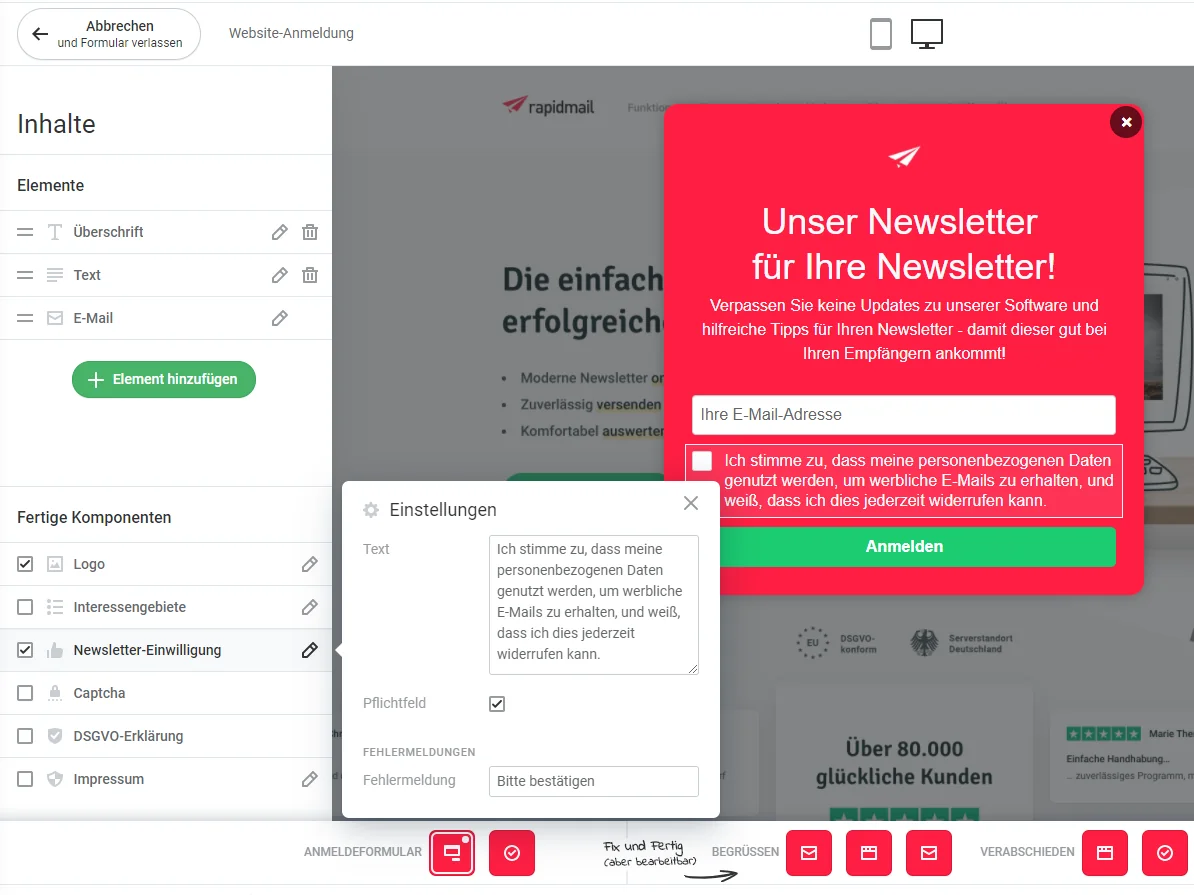
Select the “Newsletter consent” component in the sidebar on the left of the form editor and set it as a “Required field” in the settings. A checkbox for consent to data processing will then appear in your newsletter sign-up form. It uses preset standard text, which you can of course adapt as needed.
Add privacy information as a GDPR notice
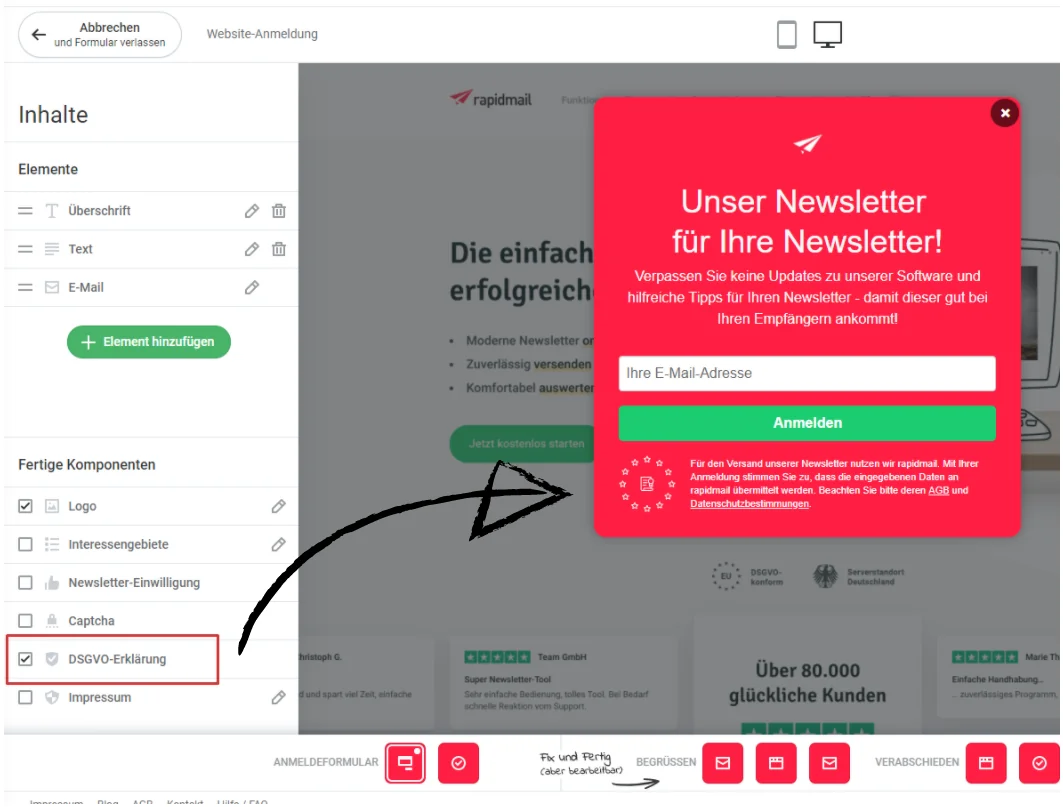
In the rapidmail form editor, simply select the GDPR notice in the sidebar on the left. The information about data processing will then be added to your newsletter sign-up form automatically. All you need to do is add links to your privacy policy and terms and conditions.
Great, the GDPR checkbox and notice have taken you an important step toward privacy-compliant newsletter delivery. There are still a few other points to consider to ensure every aspect of your email marketing complies with the law. If you have any questions, take a look at the Data protection and legal matters blog category. It contains useful information and tips for legally compliant email marketing.