Get past spam filters with DKIM and SPF: How to improve newsletter deliverability
 Lea·
Successfully delivering your newsletters is very important to us. That is why we regularly review new methods and processes that can further optimize your email deliverability. Two of these are the DKIM and SPF authentication methods. Sound like complicated technical jargon? It doesn’t have to be! We’ll use simple examples to explain how DKIM keys and SPF records work and show you how to use them to maximize your newsletter deliverability.
1. What are DKIM keys and SPF records?
The DKIM and SPF validation methods are used worldwide to ensure maximum security in email communications. On the one hand, they protect your newsletter contacts from fraudulent emails sent under a false sender name, for example. On the other, these methods also protect you and your reputation as a newsletter sender. Both methods strengthen your sending reputation as a trustworthy sender, which has a positive effect on your email deliverability.
So we can say straight away: We recommend that all newsletter senders set up a DKIM key and an SPF record!
👀 Did you know?
Don’t be confused: a DKIM key and DKIM signature key are two different names for the same thing and are equivalent. The same applies to an SPF record and SPF entry.
DKIM (DomainKeys Identified Mail)
Put simply, DKIM identifies email senders and verifies their “authenticity”. This makes it more difficult for fraudsters to send unwanted emails under a false sender name.
It is an identification protocol that creates two corresponding digital keys (domain keys). One of the keys is stored and published by your web host. This is the public key. Only the sender knows the second key. This is the private key. The two keys ensure that your emails can be encrypted by the sending server and then decrypted by the receiving server.
👀 What is a web host?
If you have your own website, you will almost certainly have had to deal with a web host sooner or later. Among other things, your website’s domain is stored there. If you commissioned an agency to create your website, you can ask them which provider hosts your domain.
Let’s imagine this as a real conversation between the sending server and the receiving server: the sending server is trying to deliver an email from company X to recipient Y via the receiving server.
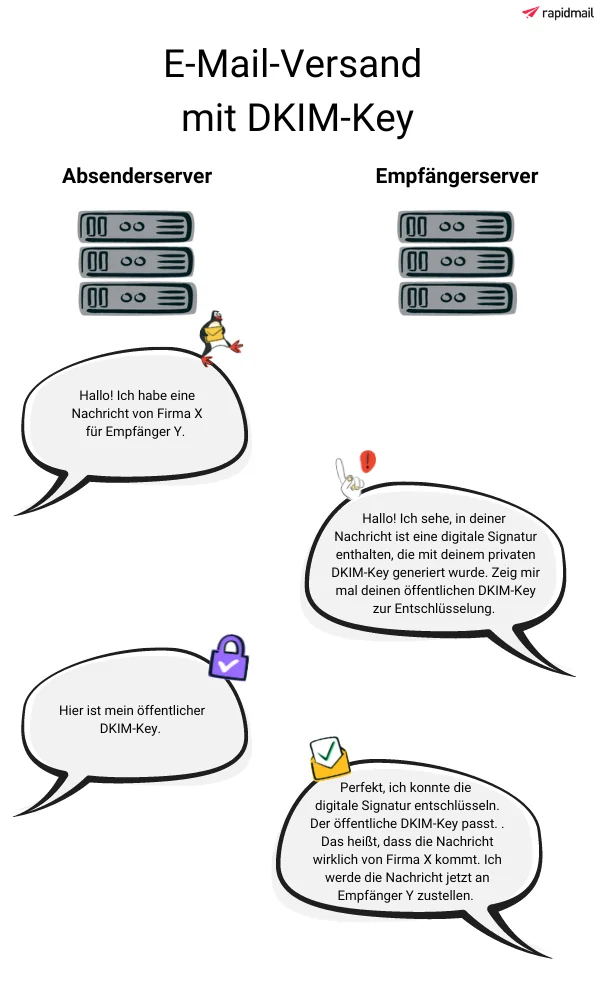
In this scenario, which is of course greatly simplified, everything goes well: the email contains the digital signature generated by the private DKIM key. The receiving server therefore first checks whether the public DKIM key matches and can decrypt the signature before allowing the message into the recipient’s inbox.
👀 Have you been sending successfully without a DKIM key?
You should still add a DKIM key to your DNS. In fact, the delivery of your newsletter depends on which email providers your recipients use. For a long time, many providers did not check whether a DKIM entry existed for your visible sender domain (e.g. @mycompany.com). Instead, it was enough for us, as the email marketing tool, to use the DKIM method to ensure maximum deliverability for your campaigns. However, some email providers, such as Microsoft 365, now check only the visible sender domain, in other words yours (e.g. @mycompany.com), for a DKIM entry. Because it is not obvious to you as a sender whether any addresses on your recipient list are Microsoft 365 addresses, you and all other newsletter senders should add a DKIM key as a precaution. It only offers advantages and cannot harm you. It is also entirely possible that other email providers will follow suit and soon expect a DKIM entry for the visible sender domain too.
Does that make sense? Great! The next step is to look at what the SPF method involves.
SPF record (Sender Policy Framework)
Alongside DKIM validation, SPF authentication is another method for ensuring secure email communications. SPF uses specific security mechanisms that protect against fraud which could damage your reputation as a sender, for example.
As a sender, SPF records allow you to authorize specific IP addresses for sending emails. You decide which IP addresses may be used to send emails on your behalf. This helps keep you safe and stops spammers in their tracks.
Before the email is delivered, the receiving server first checks whether the IP address from which the email is sent is listed in the SPF record. Only then is the email actually delivered to the recipient, because you, as the sender, are effectively confirming your authenticity.
For the sake of completeness, let’s also look at this scenario as a fictional conversation between the sending server and the receiving server. 👀
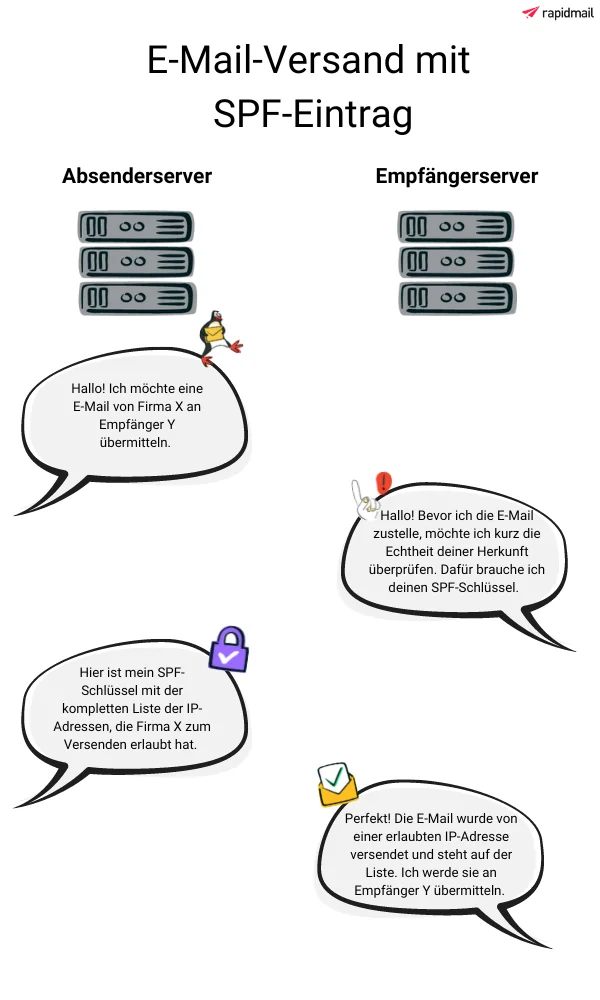
Once again, this illustration is of course greatly simplified, but it gives you an initial idea of the process!
👀 Did you know?
The SPF method only uses the SPF record to validate the sender domain hidden in the email header (if you use rapidmail as your email marketing tool, this means rapidmail’s sender domain). Your own visible sender domain (e.g. @mycompany.com) is not checked.
If you use rapidmail as your email marketing tool, you can think of the SPF record as official, public authorization for messages from your sender domain to be sent via rapidmail’s IP addresses.
Next, we’ll examine the benefits of DKIM and SPF and delve a little deeper.
2. What benefits do DKIM keys and SPF records offer when sending newsletters?
| Benefit | DKIM key | SPF record |
| Authenticity of your email | The receiving server knows that the email is the unaltered original if the public and private keys match. Your email has not been tampered with by third parties, so it's a happy ending for everyone! | The IP addresses stored in the SPF record tell the receiving server whether you have authorized the IP address used for sending. If so, everything goes smoothly and all's well that ends well! |
| Goodbye, spam filters! | Adding a DKIM key reduces the risk of your email being intercepted by email providers' spam filters. | Because the IP addresses can be confirmed as authorized, the risk of spam filters intercepting your email is reduced. |
| Good sending reputation | Your good reputation as a trustworthy sender is strengthened and established over the long term. | Your good reputation as a trustworthy sender is strengthened and established over the long term. |
| Optimal deliverability | Adding a DKIM key optimizes your newsletter delivery rate and helps ensure that your emails arrive. | Adding an SPF record is a very valuable step toward maximizing your newsletter deliverability. |
Both authentication methods protect you from fraudsters and help ensure that your emails arrive safely at their destination, your newsletter contacts, without manipulative interference from third parties. If authentication fails, whether for the DKIM key or the SPF entry, your campaign is classified as high risk, which is something you will certainly want to avoid.
The rapidmail newsletter
Tips, ideas and news about email marketing, straight to your inbox.
The good news is that setting up the two methods requires only minimal time and administration on your part. That is why we strongly recommend that all newsletter senders use both DKIM and SPF validation. The results make it worth the effort, we promise!
👀 Did you know?
Nevertheless, bear in mind that neither authentication method can offer complete certainty that your newsletters will always reach all your contacts successfully. Unfortunately, the deliverability of your campaigns does not depend solely on having DKIM keys and SPF records in place. Although both methods provide strong arguments IN FAVOR of delivering your campaigns, the size of your email, the wording of the subject line, contact engagement and much more also affect the spam filters’ decision on whether to “let your email through”.
3. When should I add DKIM keys and SPF records?
We generally recommend that all newsletter senders store DKIM keys and SPF records in the DNS for their respective sender domains.
👀 Did you know?
A DKIM key is unique and applies to a single sender domain (e.g. @mycompany.com). This means that if you send newsletters from more than one sender domain (e.g. @mycompany.com and @marketing-mycompany.com), you need the corresponding number of public DKIM keys, which you store in the DNS for each domain.
When do authentication methods become particularly important for you?
- Large recipient list: You send your newsletters to a large number of recipients. If you contact several thousand recipients at once, the spam check will be a little more thorough because the high number of recipients could indicate an unwanted spam email. DKIM and SPF verification help counter the risk of being classified as spam.
- Specific email addresses among your contacts: More and more providers are paying closer attention to what is known as “domain alignment”. Microsoft 365 and t-online, in particular, already check emails for it. Protect yourself by taking steps to ensure your emails reach their destination safely.
👀 What is domain alignment?
To achieve complete domain alignment, you, as an email sender, need both DKIM alignment and SPF alignment for the domains in the email header.
You’ve probably already noticed: we are clearly in favor of adding both an SPF record and a DKIM key! Rather than choosing one of the two authentication methods, it makes most sense to set up both. This automatically gives you domain alignment too, which is becoming increasingly important.
But now let’s finally answer the question of “how”!
4. DKIM and SPF with rapidmail: How it works
DKIM method
To use the DKIM method, you, as the sender, create a public DKIM key for your sender domain in your rapidmail account. You then add it to the DNS at your web host (e.g. united domains, strato, one.com or 1&1). When the email arrives, the receiving server can retrieve this public DKIM key from your DNS. It then has the key needed to decrypt the message you wrote.
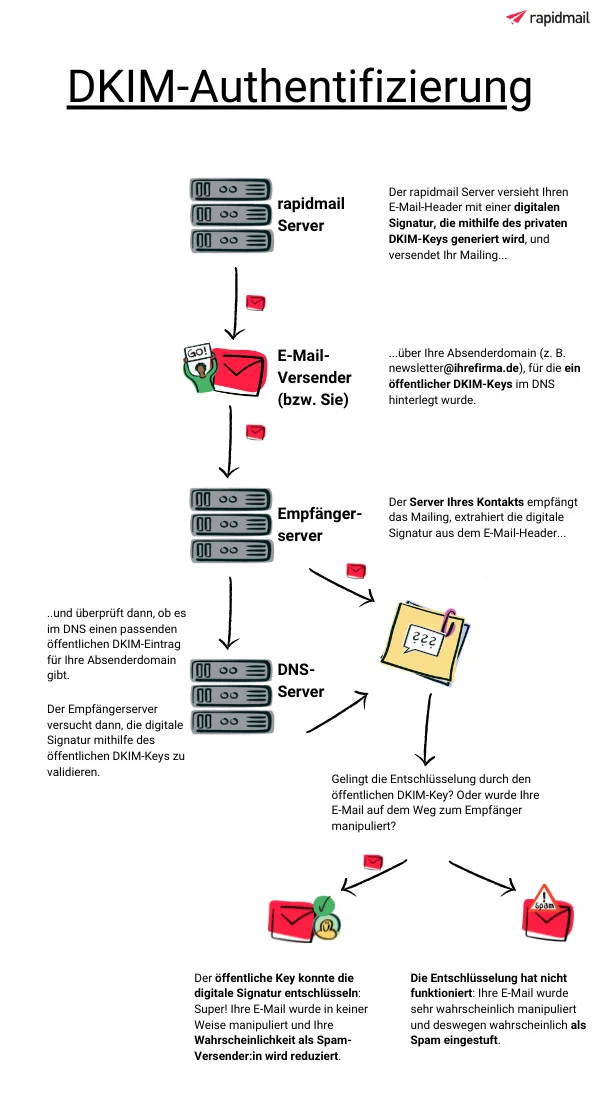
As soon as you generate the public DKIM key for your DNS in your rapidmail account, a second, private DKIM key is generated for your sender domain at the same time. This key is visible neither to you nor to the receiving server: only the rapidmail server knows it.
rapidmail then uses the private DKIM key to generate an individual DKIM signature. This is automatically added to the header of all your email newsletters, provided that you send the newsletter using a sender address from the domain for which you created the DKIM key.
The DKIM signature stored in the header gives your emails an individual fingerprint. You can think of it as a specific lock that only the corresponding public DKIM key will fit.
When your newsletter arrives, the receiving server retrieves the public DKIM key from your DNS and uses it to try to validate the DKIM signature from the email header. If it succeeds, the receiving server knows that the message was indeed sent by you in precisely this form and with precisely this content. The DKIM method therefore allows the receiving server to ensure that no “unknown” servers tampered with the message as it traveled from sender to recipient. This significantly increases the chances of successful delivery.
You can generate DKIM keys for all your sender domains yourself in just a few clicks. We have also prepared a detailed step-by-step guide to generating a DKIM key with rapidmail for you.
SPF method
If you use rapidmail as your email marketing tool, your newsletters are sent via rapidmail’s IP addresses. By copying our SPF record in your rapidmail account and adding it to the DNS at your web host, you are effectively giving the green light for your emails to be sent via rapidmail’s IP addresses.
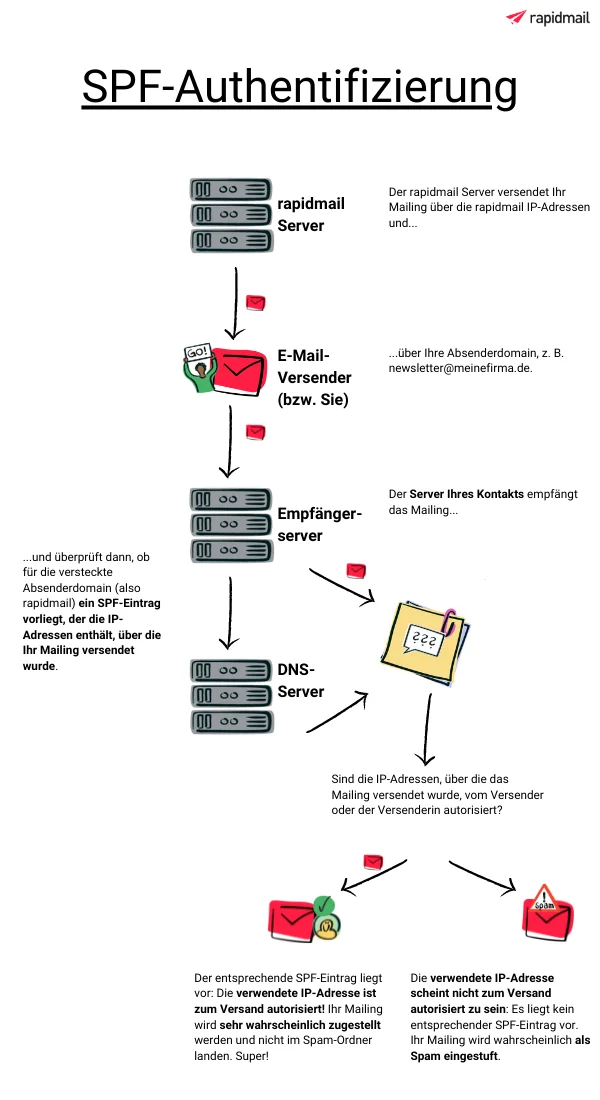
When the email arrives, the receiving server checks whether the IP address used to send your newsletter is listed in the SPF record for our sender domain or your sender domain and is therefore authorized to send it. If so, the server is more likely to allow your email through to your contact. If not, there is a risk that the receiving server will treat your newsletter as spam and not deliver it to your contact.
The SPF method therefore offers another way to reduce the risk of your newsletters being classified as spam and improve the deliverability of your campaigns.
Copy the SPF record for your sender domain in just a few simple steps and secure the highest possible delivery rate for your emails. You can find our guide to generating an SPF entry with rapidmail here.
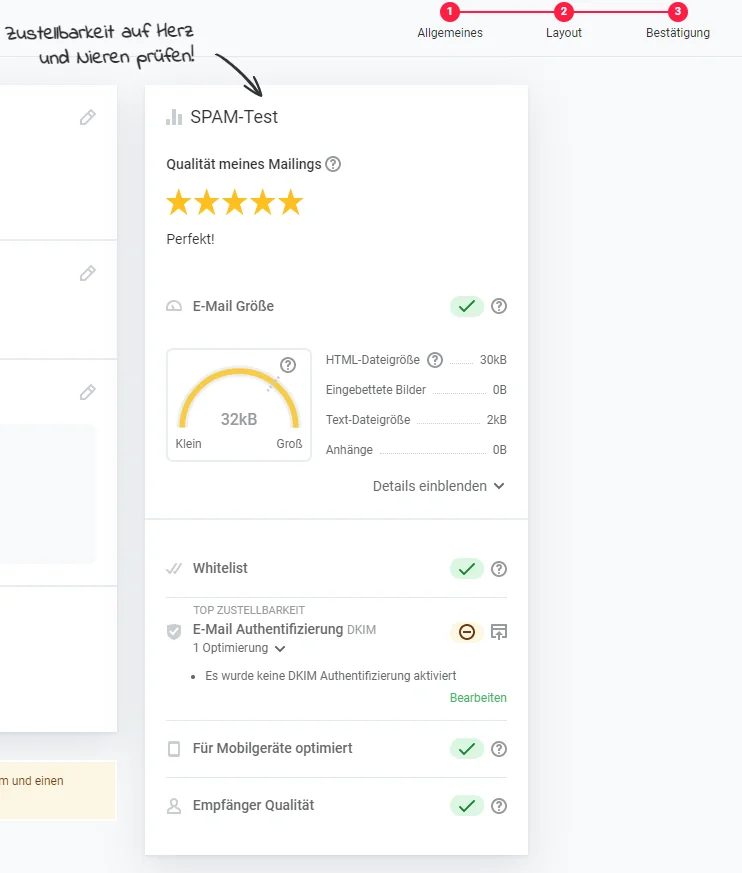
Before every newsletter send, our spam test checks whether DKIM and SPF email authentication is in place for your selected sender domain. If not, you will see a message advising you to activate it to optimize delivery.
All’s well that ends well!
Ensuring the highest possible newsletter deliverability is our top priority. This is especially true for our deliverability expert Matthias, who works every day to make sure your campaigns arrive safely in your recipients’ inboxes.
The effort involved in adding a DKIM key and an SPF record with rapidmail has decreased considerably. Previously, you had to submit a request to our support team for each new sender domain and wait for our IT team to generate the keys and send them to you. Now, it is in your hands: you can generate and add DKIM keys and SPF records yourself without having to rely on anyone else.
Of course, our friendly support team is still available if you have any difficulties or questions during setup.