Trust is good, but domain alignment is better: How to achieve ideal newsletter deliverability


To protect businesses and consumers from unwanted spam emails, email providers regularly adapt the analysis criteria used by their spam filters. Every incoming email is thoroughly examined before being delivered to the recipient’s inbox. Among other things, more and more major providers are checking whether the visible email sender address has what is known as “domain alignment”. As a reputable newsletter sender, you can easily achieve domain alignment with DKIM and SPF, increasing the likelihood of successful email delivery.
1. Domain alignment: What is it?
Experts expected almost 320 billion emails to be sent every day in 2021, which is quite a lot. But recipients do not want all these emails: more than half are spam, either unsolicited advertising or, in the worst case, phishing emails, which pose a serious threat to affected businesses.
It therefore makes sense that email providers want to protect inbox owners from spam. They use spam filters that check every incoming email against defined criteria. The email is only delivered to recipients once the spam filter gives it the green light.
As a newsletter tool, we at rapidmail regularly monitor and analyze the current methods used by different spam filters. This allows us to adapt our sending infrastructure accordingly and ensure that your newsletters continue to reach your subscribers safely.
One of the criteria currently used by an increasing number of spam filters is known as domain alignment. For example, the provider t-online announced that it would step up domain alignment checks on incoming emails from summer 2021. But what is domain alignment? And what exactly do you need to do as a sender? Don’t worry, we have all the answers!
What is domain alignment?
To explain and understand domain alignment, we first need to look at the email header and the information stored in it.
Every email that is sent contains certain hidden sender information in its header. Let’s take a newsletter that you send using rapidmail’s newsletter tool as an example. Its header contains the following information about the sender:
- The visible sender address (also known as the “From address”), e.g. newsletter@mycompany.com: When newsletter recipients receive the email in their email program, they can see that the message came from this sender.
- The sender address stored in the email header (also known as the “Return-Path”), e.g. _efahimiaiduuimkuikiuoma.eieodohiat@u12345.rmh1.net:_ Recipients only see this address if they view the newsletter’s email header. All bounces, meaning all emails that could not be delivered successfully, are reported to this rapidmail sender address. This allows our software to count every failed delivery attempt, among other things, and display it in your automatic newsletter report. As a sender, you can add an SPF record as a CNAME entry to your DNS (Domain Name System). This replaces the “normal” Return-Path in the email header with a “custom” Return-Path that uses your company’s sender domain, in our example: efahimiaiduuimkuikiuoma.eieodohiat@rm01.mycompany.com. This benefits both parties: rapidmail can continue collecting bounces for your newsletter reports, while the sender domains in your newsletters (visible and not visible) now match. More on that shortly.
- DKIM signature: The DKIM (DomainKeys Identified Mail) authentication method is used worldwide to ensure secure email communication. The process helps verify that newsletter senders are “genuine”. Among other things, the email header contains information about which domain was used for DKIM.
👀 Did you know?
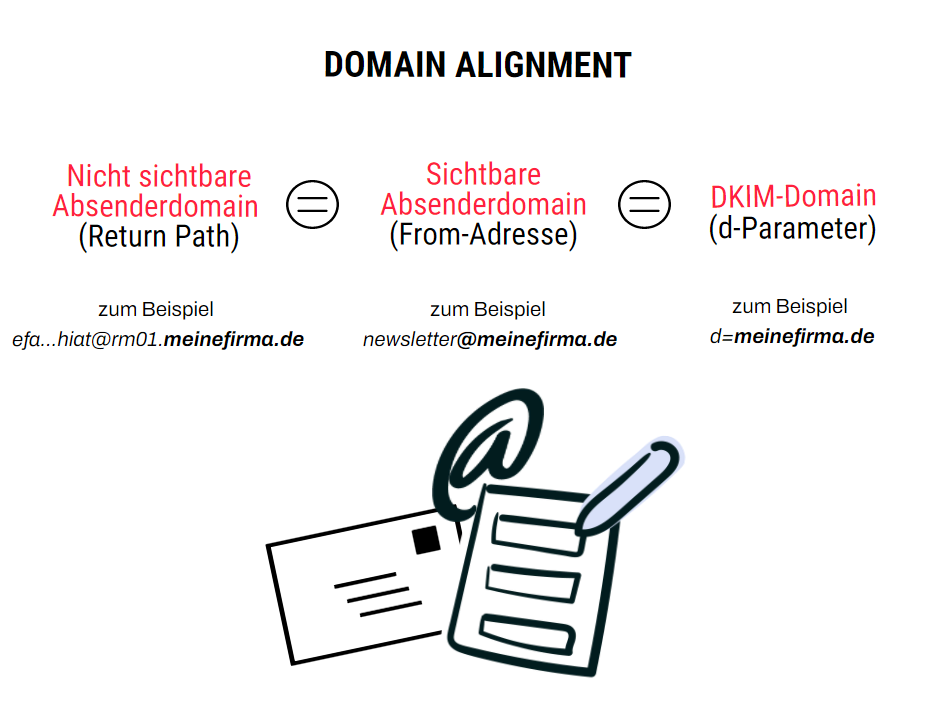
The email header can therefore contain different sender domains in the places mentioned above. To achieve domain alignment, the main domains used for SPF and DKIM are aligned with the visible sender domain (From address: newsletter@mycompany.com).
To achieve full domain alignment, an email sender therefore needs both DKIM alignment and SPF alignment for the domains in the email header:
- DKIM alignment: The DKIM domain stored in the email header must match the visible sender domain (“From address”).
- SPF alignment: The sender domain stored in the email header (“Return-Path”) and the visible sender domain (“From address”) must match.
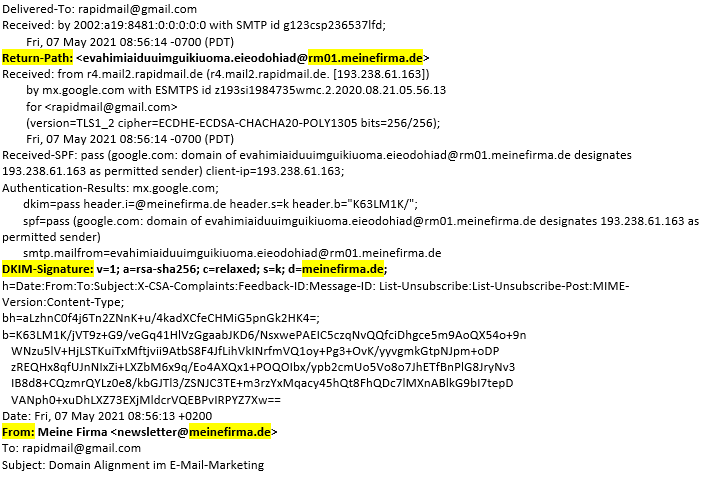
Let’s look at a practical example. The following image shows an email header with the domains it contains for the Return-Path, DKIM signature and visible sender address (From address). As you can see, all three domains match, so domain alignment has been achieved:
2. What does domain alignment have to do with email marketing?
When you send a personal email to a contact from your email account, you do not need to worry about domain alignment. With email marketing through a specialized tool, however, it should not be overlooked.
To make your efforts as a sender worthwhile, you should use a professional newsletter tool to send newsletters. Its many specialized and automated processes help you manage your customer and contact lists effectively. You can also design and send high-performing newsletters with little effort. To ensure your newsletters reach recipients’ inboxes safely, even with extensive contact lists, newsletter providers such as rapidmail supply a professional sending infrastructure and dedicated IP addresses. This makes successful delivery much more likely than sending email through a conventional email program such as Outlook.
rapidmail sends your newsletter using its own IP addresses. The rapidmail domain is stored in the email header as the Return-Path (the sender address that is not visible). As a result, all emails that cannot be delivered to your contacts (bounces) are reported to rapidmail. On the one hand, we can share this information with our customers in the newsletter report. On the other hand, we can investigate why the emails could not be delivered and take appropriate measures for our sending infrastructure if necessary.
At the same time, however, this means that without additional settings, the Return-Path (rapidmail domain) and DKIM signature do NOT match your sender address (From address, e.g. newsletter@mycompany.com). Until now, this was not a problem because most email program spam filters did not check domain alignment.
👀 Did you know?
However, some major providers had already announced that they would pay more attention to domain alignment in the future, including Microsoft (Office 365) in the previous year and Telekom (t-online) for summer 2021. This makes it all the more important for senders using a newsletter tool such as rapidmail to configure all the necessary settings to achieve domain alignment for their campaigns.
Domain alignment allows you to build increasing levels of trust as a newsletter sender, also known as “computational trust”. The more email providers’ spam filters trust you as a sender, the more likely they are to deliver your newsletters successfully to recipients’ inboxes, even if the newsletter was sent via a different IP address, such as one belonging to rapidmail.
Domain alignment is therefore becoming increasingly important in email marketing. It allows you to:
- Strengthen your reputation as a reputable sender
- Improve the deliverability of your newsletters and campaigns
- Ensure that spammers cannot misuse your company domain
Get started with rapidmail now
💡 rapidtip
Domain alignment significantly improves the deliverability of your newsletters and campaigns. Nevertheless, it is only one of the many factors that determine whether an email is successfully delivered to a recipient’s inbox. That is why you should also take a look at our comprehensive guide to nine steps for ideal newsletter deliverability.
3. Which newsletter senders is domain alignment particularly important for?
Using the two authentication methods DKIM and SPF in a way that achieves domain alignment in the email header benefits all newsletter senders. This is especially true when using a specialized newsletter tool such as rapidmail for email marketing.
The more rapidmail customers set up domain alignment, the better the deliverability of all emails sent via rapidmail’s IP addresses, including your newsletters. This calls for teamwork! ?
Above all, senders whose contact lists contain many Microsoft Office 365 or t-online email addresses should set up domain alignment as soon as possible. These two providers already pay greater attention to domain alignment when filtering spam (Microsoft 365), or have done so since summer 2021 (t-online).
4. How can I achieve domain alignment for my newsletters?
If you use rapidmail as your email marketing tool, you can set up domain alignment for your email marketing in just a few clicks. Simply copy the DKIM key and SPF record from your rapidmail account and add them to the DNS at your web host. All emails you send via rapidmail from that point onwards will then automatically have domain alignment: DKIM alignment and SPF alignment automatically combine to create full domain alignment.
How to achieve DKIM alignment:
Once you have added the DKIM entry to your DNS, the DKIM domain matches the From domain in the email header. Add the DKIM key at your web host now:
- General help article with step-by-step instructions for creating a DKIM entry
- Help article on creating a DKIM entry for STRATO
- Help article on creating a DKIM entry for IONOS
- Video tutorial with step-by-step instructions for creating a DKIM entry
How to achieve SPF alignment:
Adding the SPF record to your DNS as a CNAME entry causes the email header to include the custom Return-Path with your company domain, e.g. efahimiaiduuimkuikiuoma.eieodohiat@rm01.mycompany.com instead of the previous “normal” Return-Path efahimiaiduuimkuikiuoma.eieodohiat@u12345.rmh1.net. The custom Return-Path is necessary so that its domain matches the domain in the From address. Add your SPF record now:
The rapidmail newsletter
Tips, ideas and news about email marketing, straight to your inbox.
5. Long story short: What domain alignment does
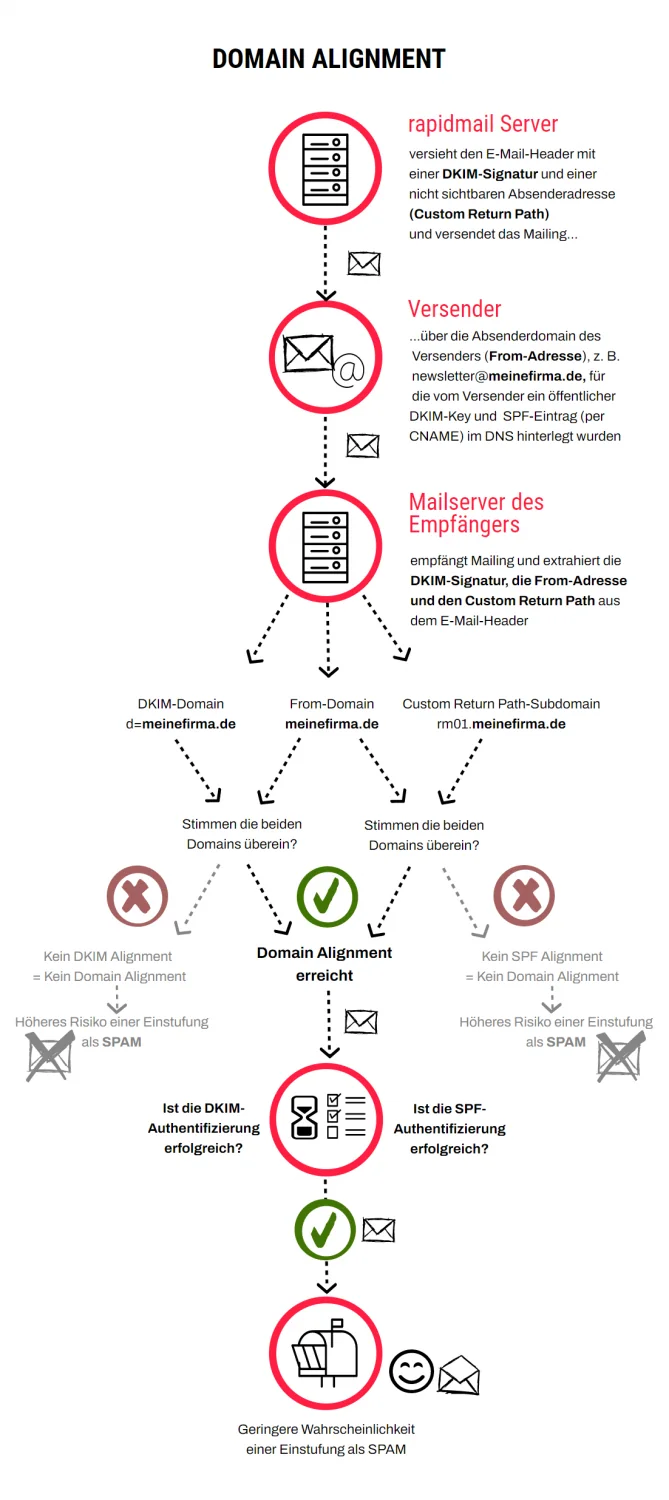
Phew, that was a lot of information! The following graphic provides a brief summary of what domain alignment is and how rapidmail checks it when sending newsletters, helping your newsletters actually reach their destination: