Which email sender is right for your newsletter?


First impressions count, including in email marketing. Before you think about what content will amaze your subscribers, you should consider your newsletter sender. After all, your sender profile, with its sender name and sender address, is one of the first things prospects see in their inbox. Spam filters also look at your sender address to assess whether your email is legitimate. Find out which email sender will win over both your contacts and spam filters.
1. What does an email sender consist of?
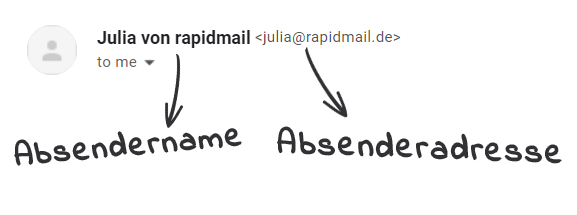
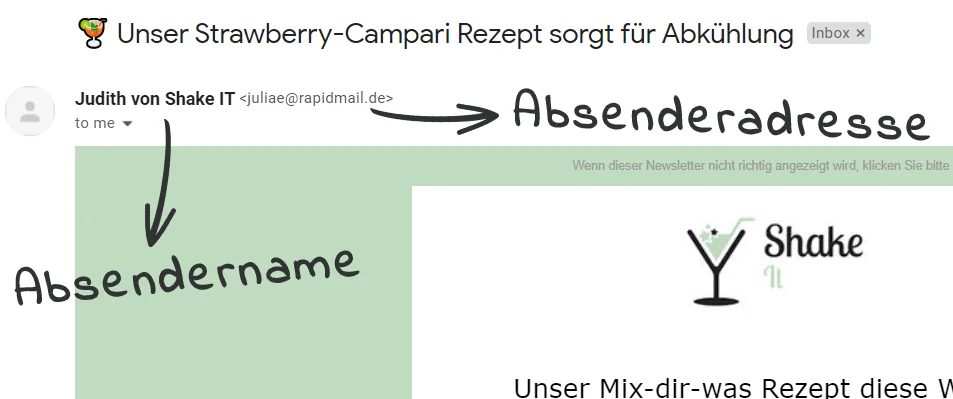
The sender profile for your newsletter consists of your sender name and sender address. Depending on the email provider and any settings applied, recipients may see this information in the email overview or, after opening an email, in its header:
2. Why is the newsletter sender so important?
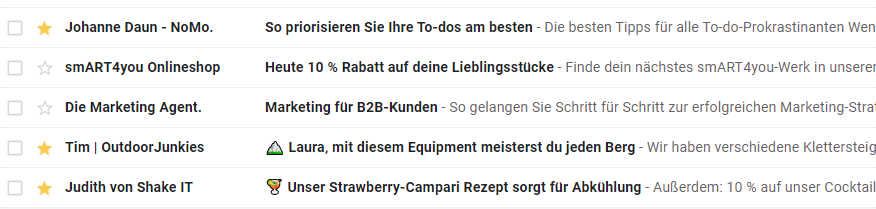
In Gmail, the sender name is shown in bold in the email header, making it even more prominent than the email sender address. Most providers also show only the sender name in the inbox overview. Before you send your newsletter, you should therefore choose the sender name just as carefully as the sender address.
Before prospects even see your newsletter content, they use the email sender and subject line to decide whether to open the newsletter at all. So many emails are sent every day that your subscribers certainly cannot make time for every message. As a newsletter sender, you should therefore carefully consider which sender profile and subject line will be most likely to convince your target audience to open YOUR email.
Although your subscribers will mainly notice your sender name in their inbox, it is still important that your sender name and sender address match and can be clearly associated with your company. This not only presents recipients with a consistent and trustworthy image. A coherent sender profile also signals to providers’ spam filters that the newsletter is legitimate, rather than spam or a phishing email. This increases the chances of successful delivery! ?
👀 Did you know?
The sender address should not only match the sender name and email content: the sender domain should also match the return path, the non-visible sender address, and the DKIM domain. This creates domain alignment, which has a positive effect on your newsletter deliverability.
It is therefore worth taking the time before sending to set up a harmonious and compelling sender profile. A well-considered email sender helps your newsletter achieve even better results because you can:
- improve the chances of successful newsletter delivery: A consistent sender with a good sending reputation is well received by spam filters.
- achieve higher open rates: A trustworthy and consistent newsletter sender means more email opens.
- build recognition: A consistent and personal newsletter sender ensures that recipients can immediately associate your emails with your brand.
- appear approachable and authentic: A personal sender address that readers can contact at any time strengthens their connection with your company.
3. Freemail addresses as newsletter sender addresses: yes or no?
It is better not to use them. Many providers, such as Gmail, gmx, t-online and web.de, offer free email addresses. This is more than convenient for private use. However, you should not use a freemail address as the sender address for your company newsletters. There are several reasons for this:
- Freemail addresses cannot be clearly associated with your company domain: From a spam filter’s perspective, anyone could have created the free email address and misused your brand name to send spam or phishing emails. Successful delivery is therefore less likely.
- Freemail sender addresses look unprofessional: Using a free email address such as mycompany@web.de as your newsletter sender also looks untrustworthy to subscribers. This makes some recipients more likely to avoid opening your email or clicking a link as a precaution.
- A freemail sender address limits your flexibility: Depending on the newsletter content and company size, it may be useful to specify different teams as newsletter senders, such as support@mycompany.com or marketing@rapidmail.de. When readers reply to the newsletter, their message reaches the relevant team. This is not as easy to implement with freemail addresses.
💡 rapidtip: Use a company domain instead of a freemail address
It is better to use your usual brand or company domain for your newsletter, such as newsletter@mycompany.com or lisa@mycompany.com, as it already has a good reputation. Do you not yet have your own company domain? You can find numerous offers online from reputable providers such as IONOS by 1&1 or STRATO that also include email sender domains.
4. Noreply addresses as email senders: a good idea?
Unfortunately not. Anyone who uses a “noreply address” for their newsletter marketing does not want recipients to be able to reply to the email: replies to a noreply sender address generally do not reach the sender or end up unnoticed in a dedicated inbox.
Noreply sender addresses often use formats such as “noreply@mycompany.com”, “do-not-reply@mycompany.com” or “please-do-not-reply@mycompany.com”. Many newsletter senders still choose a noreply email address as their sender to prevent too many replies from readers flooding their inbox.
Unfortunately, people often forget that noreply email addresses have disadvantages for recipients and senders alike, which makes them unsuitable as newsletter senders:
- Noreply addresses prevent any response to the newsletter: Your readers become frustrated because they first have to search online for a way to contact you. Spam filters can also detect fewer interactions with your email, a criterion that contributes to spam checks for your future newsletters.
- A noreply sender puts you in a legal gray area: Your readers cannot request information about their personal data from you by replying directly to the email.
You can find more information about the disadvantages of a noreply sender address in our article “Noreply addresses: Are they suitable as newsletter senders?”
The rapidmail newsletter
Tips, ideas and news about email marketing, straight to your inbox.
5. Including an employee’s name in the email sender: does it help?
Yes! Depending on the newsletter content, company and industry, it can be useful to include an employee’s name in the email sender. According to a study by absolit Dr. Schwarz Consulting, a “human” email sender can increase the open rate by up to 33% compared with an impersonal company sender such as news@mycompany.com.
The most frequently used sender formats are:
- Lisa from My Company (sender name) with lisa@mycompany.com (sender address)
- Jana | My Company (sender name) with jana@mycompany.com (sender address)
- Tom Müller | My Company (sender name), for example with t.mueller@mycompany.com (sender address)
Including a name in the sender makes your newsletter more personal and approachable. Readers are less likely to feel that they are receiving a mass message from a general company sender, such as newsletter@mycompany.com. Instead, they associate your emails with a specific person whose photo they may have seen on your website before. In the long term, this also reinforces the feeling that subscribers can contact this person if they have questions or problems. It is therefore important not to keep changing the employee name in the sender, but to use the same person, at least for each newsletter topic or type of campaign.
💡 rapidtip: Adapt the email sender to the target audience
Depending on the industry and company, it can also be useful to contact different recipient segments using different newsletter senders to increase the open rate. For example, female subscribers may identify more with a female sender and male subscribers with a male sender. Younger groups of recipients might also be more likely to open the email if the sender name contains only a first name, while older subscribers may prefer the sender to include a first name and surname. It is worth using an A/B test beforehand to identify your target audience’s preferences.
6. Different sender addresses depending on email content: yes or no?
Do you send your customers and prospects different campaigns as well as newsletters? If so, it makes sense to vary the sender and sender address for different topics.
For example, this could look like:
- Weekly newsletter: sender name “Lena from My Company”, sender address “lena@mycompany.com” or “marketing@mycompany.com”
- Monthly product updates: sender name “Paul from My Company”, sender address “paul@mycompany.com” or “product@mycompany.com”
- Special campaigns, for example about a merger or with Christmas greetings: sender name “My Company team”, sender address “info@mycompany.com”
The benefit is that, after a while, recipients can see from the email overview whether it is a newsletter with helpful tips or important product updates, for example. Even if they receive more than one email from you in a week, they will not immediately feel overwhelmed with advertising.
Using several email sender addresses is also practical for you as the sender: when readers reply to your email, the message goes directly to the right team or responsible employees. This is particularly useful for both sides in larger companies.
Conclusion: Which email sender is ideal for sending newsletters?
An email sender address and sender name often require more thought than you might initially expect. To build a good relationship with your newsletter subscribers, you should carefully consider in advance which sender name best suits your brand and how best to allocate your sender addresses.
You have found the ideal newsletter sender if:
- 👀 it is easy to recognize
- 👔 it looks professional and trustworthy
- 🏢 it can be directly associated with your brand or company
- 😊 it is personal
- 📥 people can send a message to the sender address and reach the right person
- ✅ it does not change for a long period, at least for each campaign topic
💡 rapidtip: Test, test and test again
To find out whether newly created newsletter senders appeal to recipients, you should first assess the sender names and sender addresses with an A/B test. With rapidmail, you can create several sender profiles for your email marketing and test them on a portion of your contacts first. Once your A/B test phase is over, you can select the more successful sender and use it for the rest of the send.