Outlook follows Gmail & Yahoo: What the new delivery rules mean for your email marketing

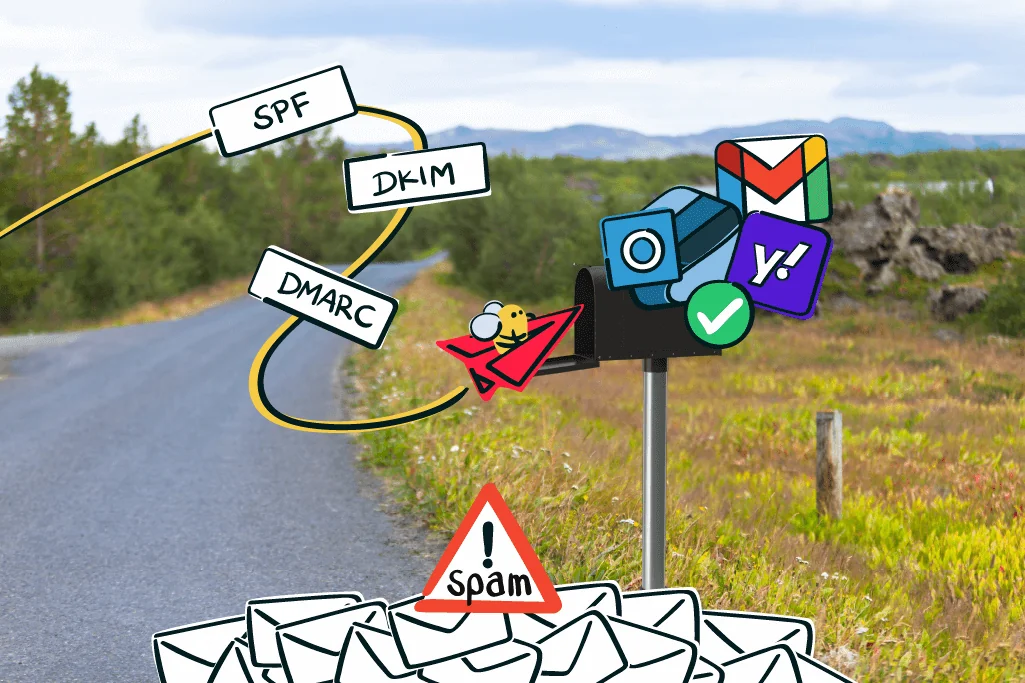
Professional email marketing depends on your contacts being interested in your messages and consenting to receive them. Unfortunately, inboxes also receive a large number of unwanted spam emails from dubious senders. Email providers Gmail and Yahoo have already taken action against this: new delivery rules are intended to help spam filters identify incoming bulk spam more effectively and keep it out of inboxes. Microsoft is now following suit with similar delivery rules for Outlook from May 5, 2025. To make sure your wanted newsletters and marketing emails continue to reach your contacts reliably, you should prepare for the new rules as a sender. We’ll show you what you need to do!
1. These changes to the delivery rules are important for you
Although the changes to the delivery rules require a little attention not only from us as an email marketing tool, but also from you as a newsletter sender, it is a good thing that Outlook is now joining Gmail and Yahoo in working to keep our inboxes as secure as possible and ensure that only messages from reputable senders reach them.
In its Safety Center, Google states that Gmail already blocks more than 99.9% of all spam, phishing and malware emails before they are delivered to inboxes, amounting to almost 10 million emails per minute. Even so, filtering measures and criteria need to be reviewed, reconsidered and optimized on an ongoing basis. After all, spammers do not stand still either: they continually adapt their methods to exploit even the smallest loophole for sending spam.
For this reason, Google announced and implemented a Gmail security update for 2024 back in 2023. Email provider Yahoo also made corresponding changes to Yahoo’s email standards.
A year later, Microsoft has now announced new rules for Outlook. They take effect on May 5, 2025 and are broadly consistent with the delivery rules introduced by Gmail and Yahoo the previous year.
But what does all this mean for you and your newsletter marketing? So you do not have to work your way through every article online, we have summarized all the rules and information relevant to you as a newsletter sender in one place. And do not panic: we’ll get through this together! 🤗
These are the 2 email delivery rules you should address for your newsletter marketing:
No. 1:
Emails sent from free email addresses to a large number of recipients will no longer be delivered.

This affects you if you currently send your newsletter or marketing emails from a Gmail, Yahoo or Outlook free email address.
No. 2:
DKIM, SPF and a DMARC record must be configured with your web host for email sender domains.
This affects you if you have not yet set up DKIM and SPF authentication for your newsletter sender domain (e.g. “@your-company.com”) or added a DMARC record with your web host, in other words, your internet service provider (e.g. IONOS or Strato).
🆘 Um, does that all sound like double Dutch? Don’t worry, it’s not as complicated as it sounds at first! We’ll explain exactly what it all means in a moment.
2. How the updated rules affect your newsletter marketing
Oh dear, have you just realized that the new delivery rules affect you? If so, we strongly recommend taking a closer look at the topic as soon as possible so that your newsletters continue to reach your target audience’s inboxes reliably.
Otherwise, the new requirements could create the following obstacles for your email marketing if:
- You currently send your newsletters and marketing emails from a free email sender address: There is a very high risk that your newsletters will no longer be delivered to any contacts who use Outlook, Gmail or Yahoo as their email provider. At present, only Gmail, Yahoo and Outlook have published new rules. However, other email providers may follow suit, which would mean that newsletters sent from other free email addresses would also stop reaching your contacts.
- You have not yet configured a DKIM key, SPF record and DMARC record with your web host: In this case, too, there is a very high risk that your newsletters will no longer be delivered to any contacts who use Outlook, Gmail or Yahoo as their email provider. Other providers could also decide to introduce the same measures. This would mean that your newsletters would also stop reaching contacts who use other email providers.
3. Stay one step ahead: How to prepare for the rules in good time
Of course, it is often easier to hope that the changes will not have such serious consequences after all and that you might not need to take any action. But our rapidmail deliverability expert Matthias, who always keeps a close eye on every change made by email providers, knows that the latest developments are all moving in the same direction:
Security in email communication is becoming increasingly important to all providers. Senders therefore have no alternative but to implement essential authentication measures.
Matthias, deliverability expert at rapidmail
The good news is that if you put in the effort now and prepare properly for the changes, you have nothing to fear for your newsletter marketing when Outlook’s new rules take effect in May 2025.
This not only ensures that you comply with the email providers’ new requirements, but also helps your company’s sender domain build a good reputation with providers such as Outlook, Gmail and Yahoo as a reputable newsletter sender. This means you will also benefit from maximum newsletter deliverability in the long term.
How to prepare for the new delivery rules from major email providers:
To-do no. 1:
Use your company domain as your newsletter sender domain instead of a free email sender address.

Do not continue sending your newsletters from a free email sender address such as “your-company@gmail.com”. Instead, set up your own sender domain for your company so that you can send your newsletter from an email sender address such as “newsletter@your-company.com”.
To-do no. 2:
Implement the three essential authentication methods: DKIM, SPF and DMARC.
As a newsletter sender, you must now be able to prove that you really are the sender of the newsletter. This sounds simple at first, but it is somewhat more complex from a technical perspective.
When newsletters are sent, the DKIM and SPF authentication methods use security mechanisms running in the background to verify that the sender displayed in an email is indeed the genuine sender. If authentication via DKIM or SPF is successful, your email will be delivered successfully to the intended contact.
If there are no DKIM and SPF records or authentication fails, however, your newsletter is very likely to be classified as suspicious. This is where the third authentication method, DMARC (short for “Domain-based Message Authentication, Reporting and Conformance”), comes into play.
The DMARC record configured with your web host then tells your contacts’ email providers what should happen to the email suspected of being spam. There are three options for specifying how your contacts’ email servers should handle unauthenticated emails. By configuring your DMARC record accordingly, you can choose whether unauthenticated emails are rejected immediately (“reject”), moved to the spam folder (“quarantine”) or delivered as usual despite the failed authentication (“none”).
Don’t worry: you do not need to understand in detail how DMARC authentication works technically or exactly what the different options trigger in the background. That is what we are here for! What matters for you and your newsletter marketing is that, alongside the DKIM key and an SPF record, you also add a DMARC record with your web host (e.g. Strato or IONOS). It only takes a few minutes! Unfortunately, we cannot do this part for you.
At present, the minimum “p(olicy)=none” option is sufficient for the DMARC record. This means that your newsletters will still be delivered as usual even if DKIM and SPF authentication fails. You cannot go wrong! Here is an example of what a DMARC record in a web host’s DNS (“Domain Name System”) looks like. As you will see, it is not that complicated:
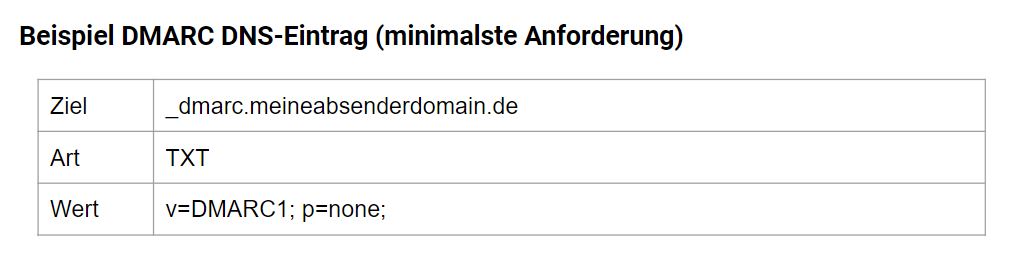
If you send newsletters, you should therefore make sure you use all three authentication methods, DKIM, SPF and DMARC, to ensure maximum email deliverability. Otherwise, the risk of your messages being classified as spam will continue to increase, particularly in light of the new Outlook, Gmail and Yahoo rules. In the final section, we’ll show you how easy it is to implement all three methods with rapidmail!
DKIM, SPF and DMARC not only strengthen the sender reputation of your own sender domain with spam filters, but also the reputation of your newsletter tool. For all rapidmail users, for example, this means that the more customers set up the essential authentication methods for their sender domains, the better the sending reputation of our newsletter tool becomes. Ultimately, all rapidmail customers benefit from optimal delivery conditions for their newsletters: One for all and all for one! 💪🏽
Unfortunately, implementing the authentication methods alone is not enough. The most important thing, of course, is still to make sure that you do not send spam content to your contacts, but instead provide varied and relevant newsletter content that is tailored precisely to their interests.
My personal advice, to be perfectly blunt, is this: please do not send trash. Spam content and excessive demands to buy will put off not only your target audience, but also spam filters. The result is miserable delivery rates and a poor brand image. Instead, make sure you have your contacts’ consent to receive newsletters through double opt-in, never buy addresses and send content that is helpful and engaging.
Matthias, deliverability expert at rapidmail
💡rapidtip: 9 steps to optimal newsletter deliverability
As a newsletter tool, we naturally do everything we can to ensure maximum deliverability for your email marketing. Nevertheless, you as the sender can also play an active role in further optimizing your newsletter delivery, whether by spring-cleaning your newsletter mailing list, reducing email size or adapting your newsletters for mobile devices. Our guide will take you through just 9 steps to ideal email deliverability!
4. How it works with rapidmail: Instructions to help you prepare
Don’t panic: You do not need to have understood every last detail in this blog post. The key thing is that you now know newsletter deliverability is an important topic and that you can actively help achieve optimal delivery.
Although deliverability has always been very important to us, and rapidmail ranks among the best German newsletter tool providers for delivery rates (source: EMailToolTester, 2023), there is a short to-do list for you as a newsletter sender that, unfortunately, we cannot complete on your behalf.
A quick reminder:
✔️ 1. To-do: Use your company domain as your newsletter sender domain.✔️ 2. To-do: Implement the three authentication methods: DKIM, SPF and DMARC.
Even so, we try to support you in completing these to-dos as much as possible by making the process as simple as we can and guiding you through the necessary changes step by step. And if all else fails, you can of course contact our support team free of charge at any time!
We have prepared detailed information and easy-to-follow, step-by-step instructions in our blog and Help Center to help you prepare for the new Yahoo and Gmail rules:
Blog and help articles for to-do no. 1: Use the right sender address for sending newsletters:
- How to find the right sender address for sending newsletters (blog article)
- Set up a new sender address for sending newsletters with rapidmail (help article)
- Get past spam filters with DKIM and SPF: How to improve your newsletter deliverability (blog article)
- Use domain alignment to achieve ideal newsletter delivery (blog article)
- Optimize delivery: An overview of authentication methods (help article)
- What is DKIM authentication? (help article)
- Instructions: Create a DKIM key with rapidmail (help article)
- What is the SPF method? (help article)
- Instructions: Generate an SPF record with rapidmail (help article)
- What is DMARC? (help article)
- Instructions: Set up DMARC with rapidmail (help article)
Good luck implementing the changes. You can do it! If you do get stuck, our support team is always here for you. 💌