Embedding videos in newsletters: yes or no?

Videos in newsletters not only attract recipients’ attention as if by magic, but also spark their interest in the email’s content. However good a newsletter’s copy may be, subscribers generally only notice it if the newsletter is visually compelling too. So how useful is it to embed videos in a newsletter, and how does it work?
1. Benefits and disadvantages of videos in newsletters
Whether they are adverts, video tutorials, promotional videos for events or corporate films, videos are popular in marketing! Across sectors, videos are used for advertising on many websites and especially on social media. Directly playable videos, however, are still rarely embedded in newsletters.
Why is that? What are the benefits and disadvantages of newsletter videos for senders?
Benefits of videos in newsletters
- 👀 Eye-catching when the email opens: When recipients open your newsletter, it should provide content that immediately catches their eye and wins them over. This might be an attractive, well-considered newsletter design with an appealing header image, relevant photos, clear graphics or exciting videos. As genuine eye-catchers, videos can make recipients take real notice of your newsletter, and therefore your company, instead of simply skimming it and moving straight to the next email.
- ▶️ Interaction: push the button! If the reader’s eye falls on a play button as the newsletter opens, it immediately signals: Aha, there is something to click here! Videos with a clearly visible play button are exciting for recipients and motivate them to click.
- 😍 Stir emotions and prompt a desire to buy: Like pictures, videos say more than a thousand words! They present an advertising message in a particularly pleasant and emotionally appealing way. If recipients see one of your products “in action” in the newsletter, for example, their desire to own and buy it grows.
- ↗️ Increase the newsletter click-through rate: Videos stand out, attract attention and encourage people to click the video’s play button and then the linked call-to-action button leading to an important page on your website. In other words, videos increase your newsletter click-through rate (CTR) and the number of visitors to your website.
Disadvantages of videos in newsletters
- Display problems: From a technical perspective, embedding a video in an email’s HTML does not require much effort. However, directly embedding newsletter videos always carries a high risk that they will not display correctly for recipients. This is because many email programs, including Outlook and Gmail, do not support video formats. Videos in emails also cannot be played on some mobile devices such as smartphones. If you decide to add a video to your newsletter, you therefore have to accept that the newsletter will not display correctly for many recipients or will not contain the video at all.
- Deliverability problems: Newsletters with embedded videos also need a lot of storage. The large volume of data can cause numerous spam filters in recipients’ email programs to reject the email entirely or display it only in the spam folder. This in turn damages your reputation as a sender. Embedded videos can therefore have a negative impact on newsletter deliverability.
👀 Interim conclusion: is it worth embedding directly playable videos in newsletters?
Disappointing though it may be, we advise against embedding directly playable videos in newsletters because correct display and reliable delivery cannot be guaranteed. Even the most interesting video is no use if the campaign never reaches your contacts. To avoid this risk, the rapidmail newsletter tool does not include a separate video element for your emails.
Of course, the choice is still yours if you want to risk faulty display and delivery and embed a playable video in your newsletter after all.
2. Adding videos to newsletters: how it works
There is no need to bury your head in the sand. We reveal three tricks that let you give rapidmail recipients the impression that your newsletter contains a video without embedding it directly. The great thing is that you can be certain your emails will arrive reliably and display correctly in subscribers’ inboxes, while still benefiting from the advantages of video described above!
Here is what to do: First, you need to put the relevant video online somewhere else and make it accessible, for example:
- on your website
- on your YouTube channel
- in your account with a file-hosting service such as Dropbox, Google Drive or OneDrive
You can then cleverly add a link to your newsletter that leads to the video. We will now show you three visually appealing ways to link it.
The rapidmail newsletter
Tips, ideas and news about email marketing, straight to your inbox.
Alternative 1: link using an animated GIF
An animated GIF gives your newsletter just as much of a wow factor as a “real” video. GIF files allow you to layer several individual images in a single file, creating moving images in your newsletter.
Here is how:
- Use a short clip or several stills from your video and convert them into a .gif file. Numerous online tools such as imgflip or viewed can do this. Design professionals can also create animated GIFs easily in Photoshop.
- Most newsletter tools, including rapidmail, make it easy to add animated GIFs to the newsletter as an image element. Make sure the email file size, including images, does not exceed 300 kB.
- In the newsletter editor, you can then link the GIF to the full video you previously uploaded, for example to your YouTube channel. You can link the GIF in exactly the same way as a normal image. Your newsletter will then contain an animation that interests recipients and leads them to the complete video.
Drinkevolution turns its newsletter into a real eye-catcher with this GIF. (Excerpt from the newsletter)
Alternative 2: link using cinemagraphs
Cinemagraphs are a newsletter design trend that achieves a big effect with one tiny movement. Unlike “ordinary” GIFs, cinemagraphs contain a small movement in just one place, so recipients perceive them more as still images than videos. Sometimes less really is more, and it can give your newsletter that special something that distinguishes you from your competitors.
Naturally, you need a suitable video containing very little movement. Portals such as Pexels make it easy to download free and potentially royalty-free cinemagraphs. Or keep this fashionable style in mind for your next video shoot. 😉
Example of a newsletter containing a cinemagraph: the movement in the water makes readers feel as though they are looking at a real pool, guaranteed to stir their wanderlust! (Excerpt from the newsletter)
You should also add a link to the cinemagraph that takes readers to your website, YouTube channel or another website where they can watch the full video.
👀 Did you know?
More email programs support the .gif format than embedded videos. There are exceptions, however, so before sending you should find out which email clients your newsletter contacts use and whether animated GIFs and cinemagraphs are suitable for you. Our help article contains more advice on successfully adding GIFs to your newsletter.
Alternative 3: link using a video still (“fake-player graphic”)
To ensure that the newsletter displays correctly for every recipient, you can also add a fake-player graphic to the newsletter as an image element. This is simply a normal image that you link to the video’s URL. For example, you can use a still from the video and add a mock player interface with a play button, as in the following example.
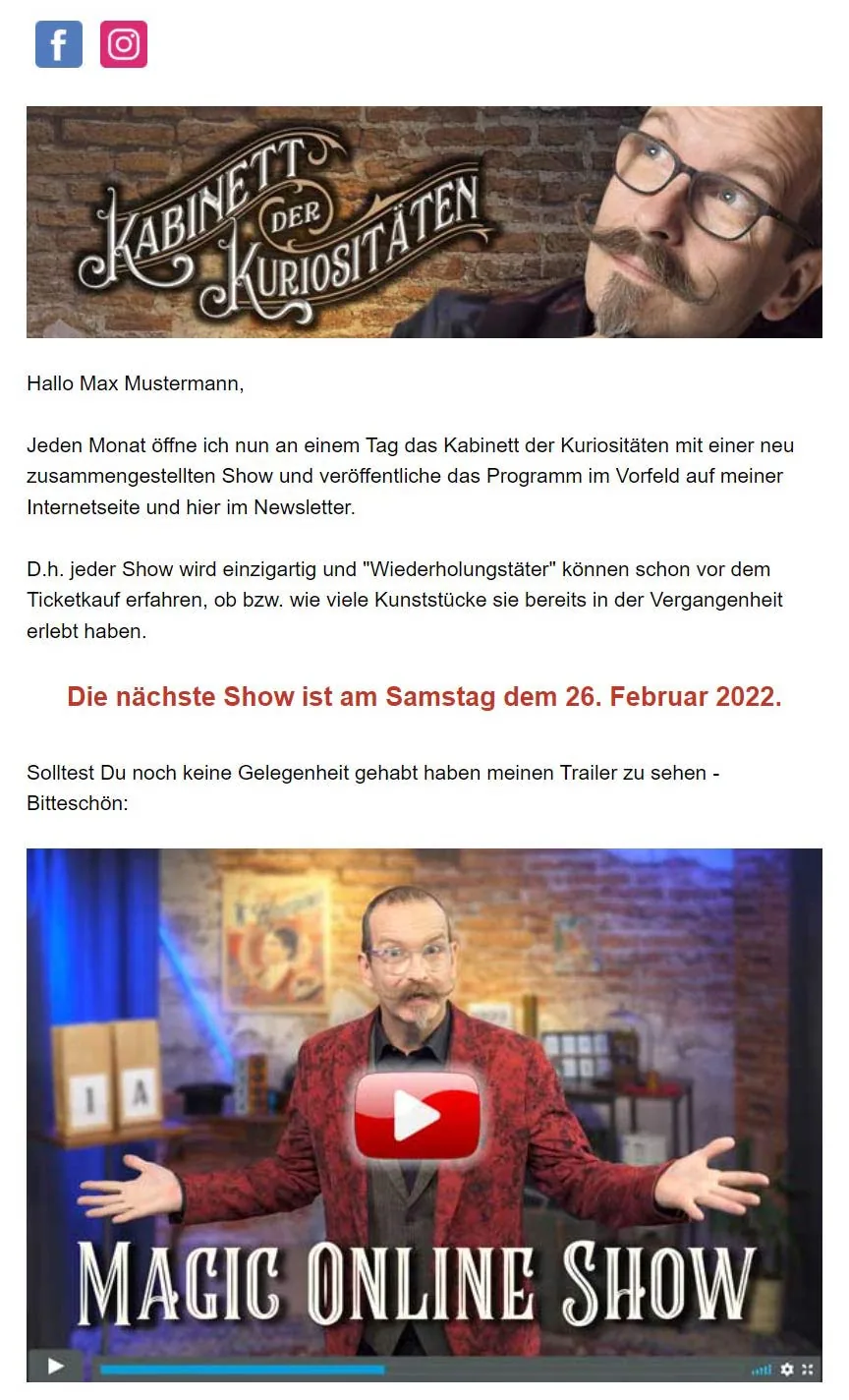
To recipients, it looks as if they can start a video by clicking the play button. In reality, clicking takes them to the video hosted online.
💡 rapidtip: test how your newsletter appears to contacts before sending
To see how the newsletter will appear in recipients’ inboxes, use the preview feature and perform a display test.
We also recommend that before actually sending your newsletter, you send several test emails to different domains and email clients to check its appearance. View the newsletter on different devices, such as a laptop, smartphone and tablet, to make sure everything appears as intended.
3. Which types of video will interest my contacts?
Whether you link your video through an animated GIF or fake-player graphic, you can let your creativity run free when it comes to the content! It is important, however, to think carefully about what you want the video to achieve and which communication strategy you are pursuing. Do you work in B2C or B2B email marketing? Do you want recipients to buy the product shown? Book a consultation? Or submit an application? Only then can you align the rest of your newsletter content with that aim and decide which page of your website the newsletter’s call-to-action button should lead to.
No idea for your video yet? We have given it some thought:
Interesting video content for newsletters
- 🆕 Present new products, services or collections
- 💡 Instructions/tutorials
- 🎥 Trailers
- 🗣️ Customer interviews
- 🗨️ Explainer videos, for example employee interviews
- 📢 Event presentations
- 🧑💼 Recruitment: we’re hiring!
- 🏢 Corporate film/company presentation
- 💻 Webinars/online conferences
- 🚀 Announcement: preview of new projects, products and more
- 🎁 Contests
- 👀 Making of: a look behind the scenes
- 📆 Review of the past year