Create a WhatsApp newsletter: 6 steps to the perfect messaging campaign

Imagine reaching your newsletter contacts exactly where they already spend time every day: directly on their smartphones in WhatsApp Messenger. Your message appears as a push notification on the lock screen and immediately captures your customers’ attention. That is exactly what makes a WhatsApp newsletter so attractive. Combined with a traditional email newsletter, it lets you share your content through two channels at once: while emails provide room for detailed information, WhatsApp stands out for its speed and directness. Together, they help you reach a large proportion of your contacts wherever they happen to be. In this article, we show you the basics of messaging marketing. You will learn step by step how to create a WhatsApp newsletter, what matters when it comes to content, technology and legal requirements, and how to send your first messages to contacts successfully. In short, we guide you toward creating a messaging campaign that really connects. 🚀
🥜 In a nutshell: The key facts about WhatsApp newsletters
WhatsApp newsletters are regular messages sent directly through the app that appear as push notifications on a smartphone. They are the perfect complement to email newsletters, allowing you to tell potential customers about offers, updates and exclusive content.
At a glance:
- ✔️ Performance: Open rates of up to 98%, plus high click-through and conversion rates thanks to personal communication directly through the messaging service.
- ✔️ Legal requirements: Sending starts with an opt-in and is GDPR-compliant when certain requirements are met.
- ✔️ Costs: Marketing messages cost approximately 11 cents per recipient, while utility and authentication messages cost approximately 4.5 cents. Service replies are free within the first 24 hours.
- ✔️ Success factors: Short copy, emojis and clear calls to action are best practice. Use personalization and segmentation, and provide genuine added value.
- ✔️ Measurability: Opens, clicks, conversions, unsubscribes and replies can be analyzed and optimized regularly with the relevant Business Solution Provider.
- ✔️ Best practice: Combine WhatsApp and email marketing, using WhatsApp for quick prompts and email for detailed content and complex campaigns.
👀 Did you know?
With rapidmail, you can complement your WhatsApp marketing with professional email newsletters. The advantages? GDPR compliance, intuitive email automation, excellent deliverability, detailed reporting and 2,000 free newsletters to get you started.
1. First things first: What is a WhatsApp newsletter?
A WhatsApp newsletter is a regularly sent message that lets your business communicate directly with customers or interested prospects through the popular messaging service. Instead of appearing in an email inbox or social media feed, your message arrives where it is almost always seen: directly on a smartphone.
In principle, a WhatsApp newsletter is similar to traditional email newsletter delivery. You share information, send reminders or draw attention to your offers, but the crucial difference is the channel. WhatsApp messages appear as notifications directly in the messaging app, which many recipients already use several times a day. This results in high open rates and especially personal communication.
WhatsApp marketing is a smart complement to traditional email marketing, particularly for businesses that interact with customers personally. A bakery, for example, can promote a spontaneous weekend offer, an auto repair shop can announce a test-drive day, and a bookshop can promote an exclusive reading. A WhatsApp newsletter makes all this fast, direct and approachable.
Content that works especially well in WhatsApp newsletters
WhatsApp is a fast channel. Your content should therefore be short and clear, and above all attract your contacts’ attention. The following types of content work particularly well:
- ⭐ Offers and discount promotions
- 🆕 New products or product range updates
- ⏰ Appointment reminders or abandoned basket notifications, perhaps with a small discount code
- 📦 Order and shipping information
- 🎁 Exclusive content or early access to promotions for your subscribers
Added value is always essential. Anyone who subscribes to a company’s WhatsApp newsletter expects relevant and up-to-date information, not constant advertising.
👀 Did you know?
Alongside WhatsApp newsletters, there is also the option of WhatsApp Channels: These can give businesses a free way to share general information such as news, opening hours or event announcements. They work rather like a digital noticeboard.
However, WhatsApp Channels are less suitable for targeted marketing, as they do not support direct interactions, personalized messages or extensive campaigns. If you want to communicate with specific groups, increase sales or send automated messages, a WhatsApp newsletter or a traditional email newsletter is definitely the better choice.
2. Sending newsletters via WhatsApp: The benefits
Why are more and more businesses choosing to send newsletters via WhatsApp? One key reason is obvious: WhatsApp is used daily by a large share of the population – in Germany alone, more than 50 million people use it every day (Superchat WhatsApp statistics, 2025). This allows you to reach almost any target group, from teenagers to people over 50, and from amateur athletes to business customers.
Whether you run a café, a hotel or an online shop, a WhatsApp newsletter lets you speak to customers exactly where they already spend time regularly.
Communication that feels like real life
A WhatsApp newsletter does not feel like traditional advertising. Instead, it feels like a personal message, and that is precisely what makes the channel so special. Your contacts read the message in the same app they use to chat with friends and family. Replies, questions and reactions all happen naturally.
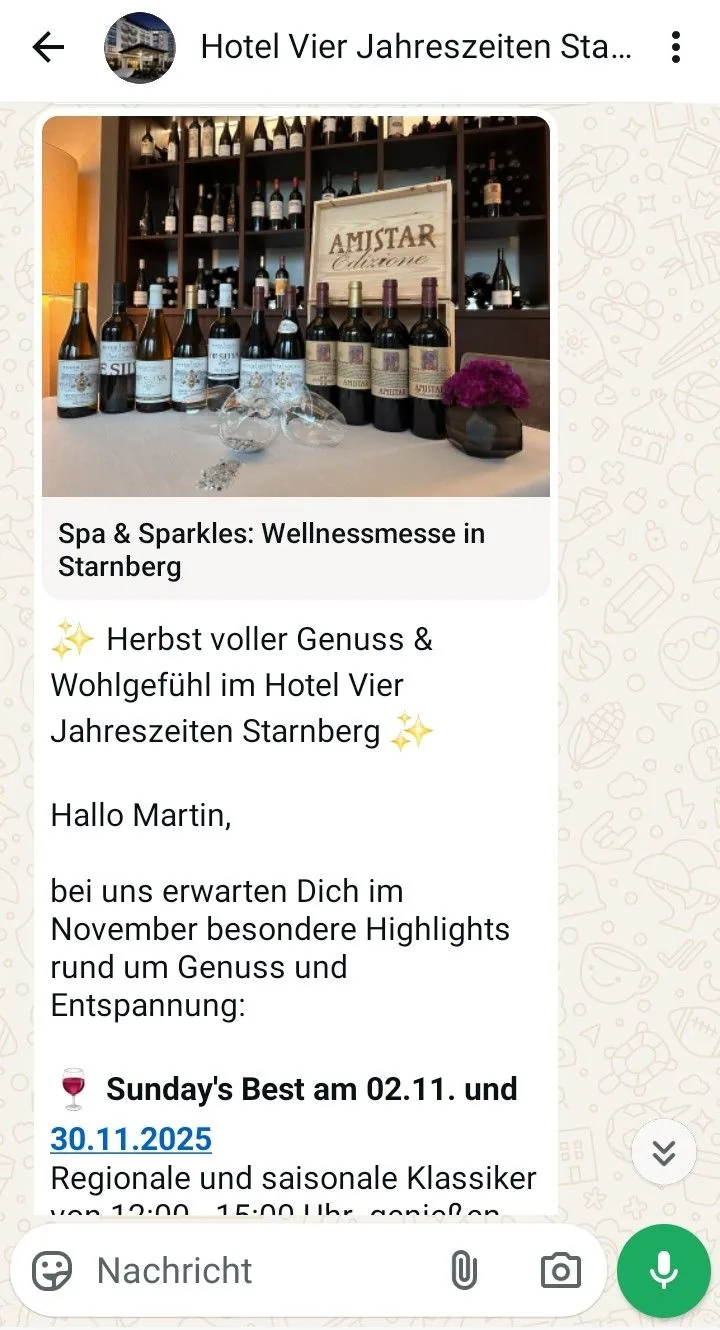
A bar might use it to announce a happy hour that evening, for example, while a hotel can remind guests about its spa or breakfast offering shortly before they arrive. This form of communication feels approachable, direct and authentic, which is exactly why it is so effective.
Open rates other channels can only dream of
WhatsApp significantly outperforms many other marketing channels. While organic content on social media platforms such as Facebook or Instagram now often achieves only single-digit reach, WhatsApp newsletters can achieve open rates of up to 98% (WhatsApp, 2023). Click-through and conversion rates are also considerably higher.
The reason is simple: many subscribers respond to WhatsApp newsletters immediately, whether on their morning commute, while scrolling during their lunch break or sitting on the sofa in the evening. The barrier to clicking is low because, alongside seeing the push notification on their smartphone screen, your recipients regularly open the app anyway and often automatically tap unread chats themselves.
Share more than just text with your target audience
Another advantage is the variety of formats. A WhatsApp newsletter is not limited to plain text messages. You can combine content to suit your company’s personality and make the most of this direct marketing channel.
The following content works particularly well in WhatsApp newsletters:
- 📸 Appealing images or impressions from your café, restaurant or hotel
- 🎥 Short videos or teasers for promotions and events
- 📢 Interactive call-to-action buttons such as “Book now”, “View the menu” or “Reserve now”
This turns your company’s WhatsApp newsletter into a multimedia experience. It is sure to capture your contacts’ attention and make your message memorable.
The investment pays off
There is one thing you should know from the outset: sending WhatsApp newsletters is not free. You generally pay per message sent, but the exact cost depends on whether you send marketing or service messages, for example. WhatsApp newsletter costs therefore depend on exactly how you use the channel and the scale of your campaigns.
In practice, however, it soon becomes clear that the investment pays off. Thanks to high open and conversion rates, a WhatsApp newsletter for businesses often pays for itself within a short time. A gym fills available classes, a bakery sells more daily specials, an auto repair shop attracts potential customers for test drives, and a bookshop increases attendance at events or readings.
Many WhatsApp newsletter providers offer flexible, volume-based packages. This is particularly useful for smaller businesses, as you only pay for the message volume you actually need.
As much as we love it, WhatsApp alone is not enough
As powerful as WhatsApp is, a single channel is not enough for sustainable, scalable customer communication. Sending newsletters via WhatsApp is especially suitable for short, quick and attention-grabbing messages, but it should be just one tool in your versatile marketing toolkit.
The email newsletter remains indispensable for detailed content, regular updates and maximum reach, and a professional newsletter tool such as rapidmail helps you make the most of these advantages. This lets you reach your target audience at the right time and in the right format.
Direct comparison: WhatsApp newsletters vs email newsletters
| Comparison category | WhatsApp newsletters | Email newsletters |
|---|---|---|
| Reach model | One-to-one communication without an algorithm | One-to-one communication without an algorithm |
| Content depth | Short, concise and focused on individual messages | Ideal for detailed content, storytelling, product ranges and complex topics |
| Design options | Very limited (text, emojis and a small number of media formats) | Extensive design freedom with images, layouts, buttons and templates in your own corporate design |
| Automation | Only available to a limited extent | Many options: welcome series, follow-ups, reactivation and triggered emails |
| GDPR & legal certainty | Strict requirements; choosing the right provider is crucial | Very feasible with EU providers and legally established |
| Typical use cases | Flash sales, appointment reminders and short updates | Newsletters, campaigns, content marketing and customer communication for sustainable brand building |
👀 Did you know?
rapidmail makes it particularly easy to get started with email marketing and offers clear advantages:
- ✔️ 2,000 free newsletters to get started: Ideal for testing your first campaigns, whether for your newly opened café, the start of a new season at your gym or the beginning of the summer semester at your university.
- ✔️ GDPR-compliant email marketing: Data protection is mandatory in email marketing. With rapidmail, your newsletters comply with legal requirements, whether you run a small business or a larger company.
- ✔️ Newsletters that match your corporate identity: Whether you run a hotel, auto repair shop or bookshop, create newsletters in your own corporate design in just a few clicks. Colors, fonts and logos are easy to customize.
- ✔️ Free personal support: We are here if you have questions or problems. You can contact our support team free of charge by phone or conveniently through the ticket system in your account.
- ✔️ Intuitive email editor with extensive design options: Create newsletters quickly and flexibly. The editor has a clear layout and provides numerous design options that let you create beautiful emails without any prior knowledge.
Open video transcript
Chapter 1: Introduction
No time for lengthy training and complex features? rapidmail makes it easy to create and send effective newsletters!
Email marketing with rapidmail gets you to your goal in no time, whether you want to win new customers, attract more people to an event or increase sales in your online shop.
Hi, my name is Wiebke, and today I am going to show you that you do not need any prior knowledge or lots of time to design great newsletters with rapidmail and move closer to your business goals. So let’s not beat around the bush. Let’s get started!
Chapter 2: Navigation and first steps
You can get anywhere from the dashboard. For example, you can create a new email straight away. To make your newsletter a real hit with your contacts, you can address them individually using our personalization formulas, add emojis to the subject line and check the automatic subject line analysis. It shows you how effective your subject line is and what you could improve.
Our 1-Click-Design makes designing newsletters incredibly easy. Simply enter your website URL, and hey presto, rapidmail creates a design template featuring your logo, corporate colors and fonts. You can make further changes here if you wish, then save it.
Then choose one of more than 250 free templates, and the basic structure of your newsletter is ready! You can now replace and populate all the content as you wish.
Chapter 3: Design and customization
The integrated image editor and our free image database, where you will find more than 1.5 million high-quality, royalty-free images, are especially useful. They save you extra steps and additional tools!
If you have an online shop, you can easily connect it to rapidmail using our free plugins, automatically synchronizing your customer and product data. Then use our one-click product import to drag products directly from your online shop into the newsletter.
Now it is time to inspect the draft using the preview function: Does the personalization work? Does the newsletter look good on different devices? You can now send test emails to up to 10 email addresses, completely free of charge!
Before the newsletter goes out, put its deliverability through its paces and make any final corrections. This ensures that your email does not land in spam. Thanks to our excellent deliverability, rapidmail delivers your newsletter to its destination especially reliably.
Everything looking good? Then your newsletter can begin its journey, either immediately or automatically at a scheduled time. We will even cover the first send to up to 2,000 contacts, so you can test rapidmail at your leisure.
Chapter 4: AI sending planner
If you are ever stuck for a great newsletter content idea, our AI sending planner uses artificial intelligence to create a customized newsletter send plan for your business. Simply enter the company name, a few keywords and a short description, and there it is: your personal send plan with newsletter ideas for the entire year!
Chapter 5: Gaining contacts
rapidmail also helps you gain new contacts. Just as with 1-Click-Design, you can create newsletter sign-up forms in only a few clicks that perfectly match your website design.
You can easily upload existing contacts to rapidmail from CSV, Excel or text files using copy and paste. You can also assign as many keywords as you like to your contacts to ensure that they only receive emails that genuinely interest them.
Chapter 6: Data protection & segmentation
Data protection is our highest priority! At rapidmail, all processes are 100% GDPR-compliant. Your contact details are stored exclusively on servers in Germany, so there is no need to worry.
To target your contacts particularly precisely, you can divide them into segments, for example by age group, gender or place of residence, and then select these during sending so that your newsletter only goes to specific subgroups.
By the way, we are always happy to talk! If you have any questions or difficulties, our support team will be glad to help, free of charge by phone or through the ticket system directly in the tool.
Chapter 7: Reporting and analysis
After sending your newsletter, you can track its success in real time. Thanks to the automatically generated newsletter statistics, rapidmail gives you an overview of all the key email marketing KPIs.
Our email statistics help you understand your target audience’s interests and preferences better and better, so you can send more successful newsletters.
Want all the details? The activity history for individual contacts shows you exactly which emails a recipient has received, opened and clicked. These reporting options help you get to know your contacts better and tailor your newsletter delivery even more precisely.
Chapter 8: Email automation
If you want to tailor your email marketing even more closely to your contacts, you should definitely try our email automation. You need no prior knowledge and can create individual email series in just a few clicks, for example for welcome and birthday messages or multi-part courses. We have practical workflow templates that make getting started even easier!
Chapter 9: Prices
Finally, a few words about our prices: If you want complete flexibility and to pay only when needed, our pay-per-send plan is ideal for you. If you prefer to send newsletters regularly, our monthly Starter and Premium subscription packages are perfect. You can get started from €15 per month and send an unlimited number of emails. Our price calculator on the website helps you find the right package. You can, of course, switch, pause or cancel your package at any time.
Sound good? Then simply try rapidmail for free and see for yourself that rapidmail lets you send professional newsletters without being a newsletter professional!
3. WhatsApp newsletters and their costs
When you create a WhatsApp newsletter and send it via the WhatsApp Business Platform, messages are billed per recipient. Meta refers to this as “template-based pricing”. This means that each pre-approved message template is charged individually. Different WhatsApp newsletter costs apply depending on the type of message.
WhatsApp essentially distinguishes between four message categories that are relevant to businesses:
| Message type | Content / use cases | Cost |
|---|---|---|
| Marketing messages | Promotional content and recurring messages such as traditional WhatsApp newsletters, campaigns or promotions. Typically used for offers, event invitations or discount promotions. | Approximately 11 cents per recipient in Germany, with no discounts |
| Utility messages | Transactional information such as order or shipping confirmations and opt-in or opt-out messages. | Approximately 5 cents per recipient, with discounts from 100,000 messages per month |
| Authentication messages | Login codes or one-time passwords. Used mainly for platforms, customer accounts or booking systems. | Approximately 5 cents per recipient, with discounts from 300,000 messages per month |
| Service messages | Replies to customer inquiries, for example about opening hours, reservations, classes or delivery status. | Free within the 24-hour window |
👀 Have you seen this?
Have you long wondered how much email marketing actually costs your business? Then we have just what you need! In this video, our social media manager Wiebke explains the factors you can use to plan your newsletter budget realistically. Roll the film! 🎬
Open video transcript
Chapter 1: Introduction
How much does it actually cost to send a newsletter? Monthly costs for email marketing software start at around 7 to €20. But that is not the whole answer, because additional costs can arise alongside these fixed costs, and they depend entirely on how you want to design your campaign. So let’s take a detailed look at the different costs involved.
Chapter 2: Are email marketing costs worthwhile?
Although email marketing costs depend on many different factors and cannot be reduced to a single flat-rate amount, there is one thing I can tell you in advance: email marketing costs less than you might initially think and is actually one of the most cost-effective marketing channels of all. On average, every euro spent generates a return of €42. So it is definitely worth accepting some costs.
Okay, but what exactly can these costs include?
Chapter 3: An overview of fixed costs
The newsletter tool
To create and send your newsletter, you first need a specialist email marketing tool. You will usually pay a fixed price per month for it. Prices vary between providers depending on features, ease of use and support. Incidentally, I have already made a video about German email marketing tools, comparing their prices and features among other things. Feel free to take a look if the topic interests you.
The size of your contact list
With most providers, the size of your email distribution list affects the cost. In other words, the more contacts you have, the more expensive your monthly subscription becomes. With this contact-based model, you pay for a fixed maximum number of contacts and can send as many emails as you like to those contacts each month. The price only increases once you reach a new threshold, such as 1,000, 5,000 or 10,000 recipients.
Sending frequency
Some providers also offer a volume-based billing model. This means that the more emails you send, the higher your monthly price. Regardless of the pricing model, however, sending your newsletter very frequently naturally requires additional resources for tasks such as planning, preparing the content or coordinating within your team.
To finally give you some specific figures, let’s quickly run through the costs of several newsletter tools on their cheapest plans:
rapidmail starts at €15 per month, allowing you to send an unlimited number of emails to up to 500 contacts. Alternatively, you can choose the no-obligation plan with no monthly commitment, starting at €20 for 500 emails.
Brevo starts at just €7 per month. That gives you 5,000 emails to 500 contacts. If you do not want a subscription, you can also buy credits, starting at €30 for 5,000 emails.
Mailchimp prices start at $13 per month for 5,000 emails to 500 contacts. Without a subscription, however, it is considerably more expensive, starting at $200 for 5,000 credits.
GetResponse costs €16 per month, allowing you to send an unlimited number of emails to up to 1,000 contacts.
MailerLite starts at €9 per month and also allows you to send an unlimited number of emails to up to 500 contacts.
Finally, Mailjet starts at €16 per month and gives you 15,000 emails to an unlimited number of contacts.
When choosing a tool, however, you should not focus only on price. Above all, make sure that it suits your needs and offers the features you require.
These cost factors, meaning your newsletter tool, the size of your distribution list and your sending frequency, are relatively easy to calculate in advance. But there are also other, much more individual factors.
Chapter 4: Costs for staff, external agencies or freelancers
When you start email marketing, your chosen tool first needs to be set up. This means someone needs to take care of the technical setup, configure the registration process for new subscribers and, if necessary, create automated email series. But do not worry, it does not have to be complicated. With rapidmail, you can do all this in just a few clicks, with excellent guidance along the way. You do not need previous experience or a great deal of time, but someone does at least need to handle the initial setup briefly and keep an eye on the processes to make sure they work exactly as intended.
The newsletter design also needs to be created. Here too, you should consider whether you want to handle this internally or need external help. In my opinion, external help is not really necessary, as you can use newsletter templates for many different purposes and occasions, and even have most of them adapted to your own corporate design. You can also search the image database for additional photos and graphics. So you do not necessarily need to spend a fortune here either. You can find more tips on creating an appealing newsletter in this video, so feel free to take a look.
Chapter 5: How to plan your newsletter costs
You now know which factors could affect your email marketing costs. To finish, let’s briefly look at how to plan your budget wisely and avoid expensive surprises.
Think carefully once again about exactly what you want to achieve with email marketing and which features you genuinely need. This will determine whether you really require a comprehensive, more expensive tool or can save some money.
Before settling on a provider, however, it is best to take another quick look at your calendar. What promotions are still planned this year? Is a new product being launched? Do you want to send your newsletter regularly or only on special occasions? If you only want to send occasionally, for example, a no-obligation package such as rapidmail’s “Pay per send” plan would be a good choice, because you only pay when you actually send something. And if your sending volume fluctuates throughout the year, perhaps you send less in summer and a great deal during the peak season toward the end of the year, a contact-based billing model may be a suitable option. In that model, you pay each month for the number of contacts but decide for yourself how often you want to email them.
Remember your staffing needs too, because your newsletter must be planned, written and designed. Can you handle this yourself, do you have staff for it, or do you need external support?
If you choose suitable software, plan your newsletter delivery in advance and assess your capacity honestly, you can set a realistic budget. It is best to add a buffer of another 10–20% to ensure that nothing goes wrong.
Chapter 6: Conclusion
As you have seen, email marketing costs are very manageable and easy to plan when you structure your budget wisely from the outset. And if you choose a tool that does not require marketing or design professionals and lets you complete every step quickly and easily yourself, you can even save the cost of external service providers altogether. More money-saving tips for your email marketing are waiting for you in this video, which you should definitely watch next!
And if you would simply like to try rapidmail, the link in the video description gives you 50% off your first invoice. Your first send to 2,000 contacts is always on us anyway.
Have fun trying it out, and see you next time!
Your final WhatsApp newsletter costs depend on several factors. The recipient’s country, sending volume and relevant message category are decisive. Additional costs are often included as well, such as monthly fees for using the platform, hosting services and support from the relevant Business Solution Provider.
💡 rapidtip: Good alternatives to WhatsApp newsletters

Looking for a free alternative to traditional WhatsApp newsletters? Our article presents various WhatsApp newsletter alternatives that also let you reach customers directly and effectively.
4. Legal and technical background to WhatsApp newsletters
Before you get started with your WhatsApp newsletter, there are a few legal and technical basics you should know. Do not worry, they sound more complicated than they are. With the right setup, you will quickly be on the safe side.
Messages may only be sent with consent
Whether you send a newsletter via WhatsApp or email, the General Data Protection Regulation states that you may only send advertising messages of any kind with explicit consent. Your subscribers must therefore actively register for your WhatsApp newsletter and be clearly informed about which data you use and for what purpose.
In practice, this can be done using a sign-up form on your website, a QR code in your café or restaurant, a note on the invoice at your car dealership or a notice in your gym. This ensures that interested people register for your WhatsApp newsletter consciously and transparently.
👀 Did you know?

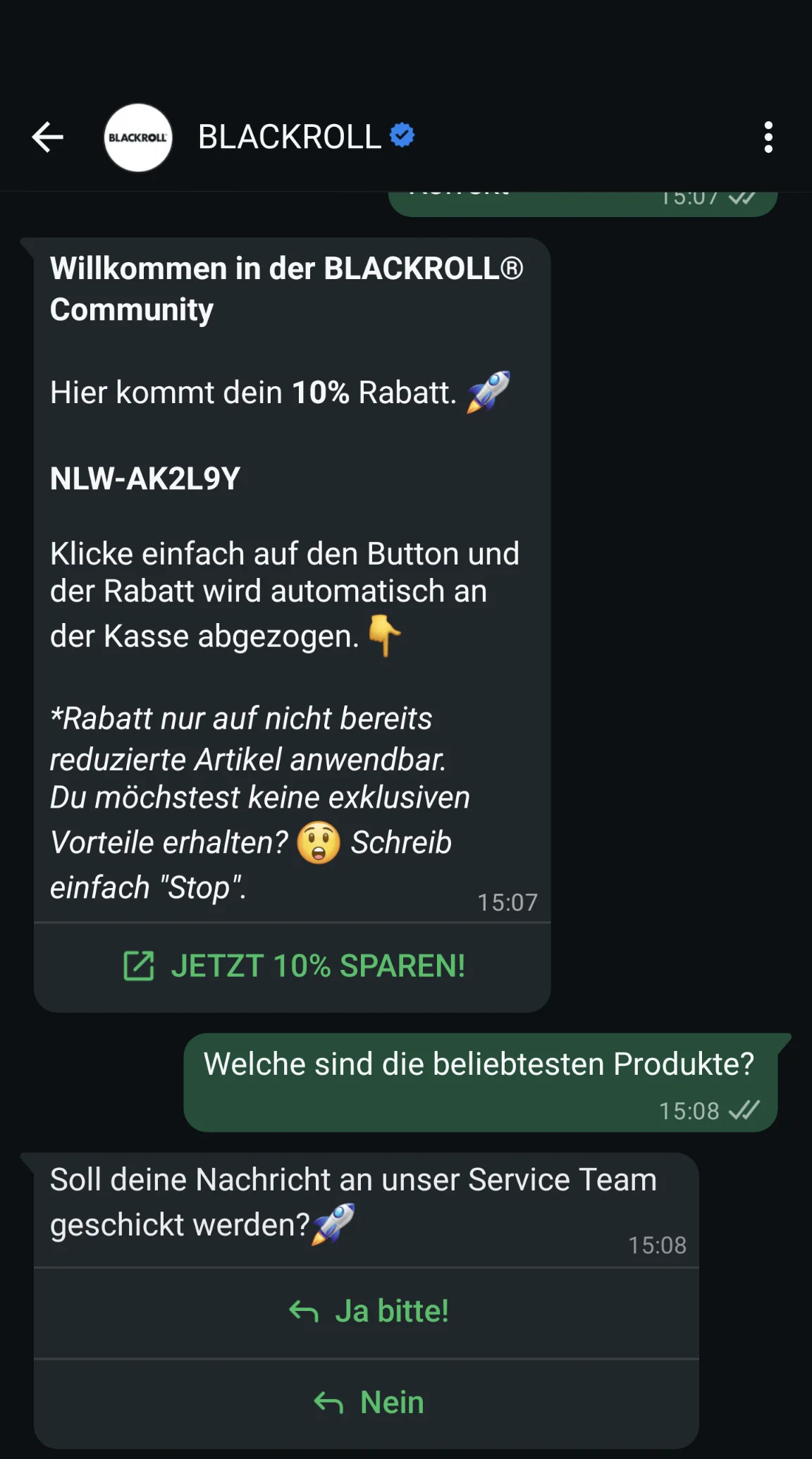
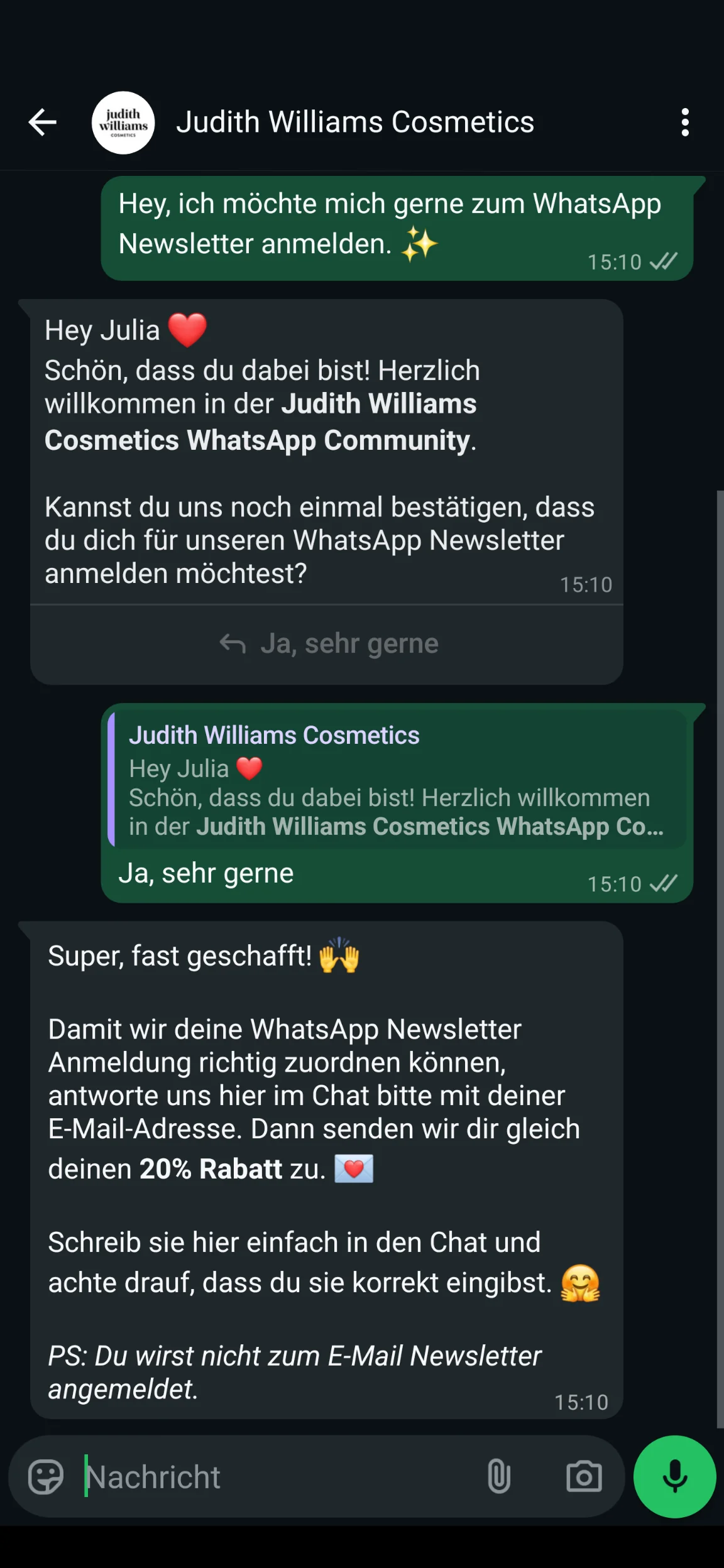
In Germany, double opt-in is not legally required under the data protection rules for newsletters, but it is strongly recommended because it documents consent to receive newsletters in a particularly legally reliable way. With a WhatsApp newsletter, this often takes the form of a confirmation message directly in the chat.
An opt-out for GDPR-compliant newsletter unsubscribes is at least as important. Your subscribers must be able to unsubscribe easily at any time. Usually, simply typing “Stop” in the WhatsApp chat is enough to end delivery automatically.
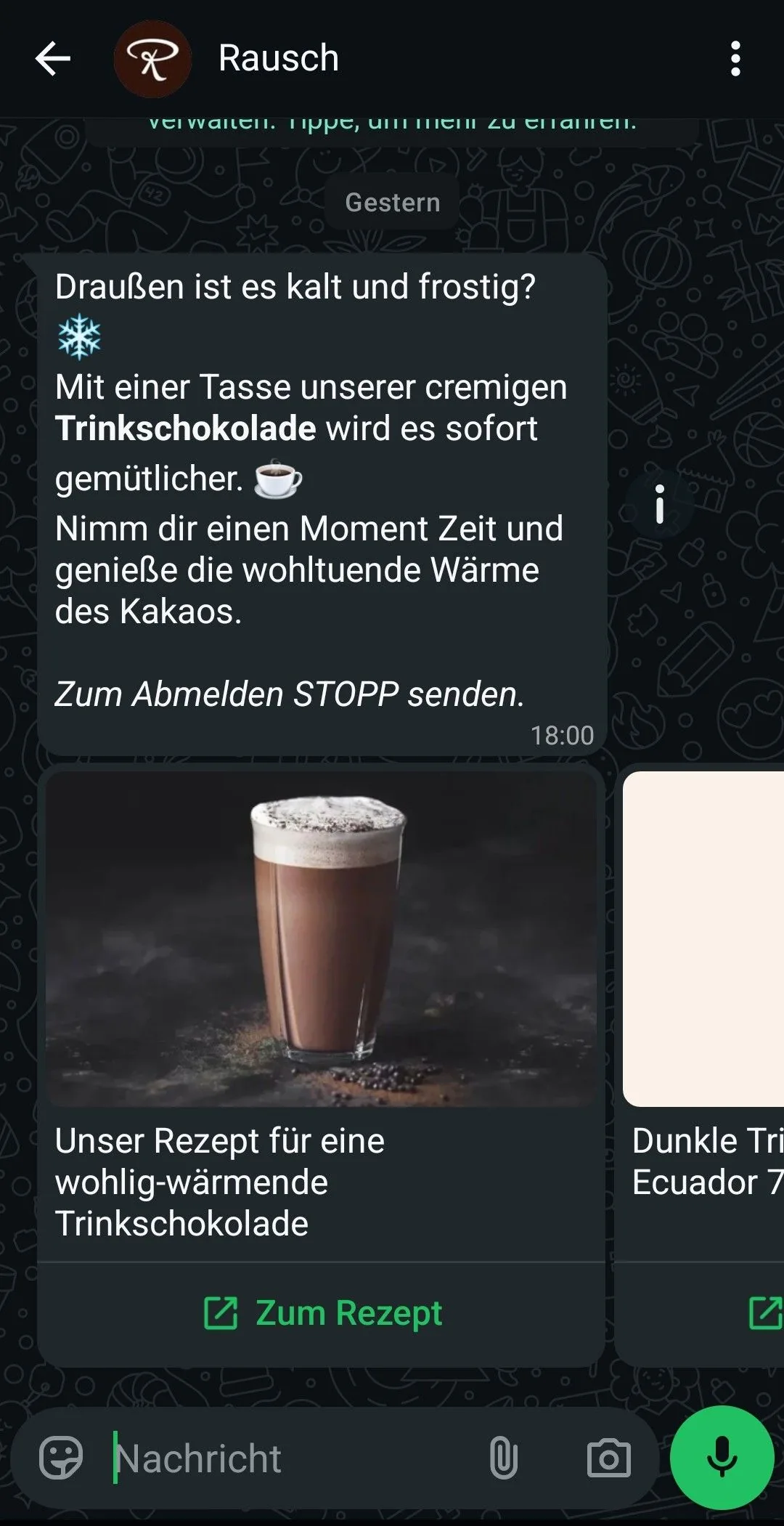
Messages may only be sent via the WhatsApp Business API
A common misconception is that you create WhatsApp newsletters using the standard WhatsApp app or the Business app from the app store. Instead, they are sent exclusively through the WhatsApp Business API.
Access is provided by certified WhatsApp newsletter providers, also known as Business Solution Providers (more on this in the next section). They provide the necessary WhatsApp newsletter tool, including a clear dashboard, opt-in mechanisms, contact management and message template management.
This is a major advantage, particularly for businesses in hospitality, (online) retail or the service sector: you retain an overview, automate processes and send newsletters in compliance with legal requirements.
Every marketing message needs an approved template
WhatsApp places great importance on protecting its users from unwanted advertising. That is why marketing messages must be reviewed in advance. Every promotional or newsletter message is based on an approved template. WhatsApp checks whether the content complies with its guidelines and is structured correctly. Approval usually takes between 24 and 48 hours, although it can sometimes be quicker.
One important exception is the service window. If you reply to a specific customer inquiry within 24 hours, you can write the response freely and do not need a template. This is particularly useful when arriving guests have questions about their hotel reservation, for last-minute appointments at your hair salon, or for questions about the delivery status of an order from your online shop.
The rapidmail newsletter
Tips, ideas and news about email marketing, straight to your inbox.
5. How to create your first WhatsApp newsletter in 6 steps
You have gathered enough knowledge and now want to create the first WhatsApp newsletter for your business? Great! With the right preparation, it is much easier than it first appears. The following six steps show you how to set up your campaign properly, send it in compliance with legal requirements and optimize it step by step.
Step 1: Choose a WhatsApp partner
The first step is choosing the right technical partner. To send newsletters via WhatsApp, you need a Business Solution Provider, or BSP. These are official WhatsApp partners that give you access to the WhatsApp Business API and provide the technical and legal foundation for sending messages.
Well-known WhatsApp newsletter providers include:
- User.com
- Superchat
- Sinch Engage
- charles
- ChatWerk
- Brevo (formerly Sendinblue)
- Lime Connect
All providers differ in price, features and target audience. Some tools are particularly well suited to small and medium-sized businesses, while others are designed more for ecommerce or larger organizations. To make the choice a little easier, we have compared the providers:
| Provider | Data protection | Price | Features | Special feature |
|---|---|---|---|---|
| User.com | GDPR-compliant (integration via the Meta Business API) | On request / customized | Native WhatsApp integration, automated and personalized campaigns, template management, CRM-linked automation, reporting & opt-out tracking | Omnichannel marketing platform: combine WhatsApp with email, SMS, push and CRM data, with messaging directly in the marketing dashboard |
| Superchat | GDPR-compliant, servers in Germany | Approx. €129/month (Professional) | Multichannel messaging (WhatsApp, Instagram, FB, Telegram and email), AI chatbot (GPT-4), workflows | Easy to use, clear inbox, website chat with link buttons |
| ChatWerk | GDPR-compliant | From approx. €129/month (Premium) | Omnichannel chat, automation, CRM/ecommerce integrations, ticket system | Ideal for SMEs, easy to use, focused on intelligent automation and customer service |
| Charles | GDPR-compliant | On request | Conversational Commerce Suite, AI chatbots, CRM integration, multichannel support (WhatsApp, Messenger, etc.) | Suitable for ecommerce, agencies and large companies |
| Sinch Engage | EU-compliant (EU-based) | From approx. €399/month (Professional) | WhatsApp API, messaging and SMS campaigns, automation, analytics | Enterprise solution, international support |
| Brevo | GDPR-compliant | From approx. €25/month | Email marketing, SMS, chat, automation, CRM features | Multichannel marketing from a single platform |
| Lime Connect | GDPR-compliant, servers in Germany | From approx. €90/month | AI chatbot (GPT-4), website messenger, multichannel support, screen sharing, chat-to-call | Scandinavian provider, all-in-one software |
Our conclusion: Superchat and ChatWerk are very good choices for small and medium-sized businesses and beginners. Both tools are clear and GDPR-compliant. If you want to manage several channels such as WhatsApp, email and SMS from one platform, User.com or Lime Connect may be more suitable. Charles and Sinch Engage mainly cater to larger businesses with high sending volumes and complex automation.
Keep these points in mind when choosing your WhatsApp newsletter tool:
- 🫱🏻🫲🏼 Is the provider an official Meta partner?
- 📞 How stable is the platform and how easy is it to reach support?
- ✨ How intuitive is it to use every day?
- ⚙️ Does it offer automation, such as after purchases or abandoned baskets?
- 🔗 Can the tool connect to CRM or shop systems?
- 💰 Is the pricing structure transparent and suitable for your sending volume?
- 🆓 Is there a free trial so you can test it?
Step 2: Define objectives and content
Before you create your WhatsApp newsletter, ask yourself one key question: What do you want to achieve with your campaign? A clear objective saves time, results in better content and measurably improves your results.
Typical objectives include:
- 💸 More revenue, for example through exclusive offers or discount codes
- 🫂 Stronger customer loyalty through regular updates or value-added content
- 💪🏼 Better service, for example through automated appointment or order reminders
- 😴 Reactivation, to target inactive contacts again
Always consider this from your target audience’s perspective. What information is genuinely relevant? What provides real added value? If you run an online shop, for example, you can use your WhatsApp newsletter to share new products or weekly offers. If you run a gym, you can easily send training plans or event invitations, or you can promote your hotel’s seasonal specials and last-minute offers. The more clearly you define your objective, the more suitable your content will be.
💡 rapidtip

Create a send plan with topics, sending times and objectives for your newsletter marketing. This helps you stay organized and avoid spontaneous last-minute promotions without a clear strategy.
Step 3: Design a template and have it approved
Now it is time to get creative! You need a message template for your WhatsApp newsletter, which WhatsApp will subsequently approve. Remember that WhatsApp is not a traditional email inbox, so your content should be short, clear and well structured. Once your template is ready, submit it for review through your Business Solution Provider’s dashboard.
Pay attention to:
- 📄 Concise copy written in a friendly, personal way
- 😀 Paragraphs and emojis to keep the message easy to read on a smartphone
- 🖼️ Media such as images or videos to attract attention
- 📢 A clear call to action so it is immediately obvious what should happen next
👀 Did you know?
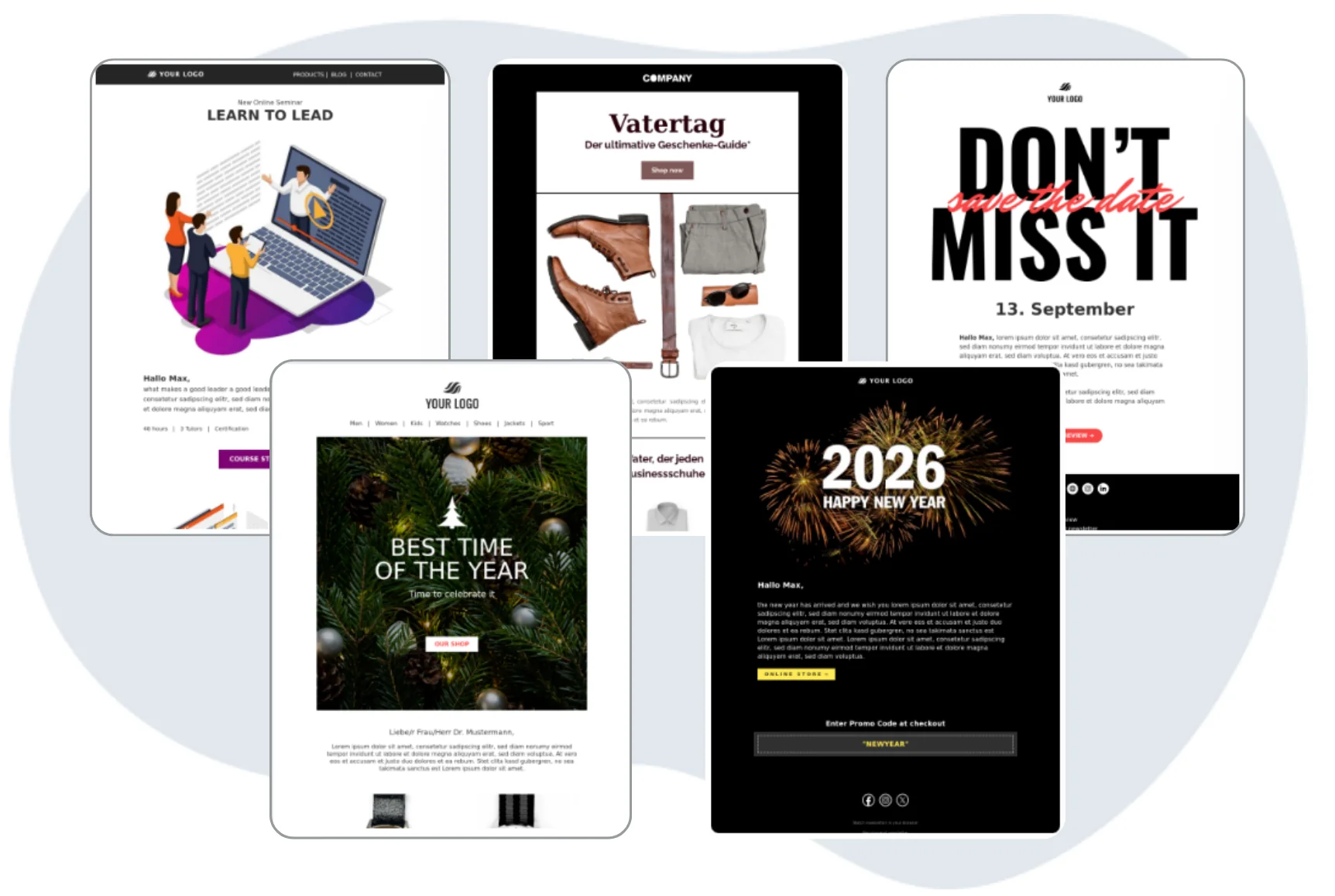
Many professionally designed newsletter templates are available for traditional email marketing. With rapidmail, you can choose from 12 email templates, customize them as you wish and use them as the perfect second online marketing channel alongside your WhatsApp marketing.
Step 4: Segment recipients
The better structured your WhatsApp newsletter list is, the more successful your campaigns will be, as this reduces the likelihood of your contacts receiving irrelevant messages from you. Segmentation ensures that your content is genuinely suitable.
In practice, you divide your contacts into different groups, for example by interests, location, purchasing behavior or customer status. Segmentation takes place directly in your WhatsApp newsletter tool and is based on the data that subscribers provide when registering or that is collected through previous interactions. This ensures that your messages reach the people for whom they are genuinely relevant.
Useful criteria include:
- ️ Purchasing behavior: Have your customers just ordered something, or was their last purchase a very long time ago? Active buyers may be pleased to hear about new products, while you can win back inactive customers with a special reactivation offer.
- 👀 Interests or product categories: Which topics or product categories are particularly popular with your customers? A fashion boutique could promote women’s and men’s fashion separately, for example, or focus on particular styles.
- 📍 Location: Particularly useful if you want to promote local offers, events or promotions. A gym could keep only members in the Stuttgart region informed about new classes, for example.
- 👤 Customer status: Distinguish between new, active and inactive customers to send targeted welcome messages, thank-you offers or reactivation campaigns.
This gives different target groups exactly the content that is relevant to them, which has a direct positive effect on clicks, conversions and unsubscribes.
Step 5: Send the campaign
You have now completed the preparatory work and it is time to send your campaign. Ideally, plan your WhatsApp newsletter in advance and make use of your tool’s scheduling function. This ensures that your message always reaches the right target group at the right time.
Spontaneous messages are also possible, for instance for last-minute promotions and offers, but make sure to send them when your target audience is active. In many industries, time slots between 10:00 and 17:00 work particularly well.
💡 rapidtip

Use a fixed sending schedule. This lets recipients know exactly when to expect your WhatsApp newsletter. It builds trust and ensures that your messages are perceived as helpful information rather than an annoying interruption.
Step 6: Measure success
Finally, the most important part: analyze how well your WhatsApp newsletter performed so you know what you can improve next time! Most of the tools from step 1 provide clear metrics, including:
- 👀 Open rate: How many recipients actually read the message?
- 👉 Clicks: How often were links or buttons clicked?
- 🛒 Conversion rate: How many recipients completed a desired action, such as making a purchase or registering for an event?
- 📉 Unsubscribes: How many people unsubscribed from the newsletter? (If this figure suddenly shoots up, you urgently need to refine your strategy.)
- 💬 Replies: How often did people reply directly to your message?
These figures show you which content works and where you should make adjustments. Test different wording, media or sending times and optimize your campaigns step by step.
💡 rapidtip

Continuously test the effectiveness of your WhatsApp newsletters, it is worth it! Even small changes to your wording, images or offers can deliver noticeable improvements and make your WhatsApp newsletter more successful over the long term.
6. How to gain subscribers for your WhatsApp newsletter
For your WhatsApp newsletter to have a real impact, there is one thing you need above all: subscribers. Even the best message is of little use if it reaches no one. With the right incentives, a little creativity and clear communication, you can build a strong WhatsApp newsletter contact list step by step.
Be visible wherever your target audience is
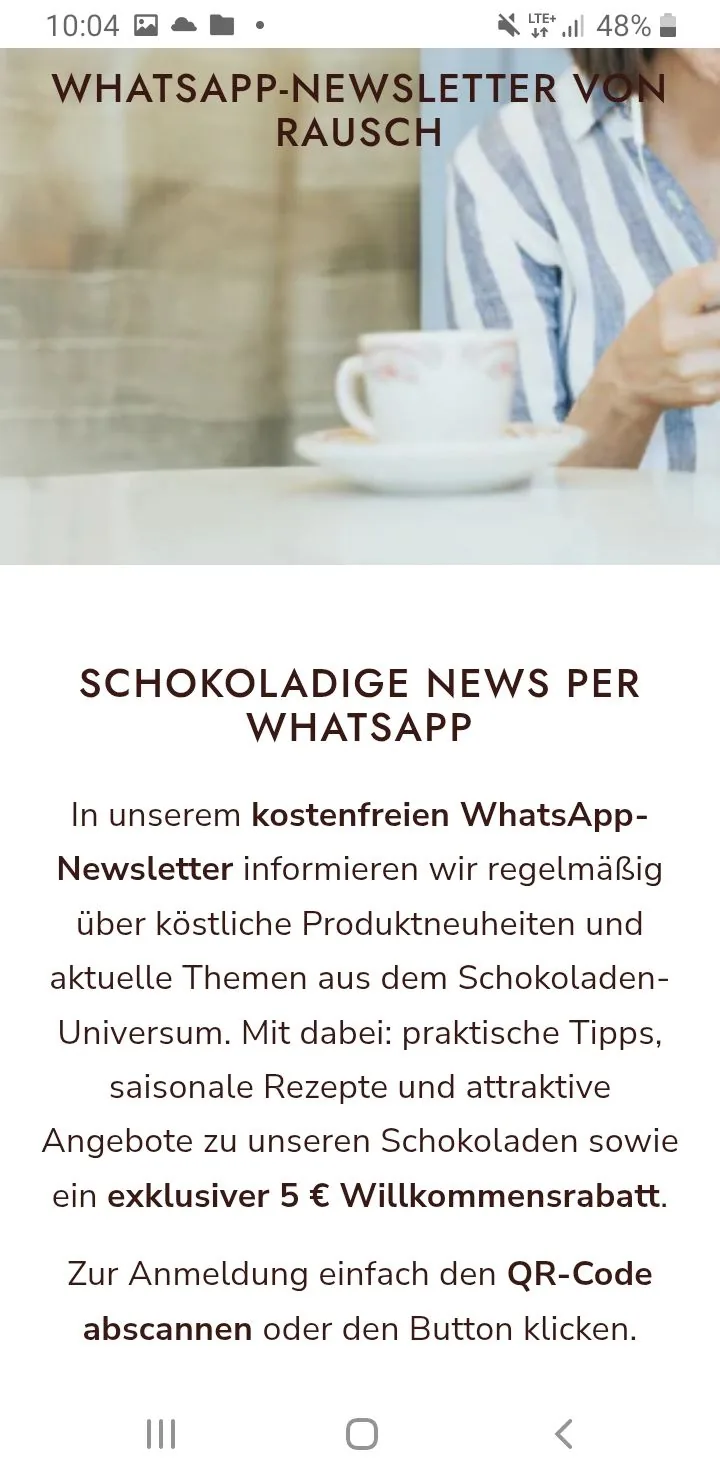
Make registering for your WhatsApp newsletter as simple and visible as possible. Do not hide it somewhere in the small print on your website. Instead, place it everywhere your target audience already spends time.
Proven options include:
- 📝 A clearly visible sign-up form on your website
- 🛒 Pop-ups or banners in your online shop
- 📱 QR codes on flyers, posters or business cards
- 🔗 A link in your email signature and on your social media profiles
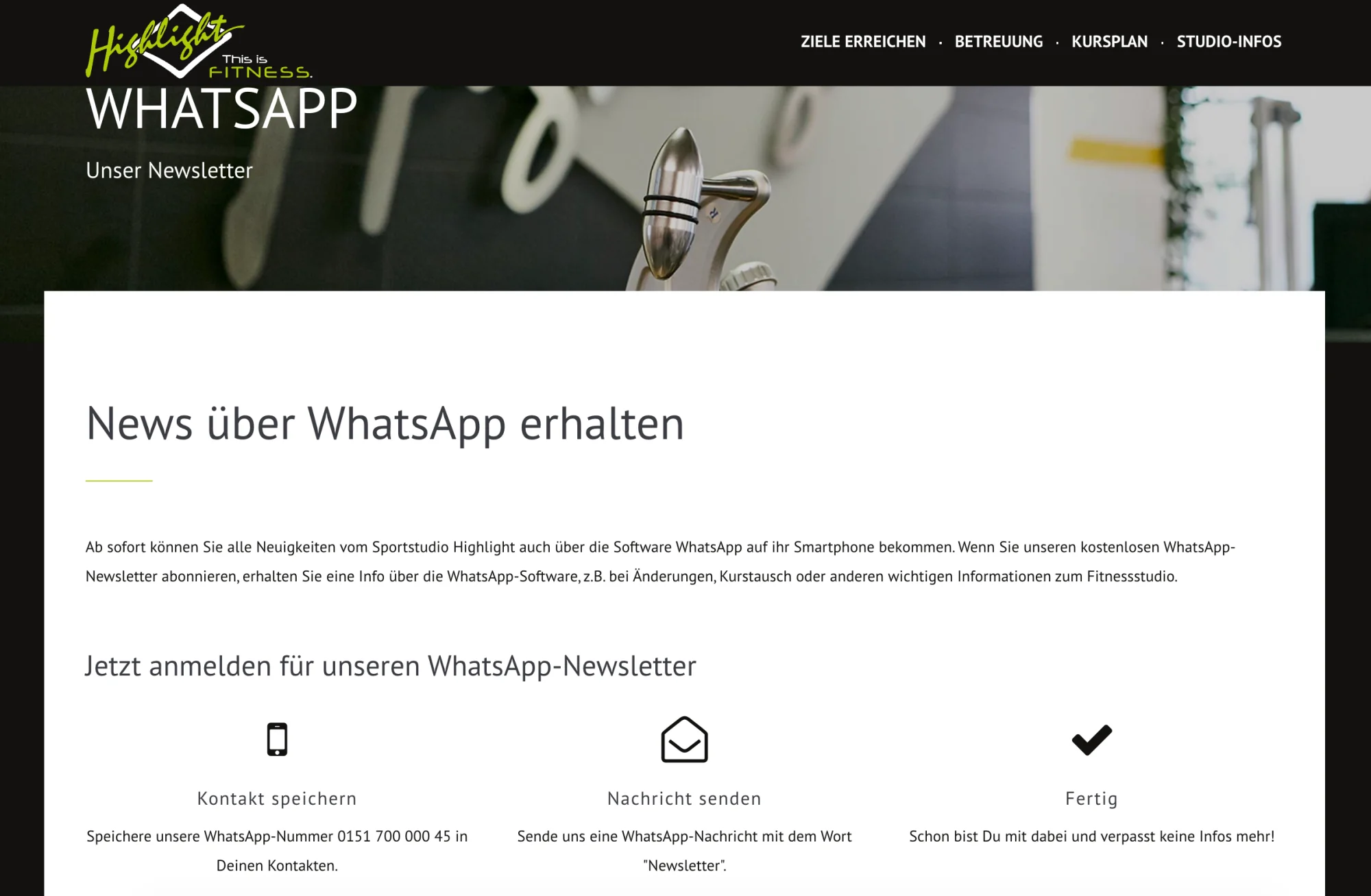
This increases the likelihood that interested people will spontaneously subscribe to your WhatsApp newsletter. A gym that promotes its WhatsApp newsletter directly on its website is a good example. If classes change or are canceled, members receive the information immediately on their smartphones, quickly, directly and reliably.
💡 rapidtip
A QR code that leads directly to the WhatsApp opt-in significantly lowers the barrier to joining. Scan once, register, done. Many WhatsApp newsletter tools even provide these QR codes automatically.
Give subscribers a good reason to join
Let’s be honest: people do not subscribe to a newsletter without a reason. That makes it all the more important to clearly communicate your newsletter’s added value. Think carefully about why registering is worthwhile for your target audience.
Popular newsletter registration incentives include:
- 🎁 Discounts or vouchers for new subscribers
- 👀 Exclusive content or early-access offers
- 💡 Personal tips, recommendations or mini guides available only through WhatsApp
Even a small benefit can make a big difference by turning interested people into subscribers and, ideally, subscribers into loyal fans of your brand.
Make data protection simple and transparent
Data protection creates security, while transparency builds trust. Make it easy for interested people to feel comfortable registering for your business’s WhatsApp newsletter, and pay attention to the following points:
- 💡 Explain clearly what you use the data for. Avoid complicated legal jargon.
- 👋🏼 Show clearly how to unsubscribe, for example by simply typing “Stop”.
- ✅ Use GDPR-compliant opt-in processes, such as a confirmation message in the chat.
This demonstrates transparency and professionalism from the outset.
👀 Did you know?
A clear, legally compliant opt-in not only fulfills the GDPR requirements for WhatsApp newsletters, but also builds trust. At the same time, you avoid legal pitfalls that could prove expensive later.
7. 3 expert tips for your WhatsApp newsletter campaign
Is your WhatsApp newsletter already running and achieving good open rates? Excellent. Now it is time for the next step, because a little fine-tuning can turn simple attention into genuine interaction and make subscribers long-term fans of your brand. Our 3 top tips for your WhatsApp newsletter campaign will help:
Tip 1: Be personal, not anonymous
Impersonal standard copy feels interchangeable. That is exactly what you want to avoid on WhatsApp, where users expect direct, personal communication. Use names, interests or previous interactions to tailor your messages.
Even small adjustments make a major difference by helping recipients feel personally addressed and seen. This builds trust and generates considerably more interaction.
Examples of personal WhatsApp newsletters:
- Bookshop: “Hello Ms Schneider, the new novel by your favorite author has just arrived. 📚 Would you like us to reserve a copy for you?”
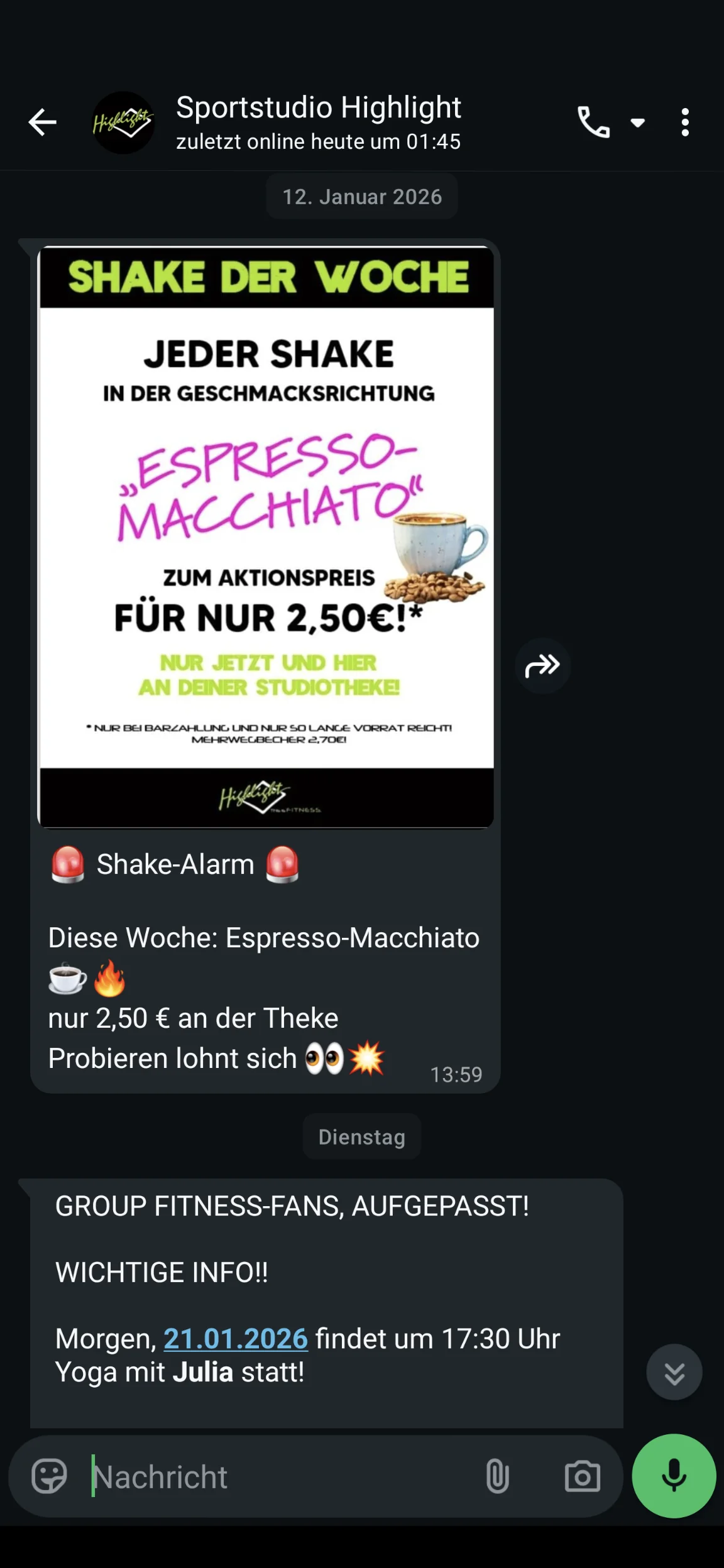
- Gym: “Hi Max, your favorite Tuesday class has spaces available again. 💪 Register now!”
- Café: “Good morning, Lisa. Today your favorite oat milk cappuccino is half price. Do not miss out! ☕”
This personal communication is particularly powerful in WhatsApp’s private setting and results in noticeably more interaction.
Tip 2: Added value that delights
A WhatsApp newsletter consisting only of advertising quickly loses its appeal. For every message you want to send, ask yourself: What genuine added value am I providing? It could be an exclusive offer, creative inspiration, a particular service or helpful tips. The more regularly your messages offer small moments of insight, the more likely your subscribers are to stay and not unsubscribe again after a short time.
Examples of WhatsApp newsletters that provide added value:
- Online shop: “👀 Just for our WhatsApp community: Get a first look at the new spring collection a week before everyone else!”
- Hotel: “Our insider tip for your stay: This week, you can enjoy the most beautiful sunsets directly from our cozy terrace 🌅.”
- Hair salon: “✂️ Styling tip of the week: How to keep your hairstyle looking perfect even in the rain.”
Added value does not always have to be a discount. Special services, inspiration and exclusive insights are also extremely popular with your contacts.
Tip 3: Use emojis strategically
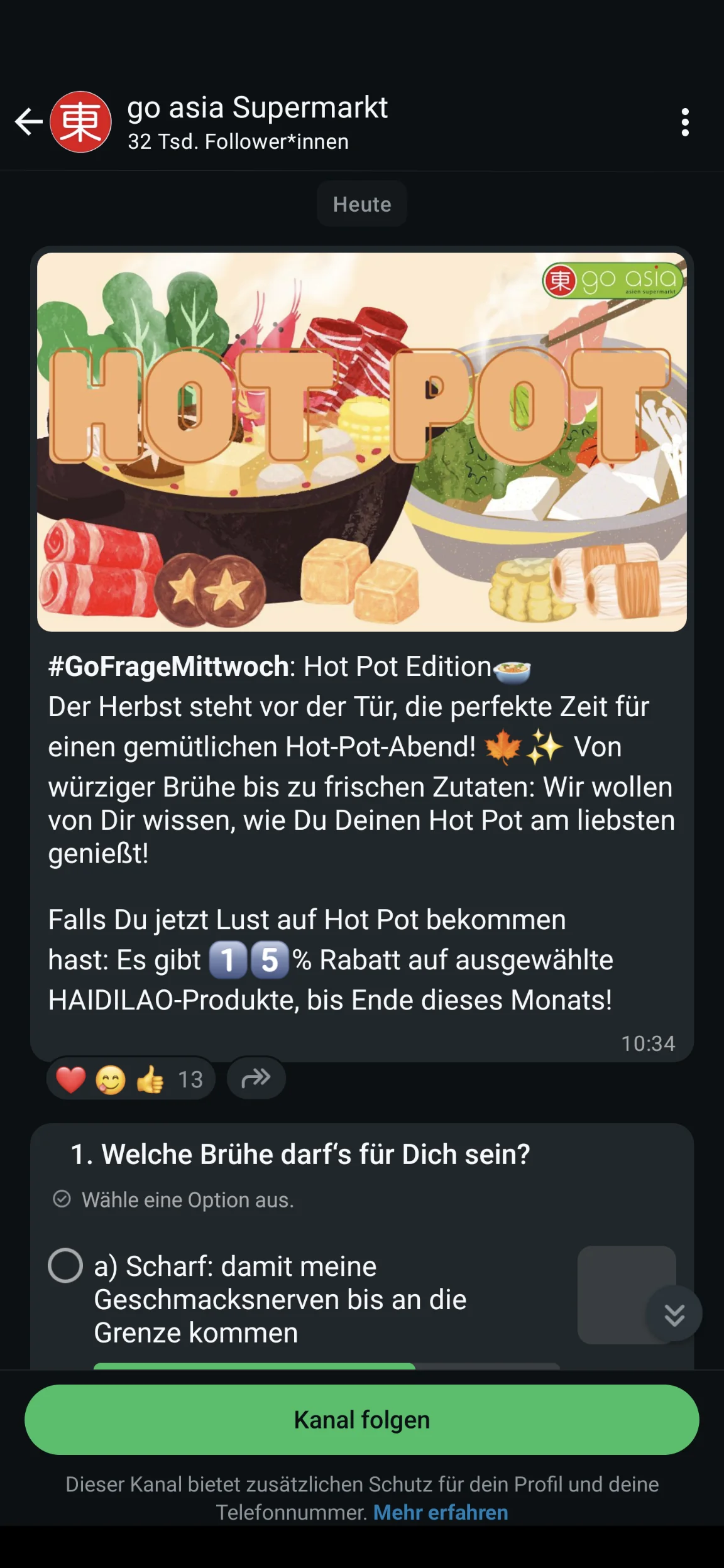
Emojis are perfect for WhatsApp. They break up text, convey emotion and attract attention. But using the right amount is important: two or three well-placed emojis are entirely sufficient to make your message more lively. Make sure the emojis also suit your brand and support the copy rather than replacing it.
Examples of effective emoji use in your WhatsApp newsletter:
- Gym: “💥 Get it now: 20% off all memberships 💪”
- Restaurant: “🍝 New on the menu today: Homemade pasta with fresh pesto.”
- Technology shop: “🚀 Just arrived: The update you have been waiting for.”
Used correctly, emojis make your messages more likeable and significantly increase attention on smartphones.
💡 Did you know?

Recent studies such as the one by Quickreplay.ai (2026) show that the effective use of emojis in WhatsApp campaigns can significantly increase attention and click-through rates.
8. Conclusion: How to achieve effective customer communication via WhatsApp AND email
WhatsApp newsletters are a real success when it comes to fast, personal customer communication. Your messages are noticed immediately, almost always opened, and create a closeness that few other channels can offer. High open rates, direct responses and strong customer loyalty are almost guaranteed.
Even so, you should not give up traditional email newsletters, as they remain a central component of successful customer communication. Emails give you more room for content, more design options and more detailed segmentation. With the right newsletter tool, you can also get the most from reporting and optimization, which is especially worthwhile for extensive or sales-focused campaigns.
If you would now like to try creating and sending your own first newsletter, we have just what you need:
Our free email marketing ebook for beginners includes:
- 🤓 Important email marketing definitions and explanations
- ✨ An overview of the benefits of email marketing
- 🏢 Key information about newsletter marketing for different company types and sizes
- 💡 Helpful tips for finding the ideal email marketing tool for you
Download the free ebook now (PDF in German)
The best solution is therefore to combine both channels: use WhatsApp for quick prompts, last-minute promotions or important announcements, and email newsletters for detailed content, storytelling and complex campaigns. A targeted cross-channel approach to your online marketing increases your reach and specifically improves your open and click-through rates. This helps you get the most from both channels and ensures truly seamless customer communication. 🚀
FAQ: Frequently asked questions about WhatsApp newsletters
What exactly is a WhatsApp newsletter?
A WhatsApp newsletter is a message sent regularly by businesses to inform their contacts directly through WhatsApp Messenger. The messages appear as push notifications on smartphones and are particularly suitable for offers, updates, reminders or exclusive content.
Which businesses are WhatsApp newsletters suitable for?
WhatsApp newsletters are suitable for almost every industry. Businesses with direct customer contact benefit in particular, including cafés, restaurants, hotels, gyms, bookshops, online shops and service providers. Educational institutions and car dealerships also use WhatsApp newsletters successfully for fast, personal communication.
How do WhatsApp newsletters differ from email newsletters?
The main difference between WhatsApp newsletters and email newsletters is the channel. WhatsApp newsletters are shorter and more personal, and are almost always opened. Email newsletters, by contrast, offer more room for content, design and storytelling. In practice, the two channels complement each other perfectly and should be used together.
Is a WhatsApp newsletter GDPR-compliant?
Yes, a WhatsApp newsletter can be sent in a GDPR-compliant way, provided that recipients have explicitly opted in. Registration must be transparent, opting out must be possible at any time, and messages may only be sent through the WhatsApp Business API.
How much does a WhatsApp newsletter cost?
WhatsApp newsletter costs are calculated per message sent. Marketing messages currently cost around 11 cents per recipient in Germany. Utility and authentication messages cost approximately 4.5 cents. Service messages sent within the 24-hour window are free. Despite these costs, the channel usually pays for itself quickly thanks to high conversion rates.
What content works particularly well in WhatsApp newsletters?
Short, relevant and attention-grabbing content works best in WhatsApp newsletters, including discounts, new products, appointment reminders, shipping information and exclusive offers. It is always important to provide subscribers with clear added value.