5 effective marketing automation workflows for your email marketing


Short on time, working with a small budget, but aiming high? Marketing automation workflows could be real lifesavers in your day-to-day work. In email marketing, you can easily use various automation workflows to simplify complex marketing processes and reduce manual effort. Automated emails such as welcome messages or product onboarding instructions, annual birthday greetings or reactivation campaigns can always be sent automatically at exactly the right time. Sound good? These 5 top automation workflows will make your email processes even more efficient and take your company’s marketing to the next level! 🚀
Try rapidmail for free & create a workflow
1. Definition: What are marketing automation workflows in email marketing?
The admittedly unwieldy term “marketing automation workflow” is easy to explain: it involves using a tool to automate marketing processes so that you only need to create a sequence once, after which certain processes run automatically, with no manual effort. In short, a workflow automates specific tasks to simplify processes and make them more efficient.
Would you like to apply this principle of marketing automation workflows to your email marketing, but have no experience or programming skills? No problem. With the right software or tool, anyone can automate the sending of marketing emails in no time. Workflows can then automatically welcome new contacts and guide them through your product, send invitations to events, deliver annual birthday greetings and much more.
👀 Did you know?

With rapidmail, you have the ideal email automation tool for creating automated email workflows and drip campaigns and optimizing your marketing processes. Design an automated workflow once, then sit back while our software takes care of the rest and provides your contacts with the content they want at the right time. Best of all, you do not need any previous experience!
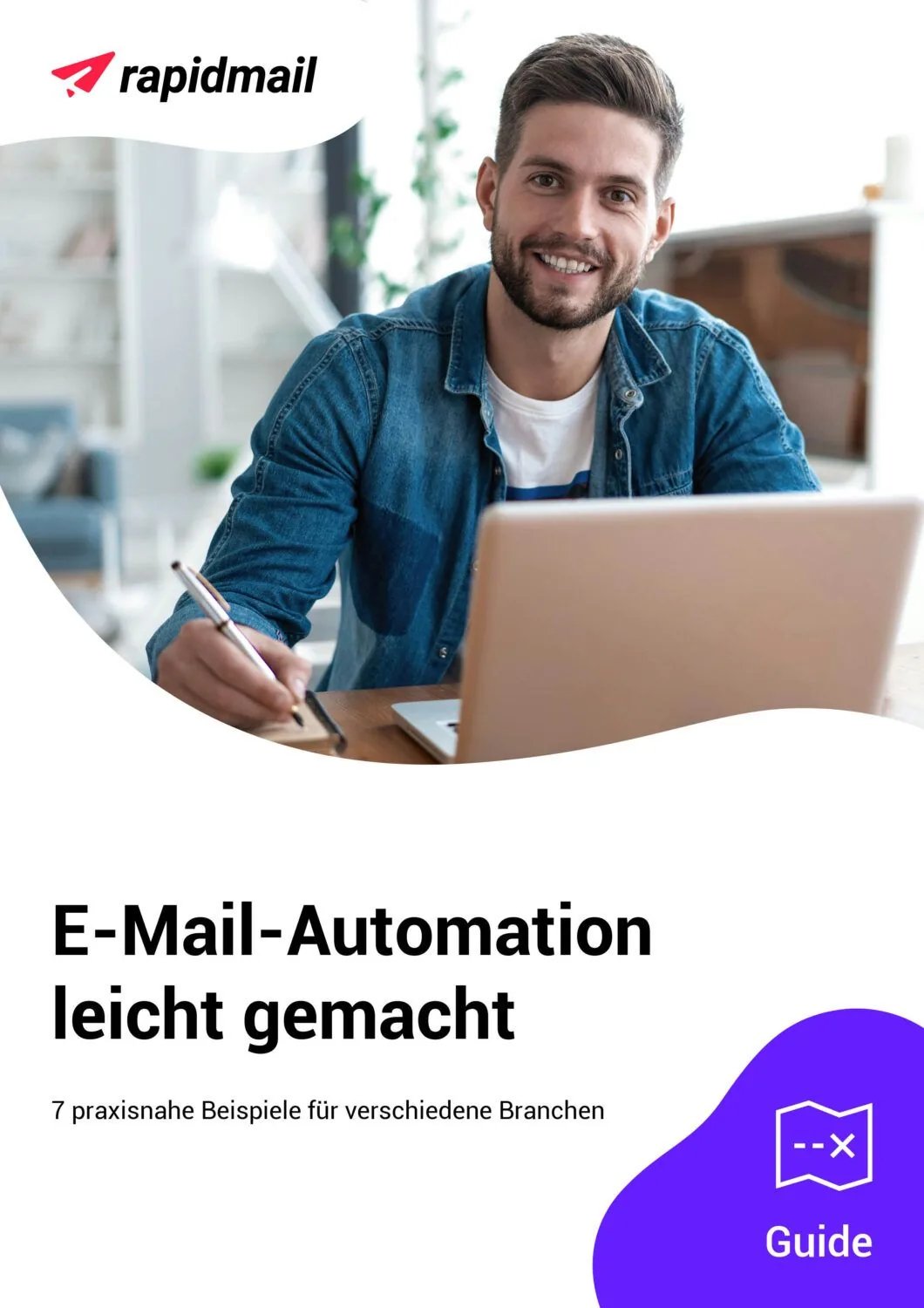
Is email automation still new to you? Take a look at our email automation guide. It gives you 7 exciting examples of email automations for different sectors.
Our guide includes inspiration for:
- 👋 smart welcome emails that help you build a strong relationship with new contacts straight away
- 🎉 celebratory birthday greetings that show your appreciation and put a smile on your contacts’ faces
- 💤 effective reactivation emails that win back inactive contacts
Download the guide for free now (PDF in German) (PDF in German)
2. The welcome workflow: Greet new contacts automatically
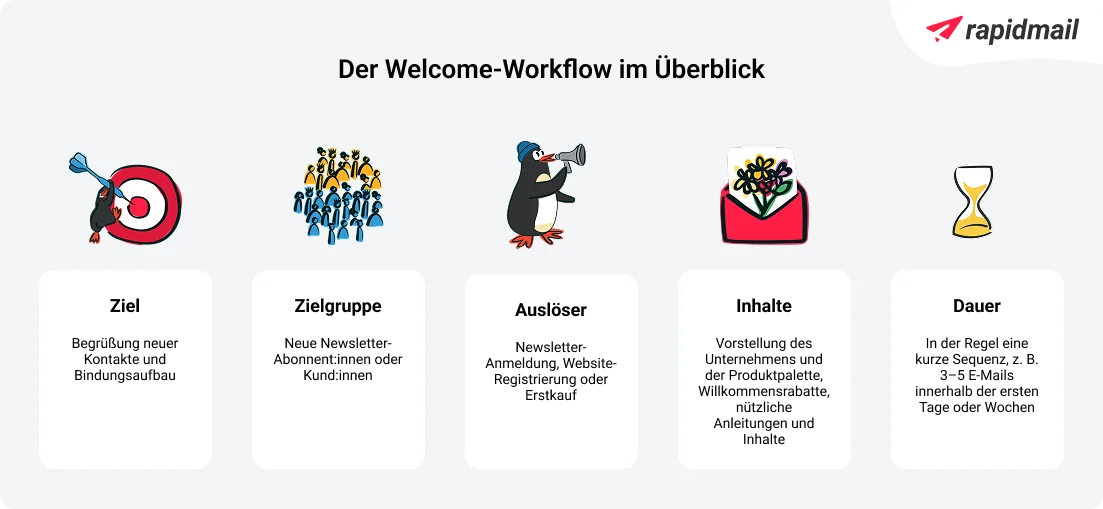
Hooray, you have gained a new newsletter contact! After this first success, you will naturally want to give your new subscriber a proper welcome and show how pleased you are to have them among your contacts.
A welcome email is just the thing for giving new contacts a proper greeting, preferably soon after they subscribe to your newsletter or register on your website. But how can you manage that? After all, you cannot be ready at all hours of the day and night to write and send a welcome email immediately after every new newsletter subscription or registration. 🤔
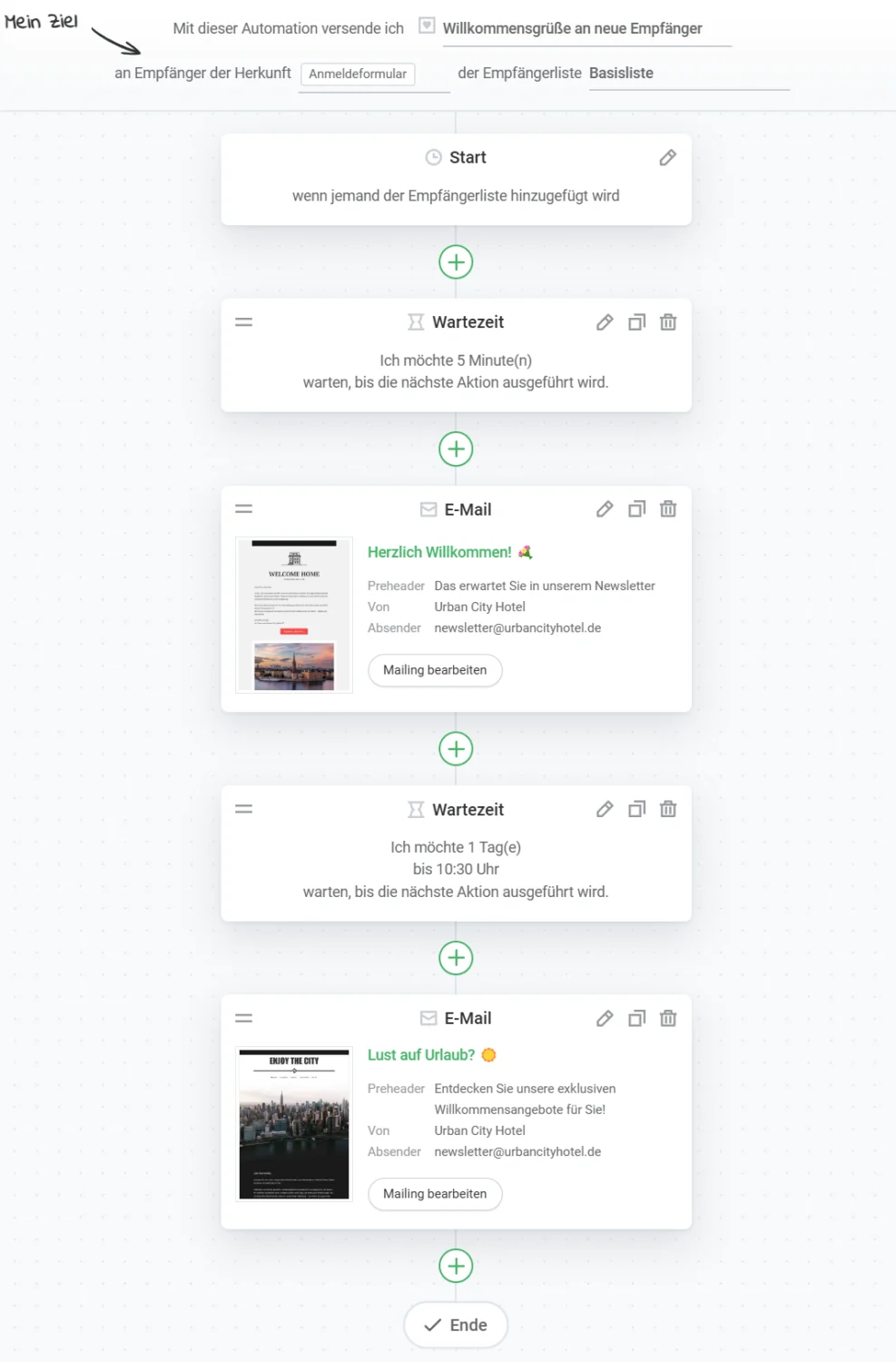
This is where the welcome workflow comes in. Once set up, it takes care of this task for you and automatically sends welcome emails to your new subscribers or customers. With a suitable automation tool, you simply create the welcome email you want or a whole series of consecutive welcome messages. You can configure different sending conditions and waiting periods to determine when, and at what intervals after registration, your welcome emails are sent.
💡 rapidtip: Get a head start with welcome emails
Welcome emails have, on average, some of the highest open rates in newsletter campaigns. Make the most of this opportunity and put particular care into designing your welcome newsletter. This is often where a new contact decides whether to remain interested and continue opening your emails. One good newsletter marketing strategy is to begin by presenting an overview of your product range and perhaps even encourage a first purchase with an offer or discount.
Instead of welcoming new subscribers or customers with just one welcome email, send them a whole series of automated welcome messages at the beginning. This allows you to make the most of your contacts’ fresh interest and introduce your company and product range in detail.
Example of a welcome workflow:
Register with rapidmail now and create a workflow
This email content is perfect for your welcome automation workflow:
- 👋🏻 Give new contacts a warm welcome: Make them feel part of your community and welcome them properly, for example with a voucher or discount
- 👨👩👧👦 Introduce your team and company: Offer a glimpse behind the scenes of your company and present your values and mission
- 📚 Email course on using your product correctly: Make it easier to get started with your product by providing step-by-step instructions
- 🗣️ Positive customer experiences: Share positive reviews from satisfied customers
3. Onboarding workflows for a successful start with your product
Another useful workflow process in email marketing automation is the onboarding workflow. It can be triggered, for example, when a new contact registers on your website or purchases one of your products. A series of onboarding emails sent at set intervals can help new customers get started with your product.
This is especially useful if you offer a less intuitive product or a service that benefits from more detailed explanations to help customers use it effectively. For example, your onboarding automation workflow can send a multi-part email course with useful step-by-step instructions. This gives customers a positive experience with your product immediately after purchase and ensures that they remember you as a reliable brand.
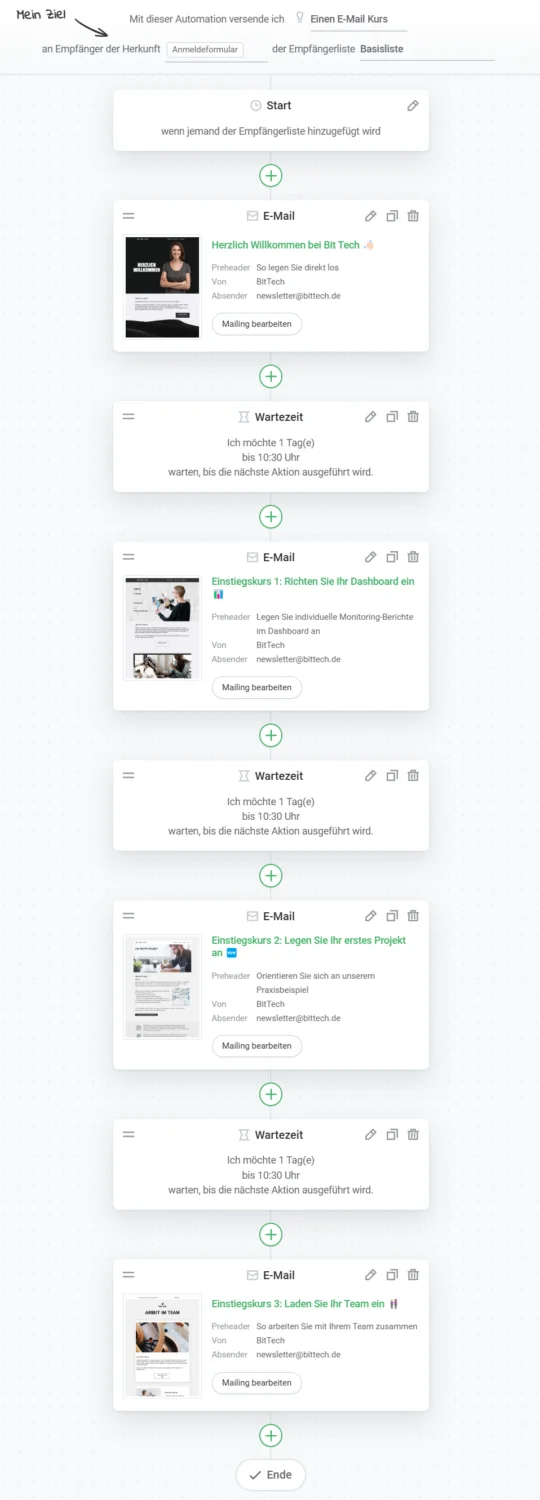
Example of an onboarding workflow:
Try rapidmail now and create a workflow
This onboarding workflow is ideal, for example, if you sell software in B2B marketing. Once a new contact has registered on your website and subscribed to a plan, the first step is to send a welcome newsletter. You can then send regular emails every three days for the next 4 weeks, first teaching contacts the basics, then explaining the benefits and gradually turning them into experts in using your product. This gives your customers consistent support in small “portions” without overwhelming them with too much information at the outset.
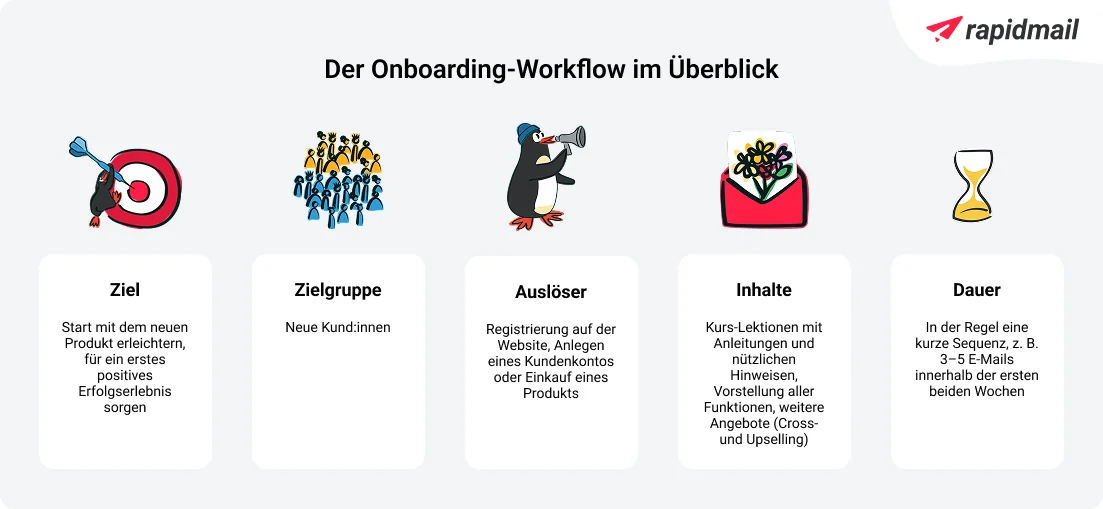
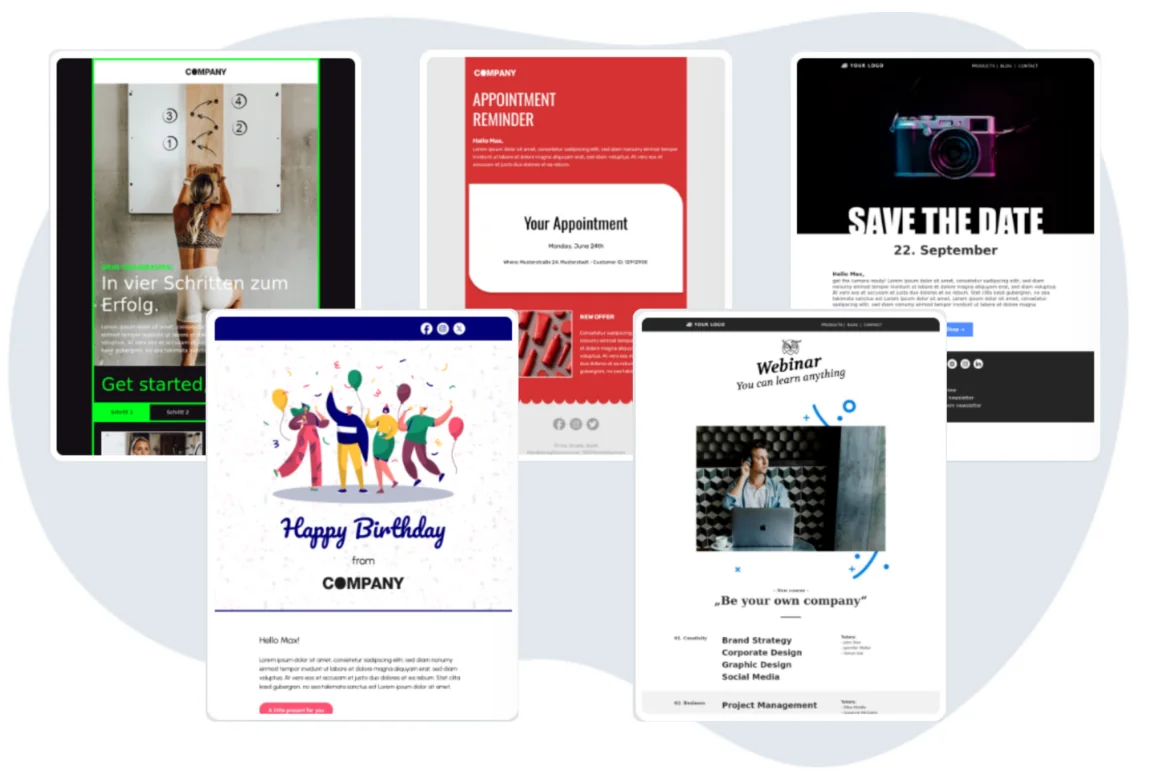
Because we want to make good email marketing accessible to everyone, rapidmail not only provides workflow templates for the most important automation use cases. We also offer a colorful selection of design templates that you can use to create the emails in your marketing automation workflows. Simply choose your favorite templates and get started!
4. Re-engagement workflow: Win back inactive contacts
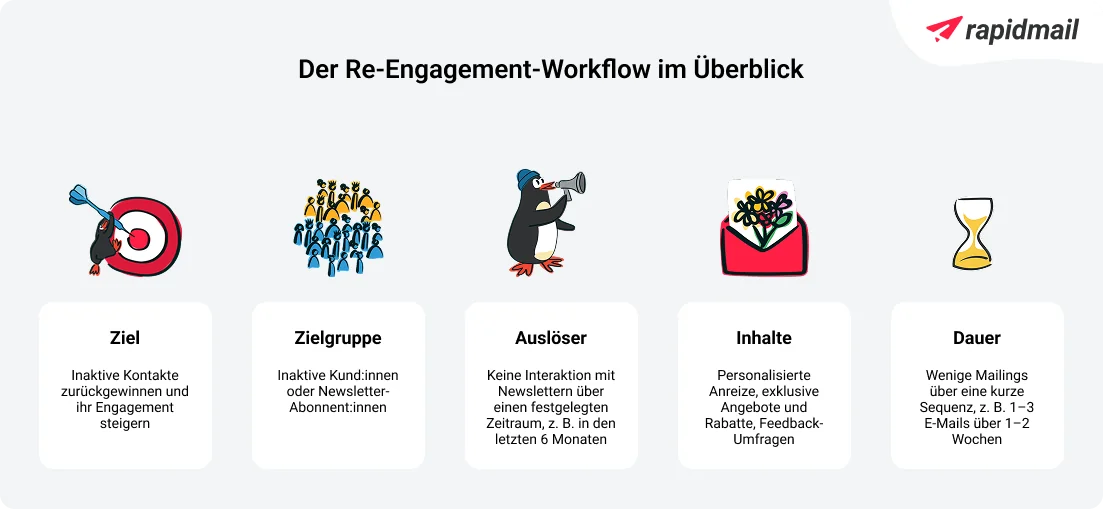
Do you have contacts on your mailing list who have been inactive for some time and do not respond to any of your newsletters? The re-engagement workflow is just the tool for winning back these recipients.
Reactivation emails give you a realistic chance of winning these contacts back, turning them into loyal customers and preventing them from unsubscribing from your newsletter. Reactivation workflows are particularly useful in email marketing because they are easy to implement and are triggered automatically if a newsletter contact has not interacted with your emails for a certain length of time, meaning they have neither opened them nor clicked a link in them.
💡rapidtip: The key ingredients for successful reactivation emails

There are many different reasons why newsletter subscribers become inactive after a while. It does not always have to be because of your company or the emails you send. Sometimes their interests or circumstances simply change. But if you are still looking for a way to win back inactive contacts with reactivation emails, compelling subject lines, appealing discount codes and clear calls to action on CTA buttons are important components of a successful reactivation newsletter.
If you use rapidmail for your email marketing, first select the reactivation email workflow from the many templates for email automation. Here, you can choose how long after a contact was last active you want to send the first email. In the next step, create your personalized reactivation email, using an appealing discount, for example, to attract the attention of your inactive contacts.
If you wish, you can add further emails to the workflow. These are sent a few days later if the contact has not responded to the first reactivation email. In the follow-up email, you can specifically ask for feedback and suggestions for improvement, for example. This means you can even benefit from inactive contacts and discover what you can improve to reduce the proportion of inactive subscribers in the long term.
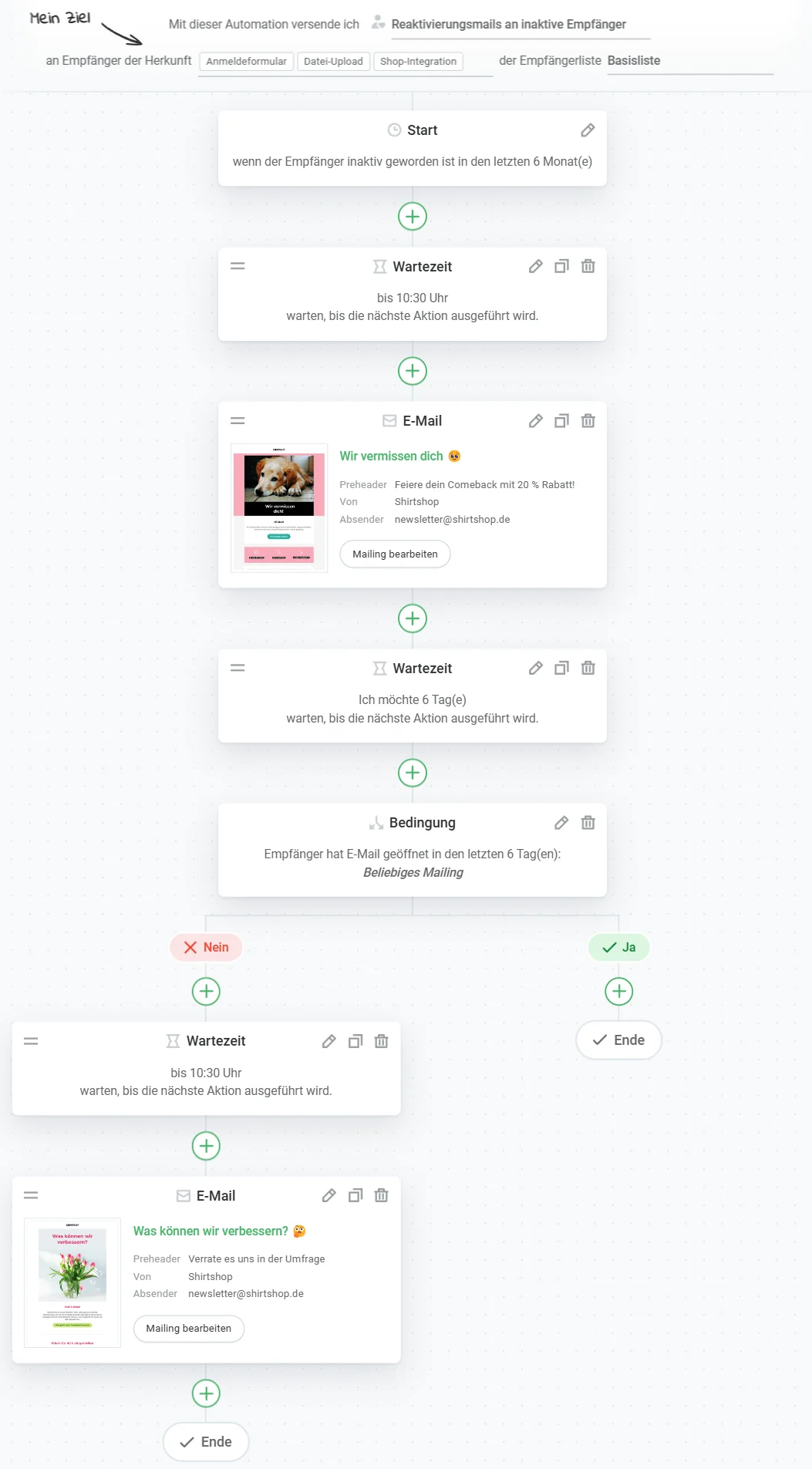
Example of a re-engagement workflow:
Create a workflow with rapidmail now
Let us assume, for example, that you work in e-commerce marketing and that some newsletter contacts have not responded to any of your emails in the past 6 months. You can set this as the trigger in your reactivation workflow, then send an engaging reactivation email that addresses these recipients directly and uses attractive offers in the subject line to encourage them to open the email.
The rapidmail newsletter
Tips, ideas and news about email marketing, straight to your inbox.
There are then two possibilities. In the best-case scenario, the contacts become active and open the newsletter, which automatically completes the workflow. Or they still do not respond. 😟 In this case, a survey email is sent next, specifically asking what you could improve to make the newsletter more interesting for your subscribers. This helps you maintain contact without being pushy and also shows that you care about customer satisfaction. ✅
5. Workflows for individual occasions such as appointments or birthdays
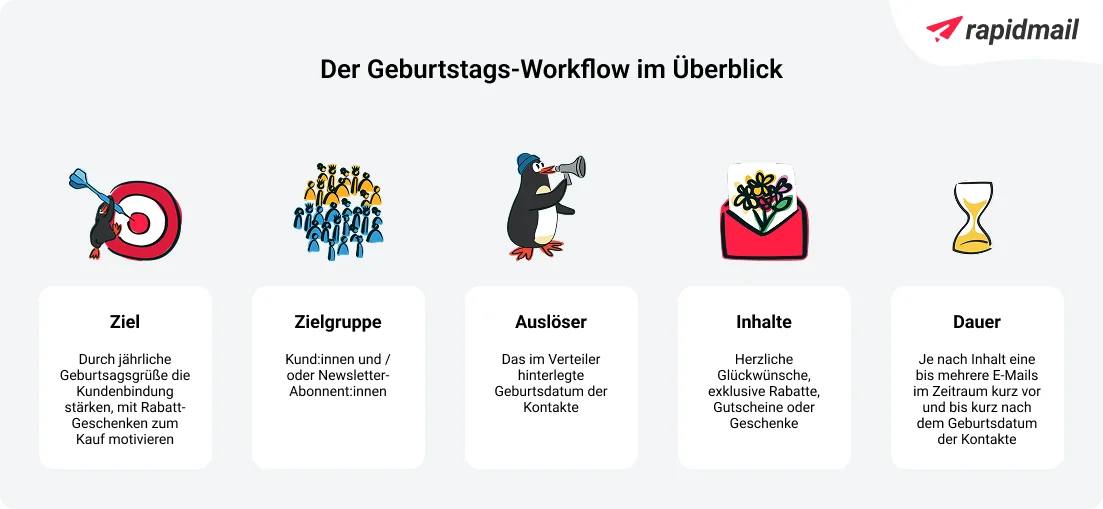
Birthday emails are a wonderful opportunity to send your contacts warm birthday wishes and a small gift, making them perfect for email marketing automation workflows. Even though each contact has a birthday on a different day, automation allows you to congratulate every one of them on the right date without having to remember it yourself. That would be useful outside the workplace too, wouldn’t it? 🫣
You can also create automation workflows for other occasions, such as the anniversary of a newsletter subscription or a contact’s first purchase. For example, celebrate your subscribers once a year on the day they joined your newsletter and reward them with a discount or voucher. This shows that loyalty pays and is also sure to prevent the occasional newsletter unsubscribe.
Example of a birthday workflow:
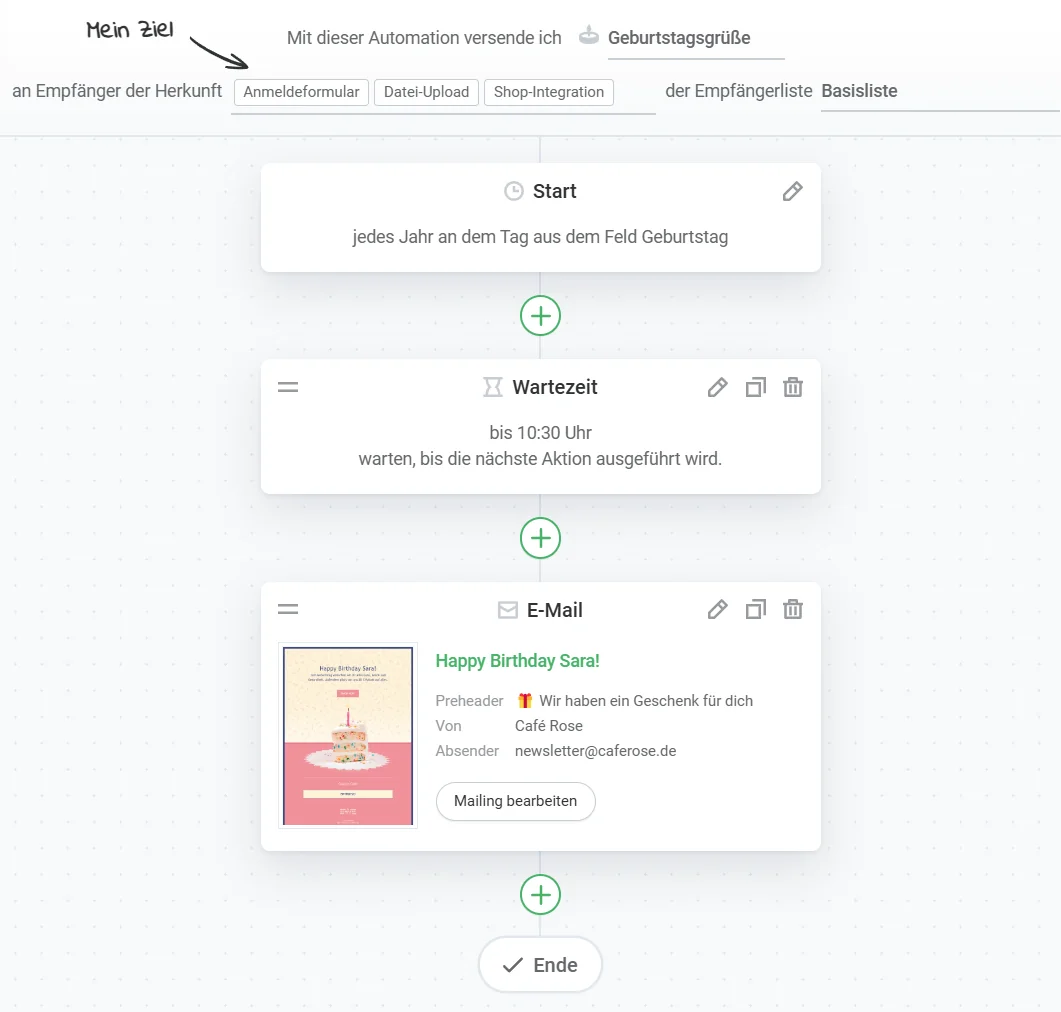
With rapidmail, simply select the birthday greetings workflow template, which automatically uses the stored date of birth of your newsletter contacts as the sending date. Then all you need to do is create a birthday email for your recipients to receive on their special day, and your birthday workflow is ready! 🎉
💡rapidtip: How to get your contacts’ dates of birth
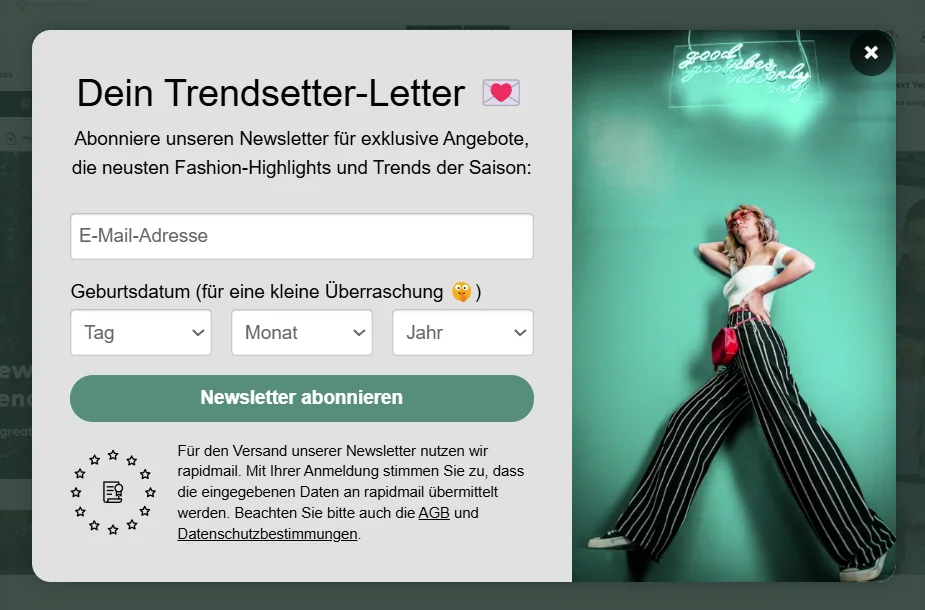
To send newsletters on birthdays, you first need your recipients’ dates of birth, of course. A good way to obtain them is to add a corresponding field directly to the newsletter sign-up form, so the dates of birth are automatically included in your recipient list. However, make sure it is not a required field and that people can still subscribe to the newsletter without entering their date of birth.
6. Gated content workflow: Always well informed
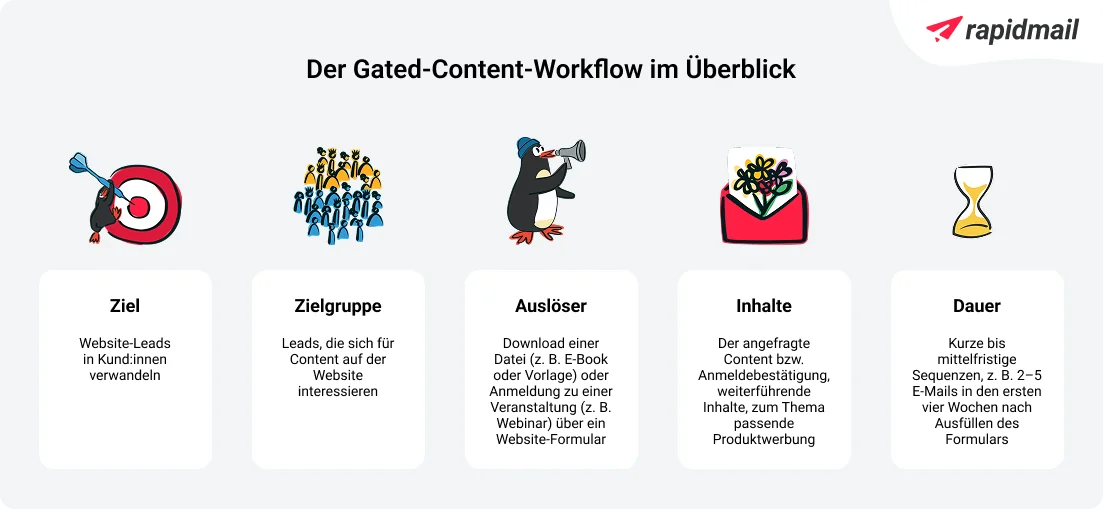
You have done it: you have created an informative ebook or an exciting webinar and want to share the content with as many interested contacts as possible. But what is the best way to go about it? It is simple: use a gated content workflow. This marketing automation workflow is all about giving your website users access to specific content in exchange for their contact details, such as their email address. Interested users receive your valuable content, while you can, once they have given their consent, use a follow-up email workflow to demonstrate the value of your company and gradually turn them into customers.
Here is how it works: Once interested users enter their email address in your download or registration form to access your ebook or webinar, they automatically receive the requested material from you by email shortly afterwards. If you wish, and if your contacts have given their consent using the double opt-in process, you can use subsequent emails a few days later to highlight additional content that recipients may also find exciting or informative. This allows you to build a relationship with your prospects over time.
Example of a gated content workflow:
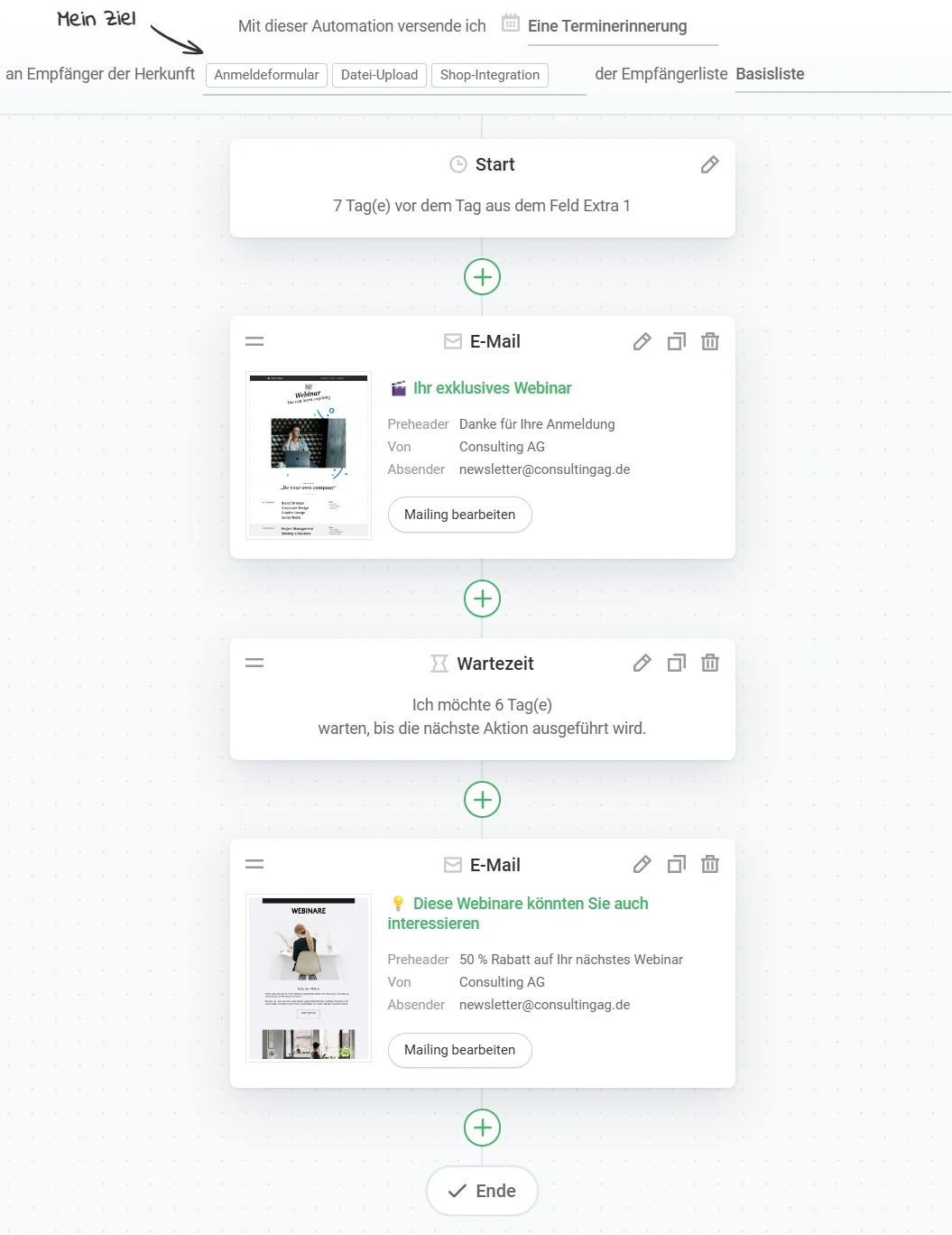
In the rapidmail workflow template, you can choose how long after prospects submit the form they receive your content. Simply add the email containing the link to the content to the workflow, and your gated content workflow is ready. If you wish, you can also send further emails a few days later, for example to tell your newly acquired contacts about other content they may find interesting.
7. Conclusion: Why we love marketing automation workflows 💌
Marketing automation workflows are far more than just technical aids, especially in email marketing. They make sending newsletters and emails extremely efficient because you only need to define the sending processes once, after which they run automatically. Here is another summary of the 5 most important workflows:
- 👋 Welcome workflows ensure that new contacts receive a warm greeting from the start and immediately gain a positive first impression of your company.
- 💡 Onboarding workflows guide new customers through their first steps and continuously provide valuable information, making them perfect for products and services that require a little more detailed explanation.
- 💤 Re-engagement workflows win back inactive contacts and are particularly effective when combined with discounts or vouchers.
- 🎉 Workflows for individual occasions such as birthdays or anniversaries show your customers that you are thinking of them and appreciate their loyalty.
- 📚 Gated content workflows allow you to offer exclusive content such as ebooks or webinars and maintain ongoing contact with potential customers.
These email marketing automation workflows not only help you save time, but also ensure that your messages reach recipients at the right time and in the right context. This allows you to make a positive first impression and build a trusting relationship in the long term, without having to take regular action.
👀 Have you seen this? Why email automation is worthwhile
Would you like to learn more about email automation? In the following video, our content manager Wiebke explains why it is worthwhile for your company too:
With rapidmail, you can choose from a range of workflow templates for your marketing automation, helping you optimize your email marketing intelligently and sustainably. Give it a try and discover how easy and effective email marketing can be!
Open video transcript
Chapter 1: Introduction
Did you know that email automation is a powerful marketing tool? Automated emails, such as annual birthday greetings, appointment reminders or multi-part email sequences, let you provide every contact with exactly the content that is relevant to them, at a time tailored to them individually.
Hi, I’m Wiebke, and in this video I will show you exactly what email automation is and how automated emails can take your marketing strategy to the next level. To help you get started right away, we will go through the three most popular email automations together.
Chapter 2: What exactly is email automation?
Email automation means automatically sending marketing emails with a specialized tool. You create the emails once, and they are then automatically sent to the defined target groups when certain conditions occur. A trigger can initiate them, meaning a specific action taken by a contact, such as submitting a form or clicking a link in a newsletter. A particular pattern of behavior over a defined period can also be a trigger, such as a contact not opening any of your emails in the past three months. Alternatively, an email can be sent at a set time regardless of the contacts’ behavior, for example when new course lessons are released every two weeks or appointment reminders are sent.
If you own a flower shop, for example, you could schedule an appointment reminder for the beginning of February to remind your contacts that Valentine’s Day is approaching. Add some great pictures of your bouquets and an offer of free delivery, and the advance orders are almost guaranteed.
Within an email automation, you can create an entire workflow of individual automated messages sent in a defined sequence.
Chapter 3: How does it differ from sending a regular newsletter?
Newsletters are regular emails sent simultaneously to a list of contacts and usually contain more general information such as news, discount promotions or product presentations. Email automation is quite different. A newsletter must be created from scratch each time and its delivery triggered or scheduled manually, whereas automated emails are sent to the right target group automatically. However, both forms of email marketing work well together. While newsletters keep readers up to date and strengthen customer loyalty, automated emails are tailored to each contact’s individual situation and accompany them throughout the customer lifecycle.
Chapter 4: Benefits of email automation
If you are already familiar with email marketing, you will know its usual benefits, such as cost-effectiveness compared with other marketing methods, direct communication with your target audience without depending on algorithms or platforms, and highly measurable results. Email automation also offers many additional benefits.
Automated emails let you send targeted offers that perfectly match the interests and purchasing behavior of your target groups. This increases your sales opportunities and revenue. At the same time, regular, personalized emails strengthen trust in your company and promote customer loyalty.
Returning to the flower shop example, you could reward your customers’ loyalty by sending a small surprise to their inbox one year after their first purchase. You can also gain new customers by winning over leads with relevant content and offers.
Another benefit is the cost saving. If-then branches in your workflows and precisely defined sending triggers ensure that your automated emails only reach contacts for whom the message is currently relevant. This saves you from sending to huge recipient lists full of contacts who are not currently interested in your offer.
Automating recurring tasks such as welcome messages, appointment reminders or course lessons also saves valuable time and increases your efficiency.
You do not need to worry about your contacts feeling bothered by too many automated emails. If you structure and personalize your automations carefully, recipients will not notice any difference from a manually created email. Instead, they will receive exactly the content that is most relevant to them.
With a high-quality email marketing tool such as rapidmail, you can also use various control features, including the preview function or free test sends for all automated emails in the workflow. Of course, you can deactivate or reactivate your automations at any time.
Chapter 5: Requirements for email automation
For your email automation to work successfully, you need a powerful email marketing tool with automation features, such as rapidmail. A well-structured and carefully maintained contact list is also essential. You must comply with data protection rules: automated emails may only be sent to people who have expressly permitted this.
Chapter 6: Three email automations for every business
Different automations may be useful depending on your company, sector and target group. However, these three email automations are always worthwhile:
Welcome greetings for new contacts are important because first impressions count. Give subscribers who have just joined your newsletter a warm welcome with a single email or an entire email series. Use this opportunity to introduce yourself, highlight future content and thank them for subscribing with a small discount.
Birthday greetings are also a great way to strengthen customer loyalty. Warm wishes and a small gift are guaranteed to delight your contacts. If you run a flower shop, for example, you could surprise the birthday celebrant with a free bouquet.
Reactivation emails to inactive recipients help you reconnect with customers who have drifted away from your brand over time. A targeted reactivation email can remind them of you, encourage another purchase or ask for feedback.
Chapter 7: Conclusion: Get started with email automation the easy way
As you can see, email automation makes it simple and straightforward to address your contacts in a targeted and personalized way. This lets you accompany customers throughout their lifecycle and build long-term customer loyalty.
With rapidmail as your email automation software, you can choose the pricing package that best suits your needs. The Starter package lets you create one automation sequence from just €15.00 per month. You can find full details of the various packages and their respective features on our pricing page.
Do you have any questions or comments? I look forward to answering them in the comments. I wish you every success and lots of fun with your first email automation! Thank you for watching, and see you soon.