Newsletter plugins, APIs and more: What are newsletter tool integrations and what are their benefits?

Most email marketing tools offer dedicated integrations such as newsletter plugins or an API. These allow you to connect the sender’s web system, such as your online shop, directly to the newsletter tool. Sounds good. But what exactly is an “integration for a newsletter tool”? And what benefits does this kind of connection offer senders? Without complicated technical jargon, we explain what newsletter plugins and APIs are and how you can use them effectively for your online shop, CRM or website.
1. What are integrations for newsletter tools?
In technical terms, integrations allow you to connect two independent systems via an interface. Take your web system, such as your website or online shop, on the one hand, and the rapidmail newsletter tool on the other. In this case, the interface aims to keep the work involved in creating and sending newsletters to a minimum for the website operator. But let’s be honest, if you are not an IT expert, statements like these do not mean very much. So let’s look at some specific examples instead.
Newsletter plugins
Suppose you run a small online furniture shop using the Shopware 6 ecommerce system. To introduce your customers to stylish pieces of furniture from the latest collections, you regularly use a professional newsletter tool to send a newsletter to all your existing customers.
The problem is that your customers register in the online shop, but you need their email addresses in the newsletter tool to send your newsletter. Adding each contact to the recipient list in your newsletter account individually would be very time-consuming. Fortunately, a newsletter plugin can do this tedious work for you.
Plugins are small software helpers that add extra functions to a system or program. In your case, the ecommerce plugins add a function to your online shop that automatically transfers stored product and customer data to your newsletter tool account.
The Shopware 6 newsletter plugin therefore connects your online shop to the email marketing tool. From then on, whenever new customers buy an item of furniture from your shop and consent to receiving your newsletter, or website visitors sign up for your newsletter using a sign-up form, the new email address is automatically transferred to the recipient list in your newsletter tool.
Your newsletter list practically looks after itself: you no longer have to keep checking which email addresses need to be added to the list before the next send, and can send your newsletter to all current subscribers and customers with complete peace of mind. The online shop plugin also allows you to add products with their description, photo and price directly to your newsletter with just one click, for example in the rapidmail newsletter editor. Simply enter the first few letters of the product name or the product number in the product search and select the right product from the list. Very handy!
Once we have connected our online shop to our newsletter account via a plugin, we can simply select the products we want from the drop-down menu while creating the newsletter and add them to the email.
Connect your shop to rapidmail now
API (“Application Programming Interface”)
Companies that use a less common ecommerce system to sell their products, or do not operate an online shop, can also make effective use of an integration for their newsletter tool.
Most newsletter tools offer what is known as an API, including rapidmail. Your company’s developers can use it, for example, to let your IT team integrate recipient lists or newsletter statistics into the company’s internal system used to manage your projects. This means the relevant employees do not have to log in to your newsletter account individually every time they want to see how successful the latest newsletter was. Instead, they can simply view the newsletter reports in the internal system.
To help you understand the principle behind the abstract term “API” (short for “Application Programming Interface”), let’s start with a simple everyday example:
👀 Did you know? How an API works
Max has a washing machine at home. When he wants to wash his clothes, there is no point standing in front of the machine and saying, “Please wash my clothes.” He has to press the different buttons on the washing machine to tell it that he wants it to wash the clothes and how it should do so.
In this case, the buttons and displays on the washing machine act as the interface (API) between the two systems: Max and the washing machine. They allow information to be exchanged in both directions 🔃.
Without the buttons, Max would not know what the machine does to the laundry or whether he can even put it in the machine. After all, the machine could generally be designed to wash everything at 150°C. The labels on the buttons tell him which options are available.
rapidmail also offers an API that works on the same principle. It acts as an intermediary between our newsletter tool and your online shop, CRM or the web system you use to manage your projects:
👀 And this is how an API for newsletter marketing works:
Like the washing machine in the example above, rapidmail is a closed system containing many processes and pieces of information, such as all customers’ data and newsletters or the technical processes that enable campaigns to be sent.
Naturally, most of this data and these processes should not be publicly accessible. Like the washing machine’s display buttons, the rapidmail API therefore provides system endpoints where precisely the information that our customers are permitted to “collect” is made available. This could be the statistics for the latest newsletter from the customer with ID 12345, for example. The system, in this example the project management tool belonging to the customer with ID 12345, can then “collect” the newsletter report data from the API endpoint by communicating the relevant customer number via the API.
Integrations for newsletter tools, such as our API, therefore act as a virtual data courier. It collects the relevant data, such as newsletter click and open rates, from the newsletter tool and delivers it to the company’s internal web system, where you as a customer can access it directly. This works in both directions, which means that the data courier can also collect data, such as product photos and prices, from your online shop, CRM or internal web system and deliver it to the newsletter tool, where you as the sender can add the data to the newsletter.
2. What are the benefits of integrations such as newsletter plugins or an API?
As you have seen, integrations for newsletter tools are primarily designed to make sending newsletters as easy as possible. You do not need to keep switching back and forth between your own system and the newsletter tool to manage recipient lists or upload product information to the tool individually. You can manage all database content centrally.
Even with an integration, each of the two systems continues to do what it does best. In the case of an online shop, for example, your products continue to be sold there. You still create your newsletters, birthday emails and welcome emails using the newsletter tool.
What changes are the processes in your day-to-day work. They become considerably easier and simpler. Not only can you add many of your products, including images, prices and descriptions, to your newsletters in just a few clicks, the system connection also supports immediate and comprehensive customer communication. Among other things, recipient lists are updated automatically, saving you a great deal of time when creating your newsletters.
In addition to automatically updating your customer data and transferring products to your newsletters with one click, connecting your online shop to rapidmail offers many other benefits for your customer communications.
These are the benefits of connecting to rapidmail:
- 💫 1-click design for professional newsletter templates in your own corporate design: enter the URL and you are ready to go!
- 🎨 More than 250 customizable newsletter templates (for ecommerce, events, surveys, seasonal occasions such as Black Friday, Christmas and much more)
- 📬 Easily send follow-up campaigns, for example to customers who have not yet opened the newsletter
- 🔎 Automatic analysis of campaign quality before sending, for optimum newsletter deliverability
- 📊 Detailed campaign statistics (opens, clicks, click map, recipient activity, devices, recipient source, unsubscribes and much more)
- 🚻 Segment contacts before sending, for example by location, gender or activity
- 💬 Assign keywords (tags) to contacts and divide them into groups of buyers or prospects
- 🧩 Win plenty of new contacts with professional newsletter sign-up forms and turn them into customers
- 💻 Easily create marketing automations: welcome emails, birthday greetings or a one-off event campaign (for example, after an order)
- 💸 Turn prospects into customers with transactional emails: reliable delivery of all important shop emails (such as registration confirmations, order confirmations, forgotten-password emails and much more)
The rapidmail API in particular offers a wide range of options for connecting the two systems intelligently. However, because implementation depends on many internal factors, such as the product offered, the company’s objectives and the staff available, it is impossible to give a general answer as to which functions are best suited to the API.
Connect my system to rapidmail now
👀 If my online shop has its own campaign function, is it still worthwhile for me to connect it to a newsletter tool such as rapidmail?
Some systems do indeed have their own campaign features that can also be used to send newsletters. The drawback is that your online shop’s main function is, of course, to sell your products. Shops’ email functions are therefore often developed and maintained with little care. Dedicated newsletter tools such as rapidmail, by contrast, focus entirely on sending your newsletters and regularly offer new features and plenty of useful support materials.
Alongside our Help Center, blog and easy-to-follow step-by-step newsletter guides, rapidmail also gives you access to 12 free newsletter templates and over 1.5 million images. You can use these to bring your email content to life. At the same time, our rapidmail deliverability expert Matthias ensures that your newsletters reliably reach your contacts’ inboxes rather than their spam folders. This is also often not the case with the campaign functions built into ecommerce systems.
3. What types of newsletter integration are available for rapidmail?
As a newsletter sender, rapidmail gives you access to different types of integration that allow you to connect your own web system to our newsletter tool.
rapidmail API
All our customers can connect their system to our tool via the rapidmail API. In other words, we provide a virtual data courier that, once set up by one of your developers, transports data between your rapidmail account and your web system.
For example, the following data and information can be exchanged via the API:
- 📝 Sent newsletters including details, such as the selected recipient list or send time, which you want to display in your internal customer database.
- 👩🏽💻 Email addresses from your customer database that should be updated automatically in your rapidmail newsletter recipient list.
- 📊 Campaign reports and statistics that you want to view in your system.
- ⚫ The blacklist that you want to manage across systems.
- 📧 Newsletters to be sent via your system.
To set up the connection between your system and our API, you should hire a developer (unless, of course, you are a coding expert yourself).
Online shop plugins for newsletters: Shopware and WooCommerce
In addition to the API, we offer newsletter plugins developed specifically by rapidmail for our ecommerce customers who use the online shop systems WooCommerce, Shopware 5 or Shopware 6. These can automatically transfer customer data, such as email addresses, or product data, such as photos, descriptions and prices, from your shop to your rapidmail account.
For example, when new customers make a purchase in your online shop, their email address is added to the newsletter recipient list in your rapidmail account. Another useful feature is that some plugins let you add products from your shop to your campaign with just one click while creating your newsletters.
👀 Is importing my customer data from my shop into rapidmail legally compliant?
Yes, our newsletter tool is 100% GDPR-compliant. Every available rapidmail integration allows you to contact only those people who have given their consent to receive your newsletter in accordance with legal requirements. For example, they may have selected the newsletter checkbox when making a purchase.
Depending on the integration used, one of the following three options applies when importing your contacts into rapidmail:
- Only customers who have explicitly signed up for the newsletter are imported.
- All customers are imported. Those who have explicitly signed up for the newsletter are automatically assigned the keyword “NL-Subscriber” during the import and can therefore be contacted separately.
- All customers are imported. Those who have agreed to receive the newsletter are added to a special recipient segment and can therefore be contacted separately.
Do you use a system that does not have a newsletter opt-in option as standard (such as WooCommerce)? No problem. Our integration ensures that your customers see a newsletter checkbox in the system, for example when registering or on the order confirmation page.
WordPress newsletter plugin
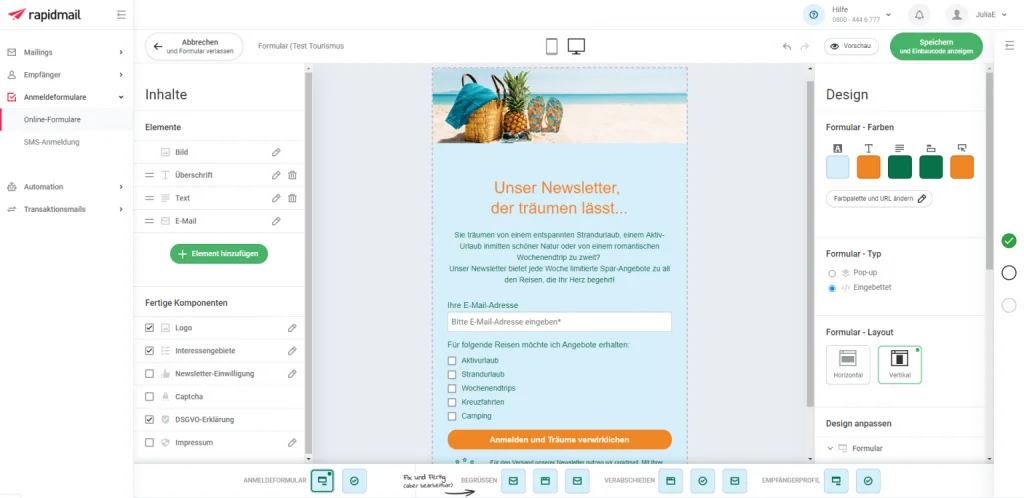
The WordPress newsletter plugin that rapidmail offered for many years is no longer being developed. This is because the rapidmail form editor has made the WordPress newsletter plugin unnecessary. It allows you to create attractive, bespoke newsletter forms in your corporate design directly in your rapidmail account with just a few clicks.
Pre-built form components such as input fields and text allow you to put together your sign-up form in no time and customize it however you like. You can also decide whether to display the form prominently on your website as a pop-up or discreetly embed it in the website footer, for example. Finally, you can choose from different embed code options (iframe, HTML code, QR code or URL) to add the newsletter sign-up form to your WordPress site.
The rapidmail newsletter
Tips, ideas and news about email marketing, straight to your inbox.
When visitors to your website sign up for your newsletter using the rapidmail sign-up form, the double opt-in process is applied automatically.
4. How do I connect my web system to my rapidmail account using a newsletter integration?
With rapidmail, you can easily connect your shop to our newsletter system using a plugin, with no technical knowledge required. Depending on the web service or ecommerce system you use, you will need the corresponding integration (an online shop plugin or WordPress plugin). Our Help Center explains step by step which settings you need to select in your web system and rapidmail account to set up the relevant integration.
Here is another overview of the newsletter plugins available from rapidmail:
To connect to the rapidmail API, your developers can create API access in your rapidmail account. You can find all the information you need to set up the integration, including an explanation of the basics and detailed documentation, in our rapidmail API developer area.
Connect my system to rapidmail now
Is your data courier not doing what you want, even though you have followed all the instructions? ✅ Our support team will be happy to help you set up your integration! Simply contact us using our contact form, by phone or via a ticket in your customer account.
Bonus: Free ebook: Email marketing for online shops

Newsletter integrations are an important piece of the puzzle for simple and efficient email marketing in ecommerce, but there are several other aspects you should consider. 🧩
But do not worry: you do not need to spend ages researching how to plan the right email marketing strategy for your online shop. Our free ebook contains all the relevant information about email marketing in ecommerce, helpful tips and best practices, collected in one convenient place.
Simply download the ebook for free and refer back to it whenever you have a question or just want to refresh your knowledge. Enjoy the read and putting it into practice! 🚀