Integrate newsletters into WordPress without a plugin – here's how!


Would you like an easy way to integrate your newsletter into WordPress without technical stumbling blocks, security risks or additional extensions? In this guide, we show you how to embed your newsletter sign-up form directly into your WordPress website with a professional newsletter tool such as rapidmail, without using a newsletter plugin. This saves you time, eliminates sources of error and makes your email marketing smarter than ever in 2026. 💡
🥜 In a nutshell: The essentials about newsletter plugins for WordPress
A newsletter plugin for WordPress connects your website to a newsletter tool so that you can create sign-up forms and send campaigns directly from the WordPress back end. Today, however, this is often no longer necessary. Modern email marketing tools for WordPress such as rapidmail handle these tasks faster and more securely, without an additional plugin.
WordPress newsletter plugins at a glance:
- ✔️ Definition: A WordPress newsletter plugin is an extension that connects your website to your email marketing tool, for example, to create newsletters, collect contacts or send campaigns.
- ✔️ Once standard, now optional: In the past, you needed a plugin to integrate newsletter features into WordPress. Today, tools such as rapidmail let you add the newsletter form directly to your website using embed code or an API.
- ✔️ Benefits without a plugin: Less maintenance, no security risks, full GDPR compliance and better deliverability through dedicated sending servers
- ✔️ When plugins are still useful: If you want to manage simple newsletters directly in the WordPress back end, solutions such as Mailchimp for WordPress or Mailpoet may be suitable. But take care: you should thoroughly check their level of data protection first.
👀 Did you know? rapidmail offers the perfect alternative to an additional newsletter plugin for WordPress. You can design your newsletter form in just a few minutes and embed it in WordPress, manage subscribers in a GDPR-compliant way and evaluate your campaign results in real time.
1. What is a newsletter plugin for WordPress, and do you still need one in 2026?
A newsletter plugin for WordPress is a technical bridge connecting two different systems: your email marketing tool on one side and the content management system (CMS), in this case WordPress, on the other. 🔗
Both technical systems perform important functions. An email marketing tool lets you design, send and evaluate your campaigns and manage your contacts, while WordPress software makes it easy to create and manage websites and content without having to write code yourself.
The two systems should work seamlessly together in email marketing. ⚙️ Your newsletter can share information about your offers and products, encouraging readers to find out more on your website, contact you, register or make a purchase. And it works the other way round too: your website can help you gain new newsletter subscribers by using appealing incentives and an eye-catching sign-up form to encourage newsletter subscriptions.
Previously, you needed an additional plugin to connect your WordPress website to the newsletter system, create forms and send the newsletter directly through WordPress.
Why you do not need a newsletter plugin for WordPress in 2026
👉🏼 Fortunately, it is much easier today. Professional email marketing tools such as rapidmail now let you create forms effortlessly and integrate them into your WordPress site using simple embed code, without any additional plugins.
This not only saves unnecessary extra steps, but also avoids the drawbacks of newsletter plugins.
| Drawbacks of newsletter plugins today | Benefits of using a newsletter tool without a plugin |
|---|---|
| 🔧 High maintenance due to updates | ✅ No additional plugin requiring regular updates |
| 🔒 Security risks from outdated or insecure extensions | ✅ No risk of security vulnerabilities caused by the plugin |
| ⚡ Limited newsletter features compared with professional tools | ✅ Full range of newsletter creation and design features because the tools specialize in email marketing |
| 📬 Problems with newsletter deliverability because WordPress is often unsuitable as a mail server | ✅ Reliable newsletter deliverability through dedicated sending servers |
| 📑 GDPR challenges in data processing | ✅ Data security through 100% GDPR-compliant email marketing and contact management |
In short, a newsletter plugin for WordPress often creates more challenges than benefits. Maintenance, security risks, limited features and deliverability problems are common stumbling blocks that can cost a great deal of time and effort. A professional email marketing tool saves you these complications: you embed your newsletter forms in WordPress without a plugin and benefit from maximum security, reliable sending and all the features that modern email marketing requires.
👀 Have you seen this?
Are you looking for German email marketing software? That is a good idea, as tools from Germany guarantee high standards and maximum security. To help you make this decision, our social media manager Wiebke compares the five best email marketing tools from Germany in this video. Roll the film! 🎬
Open video transcript
Chapter 1: Introduction
Are you looking for German email marketing software? In this video, you will learn why that is a really good idea and which providers from Germany might suit you.
Today we are taking a close look at five German email marketing tools. Among other things, we will examine the benefits they offer, who they are particularly suitable for and what they would cost you. Enjoy!
Chapter 2: Why German tools are beneficial
As I said, it is really good that you are looking for German email marketing software.
Data protection also plays a major role in Germany, and it is extremely important for German companies to meet all the requirements of the General Data Protection Regulation, or GDPR for short. It governs how a company must handle the personal data of customers and contacts. Since email marketing inevitably involves this kind of data, you need software that also meets every GDPR requirement.
Among other things, this means that personal data should only be processed and stored on servers within the EU. A server location in Germany is even more secure because controls there are generally stricter and you can rely on particularly secure infrastructure and high quality.
So, German email marketing software puts you on the safe side in terms of language, customer support and data protection. I will now show you five providers that could be an excellent choice for you and your company.
If you are not yet sure what you actually need from your email marketing tool, take a look at my video on the subject. It will certainly make it easier to choose one of the German providers at the end.
Chapter 3: rapidmail
rapidmail is an intuitive email marketing tool from Freiburg that specializes in making professional email marketing accessible to everyone, even without prior knowledge, a large marketing team or a big budget. That is why particular importance is placed on intuitive software operation and the most important core features.
You have probably already noticed that we are on the rapidmail channel and that I may be quite fond of rapidmail. But I promise that I will still be honest and tell you when rapidmail might not be such a good fit and what benefits the other German tools offer. After all, nobody benefits if you are unhappy with your choice of tool.
But back to rapidmail’s features. Our tool lets you design and send newsletters, evaluate their performance, manage and gain contacts and create automated email workflows. We have always made these processes as easy as possible, for example through our 1-click design, free email templates, workflow templates and AI subject line.
However, if you want to set up very extensive marketing campaigns, you could reach rapidmail’s limits, as it does not offer complex automations such as abandoned basket emails or a landing page editor.
Besides its intuitive operation, what distinguishes rapidmail from other providers is its complete data protection, with servers located exclusively in Germany, and its free customer support. rapidmail can be contacted free of charge by telephone and through the ticket system by all users, regardless of their plan. So if you get stuck, you can simply pick up the phone and chat to our support team.
rapidmail is the right choice if you want easy-to-use German email marketing software that requires no prior knowledge and lets you rely on intuitive features, full GDPR compliance and friendly customer support.
Chapter 4: CleverReach
CleverReach is another well-known German email marketing tool and comes from near Oldenburg. The tool is also fully GDPR-compliant and stores all data in the EU.
CleverReach also has a wide range of features and, in my view, performs really well in email automation, where it enables a variety of complex automation sequences.
However, I would deduct a point from CleverReach for service because customer support is initially only available by email and you can expect a response within 72 hours. If that is not enough, you would have to add premium support for just under €23 per month to reach CleverReach by phone as well. In this case, however, the software would be comparatively expensive. I will come back to prices at the end of the video.
Nevertheless, I would say that CleverReach is a good German tool for those who want to set up complex email campaigns and need less support, which means they may already have experience or are willing to get to grips with marketing topics.
Chapter 5: Inxmail
Like rapidmail, our next German email marketing tool also comes from Freiburg and is GDPR-compliant. Inxmail, however, is aimed more at larger companies and agencies with complex requirements and offers many professional features. Its distinctive feature is that the platform is individually tailored to each customer’s needs and therefore includes a great deal of personal advice. Logically, that also makes Inxmail more expensive than other tools in this video. If you simply want to send a straightforward newsletter, Inxmail may therefore be more than you need.
Chapter 6: Evalanche
The Evalanche marketing automation platform comes from Starnberg and was developed specifically for medium-sized and large B2B companies to make their email marketing, lead management and digital communications efficient and automated. You have probably guessed already: like Inxmail, Evalanche’s capabilities go far beyond pure email marketing. You should either have prior email marketing knowledge or the capacity to familiarize yourself with the professional features and complex processes.
Accordingly, Evalanche may be too extensive for beginners.
Chapter 7: Brevo
Strictly speaking, Brevo is not German email marketing software but comes from France. However, the former German provider Newsletter2Go is now part of Brevo, which is why I wanted to mention the tool briefly. Incidentally, Brevo used to be called Sendinblue, so you may still know the tool by that name.
In terms of features, Brevo leaves virtually nothing to be desired and is essentially more of an all-in-one marketing platform, including CRM and a landing page builder. Brevo also offers a very high level of data protection and support by email, ticket and chat. For telephone support, however, you need at least the Business plan.
I would say that Brevo is a good choice of email marketing software for advanced users and larger companies that want complex applications and either do not need telephone support or are prepared to choose a more expensive monthly package.
Chapter 8: Price comparison: How expensive is email marketing software in Germany?
Since prices naturally play an important role when choosing a tool, let us briefly go through and compare the prices of each provider’s cheapest plan with monthly billing. Some providers offer a discount for annual billing, so keep that in mind if you want to save money. Prices can of course change at any time. The figures I am using are correct as at September 3, 2025.
The cheapest German email marketing tool is Brevo. You can start from €7 per month and send 5,000 emails to as many as 500 contacts.
rapidmail and CleverReach each start from €15 per month. With both providers, that price lets you send as many emails as you like to up to 500 contacts.
As I have already indicated, Evalanche and Inxmail are significantly more expensive. Prices start from €195 with Evalanche and €200 with Inxmail.
Chapter 9: Conclusion
I cannot give you a one-size-fits-all answer as to which of the five German providers is right for you. It naturally depends entirely on your needs, but let us go through them again one by one.
Of all the German email marketing tools I have shown you today, rapidmail is the simplest software without lots of bells and whistles. I would recommend rapidmail if you want to create and send good newsletters in just a few clicks without a lengthy learning process. You can also set up automated emails such as birthday emails, appointment reminders or welcome messages very quickly with rapidmail. And do not forget: free telephone support is always included with rapidmail.
If you are already a little more advanced and want to set up more complex campaigns, Brevo or CleverReach could also be good options. And if you want to go one step further and have a large budget available in your, probably fairly large, company, Inxmail or Evalanche, with their tailor-made platforms, could be the ideal solution.
If you would like to learn a little more about the individual tools, I can highly recommend OMR Reviews. There, you will find not only a clear presentation of all the features but also reviews from real customers. Alternatively, take a look at the newsletter tool comparison on our website, in which I compared many different tools and their features, level of data protection, prices and much more. It includes not only German email marketing software but also international tools. If you would like to see the comparison, click the link in the info box.
I hope the video has helped you in your search for the perfect email marketing software from Germany, and thank you for watching. See you next time!
2. Connect email marketing software to WordPress: The smart way without a module
Connecting email marketing software to WordPress used to be complicated. Today, it is considerably easier, with no additional WordPress newsletter module. Modern newsletter tools such as rapidmail already include everything you need to create and embed sign-up forms, manage contacts and send professional campaigns.
rapidmail lets you embed your newsletter sign-up forms directly into WordPress using simple HTML embed code that you can insert anywhere on your site. It is just as easy to display the sign-up form as a pop-up window. Take a look at our help article, where we explain all the options in detail.
🪄 Step-by-step guide: How to embed a newsletter form in WordPress
Step 1: Create a form in rapidmail
The first step toward your WordPress newsletter form without a plugin takes you straight to your rapidmail account. Under “Forms” → “Create new form”, you can design a sign-up form that precisely matches your corporate design. You decide which data to request, from just the email address to personal details such as place of residence or interests. The design can be adapted in just a few clicks: customize colors, fonts and text to fit your website perfectly.
rapidmail makes it easy to create newsletter forms that perfectly match your corporate design.
💡 rapidtip

Your newsletter sign-up form can request various details from interested people, such as their name, place of residence or interests. This information is very helpful for segmenting your subscribers. However, remember that only the field for entering an email address may be mandatory in the sign-up form. For every other field, new newsletter contacts must be free to decide whether they want to complete it.
Step 2: Choose a form type
When designing your form, you can choose between the Pop-up and Embedded form types.
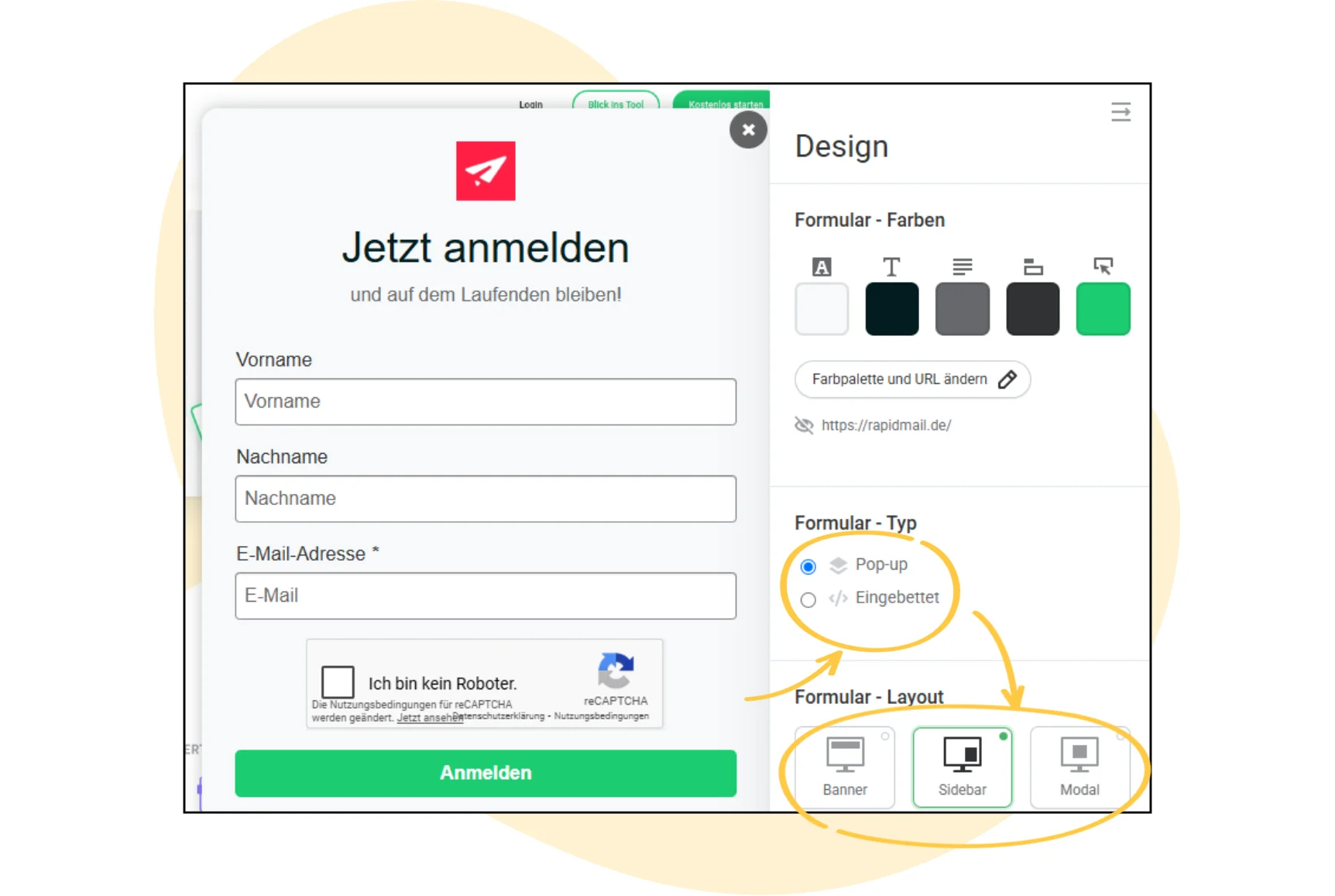
Option A: Generate a pop-up
If you want the newsletter sign-up form to appear as a pop-up, there are two basic options. With a classic pop-up, the form is displayed automatically, for example after a certain time, while scrolling or when leaving the page. rapidmail lets you configure it exactly as you wish. This works particularly well when you want to draw deliberate attention to the form and encourage as many visitors as possible to sign up. Once you have chosen this version and the automatic display, after a set time, for example, all you need to do is insert the code generated by rapidmail into your WordPress site, and you are done!
The button-triggered pop-up technically uses the same code but only opens when users click a button themselves, such as “Subscribe to newsletter”. The advantage is that your website looks less busy, and visitors decide for themselves when they want to see the form. In this case, manually insert the code displayed in rapidmail into your WordPress site as the link behind the button element.
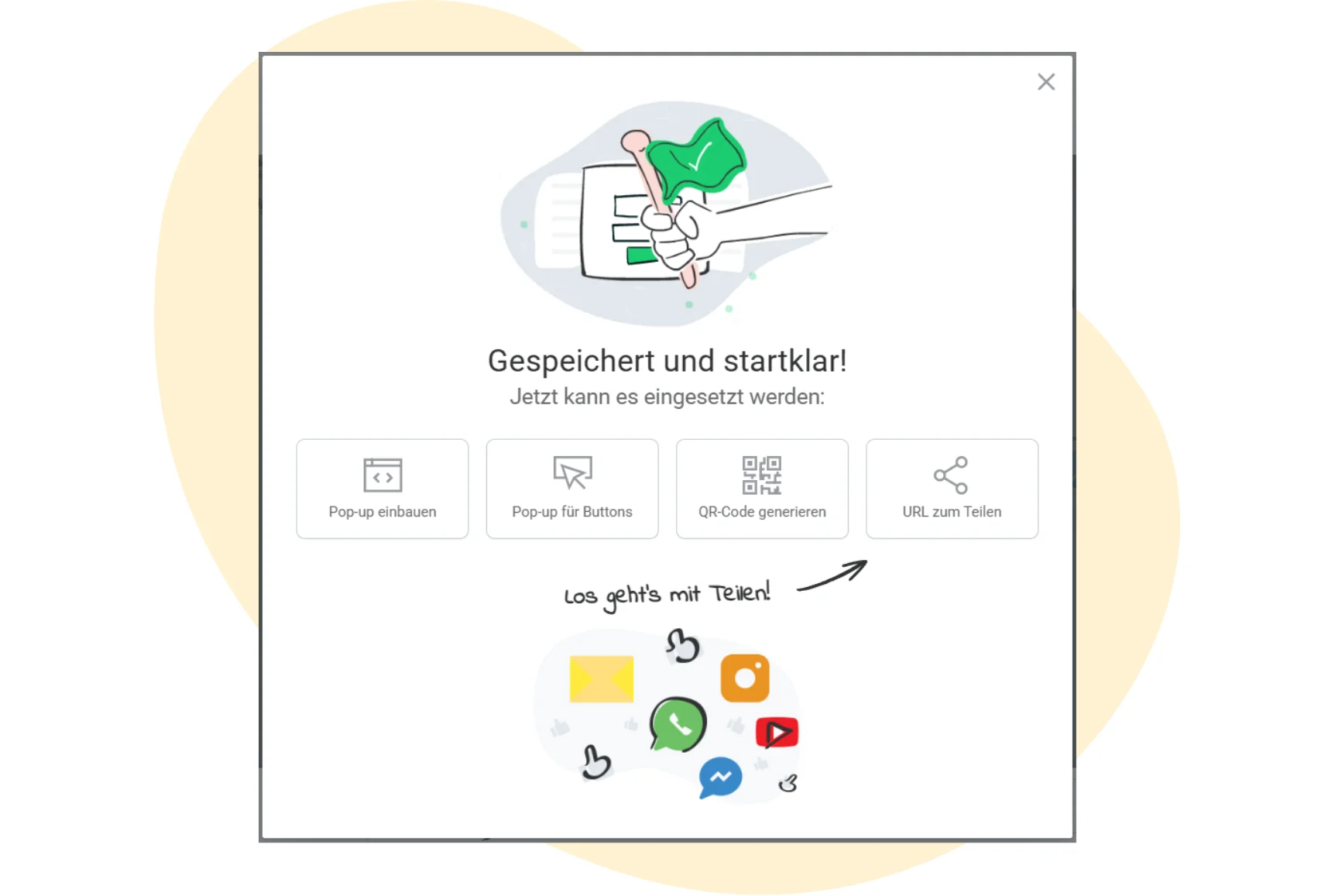
Option B: Copy the embed code
Your second option is to embed the form. Here, rapidmail automatically provides HTML embed code or, alternatively, an iframe. You can simply copy this code. It contains all the information needed to display your form correctly on the website and securely transfer the user data entered during future newsletter sign-ups to your rapidmail account.
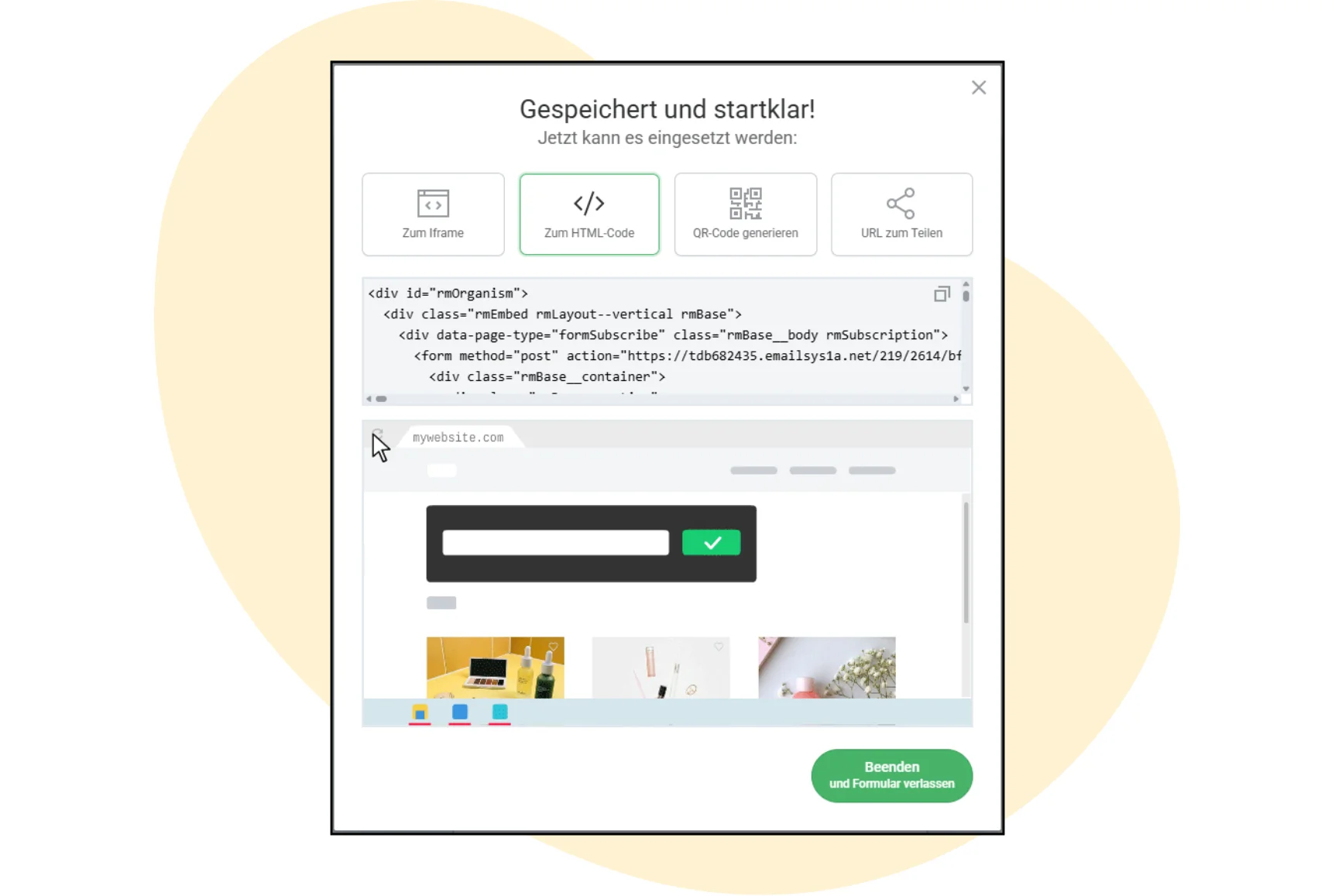
💡 What is the difference between HTML code and an iframe?
An iframe embeds your newsletter form as an external element that remains hosted by rapidmail. This option is quick and easy to implement, but some website environments restrict or even block iframes. HTML code offers an alternative: the form is integrated directly into your website and becomes part of the page’s source code. This is ideal if your website does not permit iframes or if you need maximum control over the integration.
Both options are GDPR-compliant and make it easy to embed a newsletter sign-up form in WordPress.
Step 3: Insert the code into WordPress
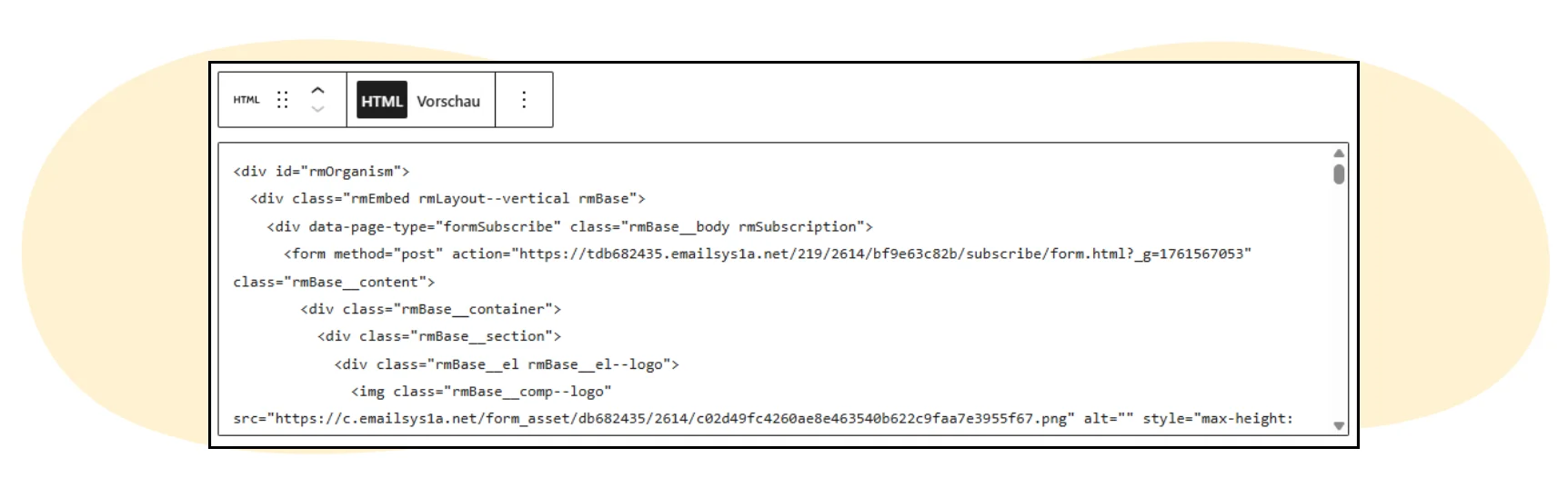
If you selected “Embed” in the previous step, now switch to WordPress. Open the page or post where you want the form to appear and paste the copied code into an HTML block. You can easily find this option in the WordPress Gutenberg editor using the plus symbol. Then save your changes, and the form is active immediately.
Step 4: Test and publish the newsletter form
Give the form a quick test to make sure that everything works smoothly. Sign up for your own newsletter as a test and check whether the new contact appears in your rapidmail contact list. If everything is correct, you can also place the form anywhere else on your website, such as the footer, sidebar or a pop-up.
👀 Have you seen this?
Would you like to know how to gain contacts for your newsletter successfully? No problem. Our content manager Wiebke shows you how to build an email list full of prospective customers who are genuinely interested in your content and offers. Roll the film! 🎬
Open video transcript
Chapter 1: Introduction
Welcome to lesson two of my newsletter course, which will turn you from a beginner into a true professional! After learning exactly what email marketing is and what you can achieve with it in the last episode, today we will look at how to find contacts for your email list in the first place. After all, no recipients means no opens. Logical, right?
So how do you get people to sign up for your newsletter voluntarily? That is what we will look at in this lesson of “Learn email marketing”!
Chapter 2: Why you should not buy email addresses
In email marketing, you regularly handle sensitive personal data. That is why it is important to comply with the applicable data protection regulations.
The number one rule is: only people who want to receive your newsletter may be sent it.
To contact someone by newsletter in a GDPR-compliant way, they must have explicitly consented in advance to receiving it. If necessary, you must even be able to present and prove this consent.
I therefore strongly advise you against buying email addresses. Writing to those purchased addresses would not make sense anyway, because those people are highly unlikely to be interested in your content.
Instead, you should build your own email list of contacts who are voluntarily and genuinely interested in your messages.
The best thing is that this email list belongs to you alone. You can communicate directly with your subscribers and are not dependent on platforms and their algorithms as you are, for example, on social media.
All right, we need to collect contacts now, but how does that actually work?
Chapter 3: What you need to build your email list
First, you need an email marketing tool. You will use it not only to design and send your emails later, but also to manage your email list.
If you are still looking for the right email marketing tool, take a look at this video on the subject. I explain the key requirements for newsletter tools step by step and show you how to find the software that best meets your needs.
Incidentally, if you already have contacts, from your online shop, for example, and they have already consented to receiving the newsletter, you can easily import them into the software.
To collect new contacts, however, you need a sign-up form, which you can easily create with your email marketing tool. Your new contacts can then enter their details in the form. The email address is naturally the most important, but you can also request additional optional data that you can later use to tailor your emails precisely to the audience through personalization and segmentation. We will examine this topic in detail at a relaxed pace in lesson four of Learn email marketing.
Once you have created your sign-up form, place it at important points on your website or online shop, for example at the bottom in the footer, on particularly popular pages or as a pop-up window after a certain visit duration.
Chapter 4: How to persuade new contacts to sign up for your newsletter
To encourage website visitors to enter their contact details voluntarily in the form, give them good reasons to sign up. Think of relevant incentives that might persuade your target audience.
A classic example is a discount code or voucher for the first order, but contests or early access to new products can also be persuasive. Lead magnets such as ebooks or checklists are also extremely popular. Your contacts can download them for free in exchange for their data. Alternatively, tell prospective contacts what content and promotions they can expect in the newsletter to convince them that signing up is worthwhile.
Chapter 5: Staying on the safe side: The double opt-in sign-up process
When your new contacts enter their details in the form, they are not immediately added to your email list. Entering their details only completes the first step in the two-stage sign-up process. The double opt-in process is designed to ensure that the new contact has genuinely consented to receiving emails.
Anyone could enter somebody else’s email address into a form and sign them up for a newsletter. To prevent this, the second step sends an email containing a confirmation link to the address entered. The subscription only becomes active once the person clicks this link and confirms that they genuinely want to receive the emails.
Data-protection-compliant tools such as rapidmail perform double opt-in as standard. You do not need to set up the process manually because it already runs automatically in the background. You can, however, design the various emails and pages as you wish.
Chapter 6: Conclusion: Build your email list step by step
With these basics, your email marketing tool, sign-up form, persuasive incentives and double opt-in process, you are ready to get started and gradually build your email list. Naturally, this will not happen overnight, so be patient and appreciate every genuinely interested contact. I wish you lots of fun and success!
Have you already gained experience with this topic and perhaps have another tip for building an email list easily? If so, share it in the comments.
The next lesson in “Learn email marketing” is about design. You will learn how to design your emails so that your newly gained contacts enjoy reading them. Watch the video straight afterwards!
Thank you for watching, and see you next time!
⚙️ Integration via API (for advanced users)
If you have more technical experience or suitable IT resources available in your team, rapidmail also offers you an API. This allows WordPress and rapidmail to be connected even more closely. New newsletter sign-ups can, for example, be synchronized in real time. Although this form of newsletter integration requires some technical expertise, it offers maximum flexibility for your individual requirements.
3. Still want to use a plugin? Here are your options
There are situations in which a conventional WordPress newsletter plugin can make sense, for example if you want to manage all newsletter activities directly within your WordPress back end. If this option is genuinely a better fit for you, you can choose from various extensions offering different features:
- 🐒 Mailchimp for WordPress is one of the best-known plugins and lets you connect your website to an existing Mailchimp account. You can create sign-up forms, design pop-ups and transfer contacts automatically to Mailchimp. This is particularly practical if you already use Mailchimp as your newsletter system and simply want to establish the connection to WordPress.
- ✍🏼 Mailpoet is a popular option for anyone who wants to design and send newsletters directly in the WordPress dashboard. You can use drag-and-drop elements to create emails and manage recipient lists without leaving the back end. Mailpoet is particularly suitable if you have a smaller website or blog and send your newsletters to a manageable number of contacts.
- 📬 The GetResponse Plugin integrates the newsletter tool of the same name into WordPress. It offers similar features to Mailchimp for WordPress but places particular emphasis on marketing automations, such as automated follow-ups or segmentation.
- 💌 There is also The Newsletter Plugin, an open-source solution that is particularly appealing to beginners. It covers basic features, so you can use the plugin to create newsletters and manage your subscribers, for example, all free of charge and directly in WordPress.
Here is another overview of all your newsletter integration options for WordPress:
| Plugin | Brief description | Suitable for | Pricing structure |
|---|---|---|---|
| rapidmail newsletter forms (without a plugin) | Direct form integration using HTML embed code or pop-up integration via iframe | Beginners without technical expertise | Free for up to 2,000 contacts, then from €15/month; various pricing plans available |
| Mailchimp for WordPress | Connects your site to Mailchimp accounts; straightforward form integration | Users with an existing Mailchimp account | Basic version free, Premium from approx. €59/year |
| Mailpoet | Create and send newsletters directly in the WordPress dashboard | Smaller websites with basic sending needs | Free version for up to 1,000 subscribers |
| GetResponse Plugin | Integrates GetResponse forms and pop-ups into WordPress | Users with a GetResponse account | Depends on the GetResponse plan |
| The Newsletter Plugin | Open-source plugin for simple newsletters | Beginners, bloggers | Free with limited features |
💡 rapidtip: When a newsletter plugin for WordPress can make sense

A plugin may be the right choice if you want to keep your newsletter management as simple as possible and complete every task in a single application. This is particularly useful for freelancers, associations or blogs that do not need email automations, extensive design options or in-depth newsletter analytics. A plugin is also a good fit for anyone who already works with a particular newsletter provider and simply wants to connect it to WordPress.
✅ Checklist: Do I need a WordPress newsletter plugin?
| Question | “Yes” → Plugin | “No” → rapidmail |
|---|---|---|
| Do you want to write newsletters directly in the WordPress back end? | ✔️ | ❌ |
| Do you already use a newsletter tool that you want to keep? | ✔️ | ❌ |
| Is sending newsletters without automations and detailed reporting sufficient for you? | ❌ | ✔️ |
| Is GDPR-compliant processing of contact data a secondary concern for you? | ❌ | ✔️ |
| Are you comfortable managing regular plugin updates? | ❌ | ✔️ |
| Can you manage without personal, free support if questions arise? | ❌ | ✔️ |
In the long term, however, you should weigh your options carefully: plugins need regular updates to prevent security vulnerabilities, and they can quickly reach their limits with larger recipient lists or more demanding campaigns. If you want to expand your reach and practice professional email marketing, a specialized email marketing tool for WordPress such as rapidmail usually offers the more sustainable approach.
4. Conclusion: Send newsletters without a WordPress plugin
At first glance, a newsletter plugin for WordPress may seem like the most convenient solution, but anyone thinking long term will benefit from using a professional newsletter tool. rapidmail lets you embed your sign-up forms seamlessly into WordPress without having to worry about technical updates, security vulnerabilities or sending problems.
Using specialized email marketing software for WordPress offers you a wide range of benefits. Your data is processed in a GDPR-compliant way, emails are sent through certified servers and your newsletters reliably reach your contacts’ inboxes. You also have access to a powerful editor that lets you design your campaigns however you wish in no time, without any knowledge of HTML. And if any questions arise, you can contact our free support at any time!
👀 Have you seen this?
rapidmail lets you send your first newsletter to up to 2,000 contacts for free so that you can test whether our tool provides all the features you need for your company’s email marketing. What are you waiting for? Take your time and have a look around! In this video, our content manager Wiebke will be happy to take you on a short tour of rapidmail. Roll the film! 🎬
Open video transcript
Chapter 1: Introduction
No time for a lengthy learning process and complex features? rapidmail makes it easy to create and send good newsletters!
Email marketing with rapidmail gets you to your goal in no time, whether you want to gain new customers, attract more attendees to an event or boost sales in your online shop.
Hi, my name is Wiebke, and today I will show you that you need neither prior knowledge nor lots of time to design great newsletters with rapidmail and move closer to your business goals. So let us not beat around the bush. Let us get started!
Chapter 2: Navigation and first steps
You can get anywhere from the dashboard. For example, you can create a new campaign directly. To make your newsletter a hit with your contacts, use our personalization formulas to address each person individually, add emojis to the subject line and check the automatic subject line analysis. It shows you how good your subject line is and what you could improve.
Our 1-Click-Design makes designing newsletters child’s play. Simply enter your website URL and, ta-da, rapidmail creates a design template with your logo, company colors and fonts. You can make further adjustments here if you wish and then save it.
Now choose one of more than 250 free templates, and the basic structure of your newsletter is ready! You can now replace and populate all the content as you wish.
Chapter 3: Design and customization
The integrated image editor and our free image library, which offers more than 1.5 million high-quality, royalty-free images, are particularly practical. This saves you extra steps and additional tools!
If you have an online shop, you can easily connect it to rapidmail with our free plugins and automatically synchronize your customer and product data. Then drag products directly from your online shop into the newsletter using our one-click product import.
It is now time to examine the draft closely with the preview feature. Does the personalization work? Does the newsletter look good on different devices? You can now send test emails to up to ten email addresses, free of charge, of course!
Before the newsletter goes out, put its deliverability through its paces and make any final corrections. This ensures that your campaign does not end up in spam. Thanks to our excellent deliverability, rapidmail gets your newsletter to its destination particularly reliably.
Is everything good to go? Your newsletter can now set off on its journey, either immediately or automatically at a scheduled time. Incidentally, the first send to up to 2,000 contacts is on us, so you can test rapidmail at your leisure.
Chapter 4: AI sending planner
If you ever lack inspiration for your newsletter content, our AI sending planner uses artificial intelligence to create a personalized newsletter send plan for your company. Simply enter the company name, a few keywords and a short description and, ta-da, there is your personalized send plan with newsletter ideas for the entire year!
Chapter 5: Gaining contacts
rapidmail also helps you gain new contacts. Just like with 1-Click-Design, you can use only a few clicks to create newsletter sign-up forms that perfectly match your website design.
You can easily upload existing contacts to rapidmail from CSV, Excel or text files using copy and paste. You can also assign as many tags as you like to your contacts, ensuring that they only receive the campaigns that genuinely interest them.
Chapter 6: Data protection and segmentation
Data protection is our top priority! At rapidmail, every process is 100% GDPR-compliant. Your contact data is stored exclusively on servers in Germany, so you do not need to worry.
To target your contacts particularly precisely, you can divide them into segments, for example by age group, gender or place of residence, and then select these segments when sending to deliver your newsletter only to specific subgroups.
Incidentally, we are always happy to talk! If you have questions or difficulties, our support team will be pleased to help, free of charge by telephone or through the ticket system directly in the tool.
Chapter 7: Evaluation and analysis
After sending your newsletter, you can monitor its success in real time. With the automatically generated newsletter statistics, rapidmail gives you an overview of all the essential email marketing KPIs.
Our campaign statistics help you understand your target audience’s interests and wishes better and better, enabling you to send more successful newsletters.
Want to know every detail? The activity history of individual contacts shows you exactly which campaigns a recipient has received, opened and clicked. These reporting options allow you to get to know your contacts better and target your newsletter sends even more precisely.
Chapter 8: Email automation
If you want to tailor your email marketing even more precisely to your contacts, you should definitely try our email automation. You need no prior knowledge and can create individual email sequences in just a few clicks, for example for welcome messages, birthday greetings or multi-part courses. We offer practical workflow templates that make getting started even easier!
Chapter 9: Prices
Finally, a few words about our prices. If you want complete flexibility and to pay only when you need to send, our pay-per-send plan is ideal for you. If you want to send newsletters regularly, on the other hand, our monthly “Starter” and “Premium” subscription packages are perfect. You can get started from €15 per month and send an unlimited number of emails. Our price calculator on the website helps you find the right package. Naturally, you can switch, pause or cancel your package at any time.
Sound good? Then simply try rapidmail free of charge and see for yourself that rapidmail lets you send professional newsletters without being a newsletter professional yourself!
If you want secure, efficient and, above all, straightforward email marketing, rapidmail is the perfect solution for you. We combine intuitive operation with professional sending technology, making additional plugins unnecessary.